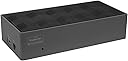
Desertcart purchases this item on your behalf and handles shipping, customs, and support to Kyrgyzstan.
๐ Elevate your desk game with power, speed, and stunning visuals!
The Targus USB-C Universal DV4K Docking Station (DOCK190USZ) is a compact powerhouse designed for professionals craving dual 4K monitor support, up to 100W power delivery, and broad device compatibility including Thunderbolt 3 and M1 MacBooks. With 6 USB ports, versatile video outputs, and included power tips, it transforms any workspace into a sleek, high-performance hub.


| ASIN | B07BPQKP8V |
| Best Sellers Rank | #7,962 in Computers & Accessories ( See Top 100 in Computers & Accessories ) #535 in Laptop Docking Stations |
| Brand | Targus |
| Built-In Media | Docking Station |
| Color | Black/Grey |
| Compatible Devices | Laptop/Personal Computer |
| Customer Reviews | 4.4 out of 5 stars 370 Reviews |
| Global Trade Identification Number | 00092636329136 |
| Hardware Interface | USB |
| Item Dimensions L x W x H | 6.8"L x 3.3"W x 1.6"H |
| Item Type Name | Targus DOCK190USZ USB-C Universal DV4K Docking Station with 100W Power |
| Item Weight | 14.4 ounces |
| Manufacturer | Targus US LLC |
| Mfr Part Number | DOCK190USZ |
| Model Number | DOCK190USZ |
| Number of Ports | 2 |
| Product Dimensions | 6.8"L x 3.3"W x 1.6"H |
| Total Number of HDMI Ports | 2 |
| Total USB Ports | 6 |
| Total Usb Ports | 6 |
| UPC | 092636329136 |
| Warranty Description | Limited 3-Year Warranty |
G**D
Allows your M1 MacBook to use 2 external monitors
My wife and I both had M1 MacBook Pros. I upgraded mine to the M1 Pro for several reasons but the main one was to get dual monitor support. I bought this Targus dock to add the dual monitor support that my previous port replicator did not have. Imagine my surprise went after getting it to work perfectly for my machine, it also allowed my wifeโs M1 Mac to support the same dual 4K monitors. It works beautifully for my M1 Pro machine, and we have the added bonus of her being able to her video editing on dual monitors now. Very pleased with it. Please note that you do need to install the DisplayPort drivers for this to work otherwise it wonโt recognize the dock.
M**K
Using with my MacBook Pro M1 with dual monitors
I'm using this with a MacBook Pro M1 with dual 4k monitors. Works fantastically well. You have to install the DisplayLink Manager software. Officially, M1 Macs only support one external display unless you have the Mac Mini. This dock has all the ports you need. Flawless.
P**7
Very Impressed - Also M1 MacBook Air Compatible
I'm really impressed with this dock, given that it's almost 2 years old when I bought it (Dec 2020). I needed a dock that can dual display 1080p monitors for the M1 MacBook Air and it delivers. You just google "displaylink Macbook M1 BigSur" and click the result that takes you to the DisplayLink website. Install it and grant the permissions which the driver walks you through. It worked like a charm and I don't mind the resolution at all as I only use it for work and nothing else. I can now triple screen set up with this dock. x1 Laptop Monitor and x2 1080p monitors. HEADS UP: It glitched out on (I don't know exactly what happened) but I can no longer use the "Clamshell Mode" on the MacBook Air. So that's why I have a triple screen set up now. Not a big deal but just a heads up. An added bonus was I was able to use it on my Dell Inspiron 7573 which only has a USB Type C (not Thunderbolt). Same process with the driver install and it worked perfectly. Definitely a great investment. I little pricey full price IMO but I got mine via Amazon Warehouse and it was in great condition.
A**A
Best docking station
On the value of money its amazing product.
Z**D
Good Mac hub
This hub got the job done and came with a fair amount of adapters for just about any setup. Only complaint is the software was difficult to find and coordinate with my companies IT to get it approved.
A**B
Apple M1 owners - this is the dock you need for dual screens!!!
This is the dock that will allow owners of Apple M1 laptops to use 2 monitors independently - using DisplayLink. I have the M1 Air, base model, tried other cheaper 'tricks' but could not get my screens to work. With this I am running 2 external displays (Dell E2216H) with Display port - no lagging, no pixelation. I downloaded DisplayLink (NOT the add on - as apparently that breaks things - Google it) and it just worked and is charging my Air too. I am not happy that I had to pay more $$$ to be able to use my new laptop on my screens, when my old work-given Windows laptop could use them without this special dock - but at the same time it's great to have 2 screens. I bought a re-conditioned unit and although the box it arrived in was very bashed it, it works great and saved me ~$50!
A**R
Targus Gran Producto
Exceletne producto y el tiempo de entrega fue tremendo... llego antes.... muy util y conveniente mi targus.
A**Y
Targus docking causes power surges strong enough to blow out a laptop
Do not buy this docking station. I've fried 2 laptops trying to figure this problem out. I've had 2 Targus docking stations how of this model (DOCK190). The first blew out one laptop. We thought it was a power surge from outside of the house, so we installed a whole house surge protector, then I bought an industrial sized surge protector. On Zoom calls, the monitors would just turn off as well as my laptop. After a few times, the laptop mother board was fried. There are chat discussions about this occurrence if you google them. The monitors also just turn off when the laptop goes to sleep. Customer Service's responses were 1) just restart your computer every time, or 2) turn your power saver function on your laptop to "Never Sleep", both of which are ridiculous.
M**I
Refurbished model
Refurbished model but not advertised as such. American plug but not advertised as such. Previous versions had both
A**.
Simplifies managing 2 screens. Now a single connection when I disconnect computer
Mac Pro 16" - hub that plugs into ports on computer were limited in power they transfer and only attached a single screen plus always for knocked. Under up needing multiple USBC cables connected to computer. Now have a single connection for power, 2 screens, keyboard and other USB connection
I**O
Best dock I ever owned
I have 3 of these over the last 3 years. Best dock tech I ever used. No software capability issues for PC or Mac. Tons of slots. Solid product.
S**A
didn't work
None of the video ports was functional. Returned.
M**L
Perfect choice
The unit worked perfectly and had all the necessary cables in the box.
Trustpilot
1 month ago
1 month ago