🏠 Elevate your smart home game with privacy and speed—because your devices deserve the VIP treatment!
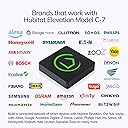
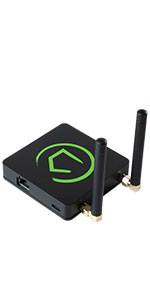
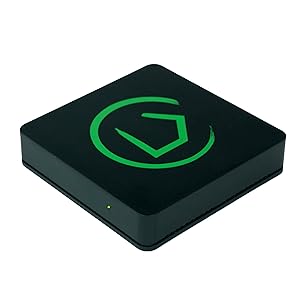
The Hubitat Elevation Home Automation Hub (EU version) is a compact, 231g smart home controller that prioritizes local edge computing for ultra-reliable, lightning-fast automation. Supporting Zigbee and Z-Wave protocols, it connects over Ethernet and integrates with over 100 smart devices including Alexa and Google Home. Designed for privacy-conscious DIY enthusiasts, it processes all automations locally, eliminating cloud dependency and enhancing data security.


| Brand | Hubitat |
| Manufacturer | Hubitat |
| Model | HC5 |
| Model Name | Hubitat Elevation C-7 |
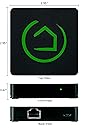
| Product Dimensions | 7.5 x 7.5 x 1.7 cm; 231 g |
| Item model number | HC5 |
| Operating System | RouterOS |
| Compatible Devices | Alexa |
| Special Features | WPS |
| Voltage | 120 Volts |
| Batteries Included | No |
| Batteries Required | No |
| GSM frequencies | 5 GHz |
| Connector Type | Ethernet |
| Manufacturer | Hubitat |
| Item Weight | 231 g |
V**S
No inspira confianza
El producto llegó abierto
J**S
The only *real* LOCAL alternative to SmartThings
I am so impressed with my Hubitat. I've been on Samsung's SmartThings platform for three years and they really don't seem like they care all that much about reliability or retaining customers. My SmartThings hub is a V1 hub which means that it cannot do any processing locally. If I have a z-wave light switch set up on a z-wave motion sensor using a "Smart Lighting" rule: The SmartThings hub sends the motion event to Samsung's servers hundreds of miles away. They process the event and send back a message to my local hub telling it to turn on the light. For this to work there cannot be any issues with your local router, your modem, any issues on your ISPs side nor any issues on the SmartThings server side. I did a traceroute and found there are at least 30 network router hops between me and the SmartThings servers. This leads to very large latencies (delays) between your motion sensor picking up motion and the trigger actually firing something like turning on a light. So Samsung tried to address this in their V2 hub... But they left customers on their V1 hubs stranded. Since the z-wave radio in the SmartThings hub is "built in", if you bought a new SmartThings V2 hub the process to migrate over would require literally excluding every single sensor or switch device one by one, and re-pairing it with the new hub. I contacted Samsung several times to see if they were planning on offering anything to help customer migrate from V1 to V2. The answer was always a resounding "No". So especially for me: Moving from a V1 hub to V2 hub would be just as much effort as migrating from ST to another HA platform. To add insult to injury the more I researched the "local processing" capabilities of the V2 hub the more disappointing I became. Only the simplest of "Smart Lighting" automations would be processed locally, and only on a limited number of "supported" devices. So I figured if migrating from V1 to V2 would be a hassle I might as well be open to migrating to a non-ST platform. I tried out Hass.io and OpenHAB and those platforms were both horrible. I gave each platform a weekend and ended up spending an entire weekend on each platform trying to pair just a couple Z-wave devices, and both platforms failed miserably. In two days neither platform could have even the most basic "If motion detected turn on a switch" capability set up. So then I decided to try Hubitat. Within 30 minutes of unboxing Hubitat I had made more progress in pairing devices and setting up automations than I made with either Hass or OpenHAB in the two days I spent on both. What is especially appealing about Hubitat is the automations (Apps) and Drivers (Device Handlers) in Hubitat are both written in Groovy: The exact same language that SmartThings uses. That means that if you have already invested a lot of time and effort building SmartApps or custom device handlers in SmartThings you can just copy paste that Groovy code over to Hubitat and it should work with only very minor tweaks. I did, in fact, have some very complicated SmartApps to port over so I was a bit worried about how difficult that would be. One of my custom apps was an app I had written that controls the recirculating pump for my water heater. It would monitor motion in the bathroom, monitor DS18B20 temperature sensors installed on the water line, compare that temperature to the ambient temperature in the attic (Where the water heater and hot water lines are run) and compare those temperatures to the temperature of the water in my solar water heater tank (We have solar pre-heater to heat the water before it enters the main tank). It would then run the recirc pump for a determined amount of time or until one of the temperatures reached a certain threshold. Fairly complex stuff (300 lines of Groovy code), and this app only took me about 5 minutes to port over! There have also been a couple older Z-wave devices that weren't "natively" supported by one of Hubitat's built in drivers and I was able to copy the "Device Handler" code from SmartThings and these devices immediately started working. Migrating to new Hubitat Hub's will also not be a future problem: Hubitat allows you to back up your entire Hub configuration to your PC, and the Z-wave stick is removable. So if Hubitat releases a new piece of Hub hardware migrating to it will be as easy as taking a backup, removing your Z-wave/Zigbee stick from the only hub, inserting into the new hub and restoring the backup onto the new hub. Since the devices are associated with the Z-wave/Zigbee radio inside the included USB stick on the Hubitat moving between hubs is a breeze. Overall I am blown away by the ease of migrating from SmartThings, the performance, capability and support I've received so far from Hubitat. If you're using ST or thinking of it and think it's silly that every single event or trigger that happens in your home is sent up to Samsung's servers to be processed: Then Hubitat is the perfect solution.
D**H
Are you tired of Smart Things? Want a SMART HOME?
I adopted the other platform around 2017 (ST). I went nuts and replaced about every switch I could throughout my 3BR home with Z-Wave switches, already had Alexa (love/hate), Z-Wave Lock, Door Sensors, Temp Sensors, Thermostat, Water Leak Sensors, and various Z-Wave outlets. Also had Philips HUE and wanted things to all work like one big happy smart family... I spent weeks and weeks and weeks trying to "get it right", create logic rules that were reliable and easy to manage, as well as to build and troubleshoot. In the end, I really spent more like months trying to tune things just so... I had my wife pretty upset with me for a few years, but tolerant... she'd never use a doubletap nor Alexa to control anything, but she got used to the switches and appreciated the front door unlocking for her as she approached. I finally got fed up trying to "fix stoopid" (I hear that's hard to do). I bought this Hub thinking "what have I got to lose?" All I wanted was something better. What I got is SOOO MUCH BETTER!!! Sure, it's not "easy" if you're not tech minded. You should certainly understand logic rules, basic if-then-else statements, setting local or global variables, etc. The real difference is THIS WORKS with everything, as intended, and it's WAY QUICKER than the old setup (cloud based). In fact, the speed is remarkable... it's milliseconds versus seconds sometimes - that finally starts to feel like you're in a smart home, not a dumb smarthome. I now have every switch neatly programmed and organized as a "button device" and have all the flexibility to easily program anything I want. I have some Homeseer WD-200 Dimmers that work really nicely and can even set the individual LEDs if I want to see that the door is unlocked, or something is awry when I nod off to slumber. When I ask Alexa something, it happens immediately, even with the HUE bulbs - like BAMMM, done! Setting up the rules and variables is not only organized and simple, it's so much better with customized event logging, meaningful features, and tons of flexibility. This is not the setup for someone who isn't willing to set things up and customize the system - it's work to invest time and testing to get things right. However, I was forever frustrated and lost in the ST interface! I couldn't figure out why and when some things worked and others didn't. It made me feel like an idiot for buying all the switch gear in the first place, already confirmed by my wife, haha. Well, nowadays she's double-tapping, triple tapping, and commanding things from Alexa without the endless frustration of the prior hub / tools. I ONLY replaced my ST hub with this hub - if you are invested at all in ST or home automation, then look no further, in my opinion. This is a dream compared to anything else I've seen. Yep, the interface/GUI is a bit clunky and a little easy to get twisted, but you know what? It works, it works reliably, and it's easy to figure out when you do something wrong (which is inevitable with home automation). Why isn't my phone automatically unlocking the door? Whammo, just look at the logs, the rules, and the devices - all captured and easy to figuree out what's wrong and fix it. I'm finally NOT feeling like an idiot with my home automation thanks to Hubitat. Hope you find this helpful.
R**.
(Not So) Awful (For The Non Technical)
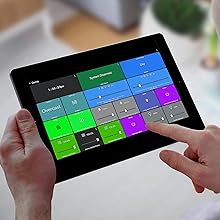
Beta version of a product being sold as consumer ready. It’s like the back end guys also designed the UI. No support for a lot of popular brands. Interesting device with potential. Like others have said, very steep learning curve and only for those who enjoy endlessly tinkering. As a matter of fact, I’d say “smart homes”, where they are currently at, are STILL only for people who don’t mind thinking of it as a hobby and sometimes a part time job keeping everything working. Edit (01/14/2023) Changed my rating from a 1 star to 3 stars. I stand by my original assessment: NOT for non technical people. That being said, it is a very interesting device to fool around with once you get going. The only compatible smart devices I currently have are Yolink motion sensors…and I had to download the so called driver written by a user. Anyway, I’m really amazed at the things I can do with a bunch of the motion detectors…gives you access to all parameters of the device. Yolink motion sensors also measure temperature which only hubitat gives you access to. Very interesting device with huge potential. Edit 01/20/2023 So I’ve been fooling around with this on my free time for weeks now and it’s really starting to grow on me. I contemplated increasing my rating to 4 stars only because there is currently nothing else as compelling in this space but couldn’t bring myself to do it because of the awful UI. Again, if you are someone who enjoys tinkering and have already figured out the limitations of Google or Alexa routines, this hub is probably for you. UPDATE 01/24/2023 Ok, I managed to stick with this and crest (i think) the learning curve finally. The hardest part for me was figuring out the quirky work flows. The “dashboards” are endlessly customizable, the level of attribute detail for each device is complete and so the things made possible are mind numbing. That being said, few people will want or appreciate the endless possibilities this offers. I think this is a device mainly for professionals. There is no user interface, you are creating the user interface. You can dig even deeper and get into designing your own custom “drivers and apps” , if you know a little CSS you can endlessly tweak the “dashboard” design etc. If you are a typical consumer frustrated by another hub or your current setup for one reason or another and would like to see the Hubitat implemented, do yourself a favor and hire someone to set it up for you. You’ll never figure it out and will waste a lot of money and time trying. As I said earlier, the whole smart home space is still in its infancy despite being around for some time now. Do yourself a favor and read a LOT of reviews on all the smart devices you intend on purchasing. One thing you are going to need to set up a smart home is endless patience. Someone has to figure out a way of “saving” a complete smart home setup so that loss of power doesn’t cause all the issues most people seem to have. Who the heck wants to spend several hours troubleshooting the lights every time the power goes out? Btw: This thing works great with the Yolink line despite being a “user driver”. Update 2/12/2023 To know it is to love it. I’m a hubitat fan. I’ve decided to replace all non compatible devices with ones that will work with the Hubster, especially the WiFi bulbs…zigbee bulbs all the way. I’ll never buy another device unless it can be made to work with my Hubitat! Nice product guys. I believe that if you sent these things out a little more pre configured it would flatten the learning curve substantially. No reason not to have a bunch of typically needed “applications” already installed….Hubitat Package Manager, Rule Machine etc…
L**N
My Z-Wave switches finally work!
The Hubitat C-7 is the older version of the company’s smart Bridge. I needed a Z-Wave bridge, and this did not disappoint. I got this on sale and was looking for a “cheap” solution. This was not the cheapest potential solution, but it was by far the most complete solution at its price point. It’s small. It’s lightweight. It runs off the small micro-c usb (cable and plug + Ethernet cable included). I set mine next to my Router and have it direct wired to my network, so I cannot speak to the ease of WiFi set up. Scan the QR code with your phone and follow the instructions. Went really smooth. Once in, now it’s no longer a beginners game. This is a community supported “open source” device that will interface with Alexa (probably others from what I’ve read), but you need to be in the devices network address (if you ever had to log into the admin functions of a router, it’s like that), and then add your devices and enable cross connectivity to your Smart hubs and Smart apps. You can make run routines. You can access all the device features. For example, once my dimmer switch was found, Alexa can turn it on and off, as well as set the level. In the Hubitat account, I can make it flash, pulse, write a run routine program, integrate it to do things with other devices… pretty cool! Let’s face it. You want a lights on, lights off when you come home, and this lets that happen. The rest is fancy distractions. But if you are old like me and want to make your Gen Z kid who knows everything wonder why the new lights you installed are acting “sus”, those fancy distractions are there for you! Background: A couple years ago, I started buying items that would make my old house “upgraded” with smart home features, like LED lighting, dimmers, Smart TV’s… you get the idea. I bought a Ring doorbell, then a hardwired flood light, then went overboard with a whole lighting kit bundle with switches, bulbs, garage door opener, light bridge… what was I thinking! Well, the Ring light Bridge appears to be useless without a Ring security hub and I didn’t want that. Basically, everything with a Z-Wave logo and my garage door opener was useless. I gave up. Over time, I got the garage door opener to work on its own but not integrated with a single Smart interface. Then I started investigating why the switches didn’t work. Well, you need a hub. We had an Echo dot. Turns out, it only has “limited” connection features for WiFi and Bluetooth. I read the bigger and newer Echo 4 had Zigbee (mistook that for Z-wave… or a new name? Naive on my part) which is NOT Z-Wave. After confusing batch of misleading articles and incorrect A.I. generated responses, I found the Hubitat C-7. It was on sale. Online forums were hit or miss on its review, but consensus was I needed a Z-wave mesh network that would talk to Alexa and this was going to do that without a subscription. TL/DR: Z-wave, bridge, not for beginners, Alexa comparable, newer version available, pay subscription available, but not required.
Trustpilot
2 months ago
3 weeks ago