We remain fully operational. Our teams are working around the clock to ensure your deliveries continue safely.

DOWNLOAD THE APP


Customer Services
Copyright © 2025 Desertcart Holdings Limited
DOWNLOAD THE APP

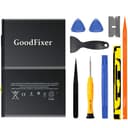
🔋 Power up your iPad life — DIY battery replacement made sleek and simple!
This A1484 battery replacement kit features a high-capacity 8827mAh Grade A+ lithium polymer battery designed specifically for iPad 5th through 9th generations and iPad Air 1. It comes with a comprehensive set of professional tools and adhesive strips, enabling confident DIY installation. Certified for safety (UN38.3, MSDS, ROHS, CE), this brand new 0 cycle battery ensures reliable, long-lasting performance while avoiding the risks of refurbished cells. Perfect for millennials who value sustainability, cost-efficiency, and maintaining peak device performance.
| ASIN | B07D35BCMD |
| Batteries | 1 Lithium Ion batteries required. |
| Best Sellers Rank | #10,155 in Electronics ( See Top 100 in Electronics ) #1 in Tablet Batteries |
| Customer Reviews | 4.0 4.0 out of 5 stars (1,896) |
| Date First Available | May 15, 2018 |
| Is Discontinued By Manufacturer | No |
| Item Weight | 5.7 ounces |
| Item model number | A1484 |
| Manufacturer | GoodFixer |
| Product Dimensions | 7.44 x 5.12 x 0.12 inches |
J**E
GO SLOW!! ESPEC where the cables are..
The battery is great! Came 60% charged. Kit comes with every thing you need to perform the job EXCEPT heating element. YOU DO NOT NEED ANYTHING SPECIAL. A HAIRDRYER works just fine. IN FACT I would think preferable? So I'll start by saying this is not for the faint hearted or ppl with shaky hands for whatever reason. For me, I was fully prepared to lose it. WHAT IT DOESNT COME WITH ARE DIRECTIONS or any explanation about what tools are or when u will need them.. There are TONS of YT vids but I found F.I.W vid with 3.03ksubs and 133k views. It explains it thoroughly and shows intensive step by step. While the pad worked on was way newer than mine it was virtually same steps. WATCH ALL THE WAY THROUGH b4 attempting to fix. It is VERY CRITICAL that u do not cut through the digitizer (screen) connectors. They are very brittle from the years of heat from use and may break regardless upon opening. Honestly in hindsight I would just order replacement screen at same time. [Very cheap AND the one I got Came with better tweezers lol (by fixcracked) The home button doesn't support touch id if thats a big deal to you u can swap with your old one I guess] Anyway I subd a slew of pics and you can see where I'm holding the brittle digitizer screen cable connector that I broke while cutting through adhesive although I think it was pretty much snapped and why my iPad kept shutting off..but I digress. The 3 things to know.. 1. Hairdryer works awesom-ly. Best way I found was to hold it at medium heat about 1-1.5 in away and don't heat all up at once. Heat a side thoroughly then break seal. Heat next side then continue etc. You can heat all then do the individual sides also. 2. Do everything but the bottom right corner (the iPad being vertical) do that last and go as shallow in breaking seal as possible to not cut wires or f it and just order screen at same time. Plus u may Crack screen while fixing too so.. 3. Use a little dish to keep screws and parts in. There are only 2 sizes of screws and no need to keep track of what came from what it's pretty basic. The big ones are LCD the rest go to board pieces. Oh! And do not use anything but dry fluffy micro fiber cloth to clean dust or gunk from lcd!! If ur not a techy u might use goo gone on it to get some glue gunk off...or something..so i heard.... 😕 Good luck! 😀
S**A
If you are handy and patient this kit has everything you need and is a great value.
My iPad’s battery was starting to fail and run out of power. It was a refurbished one I bought a while back and the battery had been replaced previously. This kit was excellent and the instructions and tool kit was great. Definitely use a hair dryer and be careful not to pry where the wires are on the lower right. Take your time and be patient. It has everything you need to make the repair although I also cleaned the glass and the led screen prior to reassembling.
J**H
Worked properly for about 3 months...
Bought this battery in September of last year and about a month or so ago it started to malfunction. The ipad can't get an accurate percentage reading on the battery. It will show 50% battery and die.
S**Y
iPad battery kit.
Appears to be a good iPad battery replacement kit but I haven’t insist yet.
M**V
I'm not sure if I would,,,,,,,,,
I replaced a battery in an old iPad. This battery does work, but it seems to discharge rather quickly. I am not sure if I would purchase again
H**T
Battery Charge
Gonna give this a 3 star only because the battery is so sporadic. I works fine other than my daughter will be on her tablet for a few hours ( she autistic don’t judge) and it will still say it’s at 100% battery power then 20 min later it at 10%. Then sometimes it will be a normal power drain. So I anticipate this battery will probably tank soon
O**I
Great replacement battery with tools.
I suggest you watch not only the video on the supplied QR code, but also several other ones. You will need a hair dryer or heat gun to soften the glue. It will take several attempts before it is soft enough to start peeling of the touch screen Heating the back plate to dislodge the Li-Ion battery is the hardest part. A few suggestions: - TAKE YOUR TIME! - get additional plastic cards or triangles to prop open the touch screen as you pry it apart - be sure to avoid the bottom right when using the razor blade. There are two ribbon cables there - to remove the batter once you dislodge it from the glue, you will need to slightly lift the motherboard and then you have to life and slide the battery pack. The battery connecter rests ln a small raised post. - Use a few boxes to keep the LCD and touch screen open (like a book) as you re-attach the cables - use a small silicone tray or magnetic tray to keep the screws organized. They are VERY small It tool me about 1.5hrs to complete the replacement. Everything worked on the initial boot test. The new battery had 75% charge from the factory. My only negative is that they do not explain how to use the supplied stickers which serve as the new adhesive. I missed using the one that goes on the right side because the ribbon cables were already connected. It still worked.
A**Z
La batería no rinde como quisiera pero al menos saque de la tumba a mi iPad 7gen El paquete llegó muy bien armado, nada golpeado!
S**O
La batterie s'adapte parfaitement et semble de bonne qualité. Par contre je vous déconseille de commander le kit comprenant les adhésifs qui ne correspondent pas.
Trustpilot
3 weeks ago
5 days ago