Desertcart purchases this item on your behalf and handles shipping, customs, and support to Kyrgyzstan.
🎮 Elevate your display game with flawless dual-HDMI fusion!
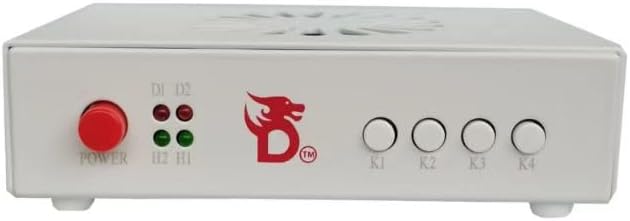
The DICHEN DMA Fuser Combiner is a high-efficiency HDMI interface adapter that merges two input signals into a single 4K UHD display at 60Hz with lossless transmission. Designed for professional environments like gaming, conferencing, and financial trading, it features plug-and-play ease, adjustable overlay clarity, and built-in temperature-controlled fans for reliable, uninterrupted performance.
| ASIN | B0F1DHLG41 |
| Audio Input | USB, XLR |
| Best Sellers Rank | #6,697 in Video Games ( See Top 100 in Video Games ) #1,507 in PC Accessories |
| Brand | DICHEN |
| Brand Name | DICHEN |
| Compatible Devices | Personal Computer, Television |
| Connectivity Technology | HDMI, USB |
| Customer Reviews | 4.1 out of 5 stars 41 Reviews |
| Manufacturer | DICHEN |
| Model Number | US Plug |
| Number of Channels | 2 |
| Number of Items | 1 |
| Number of Packs | 1 |
| Operating System | Windows (version not specified) |
A**N
Works Great Once Everything Is Set Up Properly
This adapter worked well for my setup and delivered a clear, stable overlay output once configured correctly. Build quality feels decent, and the device is compact enough to fit cleanly into a gaming or streaming setup without taking up much space. Setup can take a little patience if you’re new to DMA or overlay hardware, but once everything is connected and configured, it performs as expected. Great option for anyone looking for a reliable display overlay adapter at a good price.
D**A
Easy to connect and use
Works great. Highly recommend it
C**N
Very easy to use
Amazing
A**N
PROBLEMS RESOLUTION
Subject: Resolution issue with DICHER Gen 6 Color White Fuser Hello, I'm having a problem with my DICHER Gen 6 Color White Fuser: • When connected to a 2K monitor, it works correctly. • When connected to a 4K monitor, it only outputs a 1920x1080 signal, even though the monitor supports higher resolutions. • If I first connect a 2K monitor and then a 4K monitor, the Fuser retains the 2K monitor's signal, as if remembering the resolution of the first connected monitor. It seems the Fuser doesn't correctly detect the resolution of 4K monitors and keeps caching the resolution of the first monitor. Could you please tell me how to fix this or force the correct resolution output? Thank you.
A**S
Better than a generic fuser!
I used to have a generic fuser that I got for cheap and it ended up going out on me so I figured I’d upgrade to something that had a good reputation and it did not disappoint. Before I was running a display port to my main monitor and I was afraid the colors would get dull when switching to an HDMI through the fuser since it did that with the generic one but it didn’t. The color quality is fantastic and I wasn’t aware that the fuser would automatically figure out my monitor specs so when I flashed it I was stuck at 85 hertz but after a couple restarts of the fuser it corrected itself to 100 and I’m using a 34 inch ultra wide with the resolution at 3440x1440. I highly recommend this product
D**R
Recomiendo 100%
Excelente muy bueno
C**R
Ehh
It worked for literally 1 day. Went to work the next day and come back to it not even powering on anymore. Assumed the power supply went bad because it seems super cheap. Returned it and received a refund. 3 stars because it did actually work great when it worked.
K**Y
I would purchase it again.
Great! Totally pleased with product.
Trustpilot
1 day ago
1 month ago