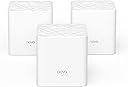
🚀 Elevate your home WiFi game—never settle for slow or spotty again!
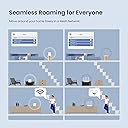
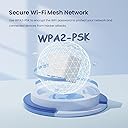
The Tenda Nova MW3 3-Pack Mesh WiFi System delivers robust AC1200 dual-band speeds and seamless coverage up to 3000 sq.ft, perfect for busy homes with up to 40 devices. Featuring MU-MIMO, Beamforming, WPA2 security, and an easy-to-use app, it ensures stable, secure, and lag-free internet throughout your space with effortless setup and smart roaming.


| ASIN | B07DFQGP1K |
| Antenna Location | Business, Gaming, Home |
| Antenna Type | Internal |
| Best Sellers Rank | #60,025 in Electronics ( See Top 100 in Electronics ) #240 in Whole Home & Mesh Wi-Fi Systems |
| Brand | Tenda |
| Built-In Media | 1 Gigabit Ethernet Cable, 3 Power Adapters, NOVA MW3 3 Identical Mesh Points, Quick Install Guide |
| Color | White |
| Compatible Devices | Smartphone |
| Connectivity Protocol | wi-fi |
| Connectivity Range | 3000 Square Feet |
| Connectivity Technology | Ethernet, Wi-Fi |
| Control Method | Voice |
| Controller Type | google_assistant |
| Coverage | Up to 3000 sq.ft. |
| Customer Reviews | 4.2 out of 5 stars 4,379 Reviews |
| Data Transfer Rate | 1200 Megabits Per Second |
| Frequency | 5 GHz |
| Frequency Band Class | Dual-Band |
| Global Trade Identification Number | 00885397271505 |
| Has Internet Connectivity | Yes |
| Is Modem Compatible | No |
| Item Dimensions L x W x H | 3.54"L x 3.54"W x 3.66"H |
| Item Type Name | Mesh Wifi System |
| Item Weight | 528 Grams |
| LAN Port Bandwidth | 10/100 Mbps |
| Manufacturer | Tenda |
| Maximum Upstream Data Transfer Rate | 600 Megabits Per Second |
| Mfr Part Number | MW3 3-pack |
| Model Name | Nova MW3 3-pack |
| Model Number | MW3 3PK |
| Number of Antennas | 2 |
| Number of Ports | 6 |
| Operating System | ZyNOS |
| Other Special Features of the Product | Beamforming, Guest Mode, Parental Control |
| Router Firewall Security Level | Basic |
| Router Network Type | Mesh |
| Security Protocol | WPA2-PSK |
| Smart Home Compatibility | Smart Home Compatible |
| Special Feature | Beamforming , Guest Mode , Parental Control |
| UPC | 885397271505 |
| Unit Count | 3.0 Count |
| Voltage | 12 Volts (AC) |
| Warranty Description | 3-year warranty |
| Wi-Fi Generation | Wi-Fi 5 |
| Wireless Communication Standard | 802.11ac |
| Wireless Compability | 802.11ac |
P**H
Whole-home mesh WiFi for Under $100? Absolutely.
I was skeptical of these when I bought them; all the reviews I read said to go with either Google WiFI or Eero, but I really didn't want to spend $200+ on a mesh setup, especially without knowing how coverage would be in our new house. My personal set up is running in "APmode" with a Ubiquiti EdgeRouter (which I also HIGHLY recommend) acting as router, DHCP, and secondary DNS for my network, with a Synology NAS running primary DNS. -- SETUP -- Setup was very very easy. Its pretty much plug in, turn on, and pair with the Tenda app. -- INTERFACE -- I took 1 star off for the UI because there's no web UI as of this review. Tenda is supposed to be rolling a web management UI out as a firmware update sometime soon-ish, but its not out yet. As of this review, all management is done via the Tenda smartphone app. It works well, but isn't as full-featured as I would like, but I'm a developer by day and my depth of interest in customization or metrics is probably way deeper than most. In the app you can see your online nodes, what devices are connected, and all the usual info -- perfectly usable. -- ISSUES -- The only issue that I had was related to DHCP leases for the nodes. When running in AP mode, the nodes aren't responsible for their own DHCP leases which has the potential to cause problems should leases expire and different IP's get assigned. This causes the nodes to not be able to communicate with each other, breaking the mesh. This can be worked around by one of two ways: 1) dont use AP mode, or 2) assign static DHCP reservations to the nodes on first boot BEFORE pairing. I didn't do this and had to re-create my mesh after a power outage, but have since assigned static DHCP leases and have had no issues since. Unless you're running a slightly more complicated setup as I am this should never be an issue, though. -- FEATURES -- The addition of an Ethernet port on the nodes is brilliant. I have one node stationed behind my smart TV with the TV tethered via CAT6e to the node. This eliminates a wireless hop that would otherwise have to exist if I weren't able to hard-wire my TV into the network. -- BANDWIDTH -- The stated bandwidth for the mesh is 1200 Mbps, however real-world bandwidth is closer to 90Mpbs with multiple devices and streaming IoT on the network (I have a few WiFI CCTV cameras, smart tvs, and other bandwidth-heavy things). I have yet to hit bottlenecks in bandwidth even when streaming 4K video over the mesh along with all the other crap on my network. -- CONCLUSION -- If you want a hyper-feature-rich experience and Gigabit WiFi speeds, go look at Google WiFi or Eero, but if you want dead-simple, bulletproof, no-frills, no-BS mesh WiFi, this is the setup for you. 5/5 would buy again
M**I
Really good product!
Easy to install, just need to follow the instructions! App is cleand and intuitive! And of course, it the solverd the internet problem I had at my place. Ps: ChatGPT or other similar tools can give some precious tips on how to improve the wifi efficiency on each scenario! Nice product, I recommend it!
Z**Y
Great so far - Would like a little more control
Reading the reviews, I was a little iffy on purchasing this. It seemed a lot of the reviews mentioned that these worked fine at first but stopped doing so after a short amount of time. I have experienced no such issues. I have had two nodes installed for almost a month and added a third about a week ago. Installation was fast and easy. I had a pretty highly-rated router and extender combo before switching to these. I have a 150Mbps download/25Mbps upload plan and I never got close to that from only ~35 feet away from my router. My house isn't huge but it has a lot of concrete/brick walls between the router and most of the house. The router itself worked fine in most rooms, getting be about a third to half of my maximums. There were a couple of "dead zone," where I could only get around 5mbps/1mbps, so I tried an extender. It worked okay but 20/5 speeds weren't acceptable. With the price finally being reasonable, it felt like it was worth giving mesh wifi a try. I have not been disappointed with the results thus. I can now pull at least 50/10 everywhere in my house and I have not experienced any connection issues. Not to mention the nodes are small and pretty well-designed. They do not stick out no matter the decor and they are well-built. My only problem with this system would be with the amount of control you have over it. The app really does not give many customization options, though it offers what most people would need. You can change the SSID and password, view and block devices, change between PPPoE/DHCP/Static IP/Bridge modes, and change a few other basic settings. Even adding such things as being able to choose whether to connect to 5ghz or 2.4ghz bands and a web portal, which would likely add more customization options, would have been a great addition to these.
M**L
Easy Setup and full net speed connection in all locations in home
Have owned for one week: Likes: Easy setup first connected 1st unit to existing Modem and ran through 4 or 5 steps on phone, including setting password for Wi-FI, then placed Units 2 and 3 of the mesh at locations that would extend the signal. Both turned green light on in about 10 seconds, indicating full strength signal and indicating all units were communicating. I placed these units about half-way to the areas that had poor reception before (60 ft out from 1st unit). Started with laptop and connected with no issue. Then added over the next couple days, the TV's, Kindles, kids gaming units and printers, all went smoothly. (3 of us, added up to over 15 devices, the good news is I read somewhere that it will handle up to 40 connections - enough to handle everything when my teenager has all their friends over. My checks shows that all have excellent signal, and no dropped connections. I left the Comcast modem on until I had the majority of equipment linked. Today, I turned off the Comcast modem wireless - to prevent interferences, per recommendations from friends, however they seemed to be playing nicely together. It may be the beaming technology of the new units helps them focus the signal where it is being used. Also, the units are nice looking small white boxes and can be mounted on the wall or placed on table. They pretty much disappear. Any improvements that I would recommend to the manufacture? I would have liked cord on the power supply to each unit to have been 8 ft long to allow easier mounting up high on my wall. I made do, by using an extension cord and hiding the cord behind the furniture I placed them on top off. (higher is better as far as signal - two of mine are at 6 ft and one is on a table ). This unit was a deal for a MESH WI-FI system and provides the same speed that I have when connected by cable. Be aware that there is a MW3, MW5, MW6, model. I bought the MW3 as it will handle several times my connection speed. MW6 handles extreme speeds (think fiber optic and top end connection package) that are not available in my area. I would recommend to friends.
T**.
More flakey than a box of cereal
Like many of the other reviews here, I've battled the wifi demons for years and with the arrival of mesh wifi, it seemed like my prayers had been answered. I decided an economical (i.e. cheap) leap was a good start, and came across the Tenda Nova. Install was relatively painless, and while the app is basic (and yes, no browser interface, must use the app on a mobile device), it did the trick. One thing I've learned with multiple wifi systems in the past is that a daily reset (power off/on) can do wonders, so I was pleased to see the scheduled maintenance option in the app. Fast forward a couple of weeks and the entire set up craps out during the night. No wifi in the morning, all smart home devices disconnected... Not impressed. After about an hour of wrangling with which node to reset when, I realized that it was necessary to do a hard/factory reset on the main node (wired to my modem) to get the system back on track. Lesson learned, I set the maintenance schedule to force reset the middle of each night. Since then there's been a couple of repeats of the above, which is getting annoying... Having to hard reset an access point every couple of weeks isn't giving the reliability I want or need. Speed and performance is great when it works... But only if it works! Fast forward to the last couple of days: there was a firmware update and in normalandia that should mean better performance and stability. Instead (and my motivation for writing this review) I'm now in this endless loop of hard resetting the primary node every few hours... With that, I'm off to spend a bit more $$$ on a more known and reputable brand that I know will have the reliability (and support) needed to make the product worthwhile. Enjoy your $100 drink coasters if you purchase the Tenda Nova...!
C**D
They really works
I have a set of these hold house WiFi extender, and they work great. So I am recommending these to my customers for her house. Add cameras at her residence.
R**Y
Second set, more issues
Second set of Tenda devices (different models) and similar problems with both. The first set had great speeds; I was getting all 250mbps that I'm paying Comcast but there was a strange problem of bottlenecking on Messenger and a couple other apps that I use daily. I ignored it for a little while but ended up getting fed up and returning the devices. Prime Day came around and this system was available at a great price but these have more problems. The bottlenecking is still happening (messages get backed up and then randomly come through all at once or I have to physically open up Messenger or other app so get notifications) and the speed is terrible. I dropped my old router for a mesh setup but as a troubleshooting and verification step, I have been swapping in my old router to ensure it is in fact the Tenda system causing the notification issue. Also, my old router is achieving better speeds. As mentioned, I pay for 250mbps and no matter the device or time tlof day, the best I've recorded through speedtest.net is about 65mbps. All firmware is updated and all settings are correct and it's just not good. I have had several problems of YouTube videos getting stuck in a buffer loop and photos come through Messenger really slow, etc., definitely not something that should be happening with cable internet. I have tested my wife's phone as well as my tablet and have also observed slow speeds on my laptop. Is quality control bad? Are they falsely advertising speeds to sell units? I don't know the answer but this setup is going back to Amazon. Despite my problems, there is some good stuff. Setup was super easy with the Tenda app. They look really cool and match my decor well. The signal is strong throughout my house as well as reliable despite the slow speeds. The app let's you easily control a lot of different things so it's quite versatile. Oh, and the price is right. I wanted to like these, and Tenda, but I'm not having any luck. Maybe down the road I will try again; third time's the charm, am I right?
B**C
Absolutely amazing for basic full property coverage. WAY better than wifi extenders.
So I gotta first say that I'm not looking for any local gigabit connections with my home network - just reliable 2g/5g signal throughout the property. My main cable modem are in the corner basement of my home with my TV room, and I wanted coverage upstairs and in the detached garage, which is about 25 feet from my home, and about 70 feet from the cable modem and the primary Tenda Nova node in my basement (With the Tenda Nova installed, the garage node does switch between "good" and "fair" signal - but it does not effect the overall speed, and keep in mind it's going through the back of a TV, 3 home walls, my main electric box, and 2 garage walls to get to my garage utility room - that's pretty amazing!) Previously I was having a heck of a time getting a good signal to the garage, event with a wifi extender (went through 2 of them with very broken and inconsistent results). With my prior Asus MIMO router (which is amazing!) my Amazon Tap was having trouble staying connected in the garage, and wifi was a inconsistent outside. I always wanted a whole home mesh router, but didn't want to spend $300 on it. The Nova system is absolutely fantastic for $100. They also have the model MW6, which does support gigabit, but as I said, I don't need that. Also, their iPhone app is actually very convenient for both setup and monitoring the nodes and the overall usage - I was very skeptical about the app, but there are plenty of basic options like guest-network, QOS, firmware updating, maintenance rebooting, etc. Setup is seriously a breeze. The only thing that I ran into was needing to turn off my modem, then turning it back on after initial plug in. It did not find the modem and internet connection type until I reset the modem - so be sure you do that! I setup the first note, set my own network information, and then connected the other 2 nodes. The other nodes connected and were up and running within about 2 minutes. Keep in mind the wifi signal goes in and out for about 2 minutes while it's connecting the other nodes, so just be patient and you'll see that they connect after about 2 minutes. So far, very satisfied - much much much better than wifi extenders! If you don't hear an update, then all is well! **quick update - I read some reviews that said there is not a firewall in this router, but I contacted Tenda directly, and they said there IS a firewall: "Yes there is a firewall it is automatically enabled, if you need to get past it you can port forward." So good news there! I also reconfigured where I placed the 3 nodes, and now I'm getting full/good signal on all of them, even in my garage. Still really happy with this kit!
P**B
Worth it
I was using bell pods and switched providers so decided to stop renting and just buy my own. Comparing to the bell pods, pods were easier and better. All were wireless so you don’t need to “waste” one connected to the main router. I used to have 2 pods and it was enough to cover my 3 story house + backyard. With this one I will need a third for sure. I will say it is very worth the price so I’m happy with the purchase. Once I have 3 I think it will be perfect. Parent control are a great feature!
W**D
Small but practical
The Tenda mesh instalation was easy for a new user of the technology and much better than using a wifi extender and repeater
S**P
Easy to install, solved my WiFi signal issue at home
This product is easy to install and works like a charm upon configuration. I have my WiFi router at a common place at home, there were constraints in signals to rooms due to walls in-between. I have used other products like WiFi extender which didn't help in anyway!. These two devices from Tenda is covering the WiFi signal across my home. The switchover from one device to other during the movement is seamless, overall WiFi performance is consistent across all the corners. The only reason I am giving 4 star is because there is a requirement for one among the device to be connected directly to WiFi router's LAN port as a Gateway. Other one will connect to Gateway over WiFi itself. So, I have turned off my WiFi router's SSID and using it as router to connect this Tenda gateway device.
L**N
Muy buen producto
Muy fácil para configurar, la red bastante estable y trabaja sin problemas tienes opción para seguir conectando más dispositivos y ampliar tu red
F**I
Worth the money
Easy to install. Light weight. Perfect size. Only app access no desktop access. app is not that good. Over all it does what it says.
Trustpilot
3 weeks ago
1 month ago