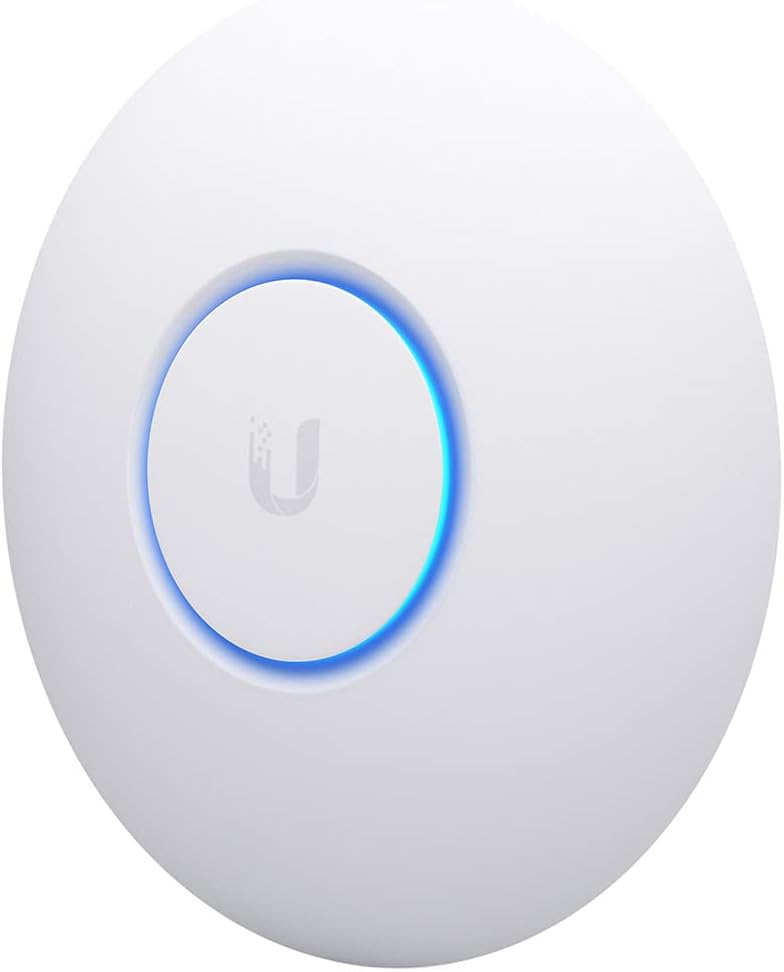
Desertcart purchases this item on your behalf and handles shipping, customs, and support to Kyrgyzstan.
🚀 Elevate your workspace Wi-Fi game with nanoHD — where power meets subtlety!
The Ubiquiti UniFi nanoHD is a compact, enterprise-grade 802.11ac Wave2 access point featuring 4x4 MU-MIMO dual-band technology, supporting over 200 simultaneous users. It offers seamless PoE installation, optional aesthetic covers for discreet deployment, and delivers high-speed wireless connectivity up to 1733 Mbps, making it ideal for high-density professional environments.


| Antenna Type | Internal |
| Asin | B07DWW3P6K |
| Best Sellers Rank | #5 in Computer Networking Wireless Access Points |
| Brand | Ubiquiti Networks |
| Built In Media | Access Point, Ceiling/Wall Mount Kit |
| Color | White |
| Compatible Devices | Desktop, Laptop |
| Connectivity Protocol | Wi-Fi |
| Connectivity Technology | Ethernet |
| Control Method | Touch |
| Controller Type | Switch |
| Coverage | Extensive |
| Customer Reviews | 4.8 4.8 out of 5 stars (2,065) 4.8 out of 5 stars |
| Data Transfer Rate | 1733 megabits_per_second |
| Frequency | 5 GHz |
| Frequency Band Class | Dual-Band |
| Global Trade Identification Number | 00817882024228 |
| Item Dimensions L X W X H | 6.3"L x 6.3"W x 1.3"H |
| Item Type Name | Access Point |
| Item Weight | 680 g |
| Lan Port Bandwidth | 100 Mbps |
| Manufacturer | Ubiquiti |
| Maximum Upstream Data Transfer Rate | 1733 megabits_per_second |
| Mfr Part Number | UAP-AC-PRO-5-US |
| Model Name | UniFi nanoHD |
| Model Number | UAP-NANOHD-US |
| Number Of Antennas | 4 |
| Number Of Ports | 2 |
| Operating System | Linux |
| Other Special Features Of The Product | Access Point Mode |
| Security Protocol | WPA, WPA2 |
| Upc | 817882024228 |
| Voltage | 48 volts |
| Warranty Description | 1 Year |
| Wi Fi Generation | WiFi 5 |
| Wireless Compability | 802.11ac |
User
Great AP, but things you should know about performance.
Summary:- DFS channels, so you can use channels your neighbors probably dont have (yey for clear channels).- Very short range. These are meant for small coverage areas, like 1 or two rooms max.- Low receive gain. In terms of radio performance, they can shout, but can't hear very well.- The low gain and short range is not always a bad thing, its great for reducing interference and focusing wifi in a small area. That is a good thing for high density areas, but don't expect any long range or whole house coverage.- Great overall AP, but you will VERY likely need more than one if you want respectable performance for home or business.This is a great multi-user AP, however if you use it for home, there are things you should know.It is short range. To be specific, it has very low gain (likely no gain or negative gain). This is only a bad thing if you are trying to cover a large area, or multiple rooms in a home. It turns out this is a good thing for reducing noisy neighborhood interference (which I have a LOT of). It is true that the NanoHD has shorter range than most consumer APs out there. On the Unifi forums, many people talk about this, but the Unifi fans will assure you the NanoHD is a "good radio". It is great actually, as long as the short range and low dbm is OK for you. It's receive dbm is about 10dbm (or more) lower than most other APs, including fellow Unifi APs like the mesh and U6-LR. It is even way lower than the old archer A7. Apparently that is not a problem, as it still performs well like that in high density environments.The TX and RX rates dont hit max on most devices, so it can be slower than other APs for single user downloads. This is a known issue, where a wifi 5 device that can reach 866Mbps Rates will not maintain the full rate. This is likely not a problem you will notice or care about as it wont affect your ability to stream and stuff... however it is annoying to me because just about every other AP I've had can reach full speed rates. Again on the Unifi forums, the pros dont mind this nuance because although the Nano is somewhat "slow" for single users, it is "fast" overall if you consider the aggregate performance of lots of concurrent users.This AP supports DFS channels, which makes it worth it by itself. Apparently DFS channels can be problematic if you live by an airport or have lots of radar traffic in your area, but for me this was the solution to all my interference problems. The clear channels and small cell size (range) actually solved my biggest wifi problems, which had to do with all my neighbors and their millions of wifi devices causing lots of interference.The Unifi APs including the NanoHD have great roaming and support the newest roaming standards. The low range and slightly lower receive sensitivity actually helps roaming. Your wifi devices are more likely to pick a stronger AP under these conditions, which makes roaming smooth and effective. I have a few mobile devices and VoIP devices that can roam seamlessly between multiple NanoHDs. This is one benefit to smaller range/cell size. Of course you need multiple APs to benefit from roaming, but if you go with Nanos, you will likely need more than one anyway.Q&A:Will this solve all of your wifi issues? Yes, most likely.Will you be happy with 2 or 3 in your home? Yea, they get the job done and have great roaming.Will you be happy with 1 for full home coverage? Nah, you need more than 1 if your house has walls in it.Will you be happy if you are a wifi nerd and love internet? Absolutely not, we wifi nerds are never satisfied with wifi or internet performance, but it will keep the wifi nerds busy and you may still have fun with it.Is there something better than the NanoHD at the same price? Absolutely. If you want to stick with Unifi, the U6-Lite is cheaper and faster than the Nano for single user speeds. The U6-LR is the same price and blows the nano away for range and speed.At the end of the day, its a 5 star product that will improve/fix just about any older/outdated wifi deployment.
User
Better multi-WAP alternative to mesh networking (see details). Highly recommended
I've been using Ubiquiti UniFi APs at home (and at work) for a long time, so I selected the Ubiquiti UniFi nanoHD Compact 802.11ac Wave2 MU-MIMO Enterprise Access Point ( UAP-NANOHD-US) units for my new home. While the UAP-AC-PROs that I'd used before were still available (and are a bit cheaper), they're quite a bit larger. At about 6 inches diameter, the nanoHD blends in to the home a bit better.Hard installation is easy. Assuming that you aren't putting the AP on a drop-ceiling tile (which uses the included metal back plate), you mount a plastic plate to the ceiling or wall. Run a Cat5e cable to the AP. Plug one end into the AP, and the other into a PoE switch or the included injector.Soft installation consists of installing the UniFi Network software on a PC (I installed mine on my home automation server). UniFi Network requires Java, so it makes you install that. Beyond that, you either perform a local installation, or create a UniFi account, for administration. I opted for the local administration. Once running, UniFi Network identifies all Ubiquiti APs on your network. From there you can set all of the AP properties, create all of your SSIDs, associate them to your various VLANs, organize your APs on a map, perform an RF survey, etc. One of the tasks you can perform, is to update your AP firmware. Mine was pretty out of date. Updating takes about 5 minutes.I've included a few pictures of the installation (before I put the cable IN the wall), and the management software. Though it's really nice software, it's obvious that they want you to have a full Ubiquiti ecosystem.... with their switches and routers. I'm using Netgear PoE switches and a home-built, 1U pfSense router, so I've obviously gone the other way. Regardless, even for just the management of the WAPs, the software is far beyond anything else you can get at the price.For a house that's approximately 5400sqft, I have two, wall-mounted, on the ground floor. One, ceiling mounted, on the 2nd floor, and a last one, ceiling-mounted on a drop-ceiling, in the basement. If your house either has some structured wiring that you can take advantage of, if you can just add a few Cat5e runs, or if you can even just backhaul your network with PowerLine networking, then you will have MUCH BETTER performance with non-meshed WAPs. If that's a project you want to take on, then the Ubiquiti UniFi nanoHD Compact 802.11ac Wave2 MU-MIMO Enterprise Access Points are a great way to do it. Highly Recommended.
User
Verifed product
User
Super Stable WiFi
Bought this to replace my aging/dying NETGEAR NIghthawk R7000 router that I had for 5ish years. I honestly don't think this thing beats the range of that router since I do see slight WiFi strength drop off in the far corner of my apartment (through multiple walls) which I did not see when using the R7000, but recently my R7000 kept locking up and randomly resetting itself which was becoming a pain when I'd get booted out of online games and have shows streaming suddenly error out.This was my first Ubiquiti purchase and I have no regrets whatsoever. I did a ceiling installation which was pretty quick and easy. It looks great, works amazingly, and the free Unifi web app + iPhone/iOS app is incredible as well. Super nice to be able to log in via the app using TouchID either from home or across the country without having to mess with VPN. Can quickly check in to see who's all connected, if there's any issues, update the AP, reboot, etc.Already picked up a Unifi switch to go along with this, waiting for the USG/firewall product update then I'll pick up that as well!Definitely recommend for the stability and ease of use/administration.
User
Throughput!
Using this for home wireless in a complicated single-story layout. Lots of brick obstructions. I have this Ubiquiti nanoHD sited at one end, serving a small 2nd floor and most of the main ground floor. The nanoHD has fantastic throughput - assuming you can get signal. Its range is decidedly local, favoring throughput on 5GHz over connection range even on 2.4. I covered the less essential-speed areas with an LR, serving the same SSIDs. If connection reliability and range was our only concern, I'd definitely use all LRs! But we wanted throughput where the heavy-use devices tend to be (laptops, desktops) and the nanoHD really is a better choice for that. The nano delivers the speeds we negotiate at - ~500Mbps to the connected servers (on GigE on the same switch, with a negotiated 600Mbps wireless connection) and 140Mbps over the Internet with a negotiated 216Mbps wireless connection and that's on a 160Mbps rated Internet connection. That said, when the distance gets a little farther, or you get a significant obstruction in the way, the LR keeps a decent connection going and the nanoHD just drops out.Short version - fantastic throughput, and easy to set up with the Ubiquiti software-based management tools. The nanoHD is seriously faster than the LR overall, at the cost of range (and higher price).
User
Great ecosystem and features, minor problem with stability
Product: UniFi AP-nanoHDVersion: 4.0.54.10625Board Revision 16My home is not wireless signal friendly, so my old setup consisted of an Asus RT-AC66U as the primary AP, with a Netgear Nighthawk AC1900 extender. This was less than optimal for several reasons:1) Two networks were required, which meant having to change networks when walking up or downstairs.2) The reduced bandwidth from the extender impacted streaming shows upstairs.3) In order for the extender to get enough signal from the AP, it had to be placed in a location which created wifi dead zones on the upper floor.I decided to replace the old system with 2 Unifi nanoHD APs. Overall, the speed and performance is on-par with the Asus. The extra abilities, such as selecting channel width, transmit power, meshing, multi VLANs, band steering, and the integration with the rest of the UniFi ecosystem (Network Management Controller, POE switches, USG firewall, etc), has made this is a very powerful implementation.That being said, I am having issues with stability. I've had 2 crashes of the APs in 2 months, which is not a huge problem, but my previous configuration of Asus/Netgear never crashed in 3 years of use. When the APs fail, though, I can easily reset them by power-cycling the POE ports remotely through the management software.
User
Came with PoE injector
The device works great. I have extensive experience with UniFi products and no problem adopting it.I was a little surprised that the product description says that it does not come with a PoE injector. Therefore, I ordered a separate PoE injector. However, the device did come with a PoE injector in the box.
User
Firmware has matured, we're ready to roll now
Update 12/7/18 - Ubiquiti has been great about pushing new firmware every few days with a ton of bug fixes in each release. Since the ~4.0 release, this AP has been rock solid and I'm comfortable recommending it now to anyone looking for a top of the line AP in small form factor. There are still a few quirks and limitations surrounding edge case features like wireless uplink but the core functionality of the AP works great and all my wireless devices have no trouble now getting and staying connected. If you have any devices that can take advantage of the 4x4 MIMO, the speeds you can achieve are incredible. I also want to reiterate how great the Ubiquiti engineering staff is. They are highly engaged on the support forums and are always looking for feedback on bugs and feature suggestions that are more often than not implemented sometimes days or weeks later. I'm really invested in this ecosystem and would recommend these products to anyone who has a solid networking background and likes to tinker.I've been working on cutting my home network over to Ubiquiti gear and was excited to get my hands on the spiritual successor to the UAP-AC-PRO. I've read that Ubiquiti gear requires a fair amount of tinkering to get everything just right and I'd say that is a fair statement after wrestling with the nanoHD, USG and the USW switches. The nanoHD is apparently still in the early stages of firmware development and has a fair number of bugs and instability compared to the other APs in the fleet. I have had a hell of a time trying to keep my devices on the 5GHz band and found that the UBNT forums are flooded with users with the same issue. I've had to resort to loading up the latest beta firmware just to stabilize things, but it still isn't perfect. Support has been great so far, they really want to stabilize as quickly as possible but I cannot give this thing a thumbs up in its current state. If you are in a saturated RF environment, I'd recommend you stick with the stable UAP-AC-PRO for now and give the nanoHD some more time to cook.
User
Best Wireless AP
First I got a $400 consumer grade wifi 6 wi-fi router, it was shaped like a space ship and it was a piece of crap, there's some fatal flaw in the radio module such that you get extremely bad 5G performance sometimes unless you have perfect signal right next to the router.Then I swapped over to this thing, honestly, signal strength isn't that strong, I had to place it in the right spot to cover the house, but it did cover the house all by itself. This thing is built like a tank, the entire base is one solid piece of cast metal for incredible quality and heat dissipation. Wifi performance is just solid and consistent, your speed goes down reasonably with signal strength, no sudden drop-off.Just to make it clear for people who are confused, this thing DOES work all by itself, HOWEVER you need to have a computer with hard wire to set this up, and use the management interface. The Unifiy controller thing they talk about is just that management interface, the wifi WILL work without it, but you can't change any settings or see any stats without something running that software.
User
High performance and solid wifi access point
Love the NanoHD!! Very solid device and high performance at the same price point as “high end” consumer grade garbage. I was getting 15-17 ms ping times with my old router and once I hooked up the nanohd my ping times dropped drastically to 2-3 ms. It’s low profile and was super easy to setup and I really like the interface and dashboard features and statistics it provides as well.
User
Beast of an AP
Shaw blue curve is no match for this thing. Our WiFi was unreliable and spotty and we were forced to get shaw blue curve (the mesh network). Blue curve sucked so I bought this and an EdgeRotuer X. Full signal strength ever where in the house and the house has a ton of metal in the walls that ruins the old access point's signal.For speed, I was able to run 20 continuous streams at ~34 mbps totaling over 600 mbps. The highest single device speed I was able to get was around 400 mbps. This is a high density device and is made for a lot of connections, not single connection throughput.
User
Good AP, vaguely-annoying software
Good connection, signal strength, etc. However in order to set it up you must install software or have a controller - this is a major con since most users simply don't need the extra functionality. The UNMS-compatible Edgemax line of Ubiquiti products work on their own OR in conjunction with a central management system, which is far better both for home and commercial users!Ubiquiti needs to get it together and unify (get it?) their products, it's a huge missed opportunity since the Unifi APs and Edgemax routers work well together, but require a ridiculously discombobulated software experience to make it work.
User
Easy to use
4 out of 5 as i had to SSH into the device to upgrade its Firmware. So cant give it 5 out of 5 which i would otherwise. Only after updating the firmware was adoption easy and adding it into a network . I really likes its size , it runs a little warm but no need to cool it. Covers my house perfectly and does a good job outside the house as well. I would recommend using it for WIFI on both 2 and 5 hertz bands. Seemlessy bridges the two into a single network.
Trustpilot
3 weeks ago
3 days ago