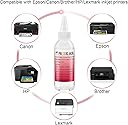
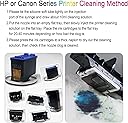
๐จ๏ธ Keep Your Prints Pristine!
The Printers Jack Printhead Cleaning Kit is a powerful solution designed to unclog and protect the print heads of various inkjet printers, including popular models from HP, Canon, and Brother. This kit includes a specialized enzyme formula that effectively dissolves dried ink, ensuring optimal print quality. With easy-to-use cleaning tools included, maintaining your printer has never been simpler.


| ASIN | B07D8KBDMJ |
| Best Sellers Rank | #576,573 in Office Products ( See Top 100 in Office Products ) #19,715 in Inkjet Printer Ink Cartridges |
| Brand | Printers Jack |
| Built-In Media | Syringe, Silicone Hose, 1 Pair Gloves, Instructions |
| Cartridge Type | Compatible |
| Color | black |
| Compatibility Options | Compatible |
| Compatible Devices | HP printer 8620, 8610, 8600, Canon Pro 10, 100, MX922, Brother MG7120, MG6320 |
| Customer Reviews | 3.9 out of 5 stars 807 Reviews |
| Ink Base | Water |
| Ink Color | black |
| Ink Colour | black |
| Item Weight | 0.1 Kilograms |
| Manufacturer | TrendVision Technology CO., LTD |
| Mfr Part Number | PJ-CS01 |
| Model Number | PJ-CS01 |
| Number of Items | 1 |
| Other Special Features of the Product | Wide Range of Compatibility, Strong Cleaning & Print Head Protection |
| Printer Model Compatibility | Brother MFC 6890CDW, Brother MFC J6920DW, Brother MFC J880DW, Canon PIXMA MG6320, Canon PIXMA MG7120, Canon PIXMA MX922 |
| Printer Type | Inkjet |
| Special Feature | Wide Range of Compatibility, Strong Cleaning & Print Head Protection |
| Specific Uses For Product | Inkjet printer maintenance and repair |
| Unit Count | 1.0 Count |
C**Y
Great product and works perfectly.
I bought this cleaning kit for my brothers MFC-J270w that I bought in 2009-2010 that ran out of ink years ago (prob 2011-2012) and we had no use for it really so I put it in the top of the closet. I got it out and put new ink cleaned it through machine etc no luck and was clogged up. So I bought this to give it a try before spending money on a new printer. Ran it through as instructions said and cleaned it real good! Still no luck on getting it to print. So I gave it one last shot and let it soak over night and then finished cleaning this morning. Low and behold the printer is alive again and working great! Definitely worth the time and money saved on buying a new printer. Donโt give up after doing it one or two times. If need be flush it and then let it soak over night and it will prob work depending on how long itโs been sitting or clogged. Only down side to this kit is the instructions doesnโt tell you how to piece it together so itโs a puzzle to get it together and working properly. That was the only issue I had with it.
S**T
Just wish there was more for the price. Doing this right is not for your avg person.
Will only work if you do not leave your heads unused too long. Also I first heated the solution to about 130F Put the head in a bath of the solution at temperature, WITH ONLY 5 mL of PJ in a syringe for all 5 heads over- night, then in the morning, I pulled the solution BACK into the head through the nozzles, as to not try to force the dried ink inside the head, out through the microscopic printhead holes. I drew up about 2 mL back up into each of the preconnected syringes, drained what was in the syringe to the sink. refilled the try the head head was sitting in, and did the same one more time. This is the 1st time any head cleaning has worked for me. The first printout was perfect on EVERY nozzle. Still is printing PERFECT a couple months later. I devised my own method from common sense, and seeing where the dried up ink REALLY is in the printhead, by taking one apart myself. 1) If you don't DRAW BACK sucking clean fluid through the nozzles, well, thats your choice. 2) Leaving soaking in a tray you make or find at least 8 -12 hrs giving the solution time to soften the NOZZLE clogs. 3) ONLY USE DISTILLED, NOT FILTERED WATER TO RINSE HEADS, OR CHECK HEAD NOZZLESPAY PATTERNS AFTER CLEANING. But this includes sucking fluid up into the head nozzles, (pre-heated) and keeping warmed for as long as possible, like in a bath of hot water. THEN leave for at least 8 hours. This gives the nozzles clean fluid to sit in instead of forcing old hardened ink through the nozzles, insuring it won't work. Or you can follow the directions. But I think this is the best head cleaner out there.
J**S
Did Not Work For Me
Tried this several times but still could not get my printer to print with black ink Ended up buying a new printer
L**A
Kit Does What Itโs Supposed To Do
Good value for what you get. This kit included gloves which is good because the printer ink will stain your hands! The kit also includes tubing which you are supposed to connect the cleaning syringe part of the print head. The tubing was too large for my printer so the cleaning solution ran all over instead of going inside the print head like it was supposed to. I didnโt use the tubing & just used the syringe which worked better but itโs hard to see what you are doing inside the printer because itโs an awkward angle. This kit did not solve my printer problem which isnโt the kitโs fault. I ended up buying a new printer but it was an inexpensive way to try & clean the printhead before I went ahead & bought a new printer.
D**P
Printer quit working altogether after using
I used this product according to instructions. It says there is a risk of damaging the printer when repairing it yourself and that is what happened. After cleaning the jets and letting it dry for one hour and now get - Printer Failure - There is a problem with the printer or ink system. Turn printer off, then on. If problem persists, contact HP. 0x610000f6 I have tried resetting the printer but nothing works. The print cartridge tray moves all the way to the left so it looks like something was damage in that tray carriage system while cleaning. Should have left it alone.
S**T
Fixed Pixma PRO-10 Head
My Pixma Pro 10 print head was clogged by ink as I hadn't used it much in recent months. I was told by many "experts" that it would be better to take advantage of current deals and buy a new printer that would only be a few dollars more than the $270 or so for the new head! I decided I had nothing to lose so after reading some information in a few printer forums I purchased this product. I then removed the ink cartridges and the print head. I first removed the rubber gaskets that seal the cartridges to the print head. Then I placed the head in a small pan and let the head take a natural tilt caused by the print screen on the bottom. I was then able to pour a small amount of solution in each cartridge depression area to let the solution seep through the ports and let it sit for a few hours. I then poured enough solution in a small Tupperware lid and set the head with the print screen down in the solution. This only required about an 1/8inch of fluid or less. I let this sit for another couple of hours. After this, I used q tips wetted with rubbing alcohol to better clean up the area where the cartridges go. I also used the solution to clean the rubber gaskets before replacing them. (I recommend the solution and not alcohol for this as I don't know how the rubber may react to the alcohol.) Finally, I used a compressed air can to dry the print head the best I could and then let it sit overnight to dry further. On replacement into the printer, everything worked perfectly. So, $20 compared to over $300 is a no brainer.
B**N
Sometimes, this just doesn't work.
I soaked the printhead in the cleaning fluid over night, squirted the cleaning fluid through the print head three times and ran the printer's deep head cleaning procedure a few times, but not much happened. I think there was some minor improvement in in the magenta color, but the main problem was the black, and it didn't improve at all. It wasn't expensive so it wasn't a big waste of money, but it was a waste of time.
M**R
Saved my epson printer.
My epson printer sat idle a few months and the nozzles got clogged. The black was totally clogged (pages that were supposed to be black print came out completely blank), and the magenta was stopped up as well. I used the nozzle clean function dozens of times in hopes that I would not have to purchase a new printer, but the black remained completely clogged. I bought this kit a while ago and finally used it -- the printer sat idle over a year, so the ink was really clogged. The instructions were good. Ran two syringes through the black and one through the magenta. I was a bit worried -- the paper towel I put under the head came out at first with black gummy ink, but then with a little rubber gasket stuck to it (also totally coated in black gum). Threw the gasket away, sopped up the fluid with paper towel, replaced the cartridges, did 2 rounds of nozzle cleaning, and the printer is printing like it is brand new. I highly recommend this product. Not only did I not have to buy a new printer, but the stash of old ink cartridges that won't work with a new printer will not be wasted.
A**.
HP 6700 Worked Fine
Used just the tube without any of the adaptors. Black was clogged and wouldn't print at all. Probably did 15 nozzle cleans via the menu. Used approx 4ml of this cleaner, generally as instructed, but did push/pull the fluid a bit and let it sit for a lot longer (4-5 hours? I forgot to get back to it). Black prints now :)
E**S
Cleaning Kit
Helped to use my printer longer
N**A
Make sure you know what youโre doing.
My printer was trashed after my attempt to clean it. You need to be super careful not to overdo it. Even though I refilled the ink, the printer didnโt recognize any ink in it and refused to print.
M**C
Good value for the money
I had Canon MX922 that was sitting for years as I used another ink jet printer. When my first printer failed I tried to use MX922. The printer head was completely clogged and I was thinking to through away the printer. I came across this product by accident. I used in and unclogged the printer head. The only problem are attachments to the small tube that I had to wrestle in order to attach it to the nozzles. You almost need another person to assist you. Good product though. Saved me $$$.
Trustpilot
1 month ago
1 month ago