🖱️ Elevate your workflow—wear the future of control on your finger!
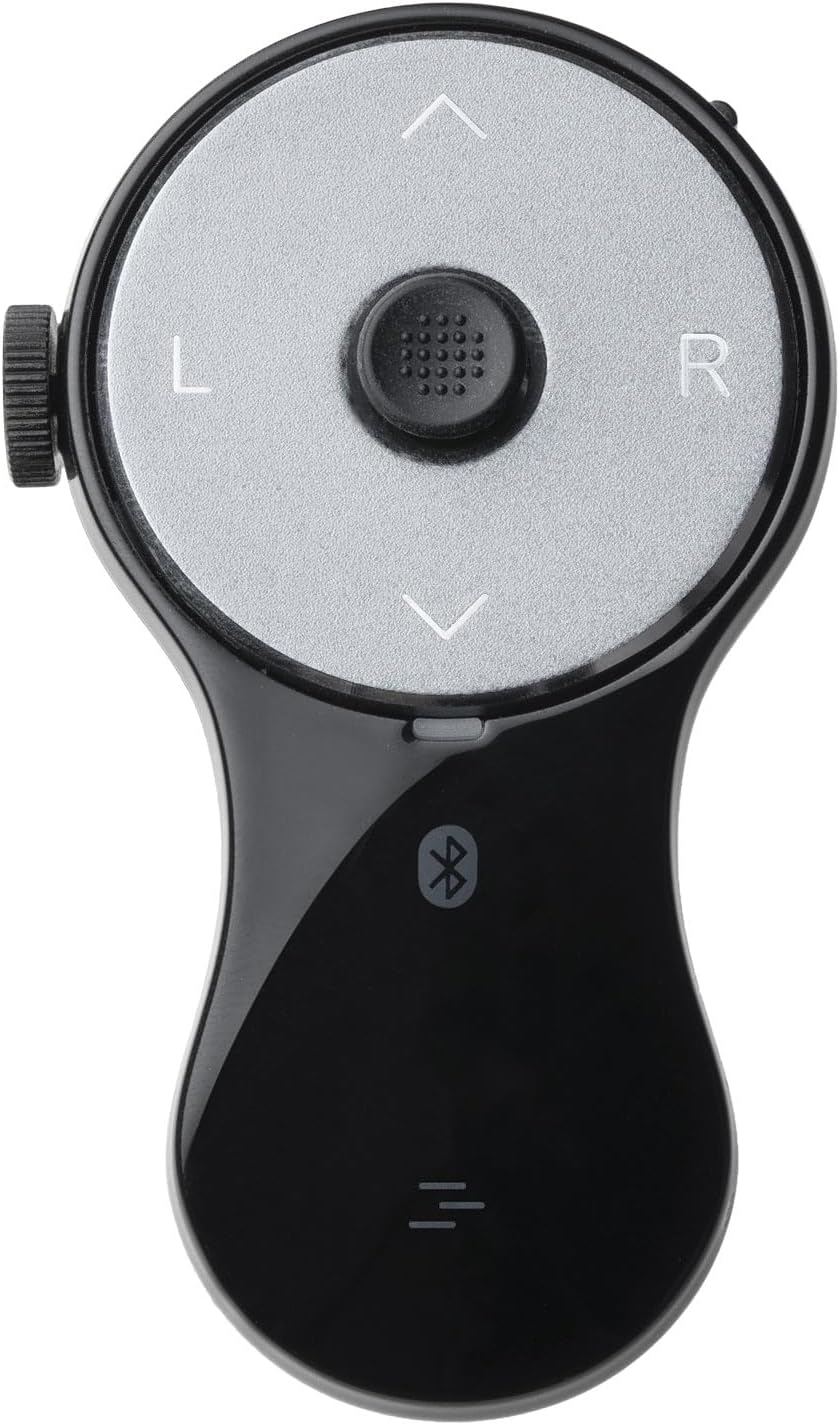
The SANWA 3 in 1 Bluetooth Finger Ring Mouse is a compact, rechargeable wearable device combining a mini mouse, wireless presentation clicker, and video scroller. Featuring Bluetooth 5.0 for stable connectivity up to 32 feet, it offers 34 hours of continuous use on a single charge. Designed ergonomically with a soft silicone ring, it reduces wrist strain while enabling seamless control of PCs, laptops, tablets, and phones. Ideal for professionals seeking hands-free, versatile control during meetings, presentations, and media consumption.


| ASIN | B0DLGK55CD |
| Batteries | 1 Lithium Ion batteries required. (included) |
| Best Sellers Rank | #561 in Computer Mice |
| Customer Reviews | 4.1 4.1 out of 5 stars (133) |
| Date First Available | October 30, 2024 |
| Item Weight | 0.739 ounces |
| Item model number | GMABT156BK3 |
| Manufacturer | SANWA SUPPLY |
| Product Dimensions | 2.83 x 1.69 x 0.1 inches |
R**.
Ergonomic Air Mouse that works.
Good quality. Controls are placed ergonomically. Angled scroll wheel is easy to operate. Cursor mini-joystick button takes some time to master. Bluetooth and RF connectivity are a plus. Rechargeable built-in batteries are convenient (charge lasts very long). Other so-called air mouse devices might be cheaper, BUT they lack a scroll-wheel and are awkward to hold. You could pay a little more for a Gyration Air Mouse, but I don't know if the new ones are still reliable. At this price point, this is an above-average package.
B**T
No Glam - Just the Facts
Simply Perfect. This device functions flawlessly, and is an absolute 'Quality of life' needed item. The controls and functionality are intuitive and very easy to use. Buttons are large enough to hit easily, and are very responsive Easily connects to my devices Battery life is excellent and recharge is simple and fast. The mouse has been subjected to drops and being stepped on, still works perfectly It is light and very durable, but does not feel cheap. Wish it came in different colors (*wink*wink) Only negative I have is I did not read the instructions and thought it was broke because I had it on the scroll function mode and not the mouse function mode. And it is rather small, which is nice, but it can get lost easily. I bought this mouse in Feb 2025, and am writing this as of Nov 2025. I shall return with an update if I remember
E**N
Handheld is good, just some improvements
Honestly it works how I wanted, but only because I downloaded software to alter my windows hotkeys. I think these things should be improved for next model: - Software to customize functions - Button for the trigger finger (currently it's annoying to do everything with the thumb, there's no good click and drag) - Bad bluetooth could be improved, or offer a dongle
A**S
Not bad, not great.
Works well, do like the placement of the buttons and the wheel. The little mouse stick thing is exactly like what you see on some laptop keyboards and is pretty accurate in it's movements. Has all the buttons a "presentation clicker" should have, save for the middle mouse button. It does have an impressive battery life, and good range. I do however have to say I hate that there is no middle mouse button. It didn't actually need to be under the mouse wheel, though I really can't see why not, but including that button would have really improved this mouses usefulness in my opinion. I really would like to give this a 3.5 out of 5, but sense we can't do that on amazon, Imma have to just give this a 3 of 5 instead.
A**R
Almost Perfect
I bought this specifically to use as a mouse alternative for the PC to prevent RSI. It sits nicely in my hands, but I could see it being a bit too large for women/people with slender fingers. The construction is solid and the Bluetooth connectivity works flawlessly. The cursor sensor is responsive to very light touches and is easy to get used to, but it's closer to using a joystick than it is to a mouse - it's not as quick or precise as a mouse, but its speed does respond to the level of pressure you put on it, which is a nice improvement over using a joystick. The scroll wheel is also neither too tight nor too loose, and spins easily to light touches. However, it's awkward to reach with my thumb when using the ring mouse left-handed, which is a bit disappointing because I like to swap hands around to avoid repetitive movement. My biggest gripe with using this thing as a mouse is that the default Page Up/Page Down buttons are a waste of potentially useful button spots since that functionality is easily covered with the scroll wheel. I had to install AutoHotkey for Windows 10 to remap those buttons to something useful, namely mouse buttons 4 & 5 to navigate back and forward on webpages. I think you might be able to remap them natively with the built-in mouse and keyboard control center in Windows 11, but I haven't used Windows 11 yet to know for sure. Either way, it seems like a missed opportunity to make this thing a full mouse alternative right out of the box. Overall this is a handy little device for my purposes. If I could design a new one for myself, I'd add a second scroll wheel on the opposite side of the existing one to make the device more ambidextrous-friendly. I'd also add a single button perpendicular to the disk face at the top of the device, which would make click & drag much easier and faster to do if you wear the device on your middle finger. I'd also map the default function of the Page Up and Page Down buttons to mouse buttons 4 & 5 for mouse mode. I think that'd make it absolutely perfect. It's very nice as it is though.
K**P
Finger mouse
Works fantastic. When giving a talk or presentation, you can scroll effortlessly and no one knows you even have a mouse.
K**N
Don't waste your money
Doesn't work. Very disappointed
F**K
Great value and convenience.
I tried purchasing a few different much more expensive handhelds as I have a hard time using trackpads on laptops and have a hard time packing my roller ball mouse on the road. I just realized after 9 months, the Sanwa is the only one I use as it has become very natural and comfortable in my hands. I find it especially convenient on flights, or sitting on a couch or anywhere a laptop is actualy on my lap where a mouse just wont work. I also appreciate that I can sit back during group meetings and navigate through websites and emails without distracting from the meeting. I do agree with the reviewer who said that the drag and drop function does not exist, so if you use function often be prepared to use your trackpad. It does look like an inexpensive plastic toy - but it is hidden in my hand and for my uses find it to be an exceptional part of my mobile office gear.
Trustpilot
2 months ago
2 days ago