Buy anything from 5,000+ international stores. One checkout price. No surprise fees. Join 2M+ shoppers on Desertcart.
Desertcart purchases this item on your behalf and handles shipping, customs, and support to Kyrgyzstan.
📺 Cut the cords, not the vibe—wireless streaming redefined!
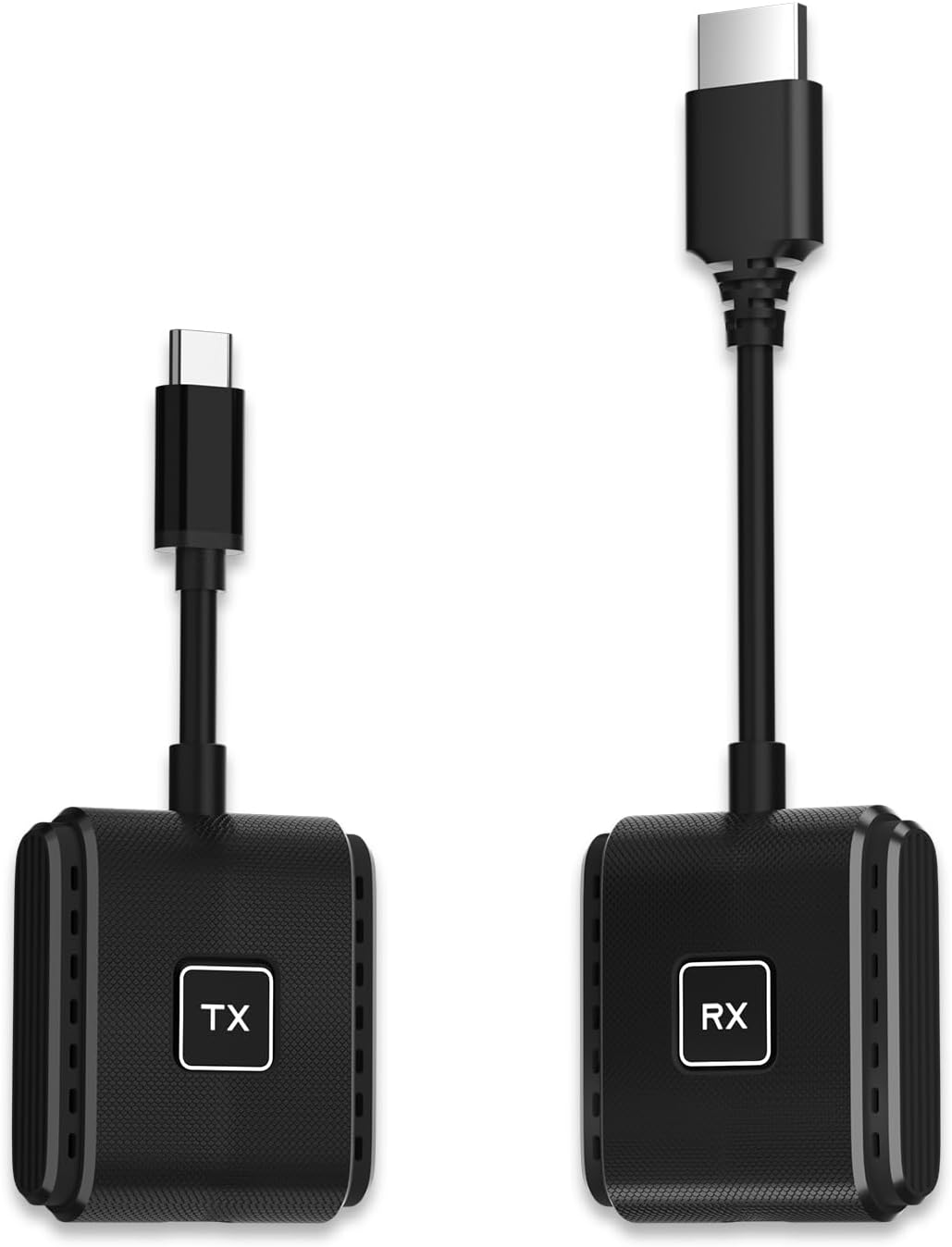
The SmartSee Wireless USB-C to HD Transmitter and Receiver Kit offers a professional-grade, plug-and-play solution for wireless screen mirroring and extension from iPhone 15/16/17, iPad, and Mac to TVs, projectors, or monitors. Featuring dual 5GHz WiFi modules for stable, low-latency streaming up to 170FT, 1080p video output with upgraded 4K decoding chipset, and the ability to charge your device while streaming, it’s designed for seamless content sharing in meetings, home theaters, and live events. Regular OTA updates ensure ongoing compatibility and feature enhancements.


| ASIN | B0DJ2BNCP1 |
| Best Sellers Rank | #140,799 in Electronics ( See Top 100 in Electronics ) #487 in Streaming Media Players |
| Brand | SmartSee |
| Built-In Media | A Receiver, A Transmitter, USB-C power cable, User Manual |
| Color | Black |
| Compatible Devices | Ipad, Iphone 15, Iphone 16, Mac |
| Connectivity Technology | HD, Usb-c, Wireless |
| Connector Type | HD, Usb-c |
| Controller Type | wireless |
| Customer Reviews | 4.0 out of 5 stars 34 Reviews |
| Form Factor | TV Stick |
| Item Dimensions L x W x H | 6.6"L x 1.5"W x 0.8"H |
| Item Weight | 0.11 Kilograms |
| Manufacturer | SmartSee |
| Model Name | Wireless Usb-c To Hdmi Transmitter And Receiver Kit |
| Model Number | 1TX(USB-C)+1RX |
| Other Special Features of the Product | Charge While Working, Plug And Play, Screen Extender, Screen Mirror, one-click to disconnect and reconnect |
| Resolution | 1080p |
| Special Feature | Charge While Working, Plug And Play, Screen Extender, Screen Mirror, one-click to disconnect and reconnect Special Feature Charge While Working, Plug And Play, Screen Extender, Screen Mirror, one-click to disconnect and reconnect See more |
| Supported Internet Services | Hulu, Hulu Plus, Netflix, Prime Video, YouTube |
| Unit Count | 1.0 Count |
| Video Codec | HEVC |
| Video Output Resolution | 1080 pixels |
| Warranty Description | 1 Year Warranty |
T**N
Perfect
I gave this a great review, then changed it to a bad review as I couldn’t get it to work properly without WiFi. I figured out how do make it work with no WiFi. I download movies and tv on my phone so I can watch without any outside data. This works perfectly if you shut off Bluetooth and turn on airplane mode. I am going to try to figure out how to watch YouTube TV as well.
D**G
Works with iPhone 16
Worked so I could stream the Charlotte NASCAR race from my iPhone Prime Video app to my motel TV. Image was slightly reduced as it’s not 4K & the tv couldn’t be adjusted.
C**N
Works great
The product worked extremely well … providing a crisp clean mirroring of my iPad image. I’m using it for foreign movies (legally).
A**R
Does not work as described
Posting says you can charge IPAD through the Tx portion wile using. Not true does not charge.
R**G
Works well with Pixel phones and very Easy of use
Work really well. Very easy to setup. Working well with the newer Pixel phones (Model 8A, 8 and 9).
M**Y
Very low-lag
I've tried a couple of these. The description was most intriguing in it's mentions of being low-lag - the others I've tried are great for presentations or video chat or such, but for action movies they have aren't great. The bandwidth is too limited and so when things move quickly or change rapidly on the screen it lowers the quality and you get blocky or juddery images. I thus decided to give this one a shot to see if they've fixed things in the last couple years. This also has some other nifty features - it has passthrough USB-C charging on the transmitter (plug your USB-C power for your laptop into this, then this into the laptop, and it'll power the laptop and the transmitter without an extra cable). The receiver does still need a roughly 10w power supply (your TV's USB port may work, but if not you'll need an external supply - this comes with a small cable but not a wall adapter). Most TVs for the past few years will work fine, but if yours is on the lower end or the older side it may not work. Note that you can also use the receiver with your phone (it essentially makes a hidden wifi network that the dongles use to talk to each other, which your phone or laptop could also use if you follow the on-screen directions). Once you plug the receiver into your TV it will bring up the connection directions. Once the transmitter is on and connects it will almost immediately bring up your laptop or phone screen (it behaved for both of my devices just as if I'd physically plugged in a cable). It showed my desktop normally and the mouse was responsive (on both my Dex via my phone and my laptop). I then played an action video and was genuinely surprised to find that the details were sharp and responsive even during the action sequences (older varieties of wireless HDMI tend to go blocky when the action ramps up due to larger refreshes of the screen taking more bandwidth than small changes). The overall screen image did have perhaps a quarter second of lag vs my laptop built-in screen, so it's probably not good for multiplayer gaming (single-player types would probably work ok) or anything else needing split-second responses. That's the only less-than-stellar thing I would have to say about this - the package is small, the response time is good, the quality is excellent, the ease of use is great. I really am genuinely impressed and pleasantly surprised. It'll become my new hotel or vacation gadget - no more wrangling with a 15-20ft HDMI cable.
O**I
Not for Galaxy S25
Bought this to replace my other that gets too hot. Sadly this does not work with Galaxy S25. Goes into "pause mode" according to the manual... Why or what that means is not explained anywhere. So you can max get 10 seconds on the screen before it says "disconnected" on my phone and the dongle goes into pause.
T**H
No audio from Mac; iPhone screen shrinks down in transmission
I have an HDMI-to-HDMI wireless transmitter but it requires that both the transmitter and the receiver be plugged into USB power in order to work. I got this hoping it would be easier to use as all I’d have to do is plug one item into my computer instead of separate wires for video output and power. I connected this to my Mac and it started streaming my screen to the TV right away. A slight lag at first, but then it seemed imperceptible. Like my other transmitter/receiver, I have to go into System Settings to switch the audio output from the computer’s speakers to this transmitter, but unlike my other set, I haven’t been able to actually get audio to play through my TV from my computer. In fact, I noticed that any multimedia ceases to play for me when I have audio set to play through this transmitter. A home movie or audio file may play just fine on the TV screen, but as soon as I switch the audio output, all playback stops. Videos pause. Music won’t play. It’s like "The Day The Earth Stood Still" came for my home electronics. Then I tried this with my iPhone to my TV. Audio and video play just fine together through the TV. The only issue (and it’s not a small one) is that when the phone screen is horizontal, the video output is letterboxed on all sides through the TV, thereby shrinking the entire screen unnecessarily. It’s not good. I couldn’t find any help in the instructions other than restoring the product to factory settings. At this price, I expected better from this product. You want these things to "just work" rather than requiring a lot of trial and error.
Trustpilot
2 weeks ago
2 days ago