Buy anything from 5,000+ international stores. One checkout price. No surprise fees. Join 2M+ shoppers on Desertcart.
Desertcart purchases this item on your behalf and handles shipping, customs, and support to Kyrgyzstan.
๐ Elevate your workspace anywhere with OLED clarity that commands attention.
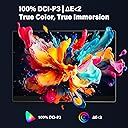
The InnoView 14 Inch OLED Portable Monitor delivers stunning 4K UHD resolution (3840x2400) on a vibrant OLED display with 100% DCI-P3 color accuracy and a 100000:1 contrast ratio. Ultra-lightweight and slim, it features a 1ms response time and versatile USB-C/HDMI connectivity, making it the ultimate portable monitor for professionals, creatives, and gamers on the go.


| ASIN | B0DGPF1GM6 |
| Adaptive Sync | FreeSync |
| Additional Features | 100% DCI-P3, 100000:1 Contrast, 14 inch 16:10, 4K 3840*2400P, OLED Self-illumination |
| Aspect Ratio | 16:10 |
| Best Sellers Rank | #7,780 in Electronics ( See Top 100 in Electronics ) #272 in Computer Monitors |
| Brand | InnoView |
| Brightness | 350 Candela |
| Color | Black |
| Compatible Devices | Camera, Desktop, Gaming Console, Laptop, Smartphone |
| Connectivity Technology | HDMI, USB Type C |
| Contrast Ratio | 100000:1 |
| Customer Reviews | 4.4 out of 5 stars 316 Reviews |
| Display Resolution Maximum | 3840 x 2400 Pixels |
| Display Technology | LCD |
| Display Type | OLED |
| Hardware Connectivity | HDMI, Headphone, USB 3.0 Type C |
| Has Color Screen | Yes |
| Image Contrast Ratio | 100000:1 |
| Item Dimensions D x W x H | 0.15"D x 11.88"W x 8.4"H |
| Manufacturer | InnoView |
| Model Name | INVPM208 |
| Model Number | INVPM208 |
| Native Resolution | 3840x2400 |
| Number of Component Outputs | 1 |
| Picture Quality Enhancement Technology | HDR |
| Refresh Rate | 60 Hz |
| Resolution | 4K |
| Response Time | 1 Milliseconds |
| Screen Finish | Glare |
| Screen Size | 14 Inches |
| Screen Surface Description | Glare |
| Shape | Flat |
| Specific Uses For Product | Business, Entertainment, Photo Video Editing |
| Total Number of HDMI Ports | 1 |
| Total USB 3.0 Ports | 2 |
| Viewing Angle | 178 Degrees |
| Warranty Description | 1.5-year warranty |
G**M
Check your Mac settings if you use this
I have the older version of this and it has been so great for the price. Its light weight and size make it easy to carry in my laptop case to use as an extra monitor when traveling or in a meeting. And on my desk (where I already have two monitors) I often add this when another monitor would be helpful, and put it back in the laptop case when I don't need it. The newer 16" version claims an improved display, but when I first plugged it into my MacBoook Pro, the screen was washed out no matter what I did with the controls - dark greys and blacks were medium to light grey, and some of the colors looked funky. I was getting ready to return it assuming something was wrong. But then I noticed that a setting for High Dynamic Range on the Settings->Displays page on my MacBook. It was checked (the default with a new screen?), and when I unchecked it the InnoView screen finally looked normal, with good contrast, correct colors, etc. And yes, the quality of the display is better than the older one. This definitely is an upgrade over the older InnoView which I already thought was great, especially for the low cost and portability.
M**6
This is a very nice screen
I'm an IT pro, so I have set up quite a few monitors (usually IPS monitors), and this 14" InnoView is really nice. The colors and black levels are perfect. A MacBook can easily power it with plenty of brightness, and this monitor looks very, very slick (as thin as a laptop screen). The pixel density is over 300 DPI, thus even higher than the retina display of a Mac laptop, and the dimensions of this 14" InnoView are about the same as the 13.3" screen of a MacBook Air. The colors are more vibrant than those of the 13" MacBook Air. I run this monitor at its "larger text" scaling, which gives it about the same resolution as the 13" MacBook Air, so text looks about the same size. Keep in mind that this is a 4K monitor, so if run at its normal scaling, text will look miniscule: excellent for eagles, not so great for aging eyes. Highly recommended.
A**X
Felt like gaming on a laptop, 16:10 was neat
Great little mini monitor Colors were good Was able to get the refresh rate advertised Cables included were quality Ports variety is good Built in stand is okay, get a real stand or vesa mount for it
S**X
Mine is picky about cables but it works fine.
16" 240 Hz 2560X1600. This is a good monitor. It could be better, but it's very good and you won't regret purchasing it. It's brighter than 300 nits. I don't have a colorimeter, so I can't tell you exactly how much brighter, but I use it along side a 500 nit rated display that has been tested as 524+/- nits by multiple reviewers. I keep them both around ~75% brightness during daylight hours and if there's a difference in brightness, I can't see it. Cranked all the way up, my 500 nit display is a little brighter but both are way too bright at that 100% setting anyway. Color is very good, but there's no HDR support. If you don't know what HDR is, then you'll never notice or care that it doesn't have it. If you do know what HDR is, then the lack of support might be a deal breaker for you. For my use case, it doesn't really matter that much but it would have been a nice bonus to be able to exactly match my monitors. The Eye Care Certification is real. Blue light reduction works fine without turning everything too brown or too red like some Eye Care Cert monitors tend to. Most people will never use the blue light reduction feature, but I have my laptop set to turn it on at a specific time in the evening and back off in the morning. I do the same with my cell phone. I would not have purchased this monitor if it wasn't Eye Care Certified. It works, and I'm satisfied with how well. Mine did not work with the supplied cable. It also didn't work with a very expensive Anker cable that I've used with multiple other displays and docks. It also didn't work with another cable I have of an unknown brand that I've used with other monitors and several docks. I have two Cable Matters USB C cables that work just fine. One of them is a 3 foot 20 Gbps and the other is an 8 foot 5 Gbps. No problems what so ever when using either of those cables. Troubleshooting that issue didn't make me happy... thus the 4 star review that I even considered giving a 3. My laptop powers this monitor just fine with a single cable connection. Some of the other reviews mention brightness problems and flickering. Those folks will need to use a two cable connection to sort that out. I would not expect the majority of laptops to be able to run a 240Hz external monitor with a single cable connection, so keep it in mind if you buy. I'm not sure exactly what the power draw is for this monitor at 240Hz and brightness all the way up, but they include a 30W charger in the box. A non-power-delivery USB-C port can only deliver a maximum of 15W. I have this connected to a Lenovo Legion 5 that has a 16" 240Hz 2560X1600 display, so this is as close as I can get to a perfect companion monitor. My Legion 5 has DP 1.4 on both USB C ports and one of my ports also has 140W power delivery, therefore I also get the benefit of a single cable connection. If this monitor had HDR support and wasn't so picky about cables, it would be exactly perfect. As it is, it's close enough. And now that I have it functioning, I'm satisfied with the purchase. ** Also worth mentioning: I've used this monitor at work a couple of times. Having a regular sized HDMI port is nice and being able to put it on a VESA mount is even nicer. I put it in portrait next to my regular monitor and put all of the corporate communication garbage software on it and keep my normal workspace free of interruptions so I can stay productive without OneTalk or Teams or etc constantly getting in the way of my work. The VESA connection is only 2 screws, but this monitor is very light and 2 screws is secure enough.
A**N
Definitely worth the money lol
This is perfect for gaming. I have a xbox series s and iโm in a barracks room. Itโs very good with graphics and iโve had zero issues. It also comes with a hdmi which is helpful. For the money i say itโs worth it. You dont need a remote to adjust brightness and volume. Very easy to use and straight forward. I love this thing. I play gta 5 with it all the time.
B**R
Love this screen
This screen is high quality. True 4k and perfect size. Love that it's portable and I can move around with it. Honestly this is one of my favorite screens. It's like a tablet but 100x better cause I plug my computer into it. Just got a long HDMI and I'm set
J**H
Failure and Firmware Challenges
Iโve purchased this monitor three times now. Previously I rated this monitor as five stars. It created the perfect setup for a mobile office. The best thing about the monitors was that you could adjust the brightness, and you could see them in full sunlight locations. In fact, he monitors are better than my MacBook Pro monitor. I used a thunderbolt 4 cable to connect to the monitors. And I was able to plug my MacBook alone into the wall, and power, the monitors off of single cables. Recently, one of the two monitors started glitching (after only about six months of use). So I purchased a new monitor. But InView has changed the internal firmware. The monitor no longer allow you to run the monitor at a brightness above 30 without plugging it into secondary power. With secondary power, these are still great monitors. But the utility of them has diminished tremendously. Be aware that you will need to plug the monitor into both secondary power and your computer. And one monitor failed after six months of use.
D**K
High performance
very good display and high performance and quality is very good, would recommend and easy to take everywhere. Only thing is the Hzs It would be even easier and better if I could change them on the monitor without a laptop or a pc
A**R
Screen
Amazing screen but faulty, when you touch the cable it turns off and I haven't travelled with it yet it's been at home and I bought it august 2025,, otherwise beautiful screen and image, also it would be nice if it could Bluetooth which it can't but the real problem is Everytime the HDMI cable gets touched I get black screen for a portable monitor it needs to be much stronger
H**N
Not true description of the item
Okay
M**N
4k OLED 1ms 60hrz .. very good ๐
Nice Monitor OLED 4K HDR 60 HRZ REFRESH RATE 1MS RESPONSE TIME VRR NOT SUPPORT ON PS5 Not for gaming purpose BUT IM IMPRESSED PLAYING VIDEO GAME WITH MY PS5 ON 4K HDR I bought 32k
J**B
Sceptical but i'll try it out
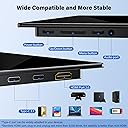
in the device's menu, the HDMI generation drop down provides indications for 1.1, 1.3, and 1.4 HDMI 1.4 is not capable of 240HZ at an resolution above 720p. i've tested this in a few configurations using the included HDMI cable and type-c cables and with an older "rocketfish e208251-g" which pre-dates the 2.1 spec (though its a premium cable with additional ethernet support, so maybe they built in the bandwidth headroom prior to the HDMI spec update? windows allows me to select the 2k resolution and 240hz output with both of these cables tested... and my understanding is that windows will only present option with-in the capabilities of the ports and cables used... additionally, even when using the type-c connection for display output, the same version are presented 1.1,1.3,1.4 which is obviously downright incorrect labelling. the output image does appear to be rather fast, so i am leaning toward trusting it, but i'm still on the fence given the uncertainties about presented values vs reality otherwise, the display is nice, super slim and quite solid build quality. the screen is a sort of semi matte and the body seems to be aluminium in the thin portion but plastic in the thicker portion the full sized HDMI port is nice as most of these types of monitors use the mini port which i'm not a fan of due to lack of wide scale adoption. the included hinge stand rotates a full 180 and covers the ports in the "closed position" while the full open position provides 4 sides of stability in a flat use position. the vesa compatibility is a bit weird in that there's only 2 mounting holes which provides the option to attach a 75mm vesa mount but in selecting the the lower position for a mounting plate, this blocks the hinge movement and in the upper position the mounting plate is almost not in contact with the monitor body at all which is a very flimsy configuration.
E**A
awesome
awesome to me
Trustpilot
1 month ago
1 month ago