Buy anything from 5,000+ international stores. One checkout price. No surprise fees. Join 2M+ shoppers on Desertcart.
Desertcart purchases this item on your behalf and handles shipping, customs, and support to Kyrgyzstan.
🚀 Elevate your network game with MikroTik’s powerhouse access point!
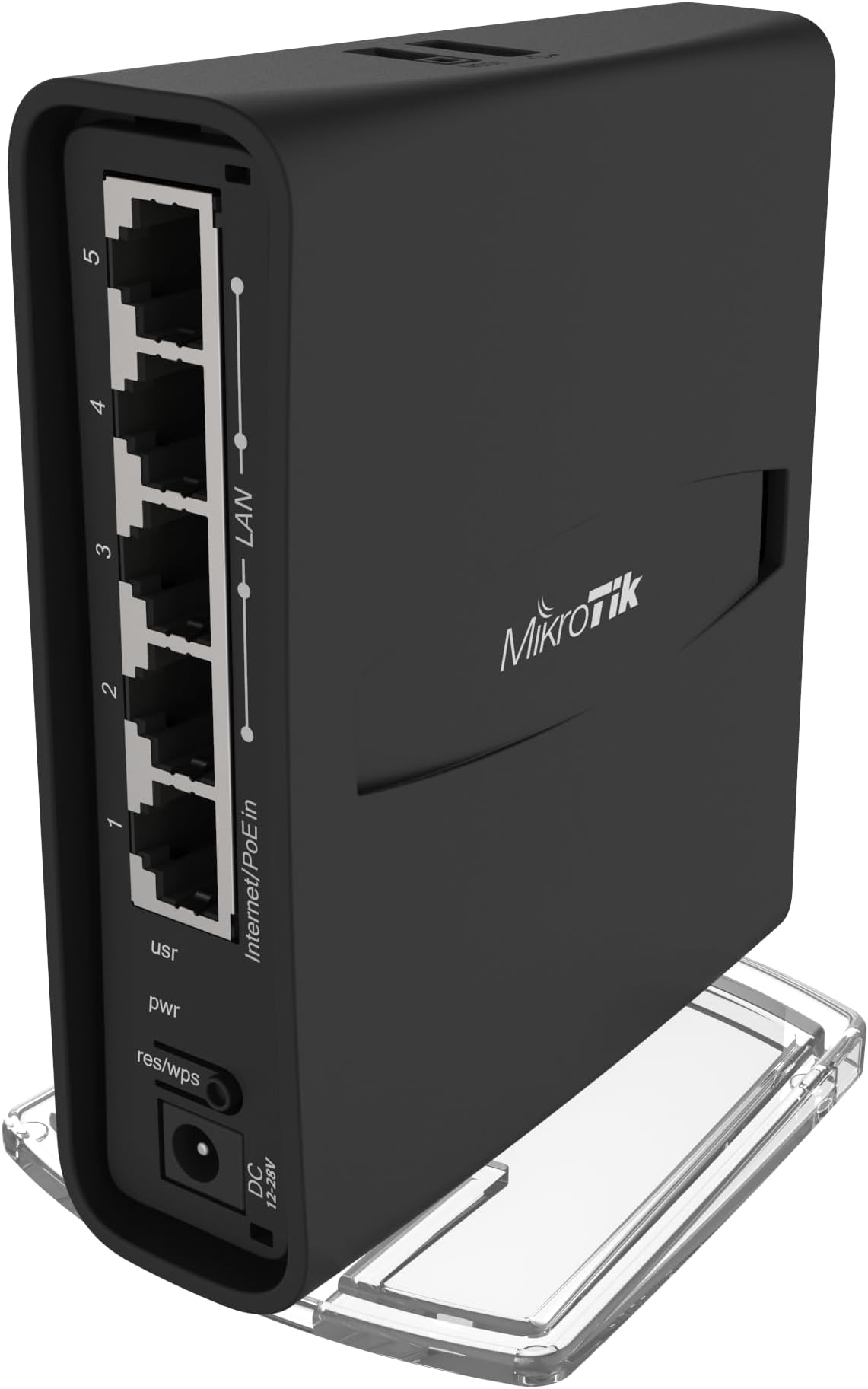
The MikroTik hAP ac² RBD52G-5HacD2HnD-TC is a dual-concurrent wireless access point delivering robust 2.4 GHz and 5 GHz WiFi coverage alongside five gigabit Ethernet ports. Powered by a quad-core CPU and 128MB RAM running RouterOS, it offers advanced networking features including IPsec hardware acceleration and WPA3 security. Its versatile design supports desktop or tower placement, with USB connectivity for external storage or 4G/LTE modems, making it a professional-grade solution for demanding home or office networks.
| ASIN | B079SD8NVQ |
| Antenna Location | Business |
| Antenna Type | Internal |
| Best Sellers Rank | #66 in Computer Networking Wireless Access Points |
| Brand | MikroTik |
| Built-In Media | 24V 0.8A power adapter , K-47 wall mount set , hAP case base |
| Compatible Devices | IPsec hardware acceleration |
| Connectivity Protocol | Wi-Fi, Ethernet, USB |
| Connectivity Technology | Ethernet, USB |
| Control Method | Remote |
| Controller Type | Switch |
| Coverage | 2.4 GHz and 5 GHz frequencies |
| Customer Reviews | 4.5 out of 5 stars 854 Reviews |
| Data Transfer Rate | 12 Gigabits Per Second |
| Frequency | 2.4 GHz |
| Frequency Band Class | Dual-Band |
| Is Modem Compatible | Yes |
| Item Dimensions L x W x H | 3.86"L x 1.34"W x 4.69"H |
| Item Weight | 0.3 Kilograms |
| LAN Port Bandwidth | 10/100/1000 megabits_per_second |
| Manufacturer | MikroTik |
| Maximum Upstream Data Transfer Rate | 6000 Megabits Per Second |
| Mfr Part Number | RBD52G-5HACD2HND-TC |
| Model Name | RBD52G-5HACD2HND-TC |
| Model Number | RBD52G-5HACD2HND-TC |
| Number of Ports | 5 |
| Operating System | RouterOS |
| Other Special Features of the Product | provides Wifi coverage for 2.4 GHz and 5 GHz frequencies at the same time |
| RAM Memory Installed | 128 MB |
| Security Protocol | WPA2, WPA3 |
| Special Feature | provides Wifi coverage for 2.4 GHz and 5 GHz frequencies at the same time |
| Unit Count | 1 Count |
| Voltage | 30 Volts |
| Wireless Communication Standard | 802.11ac |
| Wireless Compability | 802.11ac |
H**E
Terrific device - Set mine up as wifi bridge in tv room, dont be intimidated
About myself: I don't consider myself very knowledgeable about networking. Also I'll admit there are tech things in this world that really are too hard to use, for example configuring legacy audio in arch Linux. A few years ago I setup a wifi bridge in my parents tv room. I used a pair of dlink ethernet-over-power outlets to run ethernet from their cable internet box to a power outlet in their tv room, then I used a netgear nighthawk setup in bridge mode to broadcast their network over wifi and also plug in their tv devices. A few days ago the nighthawk started garbling the network, the 5g connection was dying and factory reset did nothing. So, time for a new router. I'd seen good reviews of Mikrotik but also that their 'routerboard' series were really hard to setup. I ordered this hap ac2 because it was cheap and got reasonable reviews. Tonight I set it up and I'll reiterate what others have said: I used winbox and I had a great setup experience. Took me about 35 minutes without reading any instructions. First thing... bridges are sometimes tricky to setup. Usually bridge configurations are designed to be invisible on the network. So.. when you configure the bridge and hit apply... often there is no longer any way to connect. With this unit I connected to it with a mikrotik app called winbox. I've heard people complain about it but I think its terrific. It finds mikrotik routers and connects to them via their mac address (static machine hardware id.) This means you can still see and configure it after the device has been activated as a bridge. So... I was all set to create bridge interfaces and add devices to the bridge, but right at the top of the winbox window is 'quickset' which configures the device in a few useful ways. I selected the 'PTP Bridge AP' setting. Named my network. Provided a device password. Enabled wifi security and password. Finally I went to IP/DHCP Server and disabled the DHCP (the house's main router does DHCP.) At that point I rebooted and plugged the device into my main router. I saw the wifi network I'd created, joined it, and winbox could connect again. Also... the internet was working. A minor weird part of setup... the quickset page only configured the 5ghz network, left some other wifi network with a mikrotik name on 2.4ghz. I went to wifi, clicked on wlan2 and renamed that wifi network. It was already setup to use the same security and password as the 5ghz network. Lastly... I went to 'update' the firmware on the device with quickset/update button. It failed with a dns error. The device wishes to communicate with some microtik server somewhere, and I didn't give it dns server or even let it have an ip address, so of course dns failed. I looked up the mikrotik ip address on my pc, then created a custom dns entry: upgrade.mikrotik.com 13.33.44.253 After this the update succeeded and I then disabled my dns entry. While there were a few screwy things I actually found this entire setup procedure to be extremely professional. The thing that matters to me is that once these settings were made things just worked. I sort of wish I was trying to do more with it.
J**E
Technically Challenging But A Beast in a Tiny Package
This is not for the faint of heart. It is like learning linux all over again plus the intricacies of raw networking without the consumer friendly interface. Although the OS is based on linux I believe, the command line commands are quite different and basically mimic the GUI (or vice-versa. The GUI (Winbox) is very nice but old school. The Good: Very powerful Wifi for something so little. I've used it in a 3200 sf ranch house in the middle of the house on a book case. Reached all parts with no problem and strong signal, easily switching between 2 and 5 ghz. Moved to a bigger 3 story house and it's still going strong almost 3 years later, reaching every part of the home no problem whether I place it in the basement or the second floor. The 5 ports are more than enough for me when I attach a small switch for my ethernet. The Frustrating: If you aren't a network engineer you're in for several weeks/months of learning the intricacies of networking. OR just skip it all and go to the "quick setup" button and just use that to easily setup a basic network plus a guest network. For anything more you'll need to learn RouterOS. The Great: Regular updates. POWER. If you want to do nearly anything with your home network you can do it with Mikrotik's RouterOS. Unlimited Guest SSIDS? Unlimited Vlans? Built in Wireguard ? No problem. Easy ? No. I"m spending 2 days just setting up some Vlans for my IOT devices. Support: It's there but it's in forums and documentation/youtube videos. Big fan community. Value: I was able to get this for about $50 in 2021, now much more than that but probably still worth it though I might go for some of the upgraded routers Mikrotik has. Reliability: I have not had any of the overheating issues I've had with other routers. After 3 years I did develop a minor short in the AC adapter. Instead of replacing it I just got a Poe injector which works great and powers the router. Make sure the injector is microtik compatible as microtik does not use the newer poe standard. I do have a USB powered fan with my networking equipment that I use to cool my pi and some of that also benefits the router. Always a good idea to keep your router cool if you can.
R**R
EASY setup home router, beautiful configs, UPDATE FIRMWARE AND OS!
When I opened the box, and found that the router was small enough to fit in my palm, I was worried for a second that it wouldn't perform. I quickly learned that size doesn't matter. I was searching hard to find a dual band home router that would work well with DD-WRT to replace my housemate's Belkin AC1200 router which barely carried a 5GHz signal into my room and had a painfully slow 2GHz signal as well. I looked into TP-Link and some of the Netgear Nighthawks, as well as the >$100 hAP AC before settling on this router. I was about to get a consumer home router but was primarily worried about weak 5Ghz bands and incredibly poor software. That's when I came across the brand Mikrotik on a Reddit post and looked into their offerings. Basically, these boards are much cheaper because they aren't marketed towards the consumer electronic market and are made by a Latvian company. They also run RouterOS, which is incredibly robust and I've barely scratched the surface of. I'm a Computer Engineering major with very little networking background, but I can confidently say that this router will be AS SIMPLE AS ANY OTHER HOME ROUTER - you just need to ignore the extra options. If you follow my instructions exactly as below, you shouldn't have any problems. Don't skim. Read, understand, and enjoy this router that blows away others in its price range. SETUP: Plug your router into the power, then connect ethernet from your modem (or other router) into the ethernet in. To enter the settings panel, there are three options: Mikrotik iOS/Android App (Easy), Web Portal (Medium), WinBox (Hard). Rationale behind rating: I showed my girlfriend all three options as the ways to setup the router and based it on how confused she looked. There is fairly significant difference in how eye-pleasing each of them is, and every bit helps. You will be able to do the same stuff regardless of what platform you are on. HOW TO CONNECT - MAKE SURE TO UPDATE AFTER SETUP: APP: Is really well designed and easy to navigate, plus has a DETECT feature that connects to the router when you open the app and connect it to the open wifi that the router broadcasts for the first time. If it doesn't connect automatically, GO TO 192.168.88.1, the default RouterOS address. I don't think it comes with a password, the instructions in the box will have it if otherwise. Once in the app, there is a QUICK SETUP option that will make your life a lot easier. PARENTS: THE KID CONTROL SETTING is a lot easier to find in the app - it's on the first page. The app can also do basically everything either other platform can, including accessing the terminal, so it's great to have anyway. Web Browser and WinBox: Connect to 192.168.88.1, the default IP address for this router. Login, then check my attached image. Click on QUICK SET and select HOME AP DUAL in the dropdown menu in the top right. Automatic Address Acquisition should work for most US based receivers. Set name and password like in any other router. Connecting to the webapp also gives the option to install WinBox which lives on your Windows computer (sorry Mac/Linux), but does the same exact stuff as the other two options. SUPER IMPORTANT: update both the RouterOS software AND the firmware for the RouterBoard. If on the webapp, select WebFig to see the menu, or open the menu from the app. The location of the setting will be the same on both. For RouterOS, go to System>Packages>Check For Updates (possibly have to click another button on phone) and update to the latest version on the stable or long term channels. For the Firmware, go to System>Routerboard>Upgrade. REBOOT after changes! If you have any speed or stability issues, I've heard that updating both fixes it. I did it as soon as I got it and have had no issues. If you want to optimize this for your space, check out which wifi channel is best for your router to broadcast on. There's free software for this on any computer or phone if you look it up. This router does have the channel displayed as the actual frequency in Mhz, so find a table online to convert between the channel number you may get in the program and the frequency the router takes. If it doesn't work, the band may be blocked in the US as this version is manufactured for the states, so try a different frequency. This router significantly boosted the connection throughout my house, and the gigabit ethernet is nice too. It's very noticeable how much better the signal is pushed through on an enterprise grade router as opposed to a consumer router. Even my 2.4Ghz band has been made a lot better - I use it for any smart light/home devices and a Google home, and responses have become a little faster in turning on and off lights, answering questions, not dropping requests, etc. This device will definitely work better for serving to a larger number of devices than most home routers. I picked this over the hAP AC after much deliberation. This router was $60 when I got it and the AC was listed at $110. It has an SFP port for optical fiber gigabit and three-chain wifi, as well as a Power over Ethernet output port which is missing from the ac2, but I need none of those features and neither do 90% of consumers. In return, the ac2 has a better CPU and I think more memory? In any case, the three-chain wifi offered by the AC will be bottlenecked by most devices anyways that don't have appropriate wireless receivers to handle the additional throughput, so for the majority of use cases it is more helpful to have more computing power. I also have no need yet for power over ethernet to any additional access points. When close to the router, I'll receive close to 300 mbps down. In my room, which due to unfortunate design limitations is about 45+ feet away from the router and behind 3ish walls and a door, I'll get about 55 mbps down. Significantly better than previously not getting signal at all on occasion. BONUS STEP: Change your DNS server. Find the DNS settings and redirect it to something like Cloudflare's 1.1.1.1 service for faster speeds. It's likely a pretty good improvement over a stock ISP DNS provider which also provides them more of your browsing information. Your previous router may not have had this option, or you may have DNS configured on your individual devices, but taking the time to do it can improve your internet across all devices without updating the DNS settings on each manually. I've also read that there's an option on this router for it to run its own local DNS server to resolve requests faster and that it may be adaptive based on your sites? Not fully sure how to set that up but it's something cool to look into. If you have any questions at all about the settings, I've found the YouTube channel TKSJa to be an excellent goldmine of information and tutorials that's covered everything I need. There are over 100 clearly titled and concise videos there, go check it out and see if you still can't get your equipment to work. So yeah. Get this router, follow the instructions, enjoy better performance without paying for the scam that's consumer routers.
C**Y
Solid router with powerful features, but some quirks
I bought the MikroTik hAP ac² to create an isolated IoT VLAN, and overall it delivers exactly what I needed. The good: RouterOS is incredibly flexible. I was able to configure a client-DHCP-VLAN port linked to an upstream trunk DHCP server, build a VLAN switch (VLAN + bridge) grouping three physical ports and a wireless interface with its own DHCP server, set up NAT between the VLAN switch and the client-DHCP-VLAN, and even carve out an isolated admin port restricted to SSH and HTTPS. The firewall options are comprehensive, and the level of control is a dream for anyone who enjoys fine‑tuning their network. The bad: The product shipped with RouterOS v6 and I updated to v7.20.5, I found that due to the limited memory of the hAP ac² you cannot install the WPA3 package and are stuck using the standard wireless package. On top of that, I haven’t been successful connecting either of the wireless interfaces to a mixed WPA2/WPA3 WAP in station bridge mode. If you need station bridge or other wireless client modes, avoid this product and go with MikroTik’s WiFi‑6 hAP line instead. Bottom line: If you’re looking for a powerful, customizable router for advanced networking projects like IoT VLAN isolation, the hAP ac² is a fantastic choice. Just be prepared for a learning curve and a few quirks with wireless compatibility.
A**R
Wonderful router
This little thing has been powering my home for over a year now and it's the best value I've ever gotten on a router. The WiFi was strong enough that I could get rid of my poorly placed wireless repeater, despite the lack of external antennas, and the unit has been extremely reliable, haven't needed to reboot it once except for the occasional software update. The downside is that these are fairly complex devices to use, while they do have a simpler configuration interface, I wouldn't recommend them for people that don't have a fair bit of technical knowledge or who aren't willing to really dive into the wiki and forums for Mikrotik devices and read up. It's software is designed for like professional setups (which makes sense as several of their other devices are more business driven) and while that works well for me, it might not work well for you. Amazing product and value though if the setup isn't too much.
D**E
Great Speed, Distance for small size
This is a dinky, small unit. I was shocked at the size when I opened it but wow! It sure packs a punch for speed. Using the Ookla Speedtest repeatedly over the past three months with Spectrum basic internet I'm always at 11 up and 190 down which is more than enough for my VOIP phone, two streaming TVs, and multiple phones and tablets and my desktop in the home office where I work. Very easy to setup. Some commenters have excellent setup suggestions that I've scanned to keep on hand and have proved useful. But the basic setup is quick and easy and I was up and running in 5 minutes. Very high-quality and dependable unit for the price.
M**L
Super
Funciona muy bien
W**K
Another solid product fom MikroTik
I have been using MikroTik routers for 15+ years and couldn't be happier. Professional grade router at the fracture of the cost. Despite what you hear others say about how hard it is to set it up, it does configure itself automatically and works straight off the box. Of course you may and probably should do some network specific tweaking later, at minimum do setup up admin and WiFi access passwords, but if you don't have the expertise and complicated network topology, this thing will work right away. The device does run a bit on a hotter side but nothing excessive and the MikroTik Tech assures this is normal. Highly recommended.
C**E
De router werd snel ontvangen en werkt natuurlijk prima
Na bijna 1 week in gebruik te zijn kan ik de aankoop enkel aanbevelen. De verkoper houdt zich aan de afspraken en de prijs is echt een bodemprijs.
T**X
Parfait pour les besoins
Boitier qui fait routeur, pare-feux, serveur vpn et bien plus. Super débit, interface simple et efficasse, il faut cependant s'y connaître un minimum avant de se lancer mais ça reste une super solution. Le wifi (a travers un mur de pierre, environ 6 mètre ) est bien, 300 mbps en 5Ghz et 170 mbps en 2.4Ghz. Physiquement ridiculement petit, chauffe un peut mais c'est normal pour ce genre d'equipement, montage a plat ou sur la tranche, c'est top :) Pour résumer : Petit, puissant, blindé de fonctionnalités, vraiment pas cher, et d'une stabilitée incroyable. Ravie de cet achat :)
Y**A
Perfecto
Perfecto et potente
C**N
Mikrotik igual a calidad
Genial. Lo compré para tenerlo de reserva para mi otro router Mikrotik y aunque es diminuto en comparación con el RB4011 funciona como la seda y no se nota la caída de prestaciones.
A**1
Not the greatest WiFi, but very good as home router
Very good little router and extremely configurable, if you're a power user. If not, just use the quickset "Home AP dual" and you're set (plenty of documentation online on how to do this). A very good use case for this is private DNS, there are quite a few tutorials online on how to do this. Also, it has up to 2Gbit/s routing/bridging performance, which is more than adequate for most homes. Do not expect wonders in terms of WiFi. Being a small, compact unit, it doesn't excel in coverage as it doesn't have radio amplifiers. Decent WiFi performance, otherwise.
Trustpilot
1 week ago
3 days ago