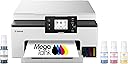
![Canon Megatank GX1020 All-in-One Wireless Supertank [Megatank] Printer | Print, Copy and Scan| Mobile Printing |2.7" LCD Color Touchscreen | Auto Duplex Printing](https://m.media-amazon.com/images/I/61HpTe2PrGL._AC_SL3840_.jpg)
Buy anything from 5,000+ international stores. One checkout price. No surprise fees. Join 2M+ shoppers on Desertcart.
Desertcart purchases this item on your behalf and handles shipping, customs, and support to Kyrgyzstan.
🖨️ Elevate your workspace with Canon’s powerhouse printer—where efficiency meets effortless style.
The Canon MegaTank GX1020 is a compact all-in-one inkjet printer designed for high-volume, cost-effective printing with up to 3,000 pages per ink set. Featuring fast print speeds (15 ppm black, 10 ppm color), a 2.7-inch color touchscreen, automatic duplex printing, and versatile wireless connectivity, it’s optimized for hybrid professionals seeking reliable, high-quality output with minimal downtime and maintenance.


| ASIN | B0CHLD2P7B |
| Additional Printer Functions | Copy, Scan |
| B&W Pages per Minute | 15 |
| Best Sellers Rank | #126,493 in Computers ( See Top 100 in Computers ) #238 in Ink Tank Printers |
| Brand | Canon |
| Built-In Media | Documentation, MAXIFY GX1020, MAXIFY GX1020 Wireless MegaTank Small Office All-in-One Printer, Power Cord, Set Up Ink Bottles (GI-25: BK, C, M, Y) |
| Color | White |
| Color Depth | 24 bits_per_pixel |
| Color Pages per Minute | 10 |
| Compatible Cartridge | GI-25 Pigment-Based Ink Bottles (Cyan, Magenta, Yellow, Black) |
| Compatible Devices | Smartphones |
| Control Method | Touch |
| Controller Type | Android, iOS |
| Customer Reviews | 4.1 4.1 out of 5 stars (385) |
| Display Type | LCD |
| Dual-sided printing | Yes |
| Duplex | Automatic |
| Global Trade Identification Number | 00013803359466 |
| Hardware Interface | USB |
| Ink Color | Black, Cyan, Magenta, Yellow |
| Item Dimensions D x W x H | 37.6D x 38.1W x 18.8H centimeters |
| Item Weight | 15.4 Pounds |
| Manufacturer | Canon |
| Maximum Copies Per Run | 100 |
| Maximum Copy Resolution Black and White | 600 dpi |
| Maximum Copy Resolution Color | 600 dpi |
| Maximum Copy Speed Black and White | 15 ppm |
| Maximum Media Size | A4/Letter |
| Maximum Print Resolution Black and White | 600 dpi |
| Maximum Sheet Capacity | 250 |
| Maximum print Resolution Color | 600 dpi |
| Model Name | MAXIFY GX1020 |
| Model Number | 6169C002 |
| Model Series | MAXIFY |
| Number of Drivers | 1 |
| Number of Ethernet Ports | 1 |
| Number of Trays | 1 |
| Other Special Features of the Product | Energy Star, Touch Screen |
| Output sheet capacity | 250 |
| Paper Size | 8.5 inches |
| Power Consumption | 21 Watts |
| Print media | Envelopes, Glossy photo paper, High-resolution paper, Paper (plain) |
| Printer Connectivity Type | USB |
| Printer Output Type | Color |
| Printer Type | Inkjet |
| Processor Count | 1 |
| Resolution | high |
| Scanner Type | Flatbed |
| Specific Uses For Product | Document printing, copying, scanning, mobile printing, duplex printing |
| Total Usb Ports | 1 |
| UPC | 013803359466 |
| Warranty Type | limited warranty |
| Wattage | 21 watts |
B**Y
Prior to purchasing this printer, I had two others from a different famous brand which both had part failures. This happened after fairly light use, but shortly after the warranties expired. Besides that, they used expensive ink cartridges, and they both failed (for different reasons) when I had a practically new ink cartridge installed. Very frustrating! This new Canon printer, which has ink tanks and is filled with liquid ink from bottles, is faster and has better print quality by far compared to my two previous printers. It was very simple to set it up and get it connected to Wi-Fi, my laptop, and phone. It was up and running flawlessly within 10-15 minutes after I got it out of the box. I have used it quite a bit, and the ink levels are still high. I am far from needing to buy new ink, and when I eventually do need to refill, doing so will be far cheaper. I recommend this printer. Ditch those costly ink cartridges! You'll be glad you did! My only minor complaint is that the menu display window is rather small. Still, 5 stars.
H**T
Had to do a bunch of copies for job and family services for disablity. This is why I wanted one cause SSI and such always want new records and new info. The day I got it had to have a bunch of paperwork turned in on the 30th..copied them all no problem..could not tell which one was original or the copy. Printed a picture of my deceased father he sent me from South Carolina back in 2014 just to see how it would come out. On regular paper not even photo paper yet...the image was beautiful. Now when I set this up I had to do manual wifi in order for it to search for my router..easy setup wouldnt find it, but it was no big deal doing it manual. So I suggest you try that first and just sign into your router to save time. Now last thought. I had a brother printer/copy/scan/fax all in one that I didnt use for a year or two so the print heads wouldnt clean and I was not about to get into all that. Replaced the cartridges bought like a 15 pack hoping after a few cleanings it would be ok. Then got the insert new cartridge into slot...does not recognize cartridge..after about 15 tries it did...then it didnt recognize the black so after reseating it about 15 times it did. Then it went to does not recognize the cyan.....again replaced it until it did..then it went back to black..didnt recognize it. I pitched the printer. Now my rant here is just to explain that whole cartridge business is a nightmare with replacements that actually work. I got this stuck the bottles in each port (setup is easier watching a video on youtube) filled the little tanks after installing the print heads....soooooooooooo easy. NO MESS. They slide right in and release and when done just remove the bottle. I will never go back to cartridges. The display works just fine I know someone said it could be updated and maybe thats true but it does what I need it to do. All in all it prints better than any printer I have ever had..and hell I been on a puter in 85 with dot matrix lol. This thing is a relief so simple to use and so easy to fill I will never go back to a cartridge printer. And Canon known for print quality and picture quality lives up to its name. Definitely would recommend this printer to anyone.
A**X
This printer is a minimalist and clean design with no protruding, hard to read buttons. It has a color touch screen LCD that is responsive and intuitive. The matte white textured finish looks and feels premium compared to cheap shiny plastic. It is faster and easier setup than the HP 7300 series printer that was plagued with setup, print and copy issues that I ultimately returned and got this one instead. I’m actually happier with this printer because it not only looks better but print quality is far superior. Tank printers supposedly have less quality prints than cartridge printers but that is a myth or misinformation out there since this printer excels for documents, graphics and photos. The setup is easy but during the ink fill ptocess it says ‘insufficient ink’ using the on screen setup. I was confused since it would not exit out of this setup menu loop so after the yellow was installed, I ignored the message and added the remaining inks. Afterwards, everything was ok and you are prompted to add paper and it goes thru a 12 min calibration process. It tells you this with a countdown to completion in minutes then its ready to print. The wifi network setup is via a QR code that pops up on the display. The setup is generally fast and intuitive and by reading this the insufficient ink prompt won’t throw you off like it did for me. The full color LCD tilts and makes a huge difference vs monochrome displays. Its easy to use with large buttons not tiny lines of text to push or scroll w buttons on other printers. It even has a preview mode so you can view your image in full color and its page positioning before printing. Unlike some other printers I used before, the single display with no other redundant buttons is so much more user friendly. The LCD is just a big deal compared to pushing buttons. Canon makes some great camera gear and gets lost in printers compared to other established brands but the end user and ease of use is engineered well into this product Some printer reviews lead you into thinking tankless printers do not have as good quality as cartridge based, but that is a complete myth as this printer produces sharp and vivid prints, documents and color graphics. Lastly the lifetime cost of ownership is a huge consideration. The Canon OEM ink is affordably priced so you don’t need to search for generics since the price gap is small AND you can purchase replacement printer heads that are NOT outrageously priced. I’ve had to pitch so many good printers that needed replacement print heads that dried up or died before life expectancy but the replacement cost was so high it was cheaper to buy a new printer. That is so frustrating considering our eWaste crisis. Every household should not need to replace a printer every 5 years! So kudos to Canon for making printers that can be kept a lifetime and maintained at an affordable cost. For all the above reasons I highly recommend this Canon or other Canons if you are brand shopping!
M**R
I had an older model Canon printer, also 3-1, that used ink cartridges. Im a trainer for the courts and our team prepares binders for our trainees. I, many times, print from home. Decided to upgrade to this Canon GX3020 that uses liquid ink. Best decision. The printing is faster, the cost for the liquid ink is cheaper, and Im able to print out tons of work without running out. To give an example, one binder is about 637 pages. I just did 4 binders and haven’t used even half of the ink supply (pictures enclosed). The older Canon printer would have run out at least 2 times during the process. The quality of the prints is really good too. I was pleasantly surprised. Highly recommend this printer for a home office or small business.
C**S
I previously owned a slower Canon ink-tank printer, but the print quality was excellent. I liked it, it worked well, and the build quality felt superior. This newer machine is much more expensive and definitely faster, but the build quality is not as good. I also do not like that it cannot print borderless photos, which I should have paid closer attention to before buying. As a result, every photo I print has a border, which is unacceptable and not what I wanted. At this point, returning it feels like too much work. The printer is quick, but the print quality has suffered. With my previous ink-tank printer, even standard quality produced good results. With this machine, standard quality shows a slight waviness in the text, which is not acceptable on a brand-new printer. Within the first 1,000 pages, it started jamming during double-sided printing. That is not entirely unusual for a printer of this size, but I expected better reliability right out of the gate. The rear access cover used to clear jams is not attached, so it has to be removed completely and could easily be lost. The front output tray also sticks and is difficult to pull out, and the paper tray feels flimsy and low-quality. Overall, this is not what I expected from a printer that costs about three times as much as its predecessor.
Trustpilot
1 week ago
1 month ago