Buy anything from 5,000+ international stores. One checkout price. No surprise fees. Join 2M+ shoppers on Desertcart.
Desertcart purchases this item on your behalf and handles shipping, customs, and support to Kyrgyzstan.
🚀 Supercharge your USB game with StarTech’s 5-Port PCIe power hub!
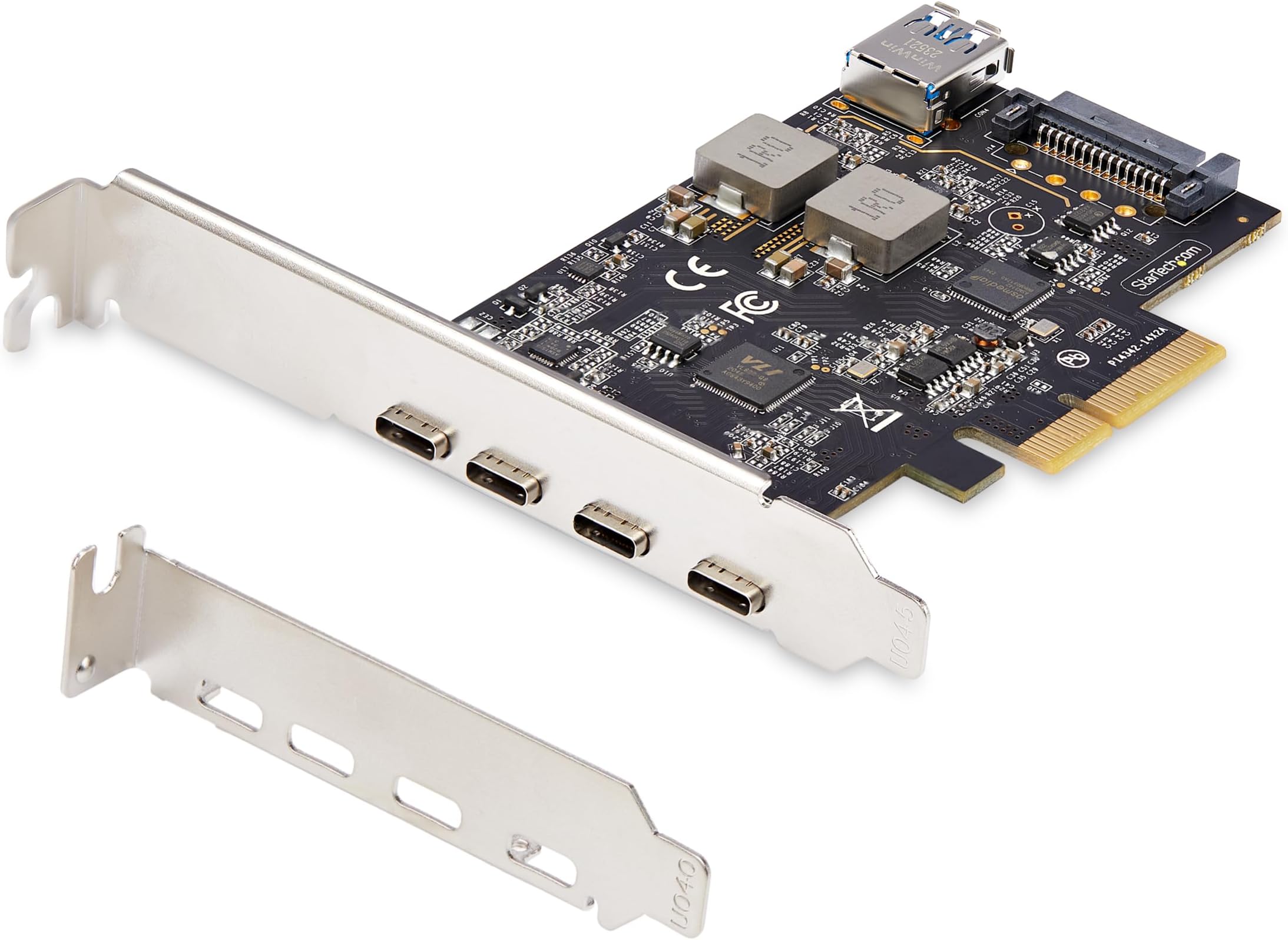
The StarTech.com 5-Port USB PCIe Card delivers ultra-fast USB 3.2 10Gbps speeds through 4 external USB-C and 1 internal USB-A ports, powered via PCI Express x4 with optional SATA power for stable high-wattage output. Compatible across major OS platforms and hardware, it’s engineered for professionals seeking reliable, high-performance USB expansion with expert support.


| ASIN | B0D8WDPD74 |
| Best Sellers Rank | #1 in Internal USB Port Cards |
| Brand | StarTech.com |
| Compatible Devices | Personal Computer |
| Customer Reviews | 4.5 out of 5 stars 125 Reviews |
| Global Trade Identification Number | 00065030909174 |
| Hardware Interface | PCI Express x4 |
| Item Dimensions L x W x H | 4.8"L x 4.8"W x 0.9"H |
| Item Weight | 60 Grams |
| Manufacturer | StarTech.com |
| Mfr Part Number | PS4C3IA3-USB-C-CARD |
| Model Number | PS4C3IA3-USB-C-CARD |
| Operating System | Linux 3.5 and up -, LTS Versions only, Windows 7, 8, 8.1, 10, 11, Windows Server 2008 R2, 2012 R2, 2016, 2019, 2022, macOS Catalina (10.15), macOS Mojave (10.14) macOS High Sierra (10.13), macOS Big Sur (11.0), macOS Monterey (12.0), macOS Ventura (13.0), macOS Sonoma (14.0), |
| Product Dimensions | 4.8"L x 4.8"W x 0.9"H |
| Style | 4C + Internal A |
| Style Name | 4C + Internal A |
| UPC | 065030909174 |
| Warranty Description | 2-Year |
M**.
Description needs adjusting but it works
This item perplexed me. It description says that it is a 10gps PCIE 5 C ports. I installed it with and then used www to get to the web site. Only to find myself trying to find the Part number. Turns out the 1 is not the #1 but an I (eye). Finally got the driver and Winzip didn't work lol. So downloaded a freebie and started the install only to have it sputter and tell me I have to go to the App page and delete the app. Guess what? No app. Ok maybe they goofed and install they needed the installation for Windows 11 removed wondering if the app could find the unit. Nope as I expected didn't see it. That took me to thinking. Finally, the reasoning accrued and I the thoughts were this. Windows is always updating instead of being the wrong on maybe it was the right one. In my experimenting I suddenly found another conundrum. The ding dong unit was actually a 3.1 not a 3.2. So why the 10gps????? So. I looked it up and there it was. This company was not trying to switch and bait. They just didn't say it was a supper 3.1 which can give you 10gps. To be honest I don't have a program to measure the item, but I do have a ways to find out. I have a qi fi 7 adapter and this is the reason why I've been trying this PCIE out. I'm using a 10gps cable (which are expensive!!!!) hooked it up to the Wi FI adapter and Bingo. 6g connection and just under 900 using a VPN. Also bad reception because its a tight living space even in the house we live in. So yes ,although I can't measure it. It's getting the work done at a good rate. So even though you see 5 stars to get your attention I can really in actuality on give it at best 3. The window Update driver is 1/26/2026 probably way before they made and updated driver at Star Tech. That -1 star. - 2 because not saying it was a super 3.1 was a bit deceitful and it does sorta limit us now.
T**E
compatible with high-speed devices, high performance, and easy to install
This 4-port USB-C PCIe desktop plug-in board is an excellent product that met all of my needs. Each external port supports 10 Gbps transfer rates (USB 3.2 Gen 2). Of course, you'll only approach these speeds if you have both a device and a cable that supports USB 3.2 Gen 2. Not all USB-C cables are marked but some brands are now using marks such as SS 10. When you purchase a USB-C cable, make sure that it supports USB 3.2 Gen 2 (previously known as USB 3.1 Gen 2). I found this card to be easily installed with Windows 11 - it was immediately detected after rebooting the system. I did not need to install any special driver. A word of caution about powering a USB-C device with this card. When installing the card, you should connect an internal SATA power cable to the SATA power port on the card. I had to use a 12-inch SATA extension cable https://www.amazon.com/dp/B00V6QA4AS . You might also need a SATA power splitter https://www.amazon.com/dp/B00V6QA65G . I have successfully used this card with my new AVerMedia 4K60 external capture card (which requires USB-C power) and my StarTech.com 1:1 M.2 NVMe Drive Duplicator (which does not require USB-C power). Both of these products support the USB 3.2 Gen 2 (10 Gbps) standard. I'm very happy with this product and I highly recommend it for its performance, ease of installation, and compatibility with high-speed devices.
W**�
Plug Everything
Just what I needed. Most MOBOs don’t come with more than 2 USB-Cs so having need of usability a dongle couldn’t provide is wonderful. Works flawlessly.
M**R
Well priced upgrade for my PC
Plug and play, easy to install. Loading my large Lightroom photo library from external SSDs is fast and convenient.
R**K
Good quality USB-C adapter for PC desktop upgrades
I feel silly reviewing Startech items, as I've used them for much of this century so far and never had a complaint. This adapter is no exception. This adapter won't give you Thunderbolt of course, but four external 10 gigabit USB 3 type C ports with 15 watts of power each, and an internal USB 2 type A port with 7.5 watts, is a great way to give a slightly older PC some extra life and expandability. The SATA power supplement from your PSU makes that 60+ watt power possible. I'm using the internal port to hold a USB drive with an OS image for emergency reinstalls/repairs, and will hang modern SSDs off the external ones. And since I'm doing this in a SFF PC, I'm glad the adapter comes with a low profile bracket , and it was fairly easy to swap out the pre-installed full-height bracket. You can get cards like this for less than the current $70 listed price, but you're probably not going to get the same speed and power.
R**.
If you need extra USB-A ports, then this is your card. It is low cost and setup is so easy!
When I was purchasing my new QNAP DAS, I did not have any USB-A ports on the back of my machine. So I bought this PCIe card, which gives me four new ports. It connected automatically after I installed it. It was suggested to me to install it in the closest port to the graphics card and the processor. It took me NO TIME at all to install it into my Dell Precision workstation. The motherboard powers it. It is super fast and a great value for the price.
M**.
Couldn’t get to work with Windows 11
Windows 11 auto installed drivers that the manufacturer’s driver said is newer than the one on their site and would not let me proceed without uninstalling it first. After doing that it still gave an error. I plan to call the support number that I saw on another review response, but if that doesn’t work I’m SOL as I’m outside the return window trying to get this thing to work. I will update my review if I figure something out.
M**8
Windows 11 Pro recognized it quickly and it works!
I needed a USB-C 3.2 port for a new device. After much looking and reading item descriptions, BTW in technical items the details are important, I chose StarTech. Many Amazon sponsored were from dubious suppliers or their headers said they were 3.2 but in their descriptions were not. StarTech's quality was very good, it worked after a restart. Windows 11 Pro recognized it and the speed isn't an issue with any device I use. I would recommend this product.
W**W
Really fragile and short lived for such a price...
I can't consciously recommend the product, not only is the design with the protruding ports flawed by design because of how easy it is to crack open (found that out first hand), but also because after a year it randomly decided to only output up to 8W of power despite being powered by both the motherboard AND PSU through the included SATA port... When unplugging and re-plugging it will sometimes only output less than 2W for no reasons whatsoever, only to switch back to 8W when unplugging and re-plugging again...
S**6
チップはASMediaです。AIの嘘に注意。
AIのミスリードにより、ASMediaチップなのにルネサスチップの製品として提示された。 ルネサス製のチップを狙って買うつもりが、AIが誤認しうる要素が隠れているのかもしれない。 物自体は問題なく使えている。 補助電源用のブラケットは自分で用意する必要がある。
A**M
Funktioniert super
Funktioniert sofort, auch ohne zusätzlichen Stromanschluss
I**I
Truly High Speed
This is one of the easiest to install PCIe cards there is. It was completely plug-and-play and delivered very fast USB-C throughput without any need for extra configuration. The power connector helps use more devices that an external USB-C hub.
J**.
Velocidad a tope para mis discos externos ssd
Que maravilla, por fin puedo aprovechar la velocidad de mis discos externos ssd. Funciona perfectamente y estos 4 puertos me vienen de maravilla. El puerto interno no lo he usado aún pero la idea me parece bastante buena.
Trustpilot
2 days ago
3 weeks ago