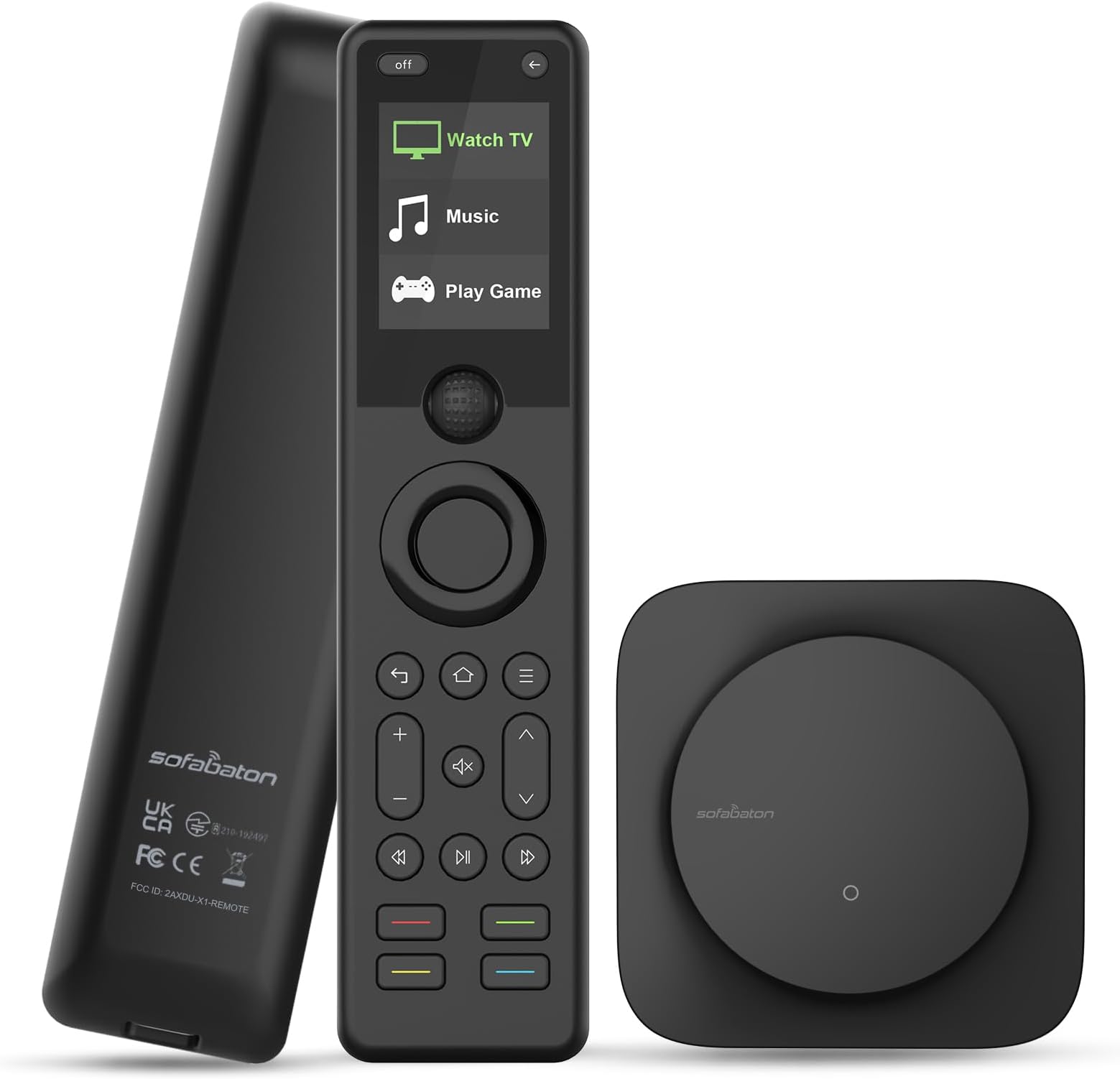
The Sofabaton X1S Universal Remote comes with a remote, a Hub, and some IR repeaters that plug into the Hub. The Hub usually sits on top of a cabinet in line of sight with the remote. The repeaters then transmit the IR signal from the remote to the Hub and subsequently to devices located inside the cabinet.The Sofabaton X1S remote works with the free Sofabaton app that can be downloaded into your smartphone such as an Apple iPhone. All device management programming is implemented using this app. As devices to be supported are added, an associated code library from Sofabaton’s vast library of supported devices is downloaded to the Hub. The Hub generates Infrared, Bluetooth or RF communication signals to equipment, not the remote itself.My home was initially built for whole home audio and video. I had speakers in multiple rooms and used RF repeaters in each room, combined with an MRX 980 Universal Remote Control to manage all of my audio and video activities throughout the house. I had access to software that was used to manage all of these devices. After programming the devices and related activities using this software, that information would be downloaded into the remote itself. Afterwards, all of my equipment was accessed using the remote. This work was done 15 years ago. Now I no longer have access to the programming software, and some of the replacement equipment has broken and needs replacement. I've decided to simplify my home entertainment system network and just focus on two rooms with all of my audio and video devices.The MRX 980 Universal Remote is a commercial product only available through dealers who supported residential audio and video systems. Radio Frequency (RF) was used to communicate with audio and video equipment mainly located in my office. Signals could be easily transferred between rooms using RF repeaters. When I decided to downsize my equipment and forget the whole home approach, the first thing I looked for was a remote that was as flexible as the MRX 980 Universal Remote and that I could program myself. I was first interested in the Logitech Harmony because I had heard about it in the past. But unfortunately, I believe that remote was discontinued in 2021.Lots of Harmony users apparently were upset that it was discontinued and support is limited today. I wanted an available and supported product, not another dealer-only available and dealer supported product.The best remote alternative I could find that appeared to meet my criteria was the Sofabaton X1S Universal Remote. I purchased two of these remotes for use in rebuilding my audio and video systems in my two entertainment rooms. The X2 was shortly announced after my purchase. I've spent the last three weeks reorganizing from a centralized equipment approach to a distributed, more standalone room architecture. As an example, my media room is configured around a Sony TV model XBR65X850C, various streaming devices, and a number of Sonos products including a Sonos Beam Gen 2 soundbar, Era 300 speakers and a Sonos Sub 4 subwoofer. My primary source of TV programming, etc. comes from a Dish Network Hopper 3 located in my office and connected to my media room via a long HDMI cable.Using the Sofabaton app, I was able to define all the necessary devices and their attributes, along with related activities such as Watch a TV, Watch a movie or TV show through a Roku Ultra or Apple TV. It took quite a while to understand how the Sofabaton app worked and how you had to set up each device and answer the questions properly to get the results you wanted.My biggest challenge was trying to work with the DISH Network Hooper 3 and Joey because these devices utilize a proprietary RF frequency. That radio frequency is not supported by the Sofabaton X1S remote. You can modify the Hopper settings to enable working with an IR remote, but I've had little success making that happen.One of my biggest challenges is that all of my equipment is in one room, but my Dish Network Hopper 3 is located in another room. The output from that Hopper 3 is an HDMI cable that runs through my house and attaches to my TV in my media room. I am challenged by remotely accessing the Hopper, but also by the fact that the Sofabaton X1S remote does not support Dish Network’s proprietary RF frequency.Despite the challenge of using this new Sofabaton X1S remote and learning the Sofabaton software, the remote itself has a limited number of keys. In fact, it has way too many fewer keys than what I am used to, especially considering the flexibility of the MRX 980 Universal Remote that I’ve been used to.The problem with such few keys is that every time you want to perform a task, you have to use the Sofabaton remote to select the device you’re currently using, find the list of commands Sofabaton’s database claims it supports, and scroll down and click on the command you wanted to perform.I analyzed every command for each device I had and listed which ones I rarely used, if at all, which function did not work or was irrelevant to the device, and which functions were supported on the virtual remote displayed within the iPhone-based Sofabaton app. Unfortunately, the Sofabaton app does not allow you to delete all of those commands that do not work or are irrelevant, leaving only the command subset that you would actually use. As a result, you have to scroll through all the commands shown to finally get to the one command of interest.There are a number of YouTube videos showing how to define your devices and create multi-step activities like watching TV, playing a video game, or listening to music. Most of these videos show rudimentary functions like powering a device up or down, or changing the volume, either by using the Sofabaton app virtual remote or the physical remote. Tasks like entering a channel number, using a Guide to see what is available to watch, or showing a screen with all your recorded videos are not illustrated because keys for these functions do not exist on the remote, requiring the user to find the list of commands or numbers available and scroll through them to accomplish these tasks. There are too many steps involved in performing practical things like changing a channel. Having access to hardware or software keys such as a Guide button to see programs available, a View button to view your recordings, or buttons to access device settings, or a menu, would be extremely convenient and familiar to most users.The new Sofabaton X2 remote provides some additional programmable keys, but they are not labeled and could be clearly assigned to more commonly used functions. The X2’s touch screen is an improvement over the scroll wheel button, but I’ve heard that screen may present numbers 0 thru 9 that could be used to enter a channel numberinstead of having to go through multiple steps like you have to with the X1S.I would summarize the pros and cons of the Sofabaton X1S remote as follows:Pros:1: The code library that SofabatonRemote supports is very large (supporting over 6,000 brands and 500,000 device models) and should accommodate most devices people would probably use for their audio and video entertainment at home.2: Using the Sofabaton application on your smart phone turned out to be easier to program than I expected given the experience I've had with my MRX 980 remote. I can’t compare it to the Logitech Harmony remote since I’ve never used that. The Sofabaton app does a good job leading you through setting up your devices and defining the activities using those devices. There is a steep learning curve associated with doing this, but once you learn the steps, the process of adding new devices, etc. was quite easy. The app has you answer a number of questions during the process of adding devices or creating activities. The app sometimes recommends which answer is the best choice for the question. Very nice. I also like the fact that when you set up an activity, the Sofabaton app will suggest activities you might consider creating, and it even identifies the potential devices that would be involved in that activity.The only hiccup I found is when I had some Bluetooth devices, such as the Apple TV or Roku, that you had to do some setup on the devices themselves before they would connect properly with the Sofabaton app.3. I really liked how the application led you through the creation of the devices and activities to be supported. What I liked most was as you were setting up these devices and creating activities there were plenty of occasions where the app provided test commands so you could immediately test out your choices to see if they work. This is really important when you are trying to organize a number of devices to work together. Having something that helps you along the way is a real plus. This becomes particularly important when you’re defining activities reliant on the devices themselves responding correctly to commands sent from the remote to the Hub.Note: These comments likely apply to the X2 remote as well, since it utilizes the same Sofabaton app.4. Sofabaton apparently offers a number of helpful videos to get you started. Unfortunately, I only found out about these after I'd gone through the pain of learning how to set things up on my own. Fortunately, there are several good videos on YouTube from Sofabaton users that have been very helpful educating me on how to set up a device on the remote and defining activities. One of the videos that I used frequently was also featured on the Sofabaton website. These videos also highlighted mistakes they made and you might make while programming the remote due to interpreting the questions incorrectly. Having those videos available to help users learn how to use this remote was extremely helpful.5. The Sofabaton app provides a method of contacting support to resolve a problem encountered. I just submitted a problem so I can’t speak to how well their support is. Upon using their contact tool, I was asked to answer a survey, which I did. They also asked for a review of the Sofabaton X1S, which encouraged me to write this review.Cons:1. My number one gripe is the lack of buttons on the Sofabaton X1S remote. The same could be said of the U2 and the X2 remotes. There needs to be additional buttons enabling users to access common device functions. Not having number keys to go to a specific channel is one of the biggest deficiencies. Also, for TVs, having access to a Guide button to see what shows are currently available, or a DVR button to view recordings, or controls accessing settings or device menus, etc. would be helpful.A purpose of a universal remote is to eliminate all those individual remotes that you have to control your various devices. The sparsity of keys on the Sofabaton X1S and X2 forces you to use the other individual remotes you had planned to replace to make up for all the missing functionality.I am going to explore if there is a way to change channels or execute some additional commands by using Alexa or Google.2. When you're setting up a device and you're mapping your Sofabaton remote commands to what's available on that device, it is frustrating that to access some of those commands not available as keys, you have to go to the device name using the scroll wheel and view the list of commands that are available for that device. The problem is that list can be quite lengthy, and generally, probably about half are not desired to be used or do not work. You need to be able to edit that command list down to only those commands that you think you would need. That would make finding those commands, if you still had to go through that scrollable list, much faster and you would have to overlook commands that are useless to you. The Sofabaton app needs to be modified to allow you to strip down that list to the bare essentials.3. The IR, Bluetooth, and RF support on the Sofabaton Hub is useful for controlling many devices, but if you have a DISH Network device, such as a Hopper 3 or a Joey, also like some other products that DISH offers, it would be nice to have the Sofabaton Hub support the Dish’s RF frequency (UHF band around approximately 369.5 MHz to 394.3 MHz) other than just the two RF frequencies supported by the Sofabaton Hub (315 MHz, 433 MHz). That would make configuring a DISH network device much easier and ensure that the Sofabaton remote can manage the DISH network equipment.4. My home might be atypical because of the number of devices I want to support, but I think having only three IR repeaters on the Hub leaves a lot to be desired. I have seen a Sofabaton R1 IR repeater mentioned online, but I could not find any information about this product. I went to the Sofabaton website, and there was a picture of this repeater, but there's no more information available on the website, and of course, there is no manual that I could review beforehand. Besides that, I found no way to purchase this item. For me, this would be of value since it might allow me to control devices in another room. In my case, my DISH Network Hopper 3 is in a different room, and having that capability would be wonderful.5. I don't know if this happens with all Sofabaton X1S remotes, but I've noticed that the remote's keys sometimes repeat the action of that key when pressed. For example, if something is playing and I quickly press the mute button, the system mutes briefly and then it acts as if I had pressed the mute button again and the volume comes back on. I've also had this happen when I am using the navigation keys to move somewhere, say horizontally, and it moves the cursor on the TV two locations vs. one over from what I just intended.I have submitted a ticket to Sofabaton regarding this issue but have not heard back yet.6. This is probably a nit, but some of the language used in the instructions of the app could be better stated. Finishing the definition of a device characteristic or an activity by requiring you click on a Complete button or a Confirm button instead of just clicking on Done would be more easily understood. Also, some of the wording on a few of the questions could be more cleanly stated to avoid any confusion about what's being asked. I was most confused with the source configuration, especially the wording when being asked about devices such as a TV or an HDMI switch needing to specify inputs supported by that device.7. There should be a charging dock available for the remote to keep it charged. I assume the Sofabaton X1S and X2 use a built-in lithium battery which gives you long times between charging, but having a removable lithium battery would be even better. Lithium batteries will age over time resulting in a poorly maintainable charge, requiring a battery replacement service to be provided by the manufacturer (unlikely) or the consumer having to repurchase a new product.8. Some devices, especially video gaming devices such as a PlayStation, an Xbox, or a Wii video game console generally don't require specifying power settings or source configurations. They only require a TV or an HDMI Hub to know which port these devices are plugged into, so that when you actually physically turn on these devices, their output appears on the TV as required. Having the Sofabaton app provide some guidance in these cases would be helpful.My review of the Sofabaton X1S remote only reflects my less than three weeks exposure to using this remote and the challenges I faced learning how to use the app to set up the devices along with their activities. My understanding is that the Sofabaton U2 and X remotes have been around awhile, and workarounds might exist some of the shortcomings I've mentioned in this review. I plan to explore the support videos provided by Sofabaton and have started looking at social media postings about the Sofabaton remotes.The X1S is a good first step toward providing a great universal remote supported by the Sofabaton App for its programming. It has some issues I’ve mentioned that I hope Sofabaton pays attention to and fixes in a future release of its hardware and software offerings.