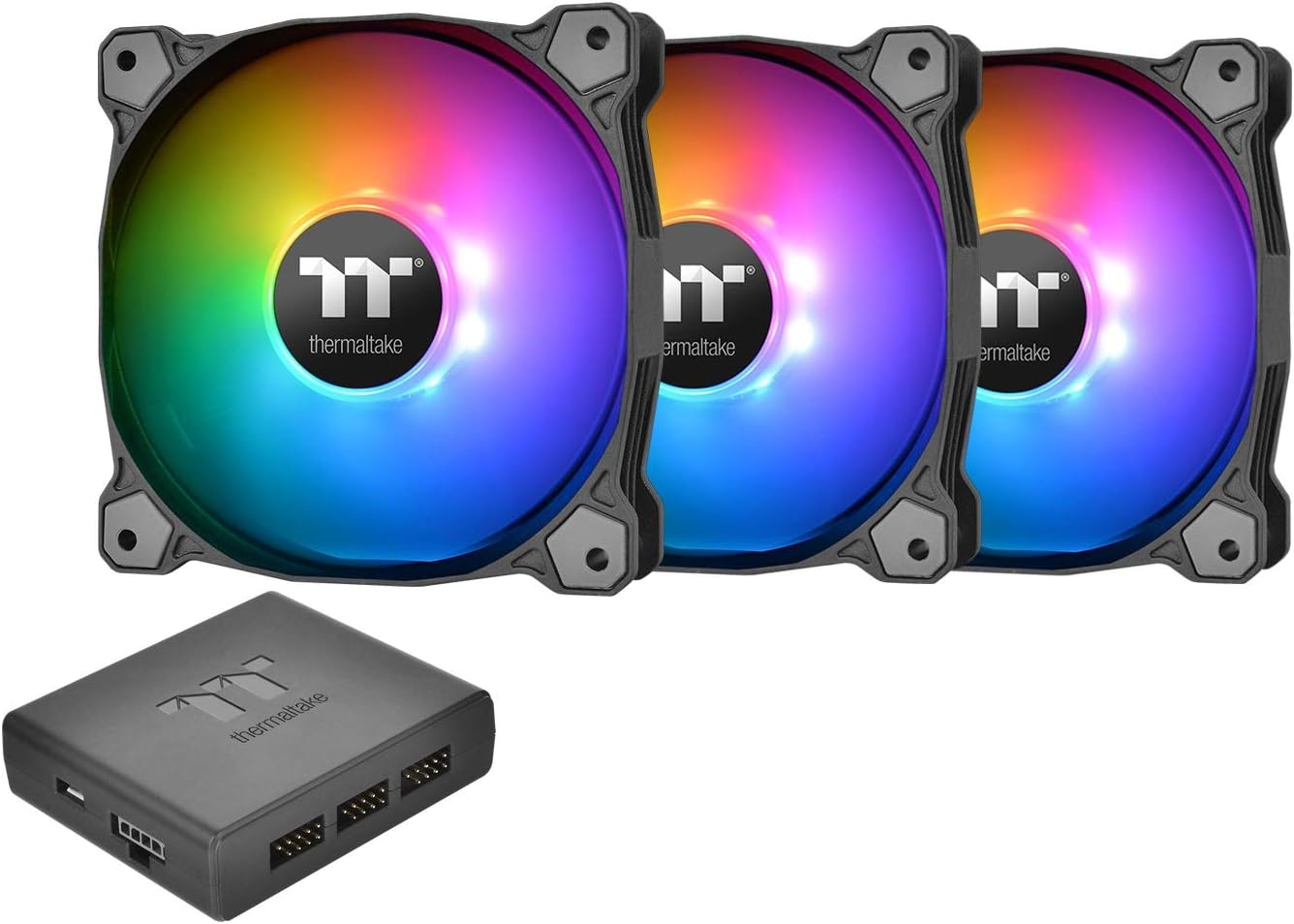
🌈 Cool vibes, smarter control — light up your PC like never before!
The Thermaltake Pure Plus 12 RGB TT Premium Edition is a 3-pack of 120mm PWM case fans featuring 9 addressable LEDs per fan with 16.8 million colors, controlled via TT RGB PLUS software or AI voice commands. Delivering up to 56.45 CFM airflow at a quiet 25.8 dB noise level, these fans offer advanced lighting modes and synchronization with system performance, backed by a durable hydraulic bearing design and a 3-year warranty.


| ASIN | B07D2N911K |
| Air Flow Capacity | 56.45 cfm |
| Best Sellers Rank | #3,523 in Computer Case Fans |
| Brand | Thermaltake |
| Brand Name | Thermaltake |
| Compatible Devices | Desktop |
| Cooling Method | Fan |
| Customer Reviews | 4.4 out of 5 stars 600 Reviews |
| Global Trade Identification Number | 00841163000694 |
| Included Components | Fan 3 |
| Item Dimensions L x W x H | 4.72"L x 0.98"W x 4.72"H |
| Item Type Name | Thermaltake Pure Plus 12 RGB TT Premium Edition 120mm Software Enabled Circular 9 Controllable LEDs PWM Case/Radiator Fan |
| Item Weight | 5.76 ounces |
| Manufacturer | Thermaltake USA Direct |
| Material Type | Rubber |
| Maximum Rotational Speed | 1500 rpm |
| Model | CL-F063-PL12SW-A |
| Noise Level | 25.8 db |
| Number of Items | 1 |
| Number of Packs | 3 |
| Part Number | CL-F063-PL12SW-A |
| Power Connector Type | 9-Pin |
| Product Dimensions | 4.72"L x 0.98"W x 4.72"H |
| UPC | 841163000694 |
| Unit Count | 3 Count |
| Voltage | 12 volts |
| Warranty Description | 3 year warranty |
| Wattage | 11.52 |
A**J
Quiet fans, good quality.
Fans are great for the price. They are quiet and have good air flow. The RGB LEDa are customizable with Thermaltakes own software, or they can be controlled with Aurasync. (Or other software.) However, you need an additional control from Thermaltake and a motherboard with a 5v output to have the LEDs controlled by Aurasync. Unfortunately I learned this after buying them, and a good motherboard with a 5v and a 12v rail costs nearly $300. A bit much for me, but the ThermalTake software is enough customization for now until motherboard prices go down. If you have the LEDs customized and put the computer in 'sleep' mode, when you wake up the computer, the color customization is lost and set to default and the fans stay at 1 speed. (Before sleep they will adjust speed depending on computer workload.)
D**M
Super quiet!
Very good quality feel when unboxing. Rubber coating and low RPM keeps them silent. The RGB seems great, but I don't have much to compare to. I found the fan cables to be a little too long, but I am working in an ITX case. Still, I can't imagine any case needing this much length!. It's a bit of a nightmare for cable management. Additionally, after using for a day the RGB went to the 'rainbow' default and the TT RGB software would not load (even after uninstall/reinstall). Had to uninstall and delete a TT folder buried in C: before reinstalling. Works fine now.
A**R
Just what I was looking for
I was looking for a name brand rgb fans in 120mm size for my new Cooler Master Masterbox NR600 which could hold up to 6 120mm fans that was ARGB and compatible with older motherboards via the controller. Thermaltake Pure Plus 12 was the best choice for me after researching Rgb fans on youtube. I was looking at the uphere brand but a few factors ruled them out. Pros: - Adjustable Fan speeds from 500-1500rpm - Looking good while moving some air keeping my temps down. - Can adjust colors via software on the desktop or App. - Installation very easy and I like the fact that only one cable is needed to connect the fan to the controller. Long cables too. Cons: - Kinda pricey at $58 for 3 fans and a contoller two sets of fans cost more than my new computer case at $69 LOL - Fans must be brought in packs of 3. I was looking to mix and match buy two 140mm for top exhaust. - App on the phone can not control fan speeds you have to manually do it from the desktop. - Some of the RGB effects doesn't sync properly even though two controllers are bridged together no way to have all 6 fans copy the master or first fan. - Molex Power connector for the controller lucky mines had 3 that came with my Cooler Master MasterWatt Lite 500w. But overall for the value of the Pure Plus 12 is pretty good compared to other 3pack fans from coolermaster or and the ring plus 12 premium edition. I might be bias as I dont like the ring plus 12 over the pure plus 12.
J**R
Good Hardware, Software is sorta flawed.
Great Fans with nice LED colors for the money. The fan blade nicely diffuse the light. They fans look great in the case. It was easy to install, i really like that it connects to a USB 2 header instead of having to go through the RGB header. The software has a lot of nice presents. Theres just a few things about the software that are annoying one being a major downside if you are purchasing these so you can sync with Razer Chrome Connect. While the connection works, it is lost once you restart. Every time you restart you will have to re-check the "sync with Chrome Connect" option to get it to work, which is highly disappointing. But regardless this is still a nice product for the money.
J**E
Easy to install and good value
Replaced my case fans in my NZXT H710. these actually run faster than my stock fans! Easy to install and lights look great! My only gripe is that they use their own software. So i cannot sync all the lights in my PC without buying another adaptor. But that doesnt take away from the quality of the product!
K**L
Looks good and works well, if you work at it
I am reluctant to write this review as my last one was rejected, and nobody seems interested in telling me why. Fingers crossed, here goes. I don't particularly care about RGB, but it seems those parts now cost about the same as non RGB parts, and what the heck, my case has a glass panel anyway. For the most part, I love these fans, but I hated them for the first four hours. It's important for me to be able to turn off the lights, and at first I couldn't do that. I feel the instructions are a little confusing for a first time PC builder. I got them working as advertised, but it took as long as my entire computer build (about an afternoon). I watched videos, I read articles, I tried all kinds of things. Apparently, I'm not the only one that had problems. I tried to get on the Thermaltake forum for help. I jumped through all the hoops, then despite trying 3 times each with 2 email accounts, I could never receive their confirmation link. Finally I decided to pull everything and send it back, and that's when it occurred to me to review step number 4 in the instructions. It says to connect the USB cable to the controller and motherboard. Well it comes with 2 possible cables for this. Both are micro (or mini?) USB. The one I wanted to use is about 8 inches long, and plugs perfectly into the RGB control on my motherboard. Seems appropriate, right? Wrong. I needed to use the splitter cord that's about 20 feet long, and plug it into a USB port on the motherboard. Step 6 says that if I want to connect 2 or more controllers, I use the splitter (or bridge) cable. Well I have one controller, so I hope you see how this might be a little confusing. At least for my build, which I consider pretty typical, there is way too much cord, and I'm having difficulty finding places to stuff it in to. I don't exactly want to complain about this, because too much cord is better than not enough. I'd have been more than happy to pay an extra $10 to get some sort of shorter cord option. Also, 2 of the pins came out of the power cord housing when I was being very gentle. Still not 100% sure I got them back in correctly. I see people are saying the software is crap. I don't understand. The software is very nice and works just like it's supposed to. The problem is the error code you're likely to see when you first see the software. There are many options for color schemes. I especially like the idea of the color changing depending on the temperature. I don't know yet if this is the temperature of the fans, or the air in the computer case, or what. The fans look nice from either side, but of course they look better from the front (intake position, not exhaust). They're plenty quiet and they're moving more air than the fans that came with the case. 5 stars for the pretty colors, software, and fan quality. 1 star for the hassle and the cords. So I guess that's a 3. I'm really trying to help, so please don't ban my review without cause.
J**Y
Awesome RGB, great for the price
After dealing with other RGB fans that were either cheap trash or expensive and didn't work as expected, these are wonderful. The noise level is acceptable, and the RGB software is some of the best I've seen. There are a ton of different modes and they look great with any color theme. The only drawbacks are the spinning label in the center looks pretty weird, the controller only installs using Velcro, and it takes up a usb 2.0 port. What's nice though is that you can support many fans, and keep your fan headers open if you don't have very many like me. Overall very happy with this buy.
A**B
Works great, looks great, way cheaper than Riing
I bought these to save $$ on the way overpriced Riing ones (seriously $99 for 3 fans??). They are quiet, have great color, and hopefully will last a long time. Will update this if my opinion changes once I use them to cool a radiator. One medium complaint - the cable sheathing on these is terribly bulky and horrible to keep neat and tidy in the case. Pro tip, the cables inside the sheathing are actually flat and slide nicely into a standard cable comb if you put them in sideways. This can help you end up with something almost resembling neat cable management if you don't just hide them under/behind something.
L**A
ThermalTake is my choice for RGB Fans
Cheaper and easy to use compared to the rest of the brands.
J**O
Muy buena compra
Compre estos ventiladores por la integración de la familia Synapse 3 de Razer, no me arrepiento de nada. Son de alta calidad. El unico detalle es que uno de los ventiladores vino con problemas pero se puede pedir un remplazo a Amazon. Y hacen un poco más de ruido cuando los tienes al 100% de velocidad
Y**J
Qualité superbe
Très beau produit qualité de fabrication au top, installation facile et logiciel complet. Un seul petit bémol on ne peut pas descendre ventilateur sous une certaine vitesse de rotation et donc un peu bruyant au minimum. Sinon rien à dire je recommande ce produit sans hésitation, ils sont vraiment très beaux.
D**N
Good Quality RGB Fans
These RGB fans are sturdy, stylish and easy to install. They are silent and cooling is also good (if not great). RGB lighting can be easily controlled/customized via TT RGB Plus software and mobile app as well. The cost of these fans here on Amazon is slightly on the higher side but the product is genuine. They are definitely going to enhance the beauty of your build.
B**E
It works!!!
Works perfectly but to my surprise how can I connect to ARGB or RGB control of the mobo.
Trustpilot
5 days ago
2 weeks ago