Buy anything from 5,000+ international stores. One checkout price. No surprise fees. Join 2M+ shoppers on Desertcart.
Desertcart purchases this item on your behalf and handles shipping, customs, and support to Kyrgyzstan.
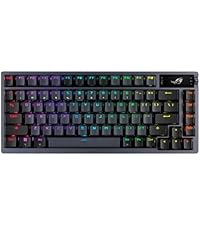
🎮 Elevate your game and workspace with the ROG Azoth Extreme — where elite design meets unstoppable performance.
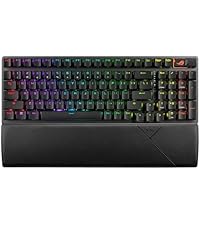
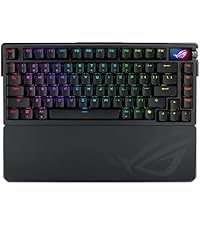
The ASUS ROG Azoth Extreme is a premium 75% TKL wireless mechanical keyboard featuring tri-mode connectivity (2.4 GHz RF, Bluetooth, wired USB-C), factory-lubed ROG NX Snow linear switches, a CNC-machined aluminum and carbon-fiber chassis, and a 1.47-inch full-color OLED touchscreen. Designed for pro gamers and productivity enthusiasts alike, it offers up to 1600 hours of battery life (RGB/OLED off), an 8K Hz polling rate, Speed Tap mode for ultra-responsive gameplay, and hot-swappable switches with durable PBT keycaps. The keyboard includes a magnetic wrist rest and advanced sound-dampening layers for a refined typing experience, making it a standout choice for those who demand both style and substance.


| ASIN | B0D45ZHYZJ |
| Additional Features | Backlit, Volume Roller, Wrist Rest |
| Antenna Location | Gaming |
| Best Sellers Rank | #2,397 in Video Games ( See Top 100 in Video Games ) #209 in PC Gaming Keyboards |
| Brand | ASUS |
| Built-In Media | M702 AZOTH EXTREME/NXSW/CA/PBT Gaming Keyboard |
| Button Quantity | 104 |
| Color | Black |
| Compatible Devices | Gaming Console |
| Compatible Operating System Family | Windows |
| Connectivity Technology | Bluetooth |
| Customer Reviews | 4.5 out of 5 stars 95 Reviews |
| Enclosure Material | Aluminum, Carbon Fiber |
| Global Trade Identification Number | 00197105599734 |
| Hand Orientation | Ambidextrous |
| Item Dimensions L x W x H | 5.5"L x 1.6"W x 13.1"H |
| Item Weight | 4.9 Pounds |
| Keyboard Backlighting Color Support | RGB |
| Keyboard Description | Mechanical |
| Keyboard Layout | QWERTY |
| Keyboard Plate Material | Carbon Fiber |
| Manufacturer | ASUS |
| Mfr Part Number | M702 AZOTH EXTREME/NXSW |
| Model Name | M702 AZOTH EXTREME/NXSW |
| Model Number | M702 AZOTH EXTREME/NXSW |
| Number of Batteries Required | 1 |
| Number of Keys | 84 |
| Number of Sections | 2 |
| Power Source | Corded Electric |
| Processor Count | 1 |
| Recommended Uses For Product | Gaming |
| Special Feature | Backlit, Volume Roller, Wrist Rest |
| Style Name | Azoth Extreme |
| Switch Type | Linear |
| Theme | gaming |
| UPC | 197105599734 |
| Unit Count | 1.0 Count |
| Warranty Description | 1 year |
C**Y
The Ultimate 75% Mechanical Gaming Keyboard — With a Few Quirks
The ROG Azoth Extreme is undeniably expensive, but it’s also one of the most unique and well-built mechanical gaming keyboards I’ve ever used. If you’re already invested in the ROG ecosystem, want everything to match visually, or just appreciate high-end mechanical keyboards with an exquisite design, this one checks nearly every box. The layered aluminum and carbon-fiber construction is both visually striking and extremely solid. You can actually see the stacked layers along the side of the board, which gives it a refined, almost industrial look that feels more like a piece of art than a typical gaming keyboard. The unboxing experience alone sets the tone. Everything is neatly presented in double-layered packaging with a removable drawer underneath, and the keyboard itself comes wrapped in a branded cloth cover. It immediately feels like a premium product. Setup was flawless but did require a Armoury Crate device driver update which installed smoothly and automatically. As someone who spends hours at my computer every day and has owned many mechanical keyboards, this board offers nearly everything I look for. You get a compact 75% layout, fully customizable key assignments and macros "on-the-fly," tri-mode connectivity (RF, Bluetooth, and wired), customizable RGB, a color OLED touchscreen, a multifunction control knob, Speed Tap for gaming, a gasket-mounted design with multiple dampening layers, carbon-fiber plate, and excellent battery life. The pre-lubed ROG NX Snow linear switches feel smooth and consistent, with a controlled sound profile that isn’t overly loud, making this keyboard perfectly usable for both gaming and productivity. The included wrist rest deserves special mention. It’s heavy, well-built, and extremely comfortable, with a rubberized surface that matches the keyboard’s front profile nicely. It doesn’t slide around and feels like it belongs with the board rather than being an afterthought. On the back of the keyboard, there’s a magnetic metal nameplate that cleanly finishes the design while hiding storage for the RF dongle and the physical gasket-adjustment switch. That said, the gasket adjustment is my biggest disappointment. While it’s a great idea in theory, the difference between the two settings is extremely subtle. Neither position is labeled, and while one setting sounds slightly more “thocky” and the other a bit firmer, the change is minimal. After doing some research, it appears this is a common complaint rather than a defect. My other criticisms are fairly minor but worth mentioning at this price point. Customization relies heavily on ASUS Armoury Crate, which can be finicky, and while the Gear web app works for basic adjustments, Armoury Crate is still required for full control. The included braided cable feels surprisingly basic for such an expensive keyboard, and switch lube isn’t included despite this being marketed as a customizable, enthusiast-grade board. The magnetic metal feet work well overall, but they can slide off if you move the keyboard aggressively across a desk. Typing on this keyboard is genuinely enjoyable. The key spacing, textured PBT keycaps, and smooth switches make long typing sessions comfortable and fast. While it’s clearly marketed as a high-end gaming keyboard, I find it just as enjoyable for everyday productivity. The lack of a numpad doesn’t bother me, as everything else I need is here. If you can find the ROG Azoth Extreme below full retail pricing, I would recommend it without hesitation. At full price, it’s more of a luxury purchase that you really have to want. Remove price from the equation, though, and this is one of the best gaming keyboards I’ve ever used.
A**R
Incredible feeling keyboard! **Updated after more than 1 year of constant use**
I must begin this review, by saying that Amazon Customer Service is currently being lead by the best possible people for the job. They are working very hard to make Amazon CS the best in the industry, and I believe they will accomplish their goals. I, very much, look forward to Amazon CS being restored to the golden days, of when they actually cared about helping you, and were very good at doing so. Now, onto the keyboard. I, personally, have never had a keyboard that felt this good to type on, and the sounds it makes are amazing. The build quality is second to none, I do not believe you will find a better machined keyboard anywhere, and it is very heavy. The wrist rest feels amazing, as well. My only wish for it, is that I wish it was magnetic, as it tends to slid around on the surface I am using it on. My hope is that this may well be the last keyboard I ever need, but only time will tell. The software, Asus' Armoury Crate, which is needed to use this keyboard, is, shall we say, it's software. It can be painfully slow at times, and doesn't have a ton of functionality at the moment, but you can, eventually, get the keyboard configured. I hope Asus eventually makes it software worthy of the gear it is meant to operate, and the customers who use it. I will update this review, as I have had more time to use this keyboard, so I can provide a full accounting of how well it performs. Thank you, to the Amazon CS Team who helped me resolve what was an ugly problem, and restoring my trust, from the 20 years I have been a member! Update: I just wanted to add an update on my experience thus far, with the ROG Azoth Extreme Keyboard. There have been issues, the very first one I purchased had to get replaced, just a few minutes after unboxing it, as the Asus update it required bricked my keyboard. This resulted in my opening comments about Amazon Customer Service, as they really went above and beyond in helping me get that issue resolved. The second one ran fine for awhile, approximately 5 months, and had several successful updates, until another update caused the wireless to stop functioning. Again, the extended warranty came through, and after having sent the keyboard in for them to look at, and they're being unable to fix the problem, they refunded me, after which I bought the same keyboard again. I love this keyboard, what can I say, for my needs it is quite literally perfect. The newest board functions fine, but the battery level reporting tool, not sure if the fault lies in the software or this keyboard itself, but it seems to take forever to drain down to around 55%. But, I have found if I do not charge it, before it hits the reported 55%, then it goes from 55% to 0%, they keyboard shuts off, and all of my settings, including lighting effects I have set up, are lost and must be reconfigured. I believe this issue is directly related to this keyboard specifically, and not the software, or the Azoth Extreme line as a whole, as none of my other Azoth Extremes behaved in this manner. It isn't as if my batter is only giving me half of the time it should, it seems as if there is a problem with how this individual keyboard reports the battery status, as I mentioned earlier, it takes several days, 8-10 on average, for it to get to that 55%. I have gotten used to this glitch, and simply know if I get below 60%, I need to recharge it that night. Still, through all of these faults, I still love this keyboard, and am happy with my purchase, it remains the best keyboard I have owned, other than my IBM keyboards back in the early 90s. As I mentioned, my needs are very specific, and shine through keys are a very important part of that, and the shine through keys on the Azoth Extreme are the best I have seen. They have clear high quality legends, and the shine through effect is perfect for me. The sound and feels of these keycaps, when coupled with the Snow switches, is right up there with another keyboard I have, but rarely use, the Evo80. The Evo80 might sound a tad better, but finding high quality shine through keycaps for it, is an impossible task, especially given the RGB is south facing, but even if you turn them around to be north facing, finding good keycaps, in a color that looks fitting to the board, is again a near impossible task. The bottom line becomes, if shine through keycaps are important to you, and you are looking for a premium feeling and sounding keyboard, which I am one of those people, then the Azoth Extreme is as good a keyboard as you'll find, and likely better. If shine through keycaps are less important to you, or not at all, you may find a better keyboard elsewhere. I paid the original opening price of $499.99, for the Azoth Extreme, and though I own other high end, high quality keyboards, I do not regret my purchase, and the Azoth Extreme is the only board I use entirely, every single day, only breaking out the others on occasions when the outside lighting is just right. For the current asking price of $399.99, I think it is a great value, if you have similar needs to mine.
D**M
Solid NX Snow Refined-Linear Switch Wireless Gaming Mechanical Keyboard!
Pros: -This is 75% Mechanical Keyboard which may not include numpads, though it is sold separately. -Excellent comfort feel while typing and gaming -I love the silicone wrist rest which is smooth, soft, and comfortable -It's got 1.47" OLED Touchscreen to add custom animation (GIF), CPU/GPU temp, brightness, etc. -It has a knob on the right side to adjust volume slider, OLED brightness, multimedia, etc. -It includes keycap puller/mechanical switch puller to customize the way it looks and feels -high-quality premium Double Shot PBT keycaps -hgh-quality dampening frames to reduce pitch noise while typing -keyboard itself is made out of high-quality aluminum -It supports 8Khz in both Wired/Wireless Polling Rate which you will need to connect polling rate booster USB dongle that comes with it out of the box, but also requires very fast CPU to benefit much higher polling rate! -RX Snow Refined-Linear Switch feels almost like Cherry MX Brown/Cherry MX Red Switches which delivers satisfying tactile feel -On the back, you can toggle between soft and hard mode to adjust dampening pad feel while typing. -It comes with USB Omni Receiver to pair up with multiple devices that supports ASUS wireless mouse & keyboard -Battery Life can last up to 1600 Hours, regardless brightness and polling rate Cons: -Incredibly expensive at $560 USD which is not for everyone. This is geared towards an enthusiast gamers who want the best wired/wireless gaming mechanical keyboard -It does not come with Magnetic Hall-Effect Switches which is much easier to double tap, but it all comes down to personal preference. If you spend a lot of time playing single player PC games, then it doesn't matter if the keyboard is comprised of either mechanical switches and/or Hall-Effect switches. -All in all, this is one of by far the best wireless/wired gaming mechanical keyboard I've ever used for gaming & content creation!
A**R
For the ASUS ROG fans. Incredible keyboard and premium cost.
Well it's pricey but you do get quite a bit of features with this keyboard. The aesthics are fantastic and so is the typing experience. This is a unit, it's heavy, it's sturdy and comes with several ergonomic features such as the weird feet for keyboard height. You get a couple of different options there and they are magnetic. Meaning you have to pick up the entire board or you'll knock off the magnetic feet. Now that I'm used to it not really that big of deal. I use this board for primarily gaming. It's fast precise and has speed tap. The OLED screen is cool and had lots of customization. I also own the regular version of the Azoth. I'd say for most people take the Azoth regular version. It's cheaper and you get an amazing board minus some of the features you see here with the Azoth Extreme. If you see this on sale I'd say give it a try.
B**R
useless because can't remap or dupe function key
I like certain aspects of it but the absolute deal-killer is that you cannot remap or duplicate the function key. This basically bricks the keyboard for me as the function key's hard-coded spot cannot be reached without breaking standard typing position....guess it can still be useful for gaming but I don't want a $300 pure game controller formatted like a keyboard!
D**E
A true mechanical, hotswappable, built like a tank dream keyboard.
This is bar none the best keyboard I have owned. I have owned multiple corsair, logitech, and now asus keyboards throughout the years. The build the quality and the typing experience, the hot swap switches. This thing is incredible. Its built to be taken apart and customized and the oled that has a read out of the temps for cpu and gpu is chefs kiss. Armoury Crate is a hot steaming pile of you know what. ASUS needs to invest the same level of detail and quality development into the software as they do on their hardware. I love this keyboard and want to see the software match the quality. Because I have an ASUS motherboard too I can have automatic fan control to ramp up system fans all from my keyboard its just crazy. If you are an enthusiast, tech nerd, streamer, gamer person. Buy this thing and enjoy.
A**X
Premium build and typing feel, but not $200 better than contenders
I picked up the ROG Azoth Extreme 75 ($500) and compared it side-by-side with the Razer BlackWidow V4 Pro 75% ($299). At this price point, you’re not paying for giant leaps in performance. Like most luxury items, the gains are real but incremental. Usage & Build: The ROG Azoth Extreme is heavier and sturdier, with tighter vertical key travel and almost no wobble. The keys feel more firmly seated in the sockets, giving a solid, precise typing experience. Key presses also have a bit more resistance compared to the Razer, which I personally enjoy since it feels more deliberate and controlled. Quick-Flip Switch & Cover Plate Gimmick: The keyboard also comes with a quick-flip toggle underneath, meant to change keystroke feel on the fly. I tested it multiple times, and if there’s a difference it’s so minor you could call it nonexistent. Honestly, it feels like another gimmick—same as the detachable magnetic feet. Then there’s the “premium” metallic cover card. You might ask: oh wow, what’s it for? Well, it’s a shiny badge that snaps over the toggle switch, so the switch feels a little cozier under the keyboard… while you’re not looking at it. That’s it. Probably got someone at ROG a promotion, but for the buyer it does absolutely nothing. Copilot Key Annoyance: One of the most frustrating design choices is that ASUS replaced the left CTRL key with a Windows Copilot key. And no, you can’t just change it in Windows. You’re forced to install ASUS’s massive, bloated Armoury Crate software just to remap it back to CTRL. They do throw in a replacement CTRL keycap in the box, but you’ll still have to manually swap the key out after fighting with the software. For a $500 keyboard, this is a ridiculous miss. Pros: • Excellent build quality, heavy and solid • Tight and precise key movement, no wobble • Typing feels fast, accurate, and premium • Slightly better feel than competitors (about 10–15% improvement) Cons: • $200 more than contenders for only minor improvements • Wrist rest has no magnets (cheaper boards include this) • Quick-flip switch does almost nothing • Metallic cover card is pointless fluff • Copilot key forces you into Armoury Crate bloatware Tips: If you’re deciding between this and other high-end boards, think about budget first. Cheaper options deliver about 85–90% of the same experience at a much lower cost. Gaming “Advantage” DUH!: Now, I will say this , after switching to the Azoth Extreme, I was suddenly unstoppable in Battlefield 6. My character was running faster than jeeps, 1v1 fights were instant wins, and the 0.00007-second faster press speed gave me cosmic precision that felt even better than the aimbot cheats I used earlier. …No, it’s not. Don’t fall for that corporate nonsense. Just pick a keyboard that feels good ergonomically. This one is very well built and feels great to type on, but it’s not going to turn you into a gaming god if you suck at it. Verdict: This is absolutely a 5-star keyboard in terms of build and typing feel, but I’m rating it 4 stars because of the weak value, poor design choices, and gimmicky extras. Honestly, it would be a strong contender if it was only $50–70 more than the competition. At $500, it’s simply not $200 better than contenders. If you want the best no matter what, you’ll love it. If you’re practical, stick with a more reasonably priced competitor and save yourself the headache (and the bloatware).
J**T
Wish I would have found this board first!
Build quality is amazing! I took it apart to put switch pads on the pcb, but to my surprise it already had a dedicated pcb pad for the all switches and stabs! I actually like the carbon plate (I tend to use PC), doesn't seem too stiff at all. The Soft/Hard typing switch is interesting. I don't see much of a difference yet, but maybe depends on the switches. I did swap mine out with something else. The small LCD has actually been very useful. I love the fact that they left the top plate bare with no lcd cover or anything! I plan on painting it now :) Yes $500 is a lot, BUT, I did buy the Glorious gmmk pro 3 for the same price and this board blows that away. It doesn't have hall effect switches. But for me, all the he switches I've tried were awful. They had too much wobble, didn't always actuate, and sounded bad. So I personally don't mind this being a non he board. Armoury crate did act up on first use. It kept wanting to update the same firmware over and over. But after the last AC update, that stopped. My only real complaint is the rgb could be a lot brighter. I really like this keyboard and love the fact that I didn't have to do any crazy mods or addons. Everything it came with (pads, plate etc) are perfect right out of the box. Well, minus the stabs. They're ok but not great. The battery life is fantastic! My gmmk pro 3 lasted barely 2 days. This board has gone a week and not dropped below 75%. I'm happy with it and for me worth it.
E**N
Just okay
Good but not worth that much, extreme actual worth around $300-$350
V**O
Great Wireless Performance, But Wired Mode Is a Dealbreaker
I really wanted to love the Azoth Extreme Keyboard. The build quality and wireless performance are excellent—but unfortunately, the Armoury Crate software issues are hard to ignore. In wired mode, the keyboard flickers and becomes unstable, making it virtually unusable for typing. It’s a strange and frustrating flaw, especially at this price point. Wireless mode works flawlessly, but I couldn’t justify keeping a $500 unit with such a critical defect. I’ve returned it.
W**O
Design issue
Not good not bad, but hard to use as the keys placed too close, at least a space F4 and F5, which by touch knows. The software is waste your time to hook up the thing. I returned it due to these.
Trustpilot
1 day ago
3 weeks ago