We remain fully operational. Our teams are working around the clock to ensure your deliveries continue safely.

DOWNLOAD THE APP


Customer Services
Copyright © 2025 Desertcart Holdings Limited
DOWNLOAD THE APP


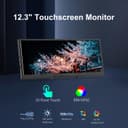

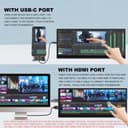


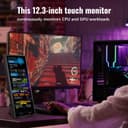


🚀 Elevate your workspace anywhere with the ultimate portable touchscreen monitor!
The 12.3 Inch Touchscreen Secondary Monitor features a crisp 1920x720 FHD IPS stretched display with a 178° viewing angle and 60Hz refresh rate. It supports plug-and-play connectivity via USB-C and Mini HDMI, includes built-in stereo speakers, and offers real-time system monitoring through AIDA64 integration. Its sleek, lightweight design with VESA mount compatibility makes it an ideal portable companion for professionals seeking enhanced multitasking and intuitive touch control on the go.


| ASIN | B0CW9GBJ63 |
| Aspect Ratio | Unknown |
| Aspect ratio | Unknown |
| Best Sellers Rank | 45,176 in Computers & Accessories ( See Top 100 in Computers & Accessories ) 804 in Monitors 6,296 in Climate Pledge Friendly: Shop All |
| Brand | Prechen |
| Brand Name | Prechen |
| Colour | Black |
| Contrast Ratio | 1000:1 |
| Customer Reviews | 3.8 out of 5 stars 64 Reviews |
| Display Technology | LCD |
| Display Type | LCD |
| Hardware Connectivity | HDMI, USB |
| Has Color Screen | Yes |
| Image Brightness | 300 |
| Image contrast ratio | 1000:1 |
| Item Dimensions D x W x H | 2D x 31W x 12H centimetres |
| Manufacturer | Shenzhen Kenowa Electronics Co., LTD |
| Maximum Display Resolution | 1920 x 720 |
| Model Name | HD-123 |
| Model Number | HD-123 |
| Mounting Type | Wall Mount |
| Native Resolution | 1920 x 720 |
| Network Connectivity Technology | USB Type C |
| Product Features | Portable, Touchscreen |
| Product Warranty | 1 |
| Refresh Rate | 60 |
| Resolution | HD |
| Response Time | 5 Milliseconds |
| Screen Finish Type | Glossy |
| Screen Size | 12.3 |
| Screen size | 12.3 |
| Screen surface description | Glossy |
| Shape | rectangular prism |
| Total HDMI Port | 1 |
| Total USB 3.0 Ports | 1 |
| Total USB Ports | 1 |
| Total Video Out Ports | 1 |
| Viewing Angle | 178 Degrees |
S**I
Great Monitor with a Minor Warnings.
This monitor is worthy of 4 stars, as it does exactly what it says. This review is based off of the 12.3 inch model. Firstly, this is much bigger than I expected, which a huge plus, but it did mention this within the dimensions. This monitor also comes fully cased, unlike most monitors within this region (which are made for the Rasberry PI) so aesthetically you're fine. The stand has two legs, which will allow you to fully adjust to ANY height in either vertical or horizontal. Positives: Big screen, Touch Screen, fits a lot more on the screen than what it states. Does not need external power socket and can work by connection to the PC. Easy to set up. Great colours for such a small monitor. Negatives: Glossy screen (no issue if screen is on), Corners are extremely sharp so be careful when putting it near other monitors or get a baby proof corner protector. Touch screen only works as MAIN DISPLAY. Summary: If you need a secondary monitor, that looks good and can fit under your main display or PC case, this is it. It would've been five stars if it wasn't for the Touch screen needing to be the main monitor for it to work 'properly' it will still work if it isn't set to main display but it will only register your touches on your assigned main display (if that makes sense) Warning: Please be careful when putting this below your main monitor as the sharp corners of thjs can scratch it and cause cosmetic damage, as I've found out. To fix this, I purchased some baby proof corner protectors which solved the issue. Edit: Touch Screen RESOLVED. You do NOT need to have it as main display anymore due to Windows 11 fully supporting touch functionality. To get the touch working, see below Ensure monitor is connected via HDMI to GPU and USB C to USB A to the motherboard (no other cables are needed) Open CONTROL PANEL > click VIEW BY (top right) > click LARGE ICONS > Finland click "Tablet PC settings" > click SETUP > Follow the prompts and now you have a fully working independent touch screen monitor. Due to this, I have now changed my review from 4 stars to a worthy 5 stars as it does everything you need. As my review has gained a lot of traction, I want everyone to know that the monitor is still going strong over half a year later.
L**S
Don’t bother, touch screen will only work correctly when set as primary which is not as advertised
Mine arrived about 2 hours ago and is already to be returned. The screen quality is good and clear but the 2 issue I have are: Video via USB C will not work on any device I tried (and I have several, including the that I bought this to replace) the other issue is the touch element will always control the primary monitor so no matter what is on the screen when you press it’s like you had pressed the main monitor. If like me and as advertised you are using this as a second screen it mean the device is useless and not fit for purpose or as advertised. Edit: The company has contacted me asking for another chance to resolve the issue but i am not willing to purchase directly from them for this nor am i willing to purchase from Amazon again as this would make a return difficult (hard to say its got an issue that i didnt know about when i did!!) so i have declined this offer, but as they have attempted to support i did think it was worth mentioning. If you are having this as a single monitor or happy for it to be the primary then no issue at all there (I did test this all through HDMI and USB for touch) Considering the price I expected more it’s a shame really but I will be sticking with my little old one for now!! My recommendation here is give this one a miss until they sort out the issues with it. I will be heading out in a few minutes to return mine so my total ownership will have been about 3 hours
F**Y
It's good but not worth the price, touch screen ✖️
Look cool, been on for 3 days, not hot at all. Both usb c r same. They mentioned about mini hdmi? It's confusing. Only touch screen work when it's a primary monitor, when its 2nd monitor, touch screen show effect on 1st screen. Only good for showing pc gadgets such as time widget, cpu temp, fan control etc. I would have bought normal 11 inch portable monitor. This narrow screen is like mobile phone, also very heavy Quality is good, but not practical, 1st time I feel I spent money on wrong gadget.
M**A
NIce picture / good blacks
I planned to build a Home Assistant dashboard with this, I did get as far as setting it up and it looked and worked great, the picture quality is really nice, it has a gloss screen with nice colours, and viewing angles, the touch screen is nice, but it does pick up fingerprints very easily because it's gloss, but I don't see them unless it's off, so I'm not worried. There are 2USB C ports, if you're connecting to a Raspberry Pi like I am, you might need to use the included cable/wall plug to power it from the wall, and then plug the other USB C into the A-C cable to plug into the Pi which is how the touch screen works, then connect HDMI for video. If you want to use it with a laptop, you can just use a single USB-C to USB-C cable and it will power it, provide touch screen and video from a capable laptop; I tested it with my XPS 13 running Arch Linux and it worked nicely, touch screen and all. I ended up needing a new screen to control my 3D printer (KlipperScreen + Happy Hare) so it's not going to be used as a dashboard for now, but overall I'm very happy with the quality. It came with all of the cables and wall adapter so you shouldn't need anything other than what's in the box, whatever you want to use it for.
D**N
Beware, may not be Mini HDMI
I'm a bit frustrated by this. I bought the monitor on Sept 8th 2025 and the version I received actually has a full-size HDMI port on it despite the listing continually mentioning it being Mini HDMI. This mean a U-shaped mini HDMI to HDMI adapter I bought was useless and I had to order another. So beware if buying a HDMI adapter or cable to go with this as it's not readily clear which type of HDMI port your device will come with. Aside from that it works fine, a single USB A to C cable seems to be enough to power it and work the touchscreen function (if not using the USB C to C single cable solution) It's pretty dim so if you have a monitor that's kind of bright, the difference will be very noticable.
M**Y
Small Size, Great Quality
I picked this up, and like others, I was shocked about the build quality for the price; the bezel is Metal and well-made. The screen, while glossy, is not an issue for me, and the brightness is excellent. However, the included cables are too small if you intend to use them with a desktop on the floor or sit-stand desk, so factor that in when you buy. I've included a shopping list further down. While others have struggled with the touch input as a secondary display. Worry not. This is a Windows issue, not a fault of the display itself. To fix this, go to "Tablet PC Settings" from your start menu and hit Setup. The on-screen display prompts will help you link the input to the correct display. It's as simple as that! (unless you can't see "Tablet PC Settings" in your start menu, in which case you can get to it this way: - Go to the Desktop. - Right-click on the Desktop and select New/Shortcut. - In the Type, the location of the item window, Copy/Paste the following. %windir%\explorer.exe shell:::{80F3F1D5-FECA-45F3-BC32-752C152E456E} - Click the Next button and type the name Tablet PC Settings. - Click the Finish button. Accessories: The model I received comes with full-size HDMI, so they may have updated it since others purchased it. Unfortunately, because of that, I bought Mini HDMI adaptors, which are unnecessary. I used 180-degree adaptors to hide the wires behind the display for a much tidier look. I think the supplier could include these to improve the offering! I agree with other reviewers that the logo is garish and detracts from the look, but it's a metal sticker. You can delicately strip this off with a fingernail or blade without causing any damage, but of course, do this entirely at your own risk. I highly recommend a Smallrig Magic Arm; the 22" model was ideal for me as I have a 30" Primary monitor. I have it clamped to the VESA mount as it connects to my monitor and screws into the 1/4 threaded hole on the back of the display: https://www.amazon.co.uk/dp/B0D5YJ42CX 2M HDMI Cable https://www.amazon.co.uk/dp/B014I8SSD0?ref=ppx_yo2ov_dt_b_fed_asin_title 2M USB C to A Cable https://www.amazon.co.uk/dp/B07V829GZ4?ref=ppx_yo2ov_dt_b_fed_asin_title 180 Degree USB C Connector https://www.amazon.co.uk/dp/B09KG463G7 180 Degree HDMI Connector (waiting for this to arrive) https://www.amazon.co.uk/gp/product/B0C9DDXYF9
R**K
Good little screen and build quality
The packaging looked a little underwhelming and was very generic chinese looking but.. the monitor itself is really good it's build quality is nice and the display itself is bright and punchy but remember it's not a 4k high end item, it comes with all the needed cables too. The touch screen works quite well and It comes with a nice little metal folding stand which sits under my main monitor, i have had no issues using this for Aida 64 sensor panels which is the purpose of mine, you can however play videos and use it as a regular little monitor etc. I would recommend this display. -Duck
R**P
I makes a noise and touch feature causes erratic mouse movement.
The screen makes a very sharp high pitched sound and when it is powered by USB C (connection to computer) it causes erratic mouse clicks, which I believe is a glitch in the touch feature. I've had to plug it directly with it's USB cable to the power adapter it came with. Meaning, NO touch screen feature. Although the screen displays nicely, the noise ruins the experience as I was hoping to use the screen for audio engineering. Can the seller let me know if it is meant to have any noise while on? UPDATE : High pitched sound is fixed, but the screen keeps switching it self ON and OFF. Please could I get some help on why the screen is all of a sudden goes from ON -> OFF and back ON. It keeps doing this intermittently.
Trustpilot
2 weeks ago
3 days ago