Buy anything from 5,000+ international stores. One checkout price. No surprise fees. Join 2M+ shoppers on Desertcart.
Desertcart purchases this item on your behalf and handles shipping, customs, and support to Kyrgyzstan.
🎥 Capture your epic moments in 4K, anytime, anywhere!
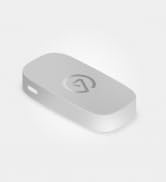
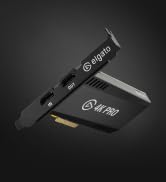
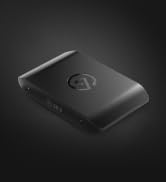
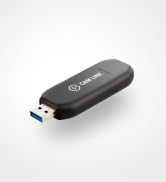
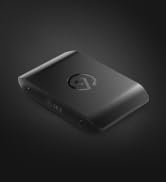
The Elgato Game Capture Neo is a compact, USB 3.0 portable capture card designed for professional-grade gameplay recording and streaming. It supports 4K60 HDR passthrough while capturing 1080p60 video, compatible with major consoles like PS5, Xbox, and Nintendo Switch. With plug-and-play ease, ultra-low latency, and broad software support including OBS and QuickTime, it’s perfect for gamers and content creators on the go. Plus, it’s eco-friendly with sustainable packaging.


| ASIN | B0CVYKQNFH |
| AV Output | HDMI |
| Antenna Location | Gameplay Capture |
| Best Sellers Rank | 18,879 in Computers & Accessories ( See Top 100 in Computers & Accessories ) 26 in External TV Tuners & Video Capture Cards |
| Box Contents | Game Capture Neo, USB-C to USB-A 3.0 braided cable (100 cm | 39.4 in) |
| Brand Name | Elgato |
| Compatible Devices | ['Game Consoles', 'Cellular Phones'] |
| Customer Reviews | 4.4 4.4 out of 5 stars (581) |
| Hardware Interface | USB |
| Item Dimensions | 6.5 x 12.3 x 2.1 centimetres |
| Item Weight | 0.09 Kilograms |
| Manufacturer | Corsair |
| Manufacturer Part Number | 10GBI9901 |
| Minimum System Requirements | macOS 12 or Windows 10 (64-bit), Intel Core i5-6xxx (6th Generation) / AMD Ryzen 7 (or better), NVIDIA GeForce GTX 10xx (or better), USB 3.0 port. |
| Model Name | 20GBI9901 |
| Model Number | 20GBI9901 |
| Operating System | Windows and macOS |
| Other Special Features of the Product | Travel |
| Platform | PlayStation 5 |
| Product Warranty | 2 Year Manufacturer |
| Tuner Type | DVB-T2 |
| UPC | 840006673439 |
| Video Capture Resolution | 1080p |
W**H
Great product
Great
M**E
Works well
Working fine with ffmpeg
F**O
Easy to use
My son enjoyed using it for the first few days
G**A
Honest review from a new streamer
So I got the product as it was on the cheaper side for the elgatos , if you set the elgato up and ur PlayStation screen goes pink ( not sure if it does the same for other consoles) you need to download an update of the elgato website they don’t state this anywhere but I done the research it will fix that problem and if you are planning on streaming off a console you need to get a elgato audio because you can’t plug ur headset into the console as the elgato will produce no audio to the stream , the quality is very very good though it’s easy to set up
C**E
Easy to set up
Easy to set up and can connect to ps4/ps5/switch/laptop/desktop pc. Quality of recording is spot on. The size of game capture is quite small and sits nicely on the desk and would recommend if just starting out to record games for YouTube
J**N
More elgato
I picked this up to stream Xbox on twitch, it's holding up great a few months on.
L**A
Welp
I forgot to send this back, it was a hassle to run, turned my tv pink?? Idk if it was user error but it wasn’t worth it. Easier just to deal with Xbox streaming
P**N
It works!
Another cracking bit of kit from Elgato. These guys really know their stuff and what 'their market' wants to use. Thanks
E**Y
After knowing about Elgato and their products for the longest time, having purchased their Wave 3 Microphone and using some of their software for years, this was a no brainer purchase for me. It is their cheapest capture card yet and it does everything you need to record the same level of gameplay quality you watch on the internet all the time. A capture card like this essentially turns your HDMI video signal from a console or pc into an input that a computer recognizes like it is a USB webcam while passing the signal through to your TV or monitor. very simple. Here is a TLDR of some points I think are useful about the capture card to save you some research if you haven't done any already: - It captures in 1080p, 60 FPS; industry standard for capturing gaming content. If you are looking to capture anything higher than that, this is not the card for you. - It can pass through up to 120 FPS at 1080p, while it is limited to 60 FPS passthrough for 1440p, 4k and HDR at any of those resolutions. It can do 720p up to 120fps too, but if you're the kind of person in the market for a capture card you should be avoiding 720p anything ever. - It is plug and play compatible with PlayStation, Xbox, PC, Mac, and IOS devices (You will need a capture software such as OBS on your capture computer) - It does not come with HDMI cables. You need (2) high quality HDMI cables capable of doing the resolution and framerate you plan to pass through/capture at. Do your research and be sure to buy cables that support 120 FPS if you plan on passing through that framerate or you will be disappointed. - It comes with a USB type C to type A cable that is USB 3.0 for to send the capture video to your capture computer. You can use an equivalent or better cable and it will work the same. It will not work with a cheap phone charging cable. - Elgato does not recommend using a dongle for input to your capture computer, it is not guaranteed to work. (for the record, I use a high quality USB 3.0 dongle as I capture my gaming PC to a Macbook Air M2 and it works fine. It was the second dongle I tried though and most just aren't going to work.) - Setup *can* be tricky depending on your setup if you aren't the most tech savvy, but there are tons of people on the internet to help troubleshoot, and Elgato has great online and phone support. Console to PC setups should be the easiest to setup. - Download Elgato Capture Device Utility on your capture computer and update the firmware or play with the Input EDID modes if your having image issues. "Display" was the mode that worked for me and my configuration. - Ensure the device your capturing is not forcing more than 120 fps into the card or you will have issues. You can change this in your console or PC's system settings. - Audio comes through HDMI. If you have a different audio setup such as Wavelink or other Mixamps/XLR setups, you will have to research how to setup your audio. I use wavelink and it was very straightforward with a Youtube tutorial. The card itself is is about the size of a rectangle donut, it fits in your hand and was smaller than I expected. It is made of matte plastic and has rubber feet. It literally has not moved or shifted from where I first placed it on my desk which is nice. Elgato comes from the same company as Corsair, so you can expect good build quality from them. I use this capture card for 1080/60 capture with 1080/120 Passthrough and it functioned perfectly once I fixed my display settings in Windows. (I have a 165hz monitor and had to change it to 120 for it to work) All in all, this is the new industry standard entry level capture card for streamers, content creators and other people who want to capture footage from one computer to another, and it gets along well with streaming software such as OBS and I recommend it to anyone whos here looking for their first capture card. You wont be disappointed. there is no reason to spend more money on an HD60 X and if you absolutely need higher resolution and framerate capture (you probably don't), you should make the jump to the 4K X. And for goodness sake, do not cheap out on HDMI cables. Trust me. Buy good HDMI cables. 10/10 Recommend.
K**D
Good item but could be better
G**D
Works exactly as described. I've used this for recording business meetings / zoom calls, software demos, and a lot of other things that aren't game streaming and it works like champ. I've used Elgato's software in a pinch and it works well enough to provide basic recording. I've primarily use OBS on Windows, Mac, and Linux (Ubuntu Studio) and it works flawless on all of the platforms. The only quirk I had was making sure if I used a longer USB C cable that it absolutely was going to provide USB 3 connectivity. Don't cheap out on this cable - also USB C to USB A adapters will fail every time, even ones claiming to be USB 3. Quality is excellent, it's a digital perfect copy and I've had no issues with content protection yet - although I haven't used it for digital ripping. YMMV. All in all, I didn't need a $500 capture card to do what I needed. This worked perfectly.
F**.
Einfach anzubringen, leicht verständlich, kompatibel mit jedem PC und jeder Konsole!
A**S
La simplicidad es su mayor virtud. Es prácticamente "conectar y listo", ideal para streamers que no quieren pelearse con configuraciones complejas en OBS. Permite jugar en 4K60 HDR sin lag mientras grabas o transmites a 1080p60, lo cual es perfecto para mantener la calidad visual en tu monitor mientras haces directo. Además, su diseño compacto y blanco es muy estético.
Trustpilot
1 month ago
3 weeks ago