We remain fully operational. Our teams are working around the clock to ensure your deliveries continue safely.

DOWNLOAD THE APP


Customer Services
Copyright © 2025 Desertcart Holdings Limited
DOWNLOAD THE APP


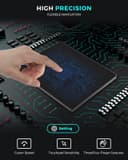
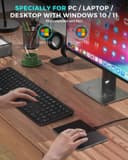
✨ Touch the Future of Navigation!
The Seenda Upgraded Trackpad features a sleek tempered glass surface and a sturdy aluminum base, designed for high precision navigation on Windows 10/11 devices. With multi-touch capabilities, two physical buttons, and a hassle-free USB-C connection, this trackpad enhances your computing experience while ensuring compatibility with a wide range of PCs.


| ASIN | B0CQT7QHRX |
| Additional Features | Ergonomic Design, Multiuse, Touchpad |
| Are Batteries Included | No |
| Are Batteries Required | No |
| Best Sellers Rank | #141 in Computer Touch Pads |
| Brand | seenda |
| Button Quantity | 2 |
| Color | Black |
| Compatible Devices | Personal Computer, Windows |
| Connectivity Technology | USB |
| Customer Reviews | 3.7 3.7 out of 5 stars (80) |
| Hardware Platform | PC |
| Item Weight | 0.31 Kilograms |
| Manufacturer | seenda |
| Movement Detection | Optical |
| Operating System | Windows 10, Windows 11 |
| Power Source | USB-C Wired Touchpad |
| Unit Count | 1.0 Count |
B**E
tired of T-650 issues? Consider this one.
I'm on my *third* Logitech T-650. Those are great when they work, but when they start to flake out, not so much. I had two side-by-side, when one flaked, I'd use the other. So I wanted something similar but *wired*. This trackpad fits the bill. About the same width, shorter front-to-back, but I never use that top part of the T-650 so it doesn't matter (to *me* - you might feel differently). The 'feel' of the surface is a little different, took me a day to stop noticing. Plug and play, no special app, but the Win10 'mouse' controls work fine. Unlike the stock T-650, text scrolls *with* your finger motion (as opposed to with the slider). I had to keep setting this in the Logi app as I wanted this behavior - and it kept forgetting. The trackpad actually clicks down a bit in the lower corners (right and left click) not special areas as the illustrations seem to imply. About the same as the T-650; the logi has buttons *under* the pad, but mechanical click is the same. The same quick double tap to left click on both. No idea how this compares with the not-upgraded seenda trackpad as this is my first (hopefully last) of these... :-) I'm happy with this one.
M**L
Excellent tracking and scrolling, but clicking is inconsistent.
Light taps don't always work, and hard press "clicks" are also a little hit or miss. So, I find myself switching back and forth between this thing and a standard mouse, depending on the program I'm using and how important it is to register a click accurately. The device was plug and play with Windows 11, no drivers required. There are some flaws here, but to be honest, there aren't a lot of good alternatives available, and this thing is reasonably priced, so I'm still giving it four stars.
R**L
Tap-to-click is buggy, everything else works fine
Tap-to-click doesn't always register the tap, sometimes requiring another or multiple taps regardless of where on trackpad I tap. Some areas are more consistent about registering a tap (i.e recognizes on 1st or 2nd attempt). The laptop trackpad does not have this issue. Despite lack of tap-to-click unsensitivity, sometimes the trackpad is overly sensitive. It drags when I don't want it to (same, common issues with laptop trackpad). All other gesture commands work fine. Apple user who has to use PC for work. I prefer the hand gestures and tap-to-click over a mouse.
K**N
Very Poor Support. TOuchpad does not work, appears to be software error
October 8, 2024 Serious problem dealing with this Company. Have been trying to get Technical Support since cannot get Touchpad to work with Computer. Emails back and forth. They do not seem to be able to read and understand the emails. So I have their product, apparently not damaged but it will not work when connected to USB Port on Toshiba Laptop. This Company does not provide phone number to speak with any support and the email Support is assigned to a person identified only as Mia who does not understand. So Customer is left with nothing. Will continue to try to get help from Amazon. Be careful purchasing from a Company that does not have an adequate support and no way to call them from United States. Amazon has no phone number in US for this Company. Getting help from Amazon is also difficult since calls go to India where few answers are to be had.
G**T
I am really impressed
I had my doubts about this when I read some reviews. I just started using it and it is very responsive and zero lag time at all. The surface feels great and just like the Apple trackpad. The only thing I wish was better was being able to click anywhere and not the bottom corners. Even the corners take a fair amount of pressure. Tapping and the gestures do work fantastic. That works better the actually pressing the corners. Looking forward to using it more.
H**P
Overall, great tech to have
The only issue is that I only bought 1, I should have bought 2 for work computer too. I really like this trackpad. I bought another brand but that was too plasticky so that was returned. I'm sticking to Seendas touchpad. Maybe Seenda can also make a wireless version where the left and right click area are placed on the upper end. I think that would be more comfortable. Overall, great tech to have.
M**R
Works with linux!
I'm happy to report that this worked out of the box with my Ubuntu 22.04 (linux) laptop, plugged in to a USB-C to USB-A hub. It is slightly smaller than the Apple Magic Trackpad 2 it's replacing. I think another reviewer noted that the surface isn't quite as smooth as the Magic Trackpad, which I guess is true, but not to any extent I would have noticed if the reviewer hadn't pointed it out. My only real complaint is that the click-sensitive areas are only in the lower-left an lower-right corners rather than the whole surface like the Magic Trackpad; it means more wrist motion to do clicks. (Unless you turn on tap-to-click in your system settings, but that always leads to stray clicks for me.) On the other hand, the seenda pad doesn't have an embedded battery that will swell up after a few years and create a fire hazard so overall I'm happy with the trade-off!
J**I
Died after 5 months
So, while it worked I really liked this. I’ve never liked using a traditional mouse and I loved the extra functionality of using the hand gestures to navigate the ui on my computer. It’s true to actually press the left and right buttons was a bit stiff but mostly I just used tap to click which worked great. That being said, it died after 5 months which sucks.
Trustpilot
1 day ago
3 weeks ago