Desertcart purchases this item on your behalf and handles shipping, customs, and support to Kyrgyzstan.
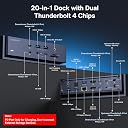
⚡ Elevate your MacBook setup with the ultimate 20-in-2 Thunderbolt powerhouse!
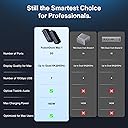
The iVANKY FusionDock Max1 is a premium 20-in-2 Thunderbolt 4 docking station designed exclusively for Apple M1-M5 MacBook Pro and Air models. It supports up to four 6K@60Hz displays, offers 40Gbps data transfer via four Thunderbolt 4 ports, delivers 180W power for sustained charging, and features a 2.5Gbps Ethernet port for ultra-stable networking. With professional-grade SD 4.0 slots and dedicated optical audio output, it’s the perfect all-in-one hub for demanding professionals seeking seamless multi-monitor setups and high-speed connectivity.


| ASIN | B0CP8SC22X |
| Best Sellers Rank | 14,874 in Computers & Accessories ( See Top 100 in Computers & Accessories ) 121 in Docking Stations |
| Brand | IVANKY |
| Brand Name | IVANKY |
| Colour | Midnight Blue (Max 1) |
| Compatible Devices | M1-M5 MacBook Pro, Air |
| Compatible devices | M1-M5 MacBook Pro, Air |
| Country of Origin | China |
| Customer Reviews | 4.3 out of 5 stars 657 Reviews |
| Hardware Interface | Thunderbolt 4 |
| Hardware interface | Thunderbolt 4 |
| Item Highlight | Quad 6K@60Hz, Dual 8K@60Hz Display, 4*TB4 Downstream Ports, 100W PD, 6*10Gbps, 2.5GbE, SD 4.0,Only for M1-M5 Pro/Max MacBook |
| Manufacturer | Shenzhen Velocity Technology Innovations Co., Ltd. |
| Number of Items | 1 |
| Number of Ports | 20 |
| Number of ports | 20 |
| Product Warranty | 2 years |
| Total HDMI Port | 2 |
| Total USB Ports | 7 |
| Total USB ports | 7 |
| Unit Count | 1.0 count |
| Wattage | 180 watts |
P**W
Fantastic to use with MacBook for multiple monitor setups, mouse moves flawlessly between monitors.
I tried so many hubs and docks before getting this one, others just didn’t work or required display-link software which just wasn’t right, moving the mouse was laggy, but this one is fantastic, mouse is smooth moving between screens, its so well made, heavy, it has plenty of ports to use, good power supply, heat levels are good, speed and compatibility with my MacBook m4 is spot on, its simple to use, it does require the use of the two thunderbolt ports on the mac but the dock has plenty spare, I've got two external displays via thunderbolt to hdmi port on monitor, if you want a third monitor you need to use the hdmi port to hdmi on monitor, this is extremely expensive but It accommodates all i need and wish i found this to begin with. I uses angle adapters so my cables point down coming out from MacBook and still works flawlessly, very much recommend for Mac users.
M**M
The Little Blue Box of Tricks
Update: 10-11-2024 - The replacement dock arrived the day after speaking to customer service, amazing! I have now had the new dock installed for a couple of months, and have only experienced a few disconnections, and I noticed they were specific to Solid State Drives or SSDs. It seems like an SSD compatibility issue as I have noticed SSDs can be flaky over time on other devices like my Samsung TV and PS5? My multiple regular magnetic hard drives do not have the same problem. So my conclusion is the dock works fine, but you may have occasional problems specific to SSDs disconnecting. Power recycling the dock reconnects the SSD. Dual monitors, Hard drives, keyboard & mouse, card readers, USB C, A, and Thunderbolt work fine. Overall still a good product. Back to 5 stars for the excellent customer service. Update: 10-09-2024 – Random Disconnections Some reoccurring issues to update on. I have a Macbook Pro M3 Pro 2024. I am currently using all of the 3no rear USB 10Gbps ports, the 2.5 Gigabit port, Dual monitors HDMI and rear USB-C 40gbps, the two upstream USB-C ports, and the front USB-C PD port. I have had the dock running 24/7 for just over a month now, and for the most part it has been fine albeit running a little warm for my liking, but not too hot to touch. However, during that time I have experienced some random disconnections of 3 external hard drives connected to the USB ports, while the monitors, keyboard, and mouse are fine. When this happens there is nothing else for it other than to power cycle the dock, and then the drives reconnect without a problem. This is annoying, especially when carrying out a large data transfer only to find that it has been interrupted because the dock disconnected midway through! The disconnections have occurred at least 3 times over a period of 5 weeks, so I decided to contact Ivanky and seek a solution. Ivanky responded the within 24 hours, and sent me a link to download the latest firmware to update the dock. As an IT professional I have carried out numerous firmware/software updates however, I could not get the firmware setup to initiate, I kept getting an error saying that the file was either damaged or corrupted? (This was the same error that I got with an earlier version of the firmware, when I attempted an update after I first got the dock)? Despite searching on Google/YouTube I could not find any solutions or workarounds to update the firmware. Eventually I gave up and contacted Ivanky again, they responded within 48 hours. Ivanky suggested exchanging the dock FOC for a new one, which I agreed to. I am waiting for Ivanky to get back to me with the shipping details. Although pleased with the dock's overall build quality and operation, I cannot ignore the random disconnects. I'll update on how the exchange goes and the performance once the new dock arrives, and I have soaked tested it for at least a month. Original review: This iVanky dock works like a dream, firstly it replaced my 100w charger, then I connected, a KVM, HDMI 4K monitor, USB 3.0 hub, GB ethernet, and 20w PD to a desktop wireless charger. Everything just works like a charm, no problems going into standby or waking up. Basically PnP, and forget. Top quality bit of kit.
D**S
Finally!
Finally, the (almost) perfect Thunderbolt dock! I'll start with the one negative, for some reason I didn't realise at ordering, it needs two TB ports. I thought Thunderbolt was invented so we could use one cable to replace all others? Anyway, I am using it with my Mac mini M4 Pro to drive 3 monitors, (4K, 2.5K and 1080P) and of course, use the SD card reader etc when at my desk. I now use my Mac mini as a modular portable workstation, with MY choice of keyboard and portable monitor. All for 1/2 price of a MacBook Pro but with more speed due to superior desktop thermals. In my car I run Mac mini off a solar charged battery, and in a hotel room or coffee shop, I ensure I'm sitting next to a mains socket! Back at my desk, I just plug Mac mini back into iVANKY! I wish Mac mini had USB-C power port so the iVANKI could power it too. 5 stars for the fact it works (Caldigit always had issues), it's built and looks lovely and the documentation is outstanding. It even had a sticker over the rear panel to highlight issues those who don't RTFM should know before use! Clever. It's fast too, so I ask, would you like a quick iVANKY? ;)
M**N
Fantastic Premium Doc
I use a 16" M3 Max MacBook Pro in Clamshell mode connected to a Studio Display and 2 x 4K displays. I'd ended up with two Thunderbolt docks to support the screens, requiring multiple Thunderbolt connections to the Mac. In addition, I had to connect a 10Gbe interface to the Mac too. It kinda worked, but was clunky, and I found myself having to reboot often when things went wrong. Then along comes this dock. I now have the two Thunderbolt ports connected to the dock, with the 3 displays and the 10Gbe interface all connected to the dock. So far, it works really well. One thing I found which is perhaps obvious but not obvious to me for a bit, is that I'd started out with the 5K studio display, a 4K display, and the 10Gbe adapter on one Thunderbolt feed - I was getting poor performance from the 10Gbe adapter there. By moving the 10Gbe adapter to a port that shared the Thunderbolt feed with the one other 4K, the 10Gbe interface was back up to speed. The ports on the front - USB A & C - are fast too. All in all really impressed with the unit. Certainly feels solid, and doesn't appear to get hot. Downsides? Well, the cost is a bit gulp, but then it's very, very capable. Very impressed. 4/5 mainly due to cost - if that isn't an issue for you, you'll get a fantastic piece of equipment with this.
O**E
Amazing customer service.
CUSTOMER SERVICE DREAM. I’d give more if I could. I noticed after 3 months of daily use one of the ports was faulty. At first I was a little upset that one had maybe slipped through QC. I use the hub as the main link of a studio system that is used daily so being without it while do-able means a load of cable re-routing and it would be a headache. I reached out to the customer service team and they sent over a replacement straight away no questions asked. It arrived quickly and has been operating as expected since. Couldn’t recommend them enough.
S**L
Think before you buy...
Great functionality but sadly did not work for me. I cannot comment any further as it failed on a number of times. Also why it has two thunderbolt connectors? Should be operational through one cable like their competitors. Look at the Anker TB5 cube and Satechi cubedock. More functionality for your money. In my opinion also a bit too over priced for what this offers in comparison to others on the market. Sadly returned.
A**X
Exactly what I wanted
So to preface - I'm in between homes at the moment and this is a future investment for when I do move in to my new home and take my monitors out of storage. As a result I was only able to push it up to 3 monitors during testing, which won't be my daily set up to speak of long term use. With that out of the way, let's get started. The dual cables: I can see they've changed the dual cable design from a single thick braided cable with dual ends on both sides (as seen on various YouTube reviews) to what seems a cheaper two parallel cables design with the MacBook end merged into a dual connector. Without the previous cable on hand I can't speak for certain - but from the video reviews I'm pretty certain that the original cable's much shorter than the new parallel cable - which makes sense to me from a cost perspective. I think they're addressing the issue of cable length without losing too much profit margin. So the upside of the new cable is that it's a bit longer, though still not long enough for me to run the dock out of sight. Downside is, it's more unsightly, but I don't think we have much say in the matter going forward! I'm actually currently using a single much longer thunderbolt cable that I've already got - as again - I'm in between houses, and I'm running this longer cable under my bed where the dock is, which takes me to the next point... Single cable setup I've seen a few reviews (on the American Amazon listing) saying that some ports on their dock weren't working, and I'm curious if the fault is actually to do with their cable set up. As mentioned above, I'm running a single thunderbolt cable - but the point of the dock is that it has two thunderbolt chips to handle the dual cable link - so how does this work? Well I'm assuming that each port is just mapped to one of the two thunderbolt chips - and in turn thunderbolt ports, and they rely on you connecting the corresponding thunderbolt port on the dock to work. When I first connected my single cable setup, I was able to drive my audio interface and capture card fine via the USB-C ports; however when I plugged in my wireless mouse dongle into the first USB-A port I could find, it just didn't connect at all. After testing out the other USB-A ports, I eventually got it working, and when I swapped the thunderbolt port on the dock, I'd have to plug the dongle into the previous USB-A ports. I haven't done extensive testing, but with two memory cards plugged in, only one of them is available at any one time, with it swapping between the microSD and the SD slot depending on which thunderbolt port I connected to. Whilst I don't think this is relevant to everyone - it's a 'good to know' thing if you're driving a single cable like me, or more likely: experiencing connectivity issues - as it may just be that one of the cables isn't working. Monitors: I haven't done extensive testing beyond this point besides just plugging in my Display Tablet (USB-C), iPad via capture card (HDMI cable) and TV (HDMI) and they all worked fine. I really can't wait for my quad display set up when I move into my new house - but for now I'll continue on with the main screen only set up. Peripherals and everything else: I'm not a benchmarked - so you can look up YouTube reviews for those. For me, I've got my XLR mic, wireless mouse, capture card and an SD card connected to the dock at all time now and can access them through a single cable running from under the bed - so I'm happy. When I eventually have my full set up with external storage and other things, I'll be sure to come back with an updated review.
M**L
Excellent device, ***UPDATE***
Purchased this on 31st May 2025, for £339.00. ***Update*** 22.9.25 Having emailed iVanky directly ([email protected]) after attempting to contact them through their web portal, iVanky contacted me and the support was excellent, they asked for images/video of defect issue and sent out a replacement within 2 days. Very good service, even if it was frustrating that the warranty contact method indicated on the website didn't work, they responded very quickly once I emailed them. The new hub is working as it should, hopefully it will stay this way. (I have other iVanky items whcih all work well) So review is back to where it should have been, 5*. Thank you iVanky. ***Original review*** This is a great device, making connections to Mac peripherals and monitors so much easier than multiple dongles/cables. Thunderbolt connections to Mac and to T/Bolt drives, monitors, USB devices, Ethernet and more all work seamlessly. Expensive, but probably one of the best docks available for the Mac. UNTIL IT STOPS WORKING. Unfortunately the ports on the front panel, especially the upper row have stopped working completely. Have tried different cables, configurations, a process of elimination all with the same issue. I don't use this with all ports connected, and the idea is that once it's set up, you forget about it and the connections and it is supposed to work. Which it did for about 3 months. I have reached to to iVanky support twice over the past few weeks, but unfortunately have had no response or reply. Have checked junk email boxes as well, just in case. £339 is a lot of money for something that stops working as it should after just 3 months hence the 1 star, and with no reply from manufacturer. This was really good until it wasn't. I accept that there will always be some defective items in any manufacturing process that slip through the net, but no response to a warranty request is not acceptable. Buy at your own risk, sadly.
M**E
FusionDock Max1
De Fusion Dock heeft mijn werkervaring echt verbeterd! Niet alleen is het een geweldige aankoop, maar de support die je ontvangt bij vragen en problemen is perfect. Kortom, ik ben zeer tevreden met mijn Fusion Dock en kan het ten zeerste aanbevelen aan iedereen die op zoek is naar een betrouwbaar en veelzijdig apparaat voor je MacBook.
A**N
Toppkvalitet
Stilren, grym byggkvalitet och snabb.
P**N
works great, high quality product
This is a very high quality and well engineered product. If you are doing any media production tasks and have a lot of peripherals this is well worth the money. I wish I had got one ages ago. Mine is plugged into two Apple 27" Studio Displays, several 10Gbps media devices (camera, teleprompter) and a wide variety of USB 2.0, 3.0, 3.1, 3.2 peripherals. I ran a bunch of tests on the iVANKY to verify there were no bus contention issues and ended up finding a firmware bug in an Elgato Stream Deck pulling USB bus speeds to USB 2.0 (480Mbps). The iVANKY had no such issues and helped me isolate this device.
D**E
Uitstekende Dock voor een nieuwe M4 Mac mini
In tegenstelling tot de ook goede CalDigit Dock (teruggestuurd), verliest deze dock niet continue de connectie met aangesloten USB devices wanneer de computer uit slaapstand ontwaakt en werken diverse USB dongles (muis, keyboard) wel. Goede verdeling van poorten voor en achter (echter verwarrende en niet standaard poort indicatie) en razend snel (door de 2 afzonderlijke thunderbolt 4 connecties)!
Z**Z
iVANKY FusionDock Max 1
Dok do komputera MacBook Pro Max z M1. Urządzenie dość drogie, ale spełnia wszystkie moje oczekiwania. Jest OK
Trustpilot
1 month ago
3 weeks ago