Buy anything from 5,000+ international stores. One checkout price. No surprise fees. Join 2M+ shoppers on Desertcart.
Desertcart purchases this item on your behalf and handles shipping, customs, and support to Kyrgyzstan.
🚀 Elevate Your Screen Game Anywhere, Anytime!
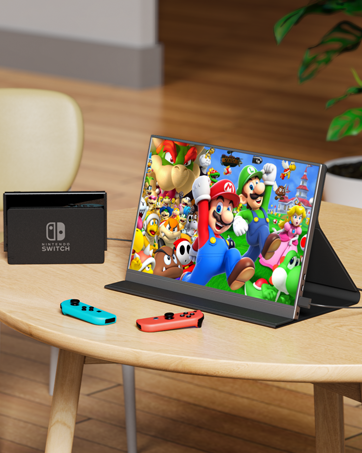
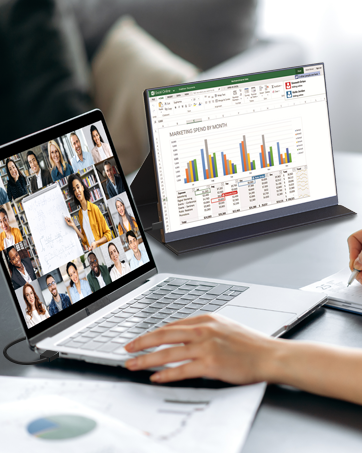
The MagicRaven 14" Portable Gaming Monitor delivers a premium 2K IPS display with HDR and FreeSync, perfect for professionals and gamers seeking enhanced productivity and immersive visuals on the move. Featuring dual USB-C and HDMI ports, a featherlight design, and a smart protective cover, it’s engineered for seamless plug-and-play use across multiple devices, backed by reliable warranty and support.



| ASIN | B0CL948YH3 |
| Adaptive Sync | FreeSync |
| Additional Features | Portable |
| Aspect Ratio | 1.50:1 |
| Best Sellers Rank | #8,824 in Computers ( See Top 100 in Computers ) #301 in Computer Monitors |
| Brand | MAGICRAVEN |
| Brightness | 300 Candela |
| Color | multi |
| Color Gamut | 100 |
| Compatible Devices | Computer |
| Connectivity Technology | HDMI |
| Contrast Ratio | 1500:1 |
| Customer Reviews | 4.2 4.2 out of 5 stars (376) |
| Display Resolution Maximum | 2160x1440 Pixels |
| Display Technology | LCD |
| Display Type | LCD |
| Hardware Connectivity | Thunderbolt 3, Thunderbolt 4, USB 3.2 Gen 2, USB 3.2 Gen 2×2, mini HDMI |
| Has Color Screen | Yes |
| Item Dimensions D x W x H | 1D x 22.2W x 30.6H centimeters |
| Item Weight | 1.56 Kilograms |
| Manufacturer | MAGICRAVEN |
| Model Name | M140001 |
| Model Number | M140001 |
| Mounting Type | Desk Mount |
| Native Resolution | 2160x1440 |
| Number of Component Outputs | 3 |
| Picture Quality Enhancement Technology | HDR, FreeSync |
| Refresh Rate | 60 Hz |
| Resolution | QHD Wide 1440p |
| Response Time | 1 Milliseconds |
| Screen Finish | Glossy |
| Screen Size | 14 Inches |
| Shape | Flat |
| Specific Uses For Product | Gaming, Productivity |
| Total Number of HDMI Ports | 1 |
| Total USB 3.0 Ports | 2 |
| Total Usb Ports | 2 |
| Viewing Angle | 178 Degrees |
G**Y
Only one cable needed, works as described
Love the portability, pixel density, aspect ratio, and that you don’t need a power source besides the laptop through usb-c (transfers both data and power).
N**N
Crisp Clear 2K Display at very competitive price
High quality 2K (2160 x 1440) screen providing a crisp clear display for less eyes strain. It provides larger area for content display compared to FHD (1920 x 1080) display. The best part is its lower price compared to similar products in the market. You can get 1 year extended warranty (total 2 years) by sending your purchase details through email.
A**A
It was good when it was working
i bought this 7 month ago and i didnt use it that much, it was good and now its not working no displaying UPDATE: i really appreciate their customer service , they were so helpfull and supportive and solved the issue , Big thanks.
M**D
Amazing external display
Excellent quality and exceptional equipment have recommended this monitor to all my friends
D**S
Defect with less than 2 months
The screen is already show defect with less than 2 months of use, And I can’t return it, I just lost money buying it, be careful, dont buy it! Its not safe!
S**B
Easy to carry and easy to use
It’s a very good option for sites work
M**E
Very Good Quality
Love this Monitor. I has sharp and very colorful and bright graphics. Controls could be a little easier, but once I got used to them, it works just fine. It is super lightweight and slim, so that is also a definite plus.
E**A
Good picture quality
Picture quality is good. Brightness is also good. But its too thin. I hope it will last long.
N**A
Excellent. Only old window machines touch screen will not support
D**O
Muy buena compra. Creo que la imagen del monitor es más nítida y de mejor calidad que la de la pantalla de la laptop propia y cumple muy bien con su función. Tiene buena calidad y volumen del sonido y la funda o protector que trae es la que sirve como pedestal para poder apoyarlo. Definitivamente recomiendo comprarlo.
T**Y
I like this monitor so much I bought a second one. At times I run a laptop in the middle and portrait mode on each side. The magnetic cover is very useful but the magnetic connection at the back could be stronger. I like that 1920x1200 ratio (16:10). Having those extra 120 pixels helps a lot over the standard 1080p monitor. It's bright with no color shift in portrait or landscape mode. Looks pretty identical to the macbook 16" pro monitor. They line up nicely when put next to each other. Love the flat solid back too. It's not as thin as the 1440p version but has vesa mounts and fits nicely stacked on top of a laptop or anything else. I do wish for two things. 1) Make it with all the buttons and connectors on the same side, this would let me put it in portrait mode without having to put something under the edge to keep the pressure off the connector or buttons. 2) Make mirror models. IE same exact monitor but connections on the left side instead of the right. Then I could buy one of each type and have the perfect setup. Especially for the price this is the monitor to get if you need a usb-c single cable powered monitor. IPS screen and great resolution.
J**Y
Wow I am very impressed with this monitor for the price and the overall value. There were not very many options for a 17.3" 2.5k monitor. Sure there's some gripes I have with it, this certainly isn't a perfect monitor when it comes to functionality. So that's why I wanted to give a really honest review for those interested in purchasing one. The Good: 1. The screen size, the 17.3" vs the 16" is a huge difference and I was so glad that I opted for this size. There's another 16" 1080p that someone else uses and it is significantly smaller. There is slimmer profile options in this size but I like the thickness of this model moreso than the thinner versions. 2. Travel: I got this for travel and it fit perfectly fine into my large backpack that I pack my tech in. 3. Setup: The setup is very straightforward and the colors at first before turning on HDR are really not great. So make sure to either turn on HDR or custom set the settings to your desired color. 4. I/O or Ports: USB-C PD works perfectly on my M3 Pro MBP no need to use the power cable. HOWEVER when using Adobe programs I do opt to plug in the power supply. This has a full size HDMI port which was another big reason I chose this model, I just didn't want to have another adapter dongle for mini HDMI. I am using a 4k HDMI cable that's connected to my PS5. 5. Gaming: I was worried about two things here - this only being 60hz and the overall quality being 2.5k with my PS5 but after playing Jedi Survivor, Genshin, and Star Rail, it looks fantastic and glad that I didn't fork out double the price for the 4k versions. There's 0 noticeable latency with controller input and the environment colors and battling look great. The PS5 will make you calibrate the screen upon the initial plugin only and not anytime after. The Bad or The Meh: 1. The buttons on the side panel can be a bit frustrating to use sometimes but they all work and you don't really mess with them much. Switching inputs can be interesting BUT when I open my MBP it automatically turns on to correct input and same with the PS5. It is only when you want to change input after the fact that it can be a challenge pressing the correct buttons. 2. Magnet Strength - The magnet strength on the cover itself is just OK, I haven't had the screen fall using the cover but it does leave something to be desired. To fix this I just use my KABCON tablet stand and it holds it beautifully. 3. Smart Cover Protection - The protection is just OK, it will protect against scratches but not against crushing so be sure not to put it in a super stuffed backpack. I would suggest finding a zippered hard EVA case if they make one. 4. Mac screen compatibility - So this kind of caught me off guard but I know has some issues with the aspect ratio of this being 16:10. It scales natively to 1280x720 when I plug it in and the text is readable but everything is HUGE. When I change to 2560x1440 the text on the screen does some weird blurry crap. It's tolerable but it's not preferred so I switched back to 1280 x 720 and actually I don't mind it now since I don't have to sit so close to the screen. But I can see this being an issue for many people. Tips: 1. Get right angle HDMI and USB C adapters to use so the cords aren't sticking out awkwardly on the right side. This makes plugging in much easier and gives an overall cleaner look. You can see them in use in the photo. 2. Use a tablet stand - My recommendation is the KABCON tablet stand. Ive had it for years and it's very sturdy with many angle options. The build quality is really unmatched. It's not on a stand in the photos because my iPad is using it when I took the photos. 3. Cables - Use cables that are least 3ft. I have 6ft cables and this works out the best. Cord wraps will help organize things so it's not a big mess. Also I'm using a Thunderbolt 3 cable for MBP connection. Make sure you use the correct USB-C cables they are not all the same! For HDMI a 4k cable is probably overkill but better safe than sorry. In conclusion despite the minor gripes I am very satisfied with this monitor and have no remorse in purchasing it. The biggest factor will be how long it lasts. Ideally years would be nice but if I at least get two years out of it then it will have paid for itself. Can this be used as a main monitor for those looking to be budget conscious? YES this is very possible to use for that. Coming from a BenQ 32" 4k to this for travel I'd say this was a great and easy solution without much sacrifice. Also for console gaming this is an excellent choice you don't really need 120hz unless the actual game you're running supports it. So I highly recommend this product if it fits your wants and needs!!!
R**O
Ya no se enciende despues de 1 anho justo!!!! Me ha funcionoado bastante bien aunque a veces se apagaba y tenia que desconectarlo del cargador y volver a conetcarlo....Pero justo despues de 1 anho de uso...se murio...Ya no se enciende!
Trustpilot
2 months ago
1 month ago