Buy anything from 5,000+ international stores. One checkout price. No surprise fees. Join 2M+ shoppers on Desertcart.
Desertcart purchases this item on your behalf and handles shipping, customs, and support to Kyrgyzstan.
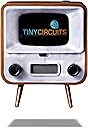
📺 Tiny Screen, Huge Vibes: Retro Cool in the Palm of Your Hand!
The TinyCircuits TinyTV 2 is a portable mini TV featuring a vibrant 1.14-inch IPS screen, preloaded with video channels and supporting custom MP4 uploads via USB-C. It offers tactile rotary knob controls plus a compact remote, powered by a rechargeable Li-Po battery delivering up to 2 hours of playback. Ideal as a nostalgic collectible, desk accessory, or unique gift, it blends retro aesthetics with modern convenience.


| ASIN | B0CMSGKMBC |
| Additional Features | Tiny |
| Antenna Location | Home Viewing, Desk display; collectible use; novelty gift; personal entertainment |
| Aspect Ratio | 16:9 |
| Audio Input | USB |
| Audio Output Mode | Stereo |
| Battery Type | Li-Polymer 3.7V, 150mAh, about 2 hours of video playback |
| Best Sellers Rank | #12,510 in Electronics ( See Top 100 in Electronics ) #7 in Portable TVs |
| Brand | TinyCircuits |
| Built-In Media | Remote Control |
| Color | Brown |
| Compatible Devices | Television |
| Connectivity Technology | USB |
| Connector Type | USB |
| Contrast Ratio | Good |
| Control Method | Remote |
| Controller Type | Hand Control |
| Customer Reviews | 4.5 out of 5 stars 324 Reviews |
| Display Backlight Technology | LED |
| Display Refresh Rate in Hertz | 60 |
| Display Size Class | 1 Inches |
| Display Technology | LCD |
| Hardware Interface | USB Type C |
| Has Color Screen | Yes |
| Item Dimensions D x W x H | 1.1"D x 1.5"W x 1.9"H |
| Item Type Name | Electronic Handheld Game |
| Line Voltage | 110 VAC 60 Hz |
| Manufacturer | TinyCircuits |
| Memory Storage Capacity | 16 GB |
| Mfr Part Number | ASK4004 |
| Model Name | TinyTV 2 |
| Model Number | ASK4004 |
| Model Series | ASK4004 |
| Model Year | 2024 |
| Mounting Type | Table Mount |
| Number of Batteries | 1 Lithium Polymer batteries required. |
| Number of Component Outputs | 1 |
| Refresh Rate | 60 Hz |
| Remote Control Technology | Infrared |
| Remote Required Battery Size | CR2032 |
| Resolution | 216x135 |
| Response Time | 16 Milliseconds |
| Screen Finish | Matte |
| Screen Size | 1 Inches |
| Signal Format | NTSC |
| Size | Mini |
| Speaker Description | 16x9mm (0.6 x 0.4) front facing speaker |
| Special Feature | Tiny |
| Specific Uses For Product | Playing preloaded and custom uploaded videos; desk display; collectible miniature electronics; novelty gift; diorama or dollhouse accessory |
| Standby Power Shutoff | Average |
| Total Audio Out Ports | 1 |
| Total Usb Ports | 1 |
| UPC | 852844005662 |
| Video Encoding | MP4 |
| Warranty Description | 3 Month Warranty Against Manufacturer Defects |
| Warranty Type | Limited |
| Water Resistance Level | Not Water Resistant |
| Wireless Technology | Infrared |
W**.
A gorgeous miniaturized TV
I recently purchased the TinyTV 2 as a gift and decided to add a personal touch by doing some paintwork and loading a few videos. This customization enhanced the already charming, miniature design of the TinyTV 2, which cleverly mimics the style of old-fashioned TV boxes in a functional, scaled-down version. While it's not a traditional TV since it plays preloaded videos, the capability to watch videos with sound on such a tiny device is quite remarkable. The video and color display quality of the TinyTV 2 is notably impressive. Even with a small internal speaker, the sound output is decent and sufficiently clear for its compact size. When it comes to pricing, the TinyTV 2 leans towards the higher side, particularly if you consider the cost of individual components like the screen and the RP2040 microcontroller. But what you're paying for is not just the parts but the entire design and experience of a miniaturized TV. Tinycircuits has developed an app for video conversion that performs admirably. It handled all the video formats I tried and offered enough options for final tweaks. However, there are some limitations. The app is available only for Windows and Mac, which posed a slight inconvenience for me as a Linux user. Although it runs acceptably via Wine, a dedicated Linux version or at least a command-line interface tool would be a significant improvement. The app appears to be a front for FFmpeg, yet this is only briefly mentioned in the forums. Clearer documentation or guidance from Tinycircuits on using FFmpeg directly for video conversion would be beneficial. For enthusiasts of miniaturized gadgets, the TinyTV 2 is undoubtedly a delightful discovery. Originally bought as a gift, its charm and functionality have left me seriously considering getting one for personal use.
R**H
This thing is so cool and such a joy
Around the late 90’s or early 00’s my friend’s mom had a small battery powered TV that we brought with us on a road trip. It barely worked and the battery didn’t last long BUT I just thought it was so cool. This memory prompted me to look up small televisions on Amazon to see how much technology has advanced since that long ago road trip. That’s when the MiniTV popped up! After a bit of research I ordered one and I could not be happier. It just oozes the sort of comfy, warm, and nostalgic vibe that I love. Like grandma’s old TV that she still uses. Except this thing is packed with awesome features. The dials work on the tv and the little remote is fully functional. The picture is clear and crisp with good sound output considering the size. It comes pre-loaded with some stuff on it (my favorite is tue Gumby channel or the fireplace channel) but with a usb-c port on the back you can connect it to your Windows or Mac and use their app to upload your own videos on the TV. You can also stream some services like Netflix to the tv screen when the cable is still connected to your computer. I really enjoy showing it off to people when they come over, everyone is always really impressed when I show them how functional it actually is. Also, it has a pretty good battery-life. Obviously this isn’t something most people are going to want to use as their primary tv or streaming device to watch all the time. This is sort of a niche thing that is meant to be a cool thing to show off to people or to have in the background when you’re just chilling. I personally like falling asleep with it playing on my nightstand or streaming a favorite movie or show while I’m relaxing or doing something in my room. If this is the kind of cool little thing you like to collect or have around your house then I can’t recommend it enough. It’s very well made and clearly created with care and quality- not churned out by the thousands in some far-away factory. For around $50 this is an awesome product and more than worth the price for the quality and the enjoyment it has given me.
J**E
Take your time and enjoy.
IT WORKS! The tv is perfect...but. The directions are few. To add videos You have to go to the site online,as noted in description of the item on Amazon. Then download their software to convert the video you want to enter to the tv. The connection from tv to computer is pretty simple,do not expect announcements that it is connected,just observe it like you would with a thumb drive.The remote has to face the TV, I got that wrong and turned it around and it worked.It already has some videos on it,each video is a new channel.Sound is controlled by knob that works on tv and buttons on remote. TV charges vis USB connection to rear of TV.
F**3
A Real 0.9" diagonal color TV...with sound!
I am happy with my purchase. This "TV" does what they say. It makes a tiny picture. The image quality is as good as it can be when the screen is 0.9" diagonal measurement. It has good color and brightness. That's the best part. The audio is mostly poor. A single voice is tolerable, but music is bad. You shouldn't purchase this expecting to use it for videos that depend on sound. You have to download a "Converter" app from TinyCircuits to process any video you have to play on the TV. You transfer the converted ".AVI" videos from a computer onto the TV directly, the same way you would copy a file to a USB flash drive. The unit charges via a standard USB C connector. A button on the top turns it on and off. The "right" button on the front rotates to advance from one stored video--the channels--to the next. This works well. BY THE WAY: The first time you select a video via the front knob, it starts playing. But if you select the next channel while the current video is halfway through, it pauses at that position. So when you eventually select through all the videos and return to that specific video, it resumes playing from the middle. If you want your videos to start from the beginning each time you select a video, you have to watch the video ALL the way through and then "change the channel". It is clear the designers did not think "beginning/middle/end" was a useful concept for videos the TV plays. The left button controls volume. To be accurate, the choices are "not loud enough", "audible" and "too loud (distorted)". I worked in audio business my whole career. I can say this is the best you can expect the sound to be from something this small, where the primary purpose is to make a good quality video image. The remote is a tiny black square with no markings. The prominent button in the corner turns it on, but a second press doesn't appear to do anything else, certainly not turn it off. The other four buttons make a little symbol appear on the screen, but my 70+ year old eyes couldn't tell what the function was. The buttons also require a fairly firm button press. I cannot see value in the remote, but that could just be me. It took me a few minutes to navigate website to download the converter app, but it works well, at least after converting one Sumo video I thought would look cool on the TV. The fireplace video is the star of the included videos, since it works well on "infinite repeat" See my video for sumo on the TinyTV2. Don't judge the video quality from my old Sumo video. The TinyTV2 makes a much better picture with a good quality video clip. I just wanted to have something to show my friends that expect me to promote Sumo.
M**N
Its great ,looks great, sounds great.
So freaking awesome I love it. 10 hours of any thing to download, and pre-programmed cartoons like when I was a kid! Gummy too. Its great! Highly recommended.
A**W
Amazing little functioning TV
What a cute gadget? It's amazing that something so small has such a good picture? The TV is easily loaded with .avi videos. There is 4.37GB of storage and a 30min .avi uses ~240MB so that should give you an idea of how many videos you can load. If your videos are of .mp4 format the online video converter at the tinytv website can convert them to fit the little screen. I glued 2 small magnets onto the back and now it's a refrigerator magnet. Makes a great conversation piece. I loaded the candy maker episode of I Love Lucy on it. The sound isn't very loud and distinguishable in a noisy room but it's there. Picture quality is much better than I imagined and setup was a breeze. It's all plug and play. There's a power button on the top of the TV and you must power on the tv after connecting it to your computer so your computer can access the storage and assign a drive letter. From there you just drag and drop .avi videos. The size is ~ 2in high by 1.3 inches wide by < 1/2 inch deep. This would be great for someone into miniatures/dollhouses.
D**E
Just go ahead and do it
This lil dude is so dope. The SD card that comes with it can hold about 8 movies or so, you can upgrade it though! I put a 124gb in one and now has 80 channels of movies/shows/game playthroughs with excessive room. You also have to download a converter off their website, thats real easy to use and not shady. Sound gets pretty loud if you click the audio enhancement on the converter. Only knock is the time it takes to transfer over to the tv, hours sometimes depending on size, but alot quicker if you open tv up and take out the microsd, plug that straight into the computer and move files over.
V**A
Could use better instructions
I got a few of these as white elephant gifts after seeing it on NYT's Wirecutter. I thought it was cute and nostalgic, so I got one for myself as well. There are practically no instructions on how to upload my own videos. The tv comes with a few retro looking "programs" preloaded, but I really wanted to upload my own stuff, and there was no mention of how when I scanned the QR code. I went to the site where there is more information, but all it said was that if my computer didn't recognize the accessory, to use a different cable that's not just for charging. However, my computer did recognize the accessory, but then there's nothing else after. Also, I didn't think the remote worked, but the "instructions" address that. However the explanation is so vague and I'm still not sure how to make it active. It's very cute and fun little gift but beyond playing just the preloaded video (I like the yule log best), I can't figure out how to use it properly yet.
Trustpilot
2 months ago
1 week ago