Buy anything from 5,000+ international stores. One checkout price. No surprise fees. Join 2M+ shoppers on Desertcart.
Desertcart purchases this item on your behalf and handles shipping, customs, and support to Kyrgyzstan.
⚡ Snap, Secure, Streamline — Upgrade your network the smart way!
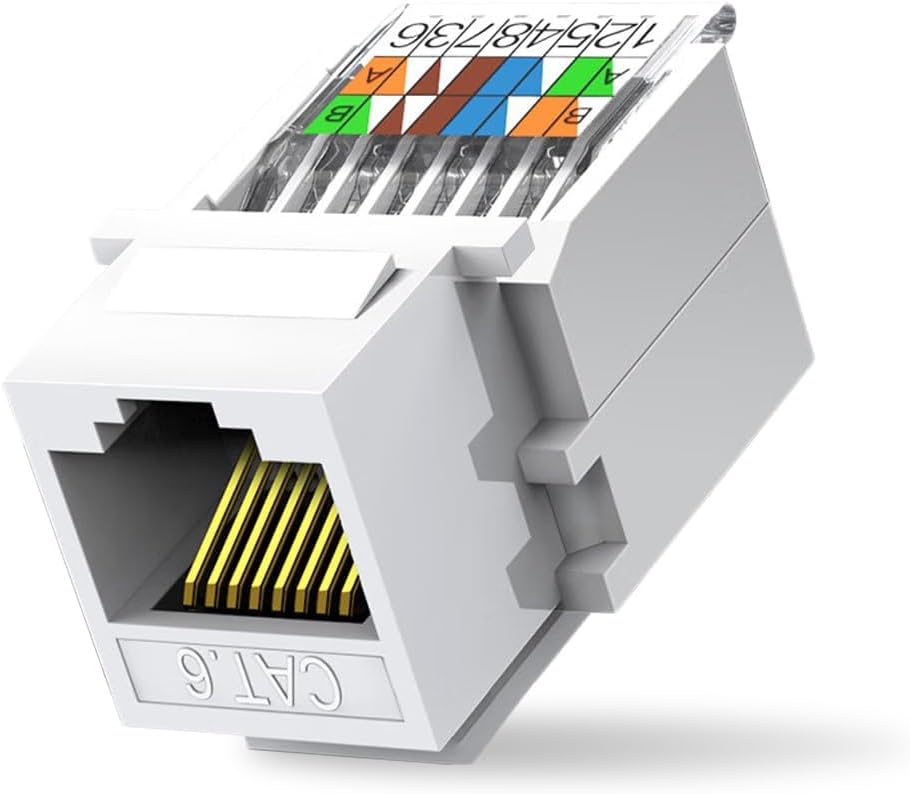
The ZOERAX 10-Pack Cat6 Tool-Less RJ45 Keystone Jacks deliver professional-grade, certified Cat6 connectivity with effortless tool-free installation. Designed for solid 23 AWG cables, these jacks feature gold-plated connectors and a dust-proof shutter for durable, high-speed Ethernet performance up to 1 Gbps with PoE support. Perfect for indoor office or home network infrastructure, they snap wires securely without punch-down tools, saving time and ensuring reliable connections.


| ASIN | B0CLV27V79 |
| Best Sellers Rank | #127 in Cat 6 Ethernet Cables |
| Brand | ZOERAX |
| Brand Name | ZOERAX |
| Cable Type | Ethernet |
| Color | White |
| Compatible Devices | Server |
| Compatible Phone Models | Likely compatible with smartphones, specific models not listed |
| Connectivity Technology | Ethernet |
| Connector Gender | Male-to-Female |
| Connector Type | RJ45 |
| Customer Package Type | Rigid Box |
| Customer Reviews | 4.4 out of 5 stars 413 Reviews |
| Data Transfer Rate | 1000 Megabits Per Second |
| Ethernet Cable Category | Cat 6 |
| Frequency | 250 MHz |
| Gauge | 26.0 |
| Included Components | 10pcs |
| Indoor Outdoor Usage | Indoor |
| Item Weight | 70 Grams |
| Manufacturer | ZOERAX |
| Model | bc9c78a5-7842-4592-b98a-727b2a3f6ad1 |
| Number of Items | 10 |
| Number of Pins | 8 |
| Other Special Features of the Product | High Speed |
| Part Number | MK-8039-010 |
| Recommended Uses For Product | building network infrastructure for indoor settings, such as offices or homes, and providing reliable Ethernet connectivity with PoE support |
| Special Feature | High Speed |
| Specification Met | Ansi/Tia/Eia 568-c.2 |
| Unit Count | 10.0 Count |
M**L
Quality and ease of installation
These were a perfect fit for my keystone jacks that were not working. 20 year old keystone jacks replaced with these. Works perfectly. Recommended for diy people. No tool required. Took 5 minutes to install.
K**C
Worked perfectly by following video instructions located to left of item on amazon product page
Just push 1 wire in at a time in the proper color coded order provided and close lid to lock in place and do same until all 8 wires are in and then leave lid closed after the last one. Just remember to push the wire in until you feel/see it go into the little hole at the end then push lid down to lock it. It only took me 1 try and i have never worked with cat-6 cables. Very easy. Excellent product. I used it for a new Reolink POE camera that has a built in ethernet connection. I already had a cat-6 wire in the wall but the original installer had cut off the the ethernet jack and ran the individual wires directly to my old style Doorbird doorbell camera which stopped working after 6 years.
M**W
Easy to use and works good.
Worked great for me. I did not install this into any type of faceplate so I can’t say anything on that. I can say I found the wiring to be extremely easy as compared to the standard RJ45 where all conductors have to be perfect and fitted into the RJ45 at the same time. Doing it one by one makes it so simple. Just follow the picture on the plug as the wiring is not standard from 1-8. The plug is set up kind of weird. Wiring 1/2 then 5/4, then 8/7, and 3/6. These are the 4 pairs but I have no idea why the manufacturer put them in this order. No biggie, just follow the pretty picture on the plug and the final outcome will be correct putting the conductors from 1-8 (internally). I was concerned that not using a punch down tool would not properly secure the conductors but I was surprised that they did not come out even when I was giving the cable a firm tug. Overall, very happy. I would buy again.
P**P
The 'Almost' Tool-Less Wonders: Unsung Network Heroes
Okay, let's talk about these keystone jacks. The product description promised 'tool-less' installation, and my inner lazy person rejoiced! Turns out, that's 'tool-less *for the actual termination*.' You'll still need to cut and strip your cable like a normal human being, unless you possess some kind of Wolverine-esque claw power for wiring. So, maybe 'less-tools' is a more accurate title? But honestly, once you've done the basic prep work, snapping these wires in is ridiculously easy. My previous encounters with punch-down tools usually involved bruised thumbs and muttered curses, so this was a welcome change of pace. In terms of performance, these little network ninjas are stealthy good. My network speeds haven't suddenly started doing the cha-cha slide, and signal integrity is as solid as my grandma's fruitcake (which is to say, incredibly dense and reliable). No weird dropouts, no mysterious lag – they just sit there, quietly doing their job, transmitting data with the stoicism of a librarian. For standard data, they're performing exactly as expected. Build quality feels robust; they don't feel like they'll spontaneously combust if you look at them funny. The gold-plated connectors look fancy, and the dust-proof shutter is a nice touch, though I'm not sure my dust bunnies care much for fancy shutters. It's only been a few weeks, so I can't comment on their willingness to survive the apocalypse, but so far, so good. The 'not compatible with patch panel' warning gave me a moment's pause, but for my wall plate setup, they clicked into place like they were custom-made. No wrestling matches, no forcing anything where it didn't belong. A glorious plug-and-play moment. And for a 10-pack, the price feels incredibly fair. You're essentially getting a small army of dependable, high-speed compatible network workhorses without having to sell a kidney. If you're looking to wire up your lair and appreciate efficiency (even if it means a *few* tools), these keystone jacks are a no-brainer. They're the unsung heroes of a stable home network – not flashy, but they get the job done without any fuss (or too many tools).
R**S
Tested and confirmed to work up to 1 G speeds.
This little guy is the solution to every CAT termination problem you will have in the field with wire that is either too thick or too thin to easily terminate. Toolless connection, no crimping, color coded. In use for months now with no drops or loss.
A**R
No strain relief.
It works best to locate each colored wire one or two at a time. The wire punch down panel on this connector works OK this way. Do not try to organize all the wires and punch down all at once. There is no strain relief, and individual wires can slip out from their punched down location. Try to center the data cable in the middle of the connector, and don’t tug on it. Good lighting, and a magnifying glass can help verify the proper assembly. A cable testing tool is a must. I am still struggling to get a successful switch connection. I fear that when I jam this cable into the electrical box, I will pull out a wire. Of course, this can happen with any data cable, but this model has been challenging my patience, and skill.
T**W
Use their color code or it will fail.
These are fantastic little connectors however after 6-7 tries using the typical connection color code I realized that it kept failing. I went to their color code on both ends and it works perfect. I know this seems like common sense but after doing so many connections and using the typical B termination color code it was a habit for me. So make sure you match their color code on both ends and it will work the first time.
L**E
A Little Fiddley, but They Work as Advertised
I used these to relocate my ISP modem, and they worked perfectly. The temptation is to try to put all the pairs in the jack and close the cover to punch them down all at once. Don't do that. Make sure the pairs are all cut to the same length. The wires can be inserted into holes at the top of the jack. Just insert the end of the wire into the hole at the top and bend it back into its slot. Insert the first wire and close the cover on it. Open the cover and insert the second wire, then close the cover on that one. Repeat that until you have all the wires punched down. Depending on the plenum-rated cable you are using, it might be impossible to close the cover to punch down all four pairs at once, but one at a time is no issue. I just used the wall plates I had on hand, which were from two different manufacturers, and these jacks snapped into them with no trouble. These are a little more expensive than the standard jacks that you can buy in bulk, so I might not use them for a big job, but they're perfect for adding one or two drops in a hurry. I'll keep a few in my tool bag.
L**.
Foolproof means to splice cable!
I used these keystones in a perhaps unorthodox way. Rather than crimp plugs on to the ends of the cable I’d just cut, I decided I’d save money and effort and instead buy these keystones. The plan was simple - I hadn’t cut an Ethernet cable before let alone crimp one, so in order to make it easier on myself and save money in the process I’d get something foolproof. I’m happy to say the mission was a success. I needed to cut a length of installed cable in the loft, connect a switch to both ends, then another device to the switch. In place of using Ethernet plugs and a crimping tool, I instead simply added one of these keystones to each end of the cut cable, then a new Ethernet cable from each keystone to the switch. It worked beautifully, with my cable tester showing all pins were connected as expected. As others have pointed out, you must wire up the keystone according to the colour coded diagram. I suspect they’ve done it this way so each colour pair is together, to make it easier for dummies like me. If you follow the diagram as shown you’ll have no issues with the wiring. The only negatives I can mention is that, if you’re completely new to this like me, you may think you’re going to break the plug when trying to lift up the transparent flap. Give it a good tug though, and it will open (don’t be afraid!). Also it’s very important to only do a couple of wires max at a time. My first go I tried all 8 and half of them just flopped out afterwards, so do a pair at a time and be sure to press down firmly. The other issue is that one or two keystones seemed a bit blunt on first use, which is not what you want when you need the core wires to make strong contact with the plug. I only needed two from the whole pack so I was fine in the end but YMMV. Over all I’d highly recommend!
A**O
Easy, Simple and practical, as expected, and without any surprises
Easy, Simple and practical, as expected, and without any surprises.
I**N
Compatible con cable de conductor trenzado
Funcionan perfectamente con cable de conductor trenzado. Fácil instalación sin usar herramientas
S**S
EASY DIY
I was able to DIY this. The only other tool needed was a cable stripper. Worked flawlessly
A**P
Weak plastic
Can't attest to their durability, clips broke when trying to remove them
Trustpilot
1 day ago
2 months ago