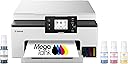
![Megatank GX1020 All-in-One Wireless Supertank [Megatank] Printer | Print, Copy and Scan| Mobile Printing |2.7" LCD Color Touchscreen | Auto Duplex Printing](https://m.media-amazon.com/images/I/61HpTe2PrGL._AC_SL3840_.jpg)
Buy anything from 5,000+ international stores. One checkout price. No surprise fees. Join 2M+ shoppers on Desertcart.
Desertcart purchases this item on your behalf and handles shipping, customs, and support to Kyrgyzstan.
📈 Elevate Your Office Game with the Canon Megatank GX1020!
The Canon Megatank GX1020 is an all-in-one wireless printer designed for high-volume printing, copying, and scanning. With the ability to print up to 3,000 black and white or color pages using a single set of inks, it combines efficiency with convenience. The 2.7" LCD color touchscreen and automatic duplex printing enhance user experience, making it a perfect fit for modern professionals seeking reliability and performance.


| ASIN | B0CHLD2P7B |
| Additional Printer Functions | Copy, Scan |
| B&W Pages per Minute | 15 |
| Best Sellers Rank | #8,401 in Office Products ( See Top 100 in Office Products ) #21 in Ink Tank Printers |
| Brand | Canon |
| Built-In Media | Documentation, MAXIFY GX1020, MAXIFY GX1020 Wireless MegaTank Small Office All-in-One Printer, Power Cord, Set Up Ink Bottles (GI-25: BK, C, M, Y) |
| Color | White |
| Color Depth | 24 bits_per_pixel |
| Color Pages per Minute | 10 |
| Compatible Cartridge | GI-25 Pigment-Based Ink Bottles (Cyan, Magenta, Yellow, Black) |
| Compatible Devices | Wireless-enabled Laptops, Computers, Tablets, Smartphones, Chromebooks |
| Connectivity Technology | USB, Wi-Fi® (Wireless LAN, 2.4/5 GHz, IIEEE 802.11b/g/n/a/ac), Wired LAN 100BASE-TX / 10BASE-T |
| Control Method | Touch |
| Controller Type | iOS |
| Customer Reviews | 4.2 out of 5 stars 289 Reviews |
| Display Type | LCD |
| Dual-sided printing | Yes |
| Duplex | Automatic |
| Global Trade Identification Number | 00013803359466 |
| Hardware Interface | USB |
| Ink Color | Black |
| Item Dimensions D x W x H | 14.8"D x 15"W x 7.4"H |
| Item Type Name | Inkjet Printer |
| Item Weight | 15.4 Pounds |
| Manufacturer | Canon |
| Maximum Copies Per Run | 100 |
| Maximum Copy Resolution Black and White | 600 dpi |
| Maximum Copy Resolution Color | 600 x 1200 dpi |
| Maximum Copy Speed Black and White | 15 ppm |
| Maximum Media Size | 8 x 10 inch |
| Maximum Print Resolution Black and White | 600 x 1200 dpi |
| Maximum Sheet Capacity | 250 |
| Maximum print Resolution Color | Up to 600 x 1200 dpi |
| Model Name | MAXIFY GX1020 |
| Model Number | 6169C002 |
| Model Series | MegaTank |
| Number of Drivers | 1 |
| Number of Ethernet Ports | 1 |
| Number of Trays | 1 |
| Other Special Features of the Product | Energy Star, Touch Screen |
| Output sheet capacity | 250 |
| Paper Size | Cassette: LTR, A5, B5, A4, 4" x 6", 5" x 7", 7" x 10", 8" x 10" Custom Size: 3.5” - 8.5” / Length: 5.0” x 14.0” |
| Power Consumption | 21 Watts |
| Print media | Envelopes, Glossy photo paper, High-resolution paper, Paper (plain) |
| Printer Connectivity Type | USB, Wi-Fi® (Wireless LAN, 2.4/5 GHz, IIEEE 802.11b/g/n/a/ac), Wired LAN 100BASE-TX / 10BASE-T |
| Printer Output Type | Color |
| Printer Type | Inkjet |
| Printing Technology | Inkjet |
| Processor Count | 1 |
| Resolution | 600 x 1200 dpi |
| Scanner Type | Flatbed |
| Special Feature | Energy Star, Touch Screen |
| Specific Uses For Product | Home and Office Document Printing |
| Total Usb Ports | 1 |
| UPC | 013803359466 |
| Warranty Description | 3 year |
| Warranty Type | Limited |
| Wattage | 21 watts |
H**T
Great little printer came just in time
Had to do a bunch of copies for job and family services for disablity. This is why I wanted one cause SSI and such always want new records and new info. The day I got it had to have a bunch of paperwork turned in on the 30th..copied them all no problem..could not tell which one was original or the copy. Printed a picture of my deceased father he sent me from South Carolina back in 2014 just to see how it would come out. On regular paper not even photo paper yet...the image was beautiful. Now when I set this up I had to do manual wifi in order for it to search for my router..easy setup wouldnt find it, but it was no big deal doing it manual. So I suggest you try that first and just sign into your router to save time. Now last thought. I had a brother printer/copy/scan/fax all in one that I didnt use for a year or two so the print heads wouldnt clean and I was not about to get into all that. Replaced the cartridges bought like a 15 pack hoping after a few cleanings it would be ok. Then got the insert new cartridge into slot...does not recognize cartridge..after about 15 tries it did...then it didnt recognize the black so after reseating it about 15 times it did. Then it went to does not recognize the cyan.....again replaced it until it did..then it went back to black..didnt recognize it. I pitched the printer. Now my rant here is just to explain that whole cartridge business is a nightmare with replacements that actually work. I got this stuck the bottles in each port (setup is easier watching a video on youtube) filled the little tanks after installing the print heads....soooooooooooo easy. NO MESS. They slide right in and release and when done just remove the bottle. I will never go back to cartridges. The display works just fine I know someone said it could be updated and maybe thats true but it does what I need it to do. All in all it prints better than any printer I have ever had..and hell I been on a puter in 85 with dot matrix lol. This thing is a relief so simple to use and so easy to fill I will never go back to a cartridge printer. And Canon known for print quality and picture quality lives up to its name. Definitely would recommend this printer to anyone.
A**X
This printer is way better than my old HP
This printer is a minimalist and clean design with no protruding, hard to read buttons. It has a color touch screen LCD that is responsive and intuitive. The matte white textured finish looks and feels premium compared to cheap shiny plastic. It is faster and easier setup than the HP 7300 series printer that was plagued with setup, print and copy issues that I ultimately returned and got this one instead. I’m actually happier with this printer because it not only looks better but print quality is far superior. Tank printers supposedly have less quality prints than cartridge printers but that is a myth or misinformation out there since this printer excels for documents, graphics and photos. The setup is easy but during the ink fill ptocess it says ‘insufficient ink’ using the on screen setup. I was confused since it would not exit out of this setup menu loop so after the yellow was installed, I ignored the message and added the remaining inks. Afterwards, everything was ok and you are prompted to add paper and it goes thru a 12 min calibration process. It tells you this with a countdown to completion in minutes then its ready to print. The wifi network setup is via a QR code that pops up on the display. The setup is generally fast and intuitive and by reading this the insufficient ink prompt won’t throw you off like it did for me. The full color LCD tilts and makes a huge difference vs monochrome displays. Its easy to use with large buttons not tiny lines of text to push or scroll w buttons on other printers. It even has a preview mode so you can view your image in full color and its page positioning before printing. Unlike some other printers I used before, the single display with no other redundant buttons is so much more user friendly. The LCD is just a big deal compared to pushing buttons. Canon makes some great camera gear and gets lost in printers compared to other established brands but the end user and ease of use is engineered well into this product Some printer reviews lead you into thinking tankless printers do not have as good quality as cartridge based, but that is a complete myth as this printer produces sharp and vivid prints, documents and color graphics. Lastly the lifetime cost of ownership is a huge consideration. The Canon OEM ink is affordably priced so you don’t need to search for generics since the price gap is small AND you can purchase replacement printer heads that are NOT outrageously priced. I’ve had to pitch so many good printers that needed replacement print heads that dried up or died before life expectancy but the replacement cost was so high it was cheaper to buy a new printer. That is so frustrating considering our eWaste crisis. Every household should not need to replace a printer every 5 years! So kudos to Canon for making printers that can be kept a lifetime and maintained at an affordable cost. For all the above reasons I highly recommend this Canon or other Canons if you are brand shopping!
D**E
A Great Little Printer, but It Has One Problem.
I’ve been using this printer for four days now. I’ve gotten to know the setup menus and I have tried different configurations of the WiFi connections. I love that this printer just uses bottles of ink and these bottles do NOT have a chip in them so the printer can’t tell when you are not using high priced ink bottles from the manufacturer. The double siding printing works very well. I have had no trouble connecting this printer to both Windows laptops and Chromebooks. However, if you are using a Chromebook, make sure the printer has the Bonjour service enabled. The only thing I have found about this printer that just isn’t quite right is the 2.4gHz WiFi. The printer supports both 2.4gHz and 5gHz which is a good thing since the 2.4gHz doesn’t seem to work well. I have the printer located in the next room away from my router which translates to about 50 feet and one wall between them. From all that I’ve read, 2.4gHz WiFi is slower than 5gHz, but goes through walls better and works at greater distances. Well, the 2.4gHz band in this printer will not connect reliably to my router in the next room. The 5gHz band does connect reliably however. Hopefully, the weak 2.4gHz WiFi problem will be fixed with future firmware releases. If you have the skills to work through the WiFi issues, then you will find this to be a great little printer with a lot of nice features. Also, if the printer is located close to your computer, you can always connect it with a USB cable. If the printer is located close to your router, you can connect it with a CAT5 cable.
C**.
Great on ink use. Easy to fill too.
My five year old Canon cartridge style printer needed its ink absorbers replaced, but it still was printing. It had been a great printer. Quieter than other brands and printed well. I live far from a big city with repair shop, so I opted to just get a new Canon printer. After reading reviews, wasn't sure I wanted to go with a no cartridge model. They are still fairly new and untested by time. I bravely decided to do so, because I really needed to cut ink costs. I do a lot of printing for job and home. I print documents, photos, advertising, flyers, you name it. I have not been disappointed. This printer is still quieter and faster than a few other brands I have access to write now to use. It is pretty good print quality. Its ink use is wonderful. I am already saving on ink expense. Filling the ink tanks was super easy. No mess, no confusion. They set up the filling system to allow the user not to make any mistakes filling. Only one way to fill each separate color. Also very easy set up. Matter of minutes and I was done. Canon seems to have made some improvements even to the software from my last printer. Very pleased and happy I got this model and cartridge free.
S**N
Will not print via AirPrint from IPad Pro!
First problem: the setup instructions skipped a minor but necessary install step: locating where you pop in the print heads. In the black-on-black gloom of the innards, even with a flashlight I overlooked - and the install cartoon video did not illustrate - that there is a lid over the little box-within-a-box. Second: funky connectivity with main WiFi, even flakier with WiFi extender where I need to USE the thing. I moved the printer close to router, then spent WAY TOO LONG discovering that from my iPad Pro, although the printer showed as selectable, nothing printed directly via AirPrint; I only could print via the Canon Print app, and only docx and pdf format items and photos stored on my Google Drive! (Google Doc items do not print unless you save them as Docx; that usually results in fouled-up formatting and missing fonts. Haven't tried Sheets.) And the settings (paper size, double-sided...) kept reverting to default (no, I don't always want photos to print 4x6 glossy...). I finally discovered that I could print directly from my iPhone (the drivers work...) using AirPrint, as I had expected all along. Lest you attribute my difficulties to my being an old lady, note that when ranting to my daughter, who teaches AP Computer Science, I learned that she had exactly the same experience with a different Canon printer. All of that said: nice print quality once I managed to clear a path.
J**.
Easy set up and iOS friendly
I finally gave up on the other popular brand of printer. I would not ENVY anyone who uses the printer I replaced. My last printer I needed tech support to set it up and ink is extremely expensive and does not last. The last straw before getting rid of it - it no longer allows my iOS to print in draft mode so I could no longer save ink. This Canon printer is easy to set up and use, prints high quality photos, and is much faster. Ink is less expensive and should last a long time when printing in draft mode.
V**9
Canon makes the best printers.
Came as described and delivered 3 days early. If you don't need a scanner feeder guide then this is the better printer to have. Canon has always been one of the best for image display and printing. The duplex printing is a must for saving paper.
D**T
WOW!!!
I’m 70, and remember trying to get a new printer hooked up to my home WiFi was a hair pulling nightmare. Those days are gone! I am delighted to report the new Canon Maxify GX1020 was a breeze for me to set-up. After downloading the Canon Print app to my IPhone the printer recognizes your existing WiFi settings from the settings on your phone. You merely follow the instructions on the printer’s touchscreen and it easily walks you through each step. You will be instructed to install the black and color print heads but they both are clearly marked and easily drop into place with no fuss. Absolutely no problems encountered. To get my laptop hooked up was just as simple. They provide a link to Canon that has the program needed to be downloaded onto my laptop for a seamless WiFi connection. The ink bottles were even easier to install and since they are GI-25 (as opposed to the more expensive GI-26) ink bottles, they are cheaper to purchase. The 3 bottle color set was only $29 direct from Canon! They claim a new ink bottle set can print 3000 copies. The first picture I printed from the photos on my IPhone is provided. It’s on a plain sheet of A4 paper btw and looks fantastic. I think Canon got this one right. If you do a little research you’ll discover it has many easily replaceable internal components should the need arise. I read through many reviews before making my decision to purchase this printer and I’m totally convinced I made the best choice. I highly recommend this printer for home use. Update: I print our weekly church prayer list so I needed a reliable printer. I work from my laptop upstairs and the printer is in the basement next to the router and an old Dell tower computer (which also is hooked into this printer via WiFi connection). Well … I’m happy to say, so far, this Canon Maxify has accomplished everything I’ve asked of it. The copies print flawlessly on command from my laptop upstairs and they look crisp and clean. Should I encounter any issues in the future I’ll leave you another update. So far so good.👍 Update 01-16-24 Well I’ve been putting this printer thru its paces for over a month and everything still working perfectly. BTW, LU2000 makes a printer dust cover that works great on this printer. It’s measurements are 18.9” W x 15” D x 9” H and sells for $9.99 as of January 2024. Update March 18 2024: Well I’ve been using this printer for 3 months now and it’s still working great! Absolutely no issues. Don’t hesitate purchasing for a good home printer that’s easy to use and more importantly reliable. Still using original ink supply btw. Update: Well, it’s July now and I’m pleased to report after over six months of constant use this printer has had zero hiccups. All is well!👍 Update: 08/2025 This printer is used frequently and it’s operated perfectly since day one. Ink is inexpensive and lasts quite awhile. Don’t hesitate, just buy one!
Trustpilot
1 month ago
2 weeks ago