โก Power Your Next-Gen Build with Speed & Style!
The MSI MPG Z790 Edge TI MAX WiFi motherboard supports Intel 12th, 13th, and 14th Gen processors with LGA 1700 socket, DDR5 memory up to 7800+ MHz, PCIe 5.0 slots, and advanced connectivity including Wi-Fi 7 and 2.5Gbps LAN. Designed for professionals and gamers seeking cutting-edge performance and a sleek white aesthetic, it features a robust power design and optimized cooling for stable, high-speed computing.


| Processor | pentium |
| RAM | DDR5 |
| Memory Speed | 7800 MHz |
| Number of USB 2.0 Ports | 2 |
| Brand | msi |
| Series | MPG Z790 Edge TI MAX WiFi |
| Item model number | MPG Z790 Edge TI MAX WiFi |
| Item Weight | 4.91 pounds |
| Product Dimensions | 12 x 9.6 x 1.75 inches |
| Item Dimensions LxWxH | 12 x 9.6 x 1.75 inches |
| Manufacturer | MSI |
| ASIN | B0CJS34SLJ |
| Date First Available | September 25, 2023 |
J**E
Excellent Performance and Top-Notch Features for Gamers and Enthusiasts
I recently upgraded my gaming rig with the MSI MPG Z790 Edge TI MAX WiFi Gaming Motherboard, and I am extremely impressed by its performance and range of features. This motherboard is a powerhouse, packed with cutting-edge technology that makes it perfect for gamers and PC enthusiasts looking to build a high-end system. Key Highlights: Build Quality: The build quality is top-notch. The motherboard feels solid and sturdy, with high-quality components that inspire confidence in durability. The design is sleek and modern, with a great-looking black and silver finish that fits perfectly in my case. Wi-Fi 6E and Connectivity: The built-in Wi-Fi 6E support is fantastic for reducing latency and offering faster speeds. I noticed a significant improvement in my wireless network performance compared to my previous motherboard, especially with devices that support Wi-Fi 6E. It also offers plenty of USB ports, including USB 3.2 Gen 2, which is great for connecting all my peripherals. Performance: Paired with my Intel 14th-gen processor, the motherboard handles heavy multitasking, gaming, and content creation with ease. The power delivery system is impressive, providing stable voltage and allowing for smooth overclocking without issues. It is perfect for pushing your hardware to its limits. Cooling and RGB: The enhanced cooling features, including multiple fan headers and a well-designed heatsink, keep my system running cool under load. The RGB lighting is customizable, which is a nice touch for personalizing your build. BIOS and User Interface: The BIOS interface is easy to navigate, even for beginners. MSI's software suite, including Dragon Center, offers excellent control over various settings like fan speeds, overclocking, and RGB lighting. The user-friendly approach ensures that both novice builders and seasoned experts can easily optimize their systems. Value: For the price, this motherboard offers incredible value. It includes premium features like PCIe 5.0 support, 4 DIMM slots for memory, and ample M.2 slots for high-speed storage. Overall Verdict: The MSI MPG Z790 Edge TI MAX WiFi Gaming Motherboard is a fantastic choice for anyone looking to build a high-performance gaming rig. With exceptional connectivity, solid cooling, and impressive performance, it delivers everything you need for both gaming and content creation. I highly recommend this motherboard for anyone wanting to future-proof their PC build. Would definitely buy again!
M**E
Decent price for decent features
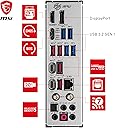
A nice mobo but keep in mind if using the gen5 nvme slot, your gpu pcie lane will half to 08 lanes from 16 (not a big deal for 1080p gaming but is a bother for higher res gaming). Lotsa USB ports which is only decent. Wifi is okay. Max speed for 02 dual rank dimms is 6600mhz so keep that in mind (well at least per the current firmware). If your pc case has 04 front usbs (like the corsair 5000t) then you will either need a usb3 pcie solution (as this board only has 1 usb3 front port hub...wouldn't recommend a splitter for obvious reasons). Overall would consider again if doing an intel 13-14 build as the price to performance is way better than asus (only better are asrock/gigabyte but they skimp on rear IO so bleh). 69 thumbs up, nice. Vinaka from FIji.
K**U
Bad QC at MSI
The motherboard arrived with the rear I/O shield bent at the top. There are no signs of this being bent by a customer and returned to Amazon. It was either dropped and bent by a worker at MSI or the box was thrown 100mph against a wall by one of the shipping companies. It is impossible to remove the rear I/O shield without removing the VRM heatsink in order to straighten the bend. Also, one of the M.2 quick hold-downs was missing. Lastly, only one of the three ARGB headers is working properly. I'm quickly remembering why I haven't bought MSI in a very long time.
P**T
great board with potential
wish it would of came with the debug code on board looks well built, overall looks and performs great. little pricey though. easy installation.
C**S
There be dragons here
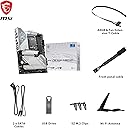
Good board if you need one. Pricey though. I'm a little bummed out at some of the features they pulled vs the z690 version, no full third PCI slot, less onboard lighting. The included extras are a little less polished too. No paper manual, no big MSI sticker, even the old box was better. Dunno why they made the heatsinks white (maybe it's cheaper?) The Z690 board came with a little paper talking about how proud they were of their product. Ah well, such is the march of progress. LGA1700 isn't the hot thing anymore. The features it does include are good though. Same VRAM, lots of I/O, fan and rgb headers. I don't know if I'll ever use the propietary USB4 header, but it has enough power output to charge a laptop. And, you know, there's still a pretty dragon in the corner.
M**H
msi mpg z790 edge ti max wifi 7
great motherboard have had it about 6 months with 0 issues
A**N
No fuss. No muss. (as long as you have a USB Flash Drive with the current drivers)
Mobo is easy to install (although I wish it had the ASUS case cable group connector to make things easy) and has been rock stable. BIOS isn't a user friendly as ASUS, but if you know what you are doing, it's no problem. As others have noted, I recommend if installing OEM Windows 11 to download all the current MoBo drivers off of the MSI website onto a flash drive. While it is true that the Mobo comes with a flashdrive with drivers, I found my own directory structure much easier to navigate and also all my drivers were up to date. Flash the BIOS first, the install the Ethernet or WiFi driver during the Windows install. There will be a button to "install driver" during the Windows install near the bottom of the page. No need to go to command prompt any more. Finally, I would recommend installing the following drivers from MSI first: 1) Intel Chipset Driver 2) Intel Serial IO Drivers 3) Intel Management Engine Driver 4) Realtek HD Audio Universal Driver 5) Intel GNA Scoring Accelerator You do not need the Intel Rapid Storage Tech Driver (unless you have RAID), or the Intel Dynamic Tuning Tech or the Intel VGA Driver (unless you don't have a graphics card). I chose not to load any of the MSI driver update software, not the MSI Center software after reading lots of bad reviews--haven't missed them one bit and now have a lean, stable stystem. I hope this helps! Good luck!
B**N
Very nice motherboard!
Highly functional with very nice looks! This is one of the best boards going out there. It has all the ports you need. Also an astounding 5 m.2 slots. Booted with my 14700k and 4070 TI Super not problems!
Trustpilot
3 days ago
4 days ago