

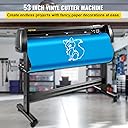


VEVOR Vinyl Cutter Plotter Machine, 53" Signmaster Software Sign Making Machine, 1350mm Paper Feed Vinyl Cutter Plotter with Stand (53" 1350mm)
Product ID: 562453593
📏53" max paper feed
⚙️±0.0004" cutting precision
🖥️LCD digital control panel
Buy anything from 5,000+ international stores. One checkout price. No surprise fees. Join 2M+ shoppers on Desertcart.
Desertcart purchases this item on your behalf and handles shipping, customs, and support to Kyrgyzstan.
✂️ Cut Above the Rest: Precision Meets Power in Every Inch!
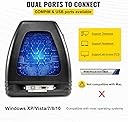
The VEVOR Vinyl Cutter Plotter Machine is a professional-grade 53" wide cutter featuring ultra-precise ±0.0004" cutting accuracy, a robust stepper motor for quiet, efficient operation, and a user-friendly LCD control panel. Compatible with multiple cutting languages and Windows systems, it supports large-format vinyl, decals, and signage projects with real-time pressure and speed adjustments. Ideal for creative professionals seeking reliable, high-performance sign-making tools.


| Best Sellers Rank | #29,680 in Office Products ( See Top 100 in Office Products ) #3 in Computer Printer Cutters |
| Customer Reviews | 4.0 out of 5 stars 578 Reviews |
S**.
All
Works great. I’m not the best at this kind of thing, but figured it out relatively fast with the help of the great YouTube videos that are online. The vinyl that it comes with is not good. I saw a lot of reviews that stated that. Got much better results when I got better paper. Do yourself a favor and get some especially if you’re new at this. Plus it’s easier the set up the first time with good paper.
S**R
Awesome Product, Amateur Friendly, Flawless Performance...
Pros: "Awesome" Amateur friendly... Cons: The included Vinyl is poor quality, mainly due to insufficient backing thickness. Do yourself a favor and buy Orical by 3M or another quality vinyl stock. ~BEWARE~ of Pressure cut Definition, The actual function is more defined as: "Cutter to Vinyl Distance" then refined to distance into the vinyl being cut. It is easy to cut far to deep, so start in small increments until the cutter reach's the vinyl... then proceed to necessary depth without cutting through the backing.
J**D
Will probably burn your house down.
6mo warranty... It died at 6mos and 1 week. Won't turn on anymore, smelled like burning electronics. Should have expected this though since I had so many issues since the second it arrived. 1. It came with loose screws bouncing around inside it. CS (I called after thoroughly inspecting it for a possible point of origin didn't show anywhere it could have came from.) They said "its probably just an extra that got left in there, nothing to worry about." 2. It is advertised to be capable of many things, one more important then the others, the ability to vectorize. Issue here is that the software included with the plotter is the basic version of Sign Master.... The basic version DOES NOT ALLOW VECTORIZING!! Cost me an additional $160 to be able to do what THEY advertised it COULD ALREADY DO!! 3. Several of the included vinyl rolls were already opened and either totally destroyed (as in dropped off a truck and draged down the freeway for a while, then stuffed into half a plastic bag) or cut into with chunks missing (as if the roll was used and I was given the remaining scrap!) Other issues: had to reinstall the software 3x over the last 6 months and the driver 4x. Not sure why, just stops working periodically. That is of course right up until days after their "warranty" expires when the circuitry spontaneous melted!! Luckily I was there and could pull the power cord since you know... It was SMOKING and probably would have started a dam fire!!!! Stay away! Stay far away from this machine, this seller, and these companies! Save yourself a possibly burnt down house or business, hundreds of dollars in loss, and hours of live wasted with "customer service."
A**D
Get AI To Help With Linux :D
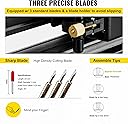
Pretty sturdy machine. Only a few things I didn't like... The image shows an exacto knife, not to be picky, but that's not in there. I may have been in a hurry but the stand is not super obvious and could be designed better so it only really works one way when putting together. I don't use windows or mac, I use Linux. Luckily chatgpt was able to help me figure out where this usb is listening and write a custom script to push HPGL code to the cutter. Super stoked that it works and it's really fast. Setting the blade depth is a pain, but that's probably normal. Overall, pleased on day 1, might come back and comment about my experience a few months from now.
A**L
👌👌👌👌
Trabaja muy bien
J**A
Excellent quality and price
Very good equipment at an excellent price, it works excellent, it leaves my vinyl cuts precise
J**H
Decent unit, poor instructions
Eventually it worked great. The instructions are not great, they cover all models and my model number was not readily apparent, though I eventually found it. The instructions tell me to press a button which may be called one thing on some models and something else on others, neither of which are on my sk720t. Also, the top wheel of the carriage was installed outside of the track, causing the carriage to lean in a way that caused the carriage to hit the rollers each time it went past them. I had to partially disassemble the carriage assembly to get the wheel in the track. This leads me to believe the test cut included in this package was not actually done with this machine. Once I fixed that, it did cut very nicely. The vinyl included in the package is poor quality, but nice to learn on so you don't waste good material. Still learning various functions and have yet to master the Sign Master software.
A**A
Fast, Accurate, Adjustable, Love it!!! Working on Mac
I love this cutter. It does not “print” in color. Comes with a marker you can use for “plotting” which means you can draw lines in place of cutting with the blade. I used on windows 11 machine and it worked great. There is literally nobody online who was able to get this working with a Mac computer, however last night I was able to get it going. Note: you must be able to run windows on your Mac, it will not work with Mac OS as it doesn’t register. I love this cutter and it is lightweight considering how big it is and can easily be moved in the back seat of a big car
Trustpilot
2 weeks ago
1 week ago