

Desertcart purchases this item on your behalf and handles shipping, customs, and support to Kyrgyzstan.
🎥 Elevate your video game—because your image deserves the spotlight.
The Logitech Brio 101 is a Full HD 1080p webcam designed for professional streaming and video conferencing. Featuring RightLight technology that boosts brightness by up to 50%, it ensures you look your best even in low light. The integrated privacy shutter offers peace of mind, while the built-in microphone delivers clear audio. Compatible with major platforms like Zoom, Microsoft Teams, and Google Meet, it connects easily via USB-A. Made with 77% recycled plastic, it blends performance with eco-conscious design.
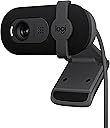


| Antenna Location | video conferencing, streaming, and remote work |
| Asin | B0BXGFFSL1 |
| Best Sellers Rank | #1 in Webcams |
| Brand | Logitech |
| Built In Media | Privacy Cover |
| Camcorder Type | Webcam |
| Color | Black |
| Compatible Devices | Windows 7 and up, macOS 10.10 and up, Chrome OS |
| Connectivity Technology | USB-A |
| Customer Reviews | 4.3 4.3 out of 5 stars (6,924) 4.3 out of 5 stars |
| Display Resolution Maximum | 1080p Full HD |
| Effective Still Resolution | 0.9 mp |
| Effective Video Resolution | 1080 pixels |
| Exposure Control Type | Automatic |
| File Format | MP4 |
| Flash Memory Speed Class | C10 |
| Flash Memory Type | Micro SD |
| Flash Memory Uhs Speed Class | 3 |
| Flash Memory Video Speed Class | V60 |
| Focus Type | Fixed Focus |
| Form Factor | Rectangular |
| Global Trade Identification Number | 00097855188915 |
| Image Aspect Ratio | 16:9 |
| Image Stabilization | false |
| Item Dimensions D X W X H | 1.26"D x 2.87"W x 2.62"H |
| Item Weight | 4.96 ounces |
| Lens Type | Zoom |
| Manufacturer | Logitech |
| Maximum Aperture | 2 f_stop |
| Maximum Focal Length | 4 millimeters |
| Model Name | BRIO 100 |
| Model Number | 960-001589 |
| Operating System | Windows 7 and up, macOS 10.10 and up, Chrome OS |
| Optical Zoom | 5 x |
| Screen Size | 0.01 |
| Sensor Type | Fluid crystal |
| Shooting Modes | Low Light |
| Special Feature | Low Light |
| Style Name | 1080p |
| Supported Audio Format | Mono |
| Supported Image Format | JPEG |
| Unit Count | 1 Count |
| Upc | 097855188915 |
| Video Capture Format | H.264 |
| Video Resolution | 1080p |
| Viewing Angle | 60 degrees |
| Warranty Description | 1 Year Limited Hardware Warranty |
| Water Resistance Level | Not Water Resistant |
| White Balance Settings | Auto |
| Zoom | Digital |
User
Integration is the best.
I like it. I like the logi integration on my PC. Picture quality is very good and adjustable. No issues with mic or being able to be heard from anyone. Very easy to setup and it's small which is nice. It also includes a privacy blocker. Overall this is my pick and it's a great value.
User
I've bought 6 and i'd buy 6 more without question. Great Quality, Great Price Easy to install.
I love this thing. I've bought at least 6 of them for my company. Super easy to install. Pretty much plug and play on my PC's. the image quality is fantastic. It works nicely with minimum light. I mount mine on top of my monitors. But, they are made so you can put them on your desk and use the handy stand to aim it however you want. The sound seems to be great i've never had anyone complain. The USB plug is compatible with my desktop or my laptop. Best of all it was priced very fairly. It's made by Logitech and my experience with them is always great.
User
Good camera for meetings.
Picture quality is good. Easy to set up, autofocus works fine. Microphone is OK. A good camera if you want something cheap for online meetings.
User
Great budget webcam for casual use
I've been happy with this webcam overall. It's a simple, no-frills option that was incredibly easy to set up with my MacBook. I mainly use it for Zoom and Google Meet calls, and it connected without any issues.One of my favorite features is the built-in privacy shutter. It's nice being able to physically cover the camera when I'm not using it instead of relying on software settings. It also has a built-in microphone, which is convenient if you don't already have an external mic.I didn't want to spend a lot of money on a high-end webcam because I only use one occasionally. My desk setup is also pretty limited on space since I have two large monitors, so I was looking for something compact, simple, and reliable. This checked all of those boxes.The image quality is good for video meetings, though it's not going to compete with more expensive webcams—which is why I'm giving it 4 out of 5 stars instead of 5. If you're a content creator or someone who spends hours on camera every day, you may want to invest in a higher-end model. But if you're like me and just need a dependable webcam for work meetings or occasional video calls, I think this is a great value.
User
Excellent 1920x1080 webcam at entry-level price point, detailed notes...
I would definitely recommend this webcam as an excellent 1920x1080 webcam at entry-level price point. I upgraded from a 720 resolution webcam and the image is significantly clearer. As with any webcam, make the room as bright as possible, although this one does a decent job in low light. Also like that this webcam has a narrower viewpoint than other webcams. I have a home office and want my image to take up most of the frame rather than showing the clutter around me in the office.Any external webcam is going to do a much better job than the webcam built into your laptop and it's not just about resolution it's about how it handles the shadows and bright spots. Also, the built-in mic is much better than my laptop's mic. Also, you can position an external webcam anywhere you want to. Nothing worse than using a laptop webcam and having to look down onto the camera. By having it on top of the monitor, the image is much more professional looking. I'm perfectly happy with this webcam but if I wanted better quality, I would get an actual photography camera that's designed to use as a webcam because I don't think you'd see a difference by just spending more on a webcam.Regarding the privacy slide on any webcam, yes it does work but the issue is that when you slide it, the camera might slide sideways Just use a small piece of cloth or paper and hinge it with a piece of tape and flip it out of the way when you want to use or not use it.I do give it five stars but did want to mention one criticism. I wish this webcam had a tripod thread and also a ball socket to adjust the camera to any position. This one only lets you adjust it up/down and not left to right and also a bit annoyed that the camera blocks the top row of my screen when using the built in kickstand. Both of these problems easily solved by folding up the kickstand and using velcro to attach the bottom of the kickstand to the top of the monitor.
User
TOO ZOOMED OUT FOR SCHOOL USE
I got this for school and the video quality and microphone are good. It’s easy to set up and autofocus is good BUT and it’s a big BUT you CANT ZOOM OUT AT ALL AND IF YOU MOVE IT FURTHER OUT THAT ALSO DOES NOT HELP. I wish the listing said it couldn’t be zoomed out or something
User
Excellent clarity in same lighting as my older 720
Money well spent. Cant speak to meetings performance, I use it for low level mocap\facial mocap n short vids. Noticed right away right away, much better, clearer and brighter pic than with old 720 with the same lighting. I am amazed but my use age might be different than most. There were cheaper options but I went with the brand because I just didnt wnat to mess w returns.
User
A Great, No-Frills Webcam that Punches Above Its Price
I recently purchased the Logitech Brio 101, and it is exactly what I was looking for. I needed a simple, basic camera for video calling friends and family, and this completely fills my needs without breaking the bank.Perfect for Compact Setups: This webcam is reasonably priced and incredibly easy to set up. It integrates flawlessly with Windows 11 right out of the box. It is also the perfect size for my micro desktop setup, sitting comfortably on the monitor without feeling bulky.Premium Features for LessWhat surprised me most is that it has most of the key features you find on much more expensive webcams. A huge bonus for me is the built-in privacy cover. It gives me immediate peace of mind when the camera isn't in use without having to stick an ugly piece of tape over the lens.The Verdict: If you need a highly reliable, straightforward camera for casual video chatting, this is a fantastic value. It delivers great quality, useful features, and solid performance at a budget-friendly price. Highly recommended!
User
Good for price.
This Logitech camera is pretty decent for the price. It’s not the best quality out there, but it’s definitely not bad either. If you’re just looking for something that works reliably for video calls, school, or casual use, this does the job just fine.The video quality is solid in good lighting, and it stays fairly clear without too much lag. It also has a built-in microphone, which is actually pretty convenient and sounds okay for everyday use. One thing I like is the physical camera shutter, so you can easily cover the lens when you’re not using it.Overall, it’s a good budget option. You get what you pay for, and it works exactly how it’s supposed to.
User
Good webcam, but not ideal for frameless monitors
I’ve been using this webcam for a while, and it works really well for everyday calls and meetings. The image quality is sharp, and it handles lighting nicely even when the room isn’t very bright. Setup was quick and easy — just plug and go. The only downside is that it’s not the best fit for frameless monitors since it covers a small part of the screen. Other than that, it’s a solid, reliable webcam for the price.
User
Love this
Love this webcam, use it everyday at work.There are no issues I have with it, and it was super easy to connect to my computer.It has very good imagery and the pixels are very vibrant.
User
Excellent Webcam — No Need to Open My Laptop
The Logitech Brio 101 is a very good webcam with clear Full HD 1080p video quality. I use it for meetings and streaming, and it works perfectly with Zoom and Microsoft Teams. The built-in microphone is clear, and the privacy shutter is a great feature. The best part is that I don’t need to open my laptop anymore—I can keep my laptop closed and still get great video quality using my external monitor setup. It’s easy to plug in, works instantly via USB-A, and feels well built. Overall, a reliable and high-quality webcam that does exactly what I need.
User
Great but too zoomed in
Super clear. Easy to set up, but very zoomed in with no ability to edit the settings.
Trustpilot
2 weeks ago
2 days ago