We remain fully operational. Our teams are working around the clock to ensure your deliveries continue safely.

DOWNLOAD THE APP


Copyright © 2025 Desertcart Holdings Limited
DOWNLOAD THE APP


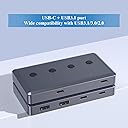
Advantages of BEYIMEI 6 in 1 USB Hub10 Gbps Superspeed Data TransferWith 6 ports, USB-A*2 & USB-C*4Configured with a dual-plug cable for USB-A & USB-CPushbutton control switch with LED blue lightPlug and play, no need driver, easy to useAll aluminum alloy structure, anodized surface treatment, fast heat dissipationMini design, compact and convenient● Applies to various devices● Wide compatibility with USB3.1/3.0/2.0● Intelligent over-voltage, over-current, short-circuit and other safety protection mechanismsWhat's in the box?●1 x 6 in 1 USB Hub●1 x Cables for USB-A&USB-C Review: Good purchase! - I absolutely love this little doohicky! It lays flat has a good variety of connections. Review: Only works with laptop or low-powered devices with a desktop PC, DC power input not working - This is a 4-port (2xUSB A + 2xUSB-C) USB 3.2 Gen 2 (10Gbps) Hub, with DC 5V 2A input power port. Pro The powered USB 3.2 Gen 2 hub seems to be sturdy with a metal case. It works ok on a laptop through a USB C port. (but see details for other issues) Cons When the hub is connected to desktop PC, it only works with low-powered USB devices. Do *NOT* use external portable USB HDD/SSD to the hub when working with a desktop PC. This problem occurs in 90% of current USB 3.2 Gen 2 hubs on the market when connected to desktop PCs. It's no excuse that this is not working. Others: You can ignore the powered DC 5V input power port. The USB hub is not taking in any external power even when connected to any external DV 5V power (see details below). Warning: Many other low-priced powered USB hubs are having the same problem. The 5V 2A of those cheap USB hubs are defective and simply not routing power to the connected USB devices from the DC input (use a USB Tester to confirm). Details 1. The USB hub runs much better when connected to a laptop vs. to a desktop PC. On a desktop PC, file transfer to a thumb drive is ok but slow. File transfer to any external portable USB SSD was slow (2MB/s), or simply failed with IO error (0x8007045D). Technically speaking, a 'USB hub' should be universal and work w/ any PC (desktop or laptop). However, the internal power setup of many of these powered USB 3.2 hubs are designed to work w only laptops. This is very misleading and frustrating to the consumers (e.g. those who work in the home/office setting with a desktop PC). 2. When able to connect, the USB hub seems to run slightly better when the hub is connected to a USB C port instead of a USB A port (less supplied power to the hub via USB A vs. some USB C ports). 3. The USB tester indicates this USB hub is not taking in any external power (0A). As a result, file transfer with any connected USB portable SSD/HDD struggles. 4. A 5V 2A power input isn't sufficient to power up 2 external USB SSDs. It needs 5V 3A to power up 2 external portable USB drives. If you plan to connect to external portable SSDs via a USB hub, I'd recommend getting a USB docking station or a hub that has a 'dedicated' input power for the hub (if it works with a desktop PC that's a good sign) or 12V input power port (but many of them are so expensive). Until USB hub manufacturers fix this fundamental power setup issue inside the hub. Summary/Recommendation: ------------------------ 1. Non-powered USB 3.2 10Gbps Hub: Laptop : works fine Desktop PC : works with only small, low-powered USB gadgets (NOT external USB HDD/SSD) 2. Powered USB 3.2 10Gbps hub: Many only work with laptop not desktop PC. If you need to use external USB SSD/HDDs with a desktop PC, Get a USB 3.2 hub that has a 'dedicated' input power (check the manual) or one with DC 12V input. Workaround: Try a good old 'powered' USB 3.0 hub if you're ok with slower USB 3.0 speed. They are more mature and the power set up is done right after many years on the market. They're not 10Gbps speed, but at least you get 300MB/s speed instead of nothing with these powered USB 3.2 hubs that only work well with laptops but not with desktops.
| ASIN | B0CCJJHXP7 |
| Additional Features | Play, Plug |
| Best Sellers Rank | #4,145 in USB Hubs |
| Brand | BEYIMEI |
| Color | BLUE-6 in 1 USB Hubs |
| Compatible Devices | Laptops, Scanners, Smartphones, Tablets, USB Flash Drives |
| Customer Reviews | 3.7 3.7 out of 5 stars (7) |
| Hardware Interface | USB |
| Item Dimensions L x W x H | 4.21"L x 2.28"W x 0.59"H |
| Manufacturer | BEYIMEI |
| Number of Ports | 4 |
| Operating System | Windows 10 |
| Total Usb Ports | 4 |
| Warranty Description | 1 year |
L**H
Good purchase!
I absolutely love this little doohicky! It lays flat has a good variety of connections.
A**R
Only works with laptop or low-powered devices with a desktop PC, DC power input not working
This is a 4-port (2xUSB A + 2xUSB-C) USB 3.2 Gen 2 (10Gbps) Hub, with DC 5V 2A input power port. Pro The powered USB 3.2 Gen 2 hub seems to be sturdy with a metal case. It works ok on a laptop through a USB C port. (but see details for other issues) Cons When the hub is connected to desktop PC, it only works with low-powered USB devices. Do *NOT* use external portable USB HDD/SSD to the hub when working with a desktop PC. This problem occurs in 90% of current USB 3.2 Gen 2 hubs on the market when connected to desktop PCs. It's no excuse that this is not working. Others: You can ignore the powered DC 5V input power port. The USB hub is not taking in any external power even when connected to any external DV 5V power (see details below). Warning: Many other low-priced powered USB hubs are having the same problem. The 5V 2A of those cheap USB hubs are defective and simply not routing power to the connected USB devices from the DC input (use a USB Tester to confirm). Details 1. The USB hub runs much better when connected to a laptop vs. to a desktop PC. On a desktop PC, file transfer to a thumb drive is ok but slow. File transfer to any external portable USB SSD was slow (2MB/s), or simply failed with IO error (0x8007045D). Technically speaking, a 'USB hub' should be universal and work w/ any PC (desktop or laptop). However, the internal power setup of many of these powered USB 3.2 hubs are designed to work w only laptops. This is very misleading and frustrating to the consumers (e.g. those who work in the home/office setting with a desktop PC). 2. When able to connect, the USB hub seems to run slightly better when the hub is connected to a USB C port instead of a USB A port (less supplied power to the hub via USB A vs. some USB C ports). 3. The USB tester indicates this USB hub is not taking in any external power (0A). As a result, file transfer with any connected USB portable SSD/HDD struggles. 4. A 5V 2A power input isn't sufficient to power up 2 external USB SSDs. It needs 5V 3A to power up 2 external portable USB drives. If you plan to connect to external portable SSDs via a USB hub, I'd recommend getting a USB docking station or a hub that has a 'dedicated' input power for the hub (if it works with a desktop PC that's a good sign) or 12V input power port (but many of them are so expensive). Until USB hub manufacturers fix this fundamental power setup issue inside the hub. Summary/Recommendation: ------------------------ 1. Non-powered USB 3.2 10Gbps Hub: Laptop : works fine Desktop PC : works with only small, low-powered USB gadgets (NOT external USB HDD/SSD) 2. Powered USB 3.2 10Gbps hub: Many only work with laptop not desktop PC. If you need to use external USB SSD/HDDs with a desktop PC, Get a USB 3.2 hub that has a 'dedicated' input power (check the manual) or one with DC 12V input. Workaround: Try a good old 'powered' USB 3.0 hub if you're ok with slower USB 3.0 speed. They are more mature and the power set up is done right after many years on the market. They're not 10Gbps speed, but at least you get 300MB/s speed instead of nothing with these powered USB 3.2 hubs that only work well with laptops but not with desktops.
C**W
Could not get it to work with Windows Mac or Chromebook
I tried this first on my Macbook, then Windows and Chromebook. All had zero connectivity. First, the item comes with no instructions, it only has labeling of ports on the outside of the shipping box, which was conveniently covered by the Amazon part number sticker, so I couldn't see half of them. Second, there are no instructions elsewhere, so the webpage was my only source of information, which simply lists one port (unlabeled on the device) as "DC". I assume that means I should provide power there. Doing so on that port or any other does not do anything at all. I occasionally see the USB stick flash for half a second and then never light up again. The devices do not show any usb connectivity or ports show up. The site says to click a button or hold for 1 second to toggle on or off, neither do anything and holding longer is the same. This also does not light up the button in blue as described. So I can't really review an item that has minimal instructions and labelling that makes me question whether I even set it up correctly. I tried multiple cables, multiple chargers and multiple OSs to try to ensure I didn't mess things up, but I'm still not even sure. If someone posts a review or response with better instructions I'm happy to amend my review.
P**.
Was mir bei diesem USB Hub besonders gefällt und auch der eigentliche Grund für die Bestellung war, ist die Tatsache, dass hier das USB-C Verbindungskabel nicht fest an den Hub verbaut ist. Bei den meisten Hubs ist standardmäßig ein recht kurzes USB-C Kabel verbaut, damit man den Hub beispielsweise direkt neben seinem Laptop nutzen kann. Da ich den Hub aber an meinem normalen PC nutzen wollte, sollte dieser auch auf dem Schreibtisch liegen. Da ich bei diesem Produkt einfach selbst mein eigenes USB-C Kabel anschließen kann, musste ich auch nicht den Umweg über irgendwelche Verlängerungskabel gehen. Das finde ich wirklich super und war genau das, was ich gesucht haben. Was mir ebenfalls wichtig war, ist die zusätzliche Stromversorgung über USB-C. Der Hub hat noch einen weiteren Port, an den man optional eine externe Stromversorgung anschließen kann. Damit umgeht man das Problem, dass den angeschlossenen Geräten mitten in der Benutzung der Saft ausgeht. Das kann bei großen und schnellen USB-Sticks oder externen NVMe bzw. SSD-Gehäusen schon schnell passieren. Die angeschlossenen Geräte laufen auch schnell genug, der Hub gibt die volle Geschwindigkeit des USB-C 3.2 Gen2 Anschlusses auch weiter. Dadurch erreicht man bei der Datenübertragung auch eine ordentliche Geschwindigkeit. Auf der Oberseite befinden sich noch Knöpfe, wodurch einzelne Ports ein- oder ausgeschaltet werden können, das finde ich jetzt nicht so super nützlich, aber wer dieses Feature benötigt, ist hier ebenfalls richtig. Es liegt aber natürlich auch ein, wie immer kurzes, USB Verbindungskabel bei, aber wie gesagt, ist in meinen Augen das beste Feature des Hubs, dass man die Freiheit hat, sein eigenes USB-C Kabel anzuschließen, in der Länge, wie man es benötigt.
A**O
Prodotto super, Materiali ottimi simili allo stile Apple. Lo utilizzo quotidianamente e mi trovo benissimo, ne ho provati molti e questo è il migliore. Per il prezzo vale ogni centesimo. Prodotto consigliato
Trustpilot
3 weeks ago
1 week ago