Buy anything from 5,000+ international stores. One checkout price. No surprise fees. Join 2M+ shoppers on Desertcart.
Desertcart purchases this item on your behalf and handles shipping, customs, and support to Kyrgyzstan.
🚀 Elevate your 3D printing game with speed, size, and smart precision!
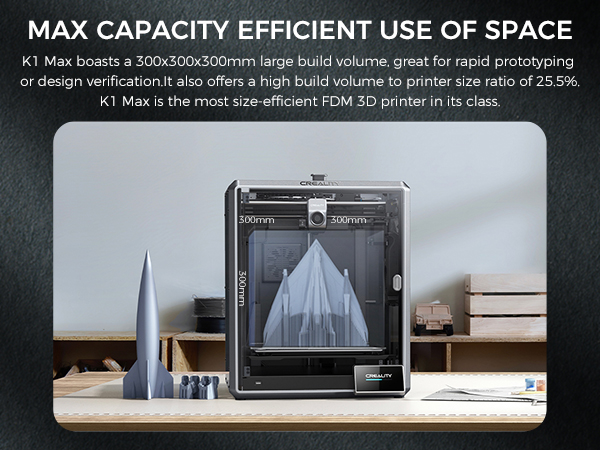
The Creality K1 MAX is a high-performance 3D printer designed for professionals and enthusiasts alike, featuring an ultra-fast 600mm/s print speed, a large 300×300×300mm build volume, and advanced AI-powered monitoring for flawless prints. Its user-friendly setup with hands-free auto-leveling and rapid heating makes it ideal for those who demand efficiency and quality without compromise.


| ASIN | B0C2T372YW |
| Best Sellers Rank | #73,411 in Industrial & Scientific ( See Top 100 in Industrial & Scientific ) #78 in 3D Printers |
| Customer Reviews | 4.1 4.1 out of 5 stars (2,704) |
| Date First Available | August 31, 2023 |
| Item Weight | 22 pounds |
| Item model number | K1 Max |
| Manufacturer | Creality 3D |
| Product Dimensions | 18.19 x 17.13 x 20.71 inches |
J**1
A good printer for a beginner and daily user
If I were a fresh-faced newbie to the world of 3D printing, this would be a great printer to start out with. This is an excellent printer for not just the price, but for a person who is new to 3D printing, or someone more experienced but wanting a secondary daily driver. The ease of use and the quality of the prints is comparable to many more expensive printers. I'd not think twice about purchasing another if I end up needing another printer. I've owned four printers by different manufacturers since roughly 2015-ish. Being on a budget, I went with printers marketed towards consumers and gradually learned about the use, updating and sometimes repairs, of printers. I joined various Facebook groups to improve my knowledge and experience. I purchased a Creality Ender-2, the ancestor of this model, back in 2019(?). It was a little intimidating to assemble, but the instructions and a few Youtube videos helped me and I was up and running after an hour or two. The Ender-2 was a tinkerers dream. I did upgrades and replacements for various components over time. It served me well. The biggest changes were replacing the cooling fans and the factory board. Those particular upgrades were to make the printer quieter. I didn't know back then that the loud fans it came with were required to move an adequate amount of air for cooling. The silent fans available then (and now) couldn't do the job adequately. Anyway, I replaced the hot end cooling fan with a silent fan, and had annoying clogs from time to time. But hey, the printer was quiet, LOL! The old board couldn't support drivers that would have silenced the stepper motors. The replacement board helped make the printer whisper quiet. But recently the controller board suffered a destructive short (very likely my fault). I was going to replace the board, but dreaded the work of compiling the firmware that it would have required to operate the printer correctly and safely. (I'm not the brightest guy and compiling firmware was a frustrating process). At about the same time, I started hearing about the Ender-2 Pro, an updated model based on the original design. I started investigating. Of particular note were all the design upgrades. All the old flaws of the original Ender-2 were addressed. They made the new model much more compact and portable. The reviews for it were good. The price for this printer was about the same as what I'd paid for the Ender-2. My overall positive experience with the Creality brand, plus what I learned from researching this new printer convinced me to buy it. When it arrived, I was delighted to see that it was like the first time I'd purchased a printer made by Creality. It had all the little extras and was even better packed than the first time. It was easier and faster to assemble than its ancestor. Now for the fly in the pudding. It initially worked great. I used the test g-code file to do an initially test run print and the printer was great. I use Ideamaker for my slicer software as it has more options for fine tuning slicer profiles. I modified an existing profile for the Ender 2 to work with the Ender 2-Pro. It worked flawlessly for a couple of days, then it started throwing out runaway thermal warnings. I'm glad to say that the printer did exactly what it was supposed to do. It warned me with a loud audio tone and shut down all the heaters to prevent a possible fire. That is a safety feature that wasn't common with printers but is becoming more widespread. In my opinion, it is an absolute must for safety. The frustrating thing was that I couldn't figure out what was causing it. I tried to find the answer at the new Facebook group for this model of printer. I did a lot of googling. I asked here on Amazon if any other customers had the same problem and had a solution. I was in a hurry to get back to printing. I didn't want to start blindly replacing stock parts so soon after buying this printer without knowing what the problem was. Happily Amazon let me return the printer without hassle. At the same time I opted to get a replacement at no extra charge. I know that virtually 100% of anything made and built for retail use has a lemon or two that slips past quality control. I've run into it in everything from no-name companies to big brand names. It is an unescapable fact of life. Creality is no exception. After I'd already returned the first printer and received its replacement a representative from Creality reached out to me. Finding out that someone from Creality actively watches the reviews here means they care about the customer experience and satisfaction. I'm impressed by that simple gesture and it reinforces my decision to stick with Creality. The replacement was delivered fast. It was brand new, factory sealed, and was quickly was assembled and running. Everything worked and the test print turned out flawlessly. The printer has been working almost non-stop since. I'm planning on keeping it bone stock for as long as possible. Adding third party parts can add new features and refinements, but for now I'm not interested modifying what works just fine. Well wait. One thing I immediately replaced were the bed springs. The factory springs seem to be a weakness in Creality's printers but are easily and quickly replaced. I used heavy duty yellow springs cited frequently in 3D printing groups and reviews. Those can be found for sale here and elsewhere. They are far more stiff and will not easily deflect like the originals. (I've been hearing about people using silicone spacers but I've not tried that yet). Now I don't have to re-level the bed very often. It helps that I'm using the included removable magnetic bed sheet. When I go to take off finished prints I remove the sheet and I can simply peel them off. Then I put the sheet back on. No muss, no fuss. The worst thing I can say about it is that it has a droning sound that is noticeable. The best comparison I can make is that it sounds like an average microwave humming. Not deafening or excessively loud, but enough to be noticed if it is in the same room with you. It is mostly due to the cooling fans and possibly the controller board. The factory control board that the printer came with might not have the updated firmware drivers that could silence the stepper motors. There were two slightly different controller boards that were used with this model. One of them can have the firmware updated but the other can't. In my case, I got a board that can't be updated. There are different controller boards sold by Creality, Big Tree Tech, etc, that can replace the stock board, but I'm not bothered by the printer noise. As for the fans, that is really inescapable. There doesn't seem to be silent fans in the same size range that can do the job the loud fans do. If the sounds are too much, you can move the printer to another room and close the door. The printer works without complaint. It has been reliable and easy to use. The updated design has made it truly portable. When I've traveled with it, I only had to double check the bed to make sure it was level, then started printing. I can print a bit faster now than I could with the older printer. I've been able to print a multipart four foot/120 centimeter Statue of Liberty in under a month. I think it would have taken at least a month and a half to do the same thing with my previous printer. Aside from the initial hiccup with the faulty first printer, I've not had another problem with the Ender-2 Pro. I wouldn't hesitate for an instant to buy another one. For my needs, it is more than up to the job.
Z**H
Beginner Friendly, Great Value, Impressive Prints, Large Community of Support
= What I Wanted As I am new to 3D printing, I wanted something that: - Easy to setup and get going on - Sufficiently capable to avoid quickly "outgrowing" it - Affordable (<$300) = Why I Choose the Ender 3 Pro I was torn between the Ender 3 and the Ender 3 Pro. I settled on the Pro, as I figured that the Pro represented the best and most refined version out-of-box. The Ender 3 is a tried and true model with it's strengths and weakness well known. There are numerous howtos available on how to address the various short comings of the Ender 3. However, several of the enhancements offered by the Ender 3 Pro are either more difficult or cost - approaching or exceeding the cost differential between the 3 and 3 Pro. For example, the upgraded (sturdier) Y-axis base is more difficult to do on your own and requires significant disassembly and reassembly. The upgraded PSU is nearly the cost difference alone and results in an unused item in your drawer that you paid for. = Out of the Box Experience The printer was easy to assemble and worked well without any modifications. It is critically important to get the bed "level" - not as in bubble level but as in consistent height from the extruder nozzle (I used the paper method). It is also important to make sure that the wheel/track assembles are straight and true with proper tightness. I found several helpful guide videos online for this specific model that do a good job of walking you through it. My device came with the latest FW at the time of writing (1.1.6.2), so I have no experience in FW flashing yet. I do plan on setting up an OctoPi/OctoPrint solution, but for now the including SDcard and adapter has worked fine. I've printed with both PLA and PETG and both come out surprisingly well in my opinion. I've been using the latest version of Ultimaker Cura at the time of writing (4.5.0) for slicing STL files. = Notes on Usage A note on print times. I have no experience from which to base my expectations on print times however, you do need to be patient as many prints can take 5, 10, 15+ *hours*. I haven't tinkered around much with the print settings to see how much of a reduction in time I can achieve and at what quality tradeoffs. Nor have I experimented much to see how print quality and time stacks up when printing multiple parts simultaneously versus multiple prints of singular parts. You should monitor your prints - initially to make sure it lays down a good first layer that adheres well and then periodically check on it to make sure it doesn't go awry. Also, make sure you have enough filament to finish the print and that you plan for the duration. Things like - Are you comfortable with it printing overnight or while you are away? - Will the printer be free from vibrations/bumps/drafts in it's location (e.g. dining room table) from foot traffic, AC vents, etc for the duration of the print? = Final Thoughts Overall, I've been very happy with this purchase and foresee a long service given it's performance, upgradability, and available of spares in case of part failure.
E**R
Don't buy this.
I did get a few nice prints. And I look forward to 3d printing in the future. It just won't be with this unreliable piece of junk. My first issue was that the hot end would regularly clog and kill my prints. I am printing PETG filament at 235c and 70c for the bed. I have tried adjusting the hot end temp with no discernable improvement. Then when that wasn't a problem, the prints would often come unstuck halfway through the job and I would come back to see a pile of spaghetti on my table. So even though I level the bed, and clear the hot end before every print, it didn't seem to matter. So I started using glue stick to help the prints stick, but then I come back to a high pitch alarm indicating thermal runaway protection has been triggered. While I am happy it has this protection, because who wants to burn down their shop, it still results in a failed print. I can't believe this machine is even available for purchase in the US. It has given me extreme highs and lows for a little over a week now, and I have only one recourse now. Return it and put my money towards a legitimate 3d printer. I did a lot of research before buying this. You will see thousands of videos on YouTube showing how popular it is. I thought it was a great value. I was duped. Now I think that those videos were hired by the company marketeers to create positive PR. If you want to get a skeleton 3d printer, and replace a bunch of components because you like to tinker or are into the hobby of printer maintenance, rather than 3d printing and modeling, you might buy this. But if you want a useful tool, I cannot recommend a Creality 3 Pro. Save yourself the AGONY, and a few dollars, so you can afford a printer that is ready for public consumption. So sad. Bryan
V**R
Great printer at this price. But, I had shipping/delivery/QC issue
Well built. Well packed but (see issue). The printer is fast. Print quality is excellent. Support is good. Klipper implementation for WEB control is adequate. However, if you are used to working with the full version of Klipper, you will feel constrained with your settings options. Almost all of the finer adjustments will need to be done in the "Creality_Print" slicer software. One small example is pressure advance. Issue - The printer arrived with the glass door shattered. The outer and inner shipping box showed no damage. What was left of the door and protective film was still taped to the chassis and in the shipping bag. I was able to clean the safety glass cubes from the chassis, drive screws, support shafts, and belts. Re-greased the screws and shafts and ran the initialization. Everything checked out OK. Creality customer service is sending a new door (after the Chinese new year). So I cut out and installed a plexiglass door until the replacement arrives. Not so sure about the glass door choice as it seems that it can be broken without an obvious sign of force. Look forward to firmware updates and I hope some Klipper genus takes the time to wiggle together a full version for this printer as Creality does give you the option to root it Other than the unfortunate door incident, I am satisfied. Like I said very fast and accurate which is what counts in the long run. --- Update --- Klipper genus is on Github by the name of Guilouz. Full Klipper implementation. Easy install (and uninstall). Supports the touch screen with Guppy. Yes, there is some Linux involved. But it is a copy and paste into a terminal program (SSL). Mainly to run a text menu so you can choose what you want to install.
L**.
Amazing Printer for the cost
For any people who were/are not happy with the resin printing experience: This printer really went above and beyond my expectations of not only a low cost printer but an FDM printer in general. I got into the printing world by purchasing a resin printer that Amazon had on sale. I thought I would really enjoy the hobby but the extensive pre and post processing of those prints as well as handling toxic chemical turned me off completely. After a month I figured printing wasn't for me, but I started looking into FDM printers(which this is one, filament based instead of resin) and decided to on a whim buy a low cost but well liked printer. WHAT A DECISION! This printer completely opened my eyes to what I thought 3D printing would be like. It's so much fun! the resin printer's build plate was way smaller and in general more ideal for miniature models, whereas this printer (Ender 5) has a huge build plate and can print just about anything to great results. So if you are turned off my resin printers and you're not sure if printing is for you , I suggest returning your resin printer and giving FDM a shot because it's a whole different experience. Being able to simply pull something(maybe pry is a better word) from your build plate immediately after it's finished and admire it is really still amazing each time I do it. Ender5 : The setup on this model wasn't bad at all, there's a few videos online you could probably search for to give you an idea of what to expect, but out of the box the directions do a pretty good job of guiding you through it. I would definitely recommend checking out a video because you are almost guaranteed to have to adjust something structural on this machine right out of the box. It's nothing major and doesn't require any technical skills but if you aren't looking for it you could very well slam your machine together incorrectly and have problems down the road you can't diagnose because you started with a bad structure. For me the top rail box would lay flush on the unit. If I didn't know to look out for possible adjustments then I very well may have just muscled down the top screws and call it a day, but I knew to check all my connections because all the reviews and videos told me to. I saw that a mount in one corner was tightened down from the factory crooked and caused the top piece to be uneven. So I loosened the necessary mounts, leveled it properly, and then tightened. The top mounted flush as it should and that was that. It was a minor inconvenience but knowing to look for these things is invaluable. Aside from that the build went very quickly and I was printing immediately. Printing: I adjusted the bed to what I thought was level and began printing. I never bothered with the CReality prints and started with some facemask ear savers. I noticed no matter how much I adjusted the bed it never quite felt level. After some prints I accidentally broke my Bowden Tube so I had to order a new, and decided to upgrade. I bought a Capricorn Bowden tube, All-Metal Extruder, and also got the Creality Glass bed. Those three upgrades turned my stringy few first prints and turned them into something I could be proud of. After installing the glass bed I realized my initial build plate was warped, which made proper leveling impossible but the glass bed cleared that up. I have to use a glue stick now (just cheap purple Staples glue stick)and haven't had any adhesion issues since starting that. Printed Bed struts to help with keeping the bed from moving while printing and it made a world of difference. This printer really prints with amazing quality and detail. After the few upgrades I made I am more than happy about this purchase and would recommend this printer to anyone looking to get into the world of FDM printing. Summary: Awesome printer for the price. Recommend upgrading to Glass Bed, Capricorn Bowden Tube, and Metal Extruder.
C**A
An amazing machine, especially once you unlock its full potential
I was thinking about giving it 4 stars, but I honestly couldn't bring myself to do it—it’s an amazing machine. That said, you definitely need to root it to get the most out of it. I initially considered 4 stars because the automatic nozzle cleaning doesn't work very well, and I prefer doing it manually (which I actually enjoy). Also, the default material purge line is quite inefficient. However, I want to emphasize that by researching and tweaking these functions through root (I use Mainsail for an adaptive purge line), the printer performs spectacularly. It has great speed and precision. I've printed in PLA and PETG, and I'm really looking forward to testing technical materials like ABS and carbon fiber filaments; so far, everything has turned out great. P.S.: You do need to print a mod so the PTFE tube doesn't rub against the top cover. For some, this might be a downside, but for me, it's just a fun project to do! :)
J**N
Loving this thing to death.
Lots of fun and really easy to setup. This printer has a ton of guides on the various "Video Websites" You May Want to Tune into for instruction. Literally this machine is very supported by the 3d printer community rich poor alike. IT runs great out of the box prints nicely. Cura looks daunting but the files you import have the settings in them already some prints may need adhesion or support checked but do be sure in Cura that it is set to only 0.2 for layer height. I upgraded this to the SKR 1.4 Turbo with TMC2209 stepper motor drivers and put it into my old grow tent which at the time I didn't know would be beneficial. This tent also has a heat controller on it so I may have accidentally placed my printer in optimal environmental settings. I didn't have bugs installing the original components that came with the printer but the extruder should be upgraded to the metal one since all the plastic ones only last about one week to a few months.. Like a $13 part. And the white hot end PTFE tube causes jams and under extrusion. I fixed with some blue Capricorn ptfe tubing so far it's working amazingly.. My problems with the original is it's a bit clunky slow and makes annoying high pich noise which isn't at all annoying it's actually interesting to hear it but it is detracting and I have ADHD. Prints came out fine with all stock parts. Learning the slicing software can be hard. If you upgrade learning to flash marlin can be hard but you can do pretty much anything at the forfront of 3d printing with this thing because literally every one doing prototyping has this thing unless they had some government grant money or don't like to actually tinker which is insane. why buy one of these at all if you're not that type of person.
B**S
Excellent
Okay, I normally don't go out of my way to spend the time reviewing products but this one deserves my time. I'm a mechanical design engineer that makes many prototype parts. I bought this printer to avoid expensive prototyping. I'm absolutely pleased with the quality of the prints and can't believe how good nylon cf prints. I had to adjust my tolerances as the final print diameters were smaller by 0.005 due to the characteristics of nylon CF but after that it's been fantastic and makes my work fun again. I printed a part that had a 3/8" "pressed" in shaft and I had to beat it in with a hard rubber mallet and the print held up like a champ. Pinter quality is excellent. Easy to start up. Slicer software is fine and intuitive. Printer is a great deal and you can see that creality has spent a great deal of time designing a product that is high quality and a fair price. I'm very satisfied.
Trustpilot
4 days ago
2 days ago