
Buy anything from 5,000+ international stores. One checkout price. No surprise fees. Join 2M+ shoppers on Desertcart.
Desertcart purchases this item on your behalf and handles shipping, customs, and support to Kyrgyzstan.
🎯 Dominate every game with Titan One — the ultimate controller transformer!
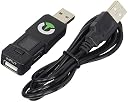
The ConsoleTuner Titan One is a cutting-edge controller converter and modding device that supports PS4, Xbox One, PS3, Xbox 360, PC, and more. It enables gamers to use any compatible controller across multiple consoles, add rapid fire and anti-recoil mods without hardware modifications, and customize gameplay with an intuitive visual scripting interface. Featuring redesigned firmware for low latency and extended battery efficiency, Titan One is ideal for competitive and casual gamers seeking a versatile, plug-and-play solution to elevate their gaming experience.
| ASIN | B00LH5XZQS |
| Best Sellers Rank | #10,791 in Video Games ( See Top 100 in Video Games ) #594 in PlayStation 4 Accessories |
| Brand Name | CONSOLE TUNER |
| Cable Type | USB |
| Color | Black |
| Compatible Devices | PC |
| Compatible Phone Models | No Compatible Phone Models |
| Connector Gender | Male-to-Female |
| Connector Type | Micro USB, Mini USB, USB Type A |
| Customer Package Type | Standard Packaging |
| Customer Reviews | 3.9 3.9 out of 5 stars (1,042) |
| Indoor Outdoor Usage | Indoor |
| Item Shape | Round |
| Item Weight | 0.15 Pounds |
| Manufacturer | ConsoleTuner |
| Maximum Voltage | 5 Volts (DC) |
| Model | Titan One |
| Number of Items | 1 |
| Number of Pins | 4 |
| UPC | 402508000306 755702188159 |
| Unit Count | 1 Count |
T**E
Solid Converter That is Well Worth the Investment
For those who cannot find comfort in a particular controller to another, the Titan One serves as an excellent remedy. As a controller converter, it does its job well with no lag input. The device's drivers are kept up-to-date on ConsoleTuner's website with community-made mods available. The converter's drivers allows tons of customization for turbo function and controller input. I personally use the Titan One to get my last-gen arcade sticks to work on the Xbox One, and suffice to say, it works very well. There is even a driver option where the device locks itself in a mode called "Tournament Mode" with a "T" displaying on the device's display for those who compete in fighting game tournaments, where turbo function et al are disabled. The converter is made with solid plastic and is pretty durable. I've dropped it once or twice and carried it around a lot in a bag and it still works to this day. The converter fits well into USB inputs and does not budge when wiggled. One thing though is that USBs inserted into the converter's USB input has to go in upside-down. It's not really a problem and is more likely a design choice to make the device itself small and compact. Continuing on with the device's list of caveats: - The initial set-up was a little difficult. Instructions can be found on their website, but it was also a bit difficult navigating ConsoleTuner's site for the instructions. - The device requires a WIRED controller for the console of choice of which you want to get another controller to work on. So for example, if you want to get an Xbox One controller to work on PS4, you will need a PS4 controller. - Every time you remove the converter from the console, the device does not retain the output of the device, so you will have to set-up the converter again if it leaves the console's USB. However, the converter will identify controllers within seconds. - Apparently the PS4 has issues with the converter's compatibility requiring the device to reboot itself every 10 minutes. ConsoleTuners is currently working on a workaround, but PS4 owners will have to deal with that. The rebooting process takes like a second, but in a competitive setting, this is an issue. Other than that, for $70, you can't go wrong with this converter. It's a solid buy if you can get around its caveats. No modding or real computer skills required. ------------------------------------------------------------------------------------------------------------------------------------------------------------------------------------------- To convert a controller: 1: Insert converter into the USB input of console of choice (e.g. PS4). 2: Insert the wired input of the console's controller (e.g. PS4 controller) into converter's USB input upside-down. 3: Wait a bit. The converter will identify the controller and will display a notification that the controller has been identified. 4: Remove controller's wired USB from the converter. 5: Insert the wired input of desired controller (e.g. Xbox One controller) into the USB of the device upside-down. 6: Wait a bit. The converter will identify the Xbox One controller and convert its signal into the console of choice. 7: Test controller.
A**N
Online Documentation Is Your Friend
This is an awesome little device. It can do everything and more that a modded controller can do. The biggest complaints I see about the Titan One are the lack of a comprehensive manual, and trouble connecting an Xbox One controller to a PS4. The reason for them not sending a comprehensive manual, as I see it, is because there is a HUGE amount of documentation on their website, (...). If they made a full manual from this, it would be massive. As far as the Xbox One controller reconnecting itself every few minutes, in my experience, this is because of the USB cable. My controller does this even without using the Titan One, and was fixed by simply using a different cable. I can't guarantee this will fix the problem for everyone, but it worked for me. There also seems to be a few one star reviews saying the device does not work for them. I can't speak to each individuals experience with the device, but I can say this; do not buy this device if you aren't willing to take the time to learn how to use it. Straight out the box, there are NO mods installed on it; NONE. The feature that does work however, is the controller crossover. For this to work, you MUST connect with a controller proven to authenticate on your console. Once authenticated, you can plug almost any other controller into the Titan One, and it will work. The important thing to remember is that you CANNOT use the authenticated controller as a secondary controller as long as the Titan is plugged in. As far as mods go, you have to download the free Gtuner Pro software from consoletuner.com. Installing mods to the device is a simple process, and requires no programming knowledge, thanks to the pre-packaged "Game Packs". One only needs to read the online documentation to learn how to use every feature the Titan One has to offer. Now for the one, single, solitary complaint I have about the Titan One; the complete and utter lack of voice communications through the device. There are workarounds for this, such as using a second controller for chat on the Xbox One, or using a headset that doesn't use the controller for voice chat, but it would be much nicer if this wasn't a problem at all. In short, this device is an amazing piece of hardware. For people with computer or programming experience, this device will take literally seconds to set up properly. For everyone else, the documentation available on consoletuner.com will have you up to speed and ready to rock in minutes. I encourage anyone having issues to go to the website previously mentioned and read through the documentation. If you can't solve your problem after that, feel free to contact them directly through the site. I am in no way affiliated with ConsoleTuner, I am merely a end user of the product who wishes to ensure everyone has as good of an experience as I have had.
M**G
Great product, with a caveat
I purchased this product in order to use my Xbox 360 fightstick on the PS4. I was very pleased with the company's previous product - the original, authentic CronusMax - in allowing me to use my 360 stick on my Xbox One, so I was very interested in finding out how well the Titan One worked for the PS4. After doing some research, I decided it was time to take the plunge. There are two key points when discussing the use of alternate controllers on the PS4 via the Titan One (hereafter referred to as "cross play"). One is minor, while the other is fairly significant. First, the minor point: cross play on the PS4 doesn't require any authentication, unlike with the Xbox One. The instructions indicate that PS4 controller authentication is necessary, but I've never had to do it; just plug in the Titan One and you're ready to go! This is a very nice feature that makes it easy to jump right into playing. The authentication required for use on the Xbox One isn't a terribly complicated or problematic step (it takes maybe 30 seconds total and is good for the whole play session) but it's nice to not have to do it. Second, the more significant point: as of the writing of this review the cross play feature of the Titan One on the PS4 is "partially" supported. What that means is that - due to how the PS4 checks for controller authentication - any controller running through a Titan One will need to re-authenticate once every 10 mins or so (in practice it's closer to 7 mins.) The re-authentication process is very fast - lasts less than a second - but during that time the controller will not accept inputs. How much of an issue this is for you depends on what kinds of games you are planning to play, and how you are planning to play them. For 95% of players and games out there, this issue feels very minor. It's a brief interruption in your control, and many games aren't reliant on constant, precision control. For fans of fighting games (a popular demographic for a product like this, since we want to keep using our sticks,) this is potentially a bigger issue. Any interruption of control during a match is potentially very unpleasant, and for anyone looking to play super competitively it is very likely a deal breaker. That said, for the average fighting game enthusiast, I think the Titan One is a good investment if you want to keep playing games using a last gen stick (or a current gen Xbox One stick) on your PS4. In the several hours I used the Titan One, only once or twice did that re-authentication pop up during a match, and I can only recall one time where it happened at a particularly inopportune moment. For me, the good of being able to play Guilty Gear with my fight stick far outweighs the very minor moments of inconvenience. Moreover, the developer behind the software that runs the Titan One is working towards a solution beyond the current setup (he acknowledges that it's more of a temporary measure on the road to a full solution) so using the Titan One for PS4 gaming is only going to get better as they continue to refine it. Also, for what it's worth, the developer has mentioned bringing crossover support to the Wii U, which will be even more value added. The Titan One works excellently as a crossover device in all the ways that the CronusMax did, with the added benefit of somewhat improved hardware. So it's also an excellent investment for anyone wanting to use alternate controllers on Xbox One, PS3, and Xbox 360. Overall, I'm very happy with my purchase of the Titan One. It works very well as a crossover gaming device, and the PS4 cross over functionality is great to have, if currently imperfect. That imperfection is why I can only give the product 4 stars, but when the developer successfully works out that last kink I'd readily rate this product at 5 stars. Moreover, if you're considering this product for something other than PS4 play, it's an excellent, very useful product.
B**R
Fun times :)
Product work's great. Doesn't feel flimsy or low quality. I did notice when plugging in the usb for the first time the male side was bent down but honestly think i may have leaned on it grabbing a cable. Either way I gently pushed it back a bit and it has been working just fine. Product was easy to navigate for an experienced pc user, programming is a different story. Luckily it comes with a Visual scripting tool but you still need to have logic and patience to understand what most of it does. I only plan on using for remapping and M&KB support. It takes ALOT of patience to fine tune the settings in Max aim DI and in game. Everyone states to set the max sense in-game to max but i prefer to keep it around the gamepad sense and maybe up it a bit and fine tune the Max aim settings. The most important part, this has NO lag whatsoever.... If you do it's either A.) Your TV. (Turn on game mode setting and any processing effects) B.) Your mouse (Mine is 500hz running in max aim at 1600DPI Sentey Nebulus) C.) You think you are feeling mouse lag but really it's the acceleration and are made for thumbsticks in the way you have to press so far to achieve the movement result. D.) USB port on pc (Try an external port?) Using mouse and keyboard on a console sure does take a bit to get used to, binding the buttons wrong could be the most turn off thing about this software. Maybe a default layout devs? I tend to forget which button is which when switching between profiles for different games, example would be... in Smite I use A and X for my 2 items. Thus i would need to bind A and B to F and G on the keyboard but if i switch to battlefield one A and B are bound to Space and R. So navigating menu's can become frustrating. Team communication in Smite is pretty much impossible until I can force my memory intro remembing AXBY are bound to FG Shift R. I ended up scripting something that would allow me to press 1 on the numpad for Attack left or numpad 3 for Attack Right but with a ton of comm's i would be limited. Only alternative would be to keep the gamepad in your lap but you're not gonna want to let go of that M&KB during a fight to use comms. Most games will use roughly the same layout WASD for movement QE for bumpers Left Click, Right click for the triggers so if i start a layout on a new game i export one of the profiles for a similar game and import and rename and adjust the settings from there. (No unnecessary rebinding over and over.) As you can see in the clip (Paladins), my aim sort of jumps around. That game has a pretty intense autoaim that takes a bit to get used to the auto lock on. I have adjusted my Max aim settings and it feel's more mouse like now. I have been gaming since Unreal tournament and Quake in '99 and won a lan contest in these games. So I a definitely as a skilled M&KB user. For the people that complain this has an unfair advantage. Well, sure it can if you can turn off acceleration in games and so far i have found a total one 1. and even then there is still a tiny bit. So much more too say but thanks for reading this wall of text :) If you didn't make it this far then you may not have the patience for this device.
J**N
Cheap Flimsy Product w/ no communication from seller.
So... Let me tell you about my 2 month journey with this product. To be fair, the Titan One did exactly what I expected it to do. Allow me to perform button combinations at the press of a single button, or macros, on a console platform. More specifically the Xbox One. It didn't stop there. I did take the controller on to the PC and used my program profile from the Titan One there and it worked with zero issues. If you are on the fence about if you should get one I'd say go ahead and buy it...... Just not from this vendor. Or even better get the Titan 2. So initially this product, a USB stick, worked fine! I opened the case and immediately felt how cheap the casing was. It comes with the territory with these kind of products so it didn't bother me too much at first. Then the first issue happened. I pulled out the USB and the contacts "shoe", the silver part of most USBs that is on the very far left of the picture, was left in the Xbox exposing the actual contacts, the little prong thingies on that object in the right and the broken little piece you see in the picture. And no... I didn't just shove the USB into the Xbox in fact if you decide to purchase the Titan One you'll see that it actually is quite loose in the port because of its design. A bad flaw to be sure. Me, being a little bit of a tech guy, was upset but still knew there wasn't really an issue. I put the "shoe" back on the contacts and positioned my Xbox so my table would support the USB stick. Was OK for a few weeks. Then it was pulled out again by my son. This one is on me in a sense but, mind you, a USB is secured into a machine by the "shoe" so essentially my USB stick just sat there next to the machine with the contacts in the machine and USB touching. This time I inspected the contacts and noticed that 1) There was no grounding solder that keeps the shoe on to begin with and 2) the far left contact was loose... At this point I knew it was only q matter of time before it broke. You have to have your controller wired through the USB unless you use a workaround which, at this point, I wasn't even going to consider. And seeing as its not secure at all in the machine because of the "shoe" it didn't matter what you did it would eventually fall out the machine. Every time the cord would sway would mean it would fall out. Needless to say I played the "fix it" game until, eventually, the contact broke. That's when I reached out to the seller. I reached out to the seller before the holidays hoping to hear from them. No response. I waited about a week or so after the holidays. No response. At this point I felt there was a need for a review. I wasn't asking for a refund primarily I would much rather take an exchange or replacement. TLDR: The casing quality leaves a lot to be desired. If you are not extremely careful it WILL break on you. You could circumvent this by using tape, a couple of rubber bands, something to secure the housing. If it does break you can count on THIS vendor NOT responding to your concerns. Although, to be perfectly honest, if you're considering the Titan One I REALLY recommend the Titan Two. It's about 40 bucks more and it eliminates EVERY ISSUE I mentioned. An overall better product. I'm going to fix this one and sell it on eBay to recoup the loss... Of course it'll be more stable than it originally was.
M**8
Yikes! A few inventive guys trying their best but product is crap. Stay Away!
This product seems like it has a lot to offer at first glance. Their website will tell you that they have "ready-to-go" gamepacks with 40 macros/settings - they overstate things quite a bit (way too much hype). The sad reality is most of those macros (or custom settings) cannot be turned on because your in-game experience will have many problems. Most of these "custom" settings are settings that you already have access to in-game or could use muscle memory to nail easily. I used this on an xbox one and every 10 minutes or so my game would freeze or controller would disconnect... and yes.. I downloaded the latest software/firmware. I had to turn off certain macros and keep writing to the same guy in Europe to update the gamepack (this was for the Battlefield series - a very popular game). After me and 100+ others complained, we had an updated gamepack in about 2 months - and so many bugs leftover from the older gamepack! Those bugs will never be overcome because the device can't recognize the difference from in-game action and menus that come up during the game. So let's say it's time to redeploy... you'll need to press special buttons to kill all macros, select your menu options, redeploy, then press special buttons to enable macros again. Way more trouble than it is worth. Another huge problem with this device is that it is VERY cheaply made. The black casing that you see is snapped together around a flimsy graphics board which is barely attached to the metal USB connector - and can easily pop open (I super-glued mine). You are asked to plug this device into your console, then plug a USB cable into it. The downward torque that is placed on this little cheap usb device eventually bends the graphics board (and ultimately breaks at the point where USB connector meets board) and within a few weeks I had a hardware failure (error 3 or something) - saw many online forums with same issue. Glad mine happened in the first 30 days. I returned the sadly built and supported Titan One. By the way, there is only like one or two guys in Europe who program (code) for this device and they can only do so much. I imagine Cronus Max to be just as crappy - same device different name. Also if you want to use your keyboard and/or mouse on your console, you'll need to have a dedicated PC that your mouse and keyboard are plugged into - and then the Titan one plugs into your PC (and also your console), then you need to use a special PC program to control how everything works. Waaaay too complicated guys. You are much better off investing in a "ready to go" system like Xim4 or Tuact's Venom X.
S**Z
Modded Controllers Are Obsolete!..and Overpriced.
Here is what you need to know before you buy this: This will NOT increase your fire rate beyond the games max rpm. This does NOT work for fully automatic weapons. This DOES make your semi-auto and pulse weapons fire at full auto without any delay. When you purchase a missed controller, you are stuck with whatever presets the controller is programmed for. Meaning, if certain functions don't work in your game you are stuck paying for a controller that you can only use 20% of the functions you pay for. That is a waste of money. This device allows you to fully customized every action. Auto melee (hold the button and your character continues to melee), Auto sprint (customize if you want constant sprint or pressure sensitive) by just pushing forward on you controller, Auto crouch, Auto sniper breath hold, and SO much more. The best thing is if you are playing even a new game like me (Far Cry 5, Destiny 2, etc.) the older game packs still work. The ability to choose your button layout if you don't use the standard is a huge plus. The big bonus is that if you have multiple gaming platforms (PC, Xbox One, Ps4), you can use any controller you want for all of them. If you are more comfortable with your Xbox controller then use it on your PS4. This is as good as it gets!
K**O
PS4 users be warned.
Well with new generation of consoles comes new controllers to purchase. Normally I don’t mind buying controllers but I do mind when I have a perfectly working expensive Xbox 360, or even a PSX (yes the very first playstaion system) that I cannot use. The problem is these arcade sticks are not cheap, and a good one will cost you between $150-$300 bucks. I did some research and found the titan one. It is not very easy to figure out at first. You will have to go on youtube or go on their website to understand out how to property use this. This can run macros that mods your controller and will offer things like rapid fire, one push strafing (advanced warfare) and so on. I have little to no interest in using the titian one for this, I purchased this so I could use an psx and xbox 360 arcade stick on my ps4. Well it does work, but it is far from flawless. I have a xbox 360 arcade stick as well as an old Psx arcade stick. The absolute first thing you have to do is upgrade the firmware on the titan one. The ps4 has to verify the DS4 every 10 minutes or so. Once it does this and you don’t upgrade the firmware the controller shuts off and you have to manually walk over to the ps4, plug in the DS4 to the titian one, unplug it, then plug the arcade stick back into the titan one. The firmware (2.17) kind of fixes this process Here is where I have an issue. While the firmware fixes this so you don’t have to manually walk over to the ps4 and stat unplugging and plugging in controllers it does not prevent the disconnects. You will play for 10 minutes, the ps4 will verify the controller, the game will pause and tell you your controller is not connected. Most of the time you simply have to hit the a button on the arcade stick, the game unpauses you’re good to go. That is fine and not a deal breaker. However that is not always the case. About 1 out every 3 times it completely disconnects and you’re forced to walk over to the ps4 and start the manual verification process all over again. Obviously, with the disconnects every few minutes it is not logical to even attempt to play any games competitively online. I am giving this 3 stars because of this. However, I will change this to 5 stars if the company is able to fix the disconnecting issues on the PS4. This a good product that could easily be a great product with all the bugs worked out.
E**Z
Its not a bad product
The problem is getting around the program but that after a while it worked
Trustpilot
2 weeks ago
2 weeks ago