We remain fully operational. Our teams are working around the clock to ensure your deliveries continue safely.

DOWNLOAD THE APP


Copyright © 2025 Desertcart Holdings Limited
DOWNLOAD THE APP




Buy anything from 5,000+ international stores. One checkout price. No surprise fees. Join 2M+ shoppers on Desertcart.
Desertcart purchases this item on your behalf and handles shipping, customs, and support to Kyrgyzstan.
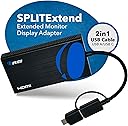
🚀 Elevate your multitasking game with OREI’s ultimate triple-display splitter!
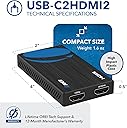
The OREI SplitExtend HDMI Splitter transforms a single HDMI source into a powerful triple-screen setup, supporting 4K@30Hz on one display and 1080p on another. Compatible with Windows, Mac OS, Chrome OS, and Android, it features a versatile 2-in-1 USB-A & USB-C adapter for broad device support. Ideal for professionals seeking enhanced productivity, it requires driver installation and an Intel i5 or higher processor for optimal performance, backed by a 1-year warranty.


| ASIN | B0C3PFQZ4G |
| Best Sellers Rank | #26 in Computer Cable Adapters |
| Brand | OREI |
| Color | Blue |
| Compatible Devices | Windows 11, 10, 7, 8.1, Mac OS 10.10 or higher, Android 7.1 and above |
| Connector Type | HDMI, USB Type C |
| Current Rating | 1 Amps |
| Customer Reviews | 4.4 4.4 out of 5 stars (17,003) |
| Finish | Chrome |
| Global Trade Identification Number | 00850031132511 |
| Item Dimensions | 4 x 2 x 0.5 inches |
| Item Type Name | SplitExtend |
| Item Weight | 1.6 Ounces |
| Manufacturer | OREI |
| Manufacturer Contact Information | [email protected] |
| Mfr Part Number | USB-C2HDMI2 |
| Model Number | USBC2HDMI2 |
| Number of Items | 1 |
| Number of Ports | 2 |
| Package Quantity | 1 |
| Packer Contact Information | [email protected] , 99250 12671 |
| Power Plug Type | No Plug |
| Smart Home Compatibility | Not Smart Home Compatible |
| Specific Uses For Product | PC, Laptop |
| UPC | 850031132511 |
| Unit Count | 1.0 Count |
| Warranty Description | 1 Year Warranty |
| Warranty Type | Limited |
R**L
You don't need a fancy capture card, just get this!
I use this for a capture card setup, splitting the picture out from my Nintendo Switch to an external monitor and to my computer. My monitors don't have HDMI out so this is a cheap way to get a stream setup! The picture quality is great, and the connectivity is fine. It works as described, so what else can I say about it? The length of the AC adapter cable should be fine for most setups, but if you don't do much AV stuff it might be easy to not realize that this thing needs a power supply in order to work, so keep that in mind! It is made of a nice durable metal material so I'm not worried about it being knocked around sometimes.
J**E
5 stars! Simple and easy and it works perfectly! True plug and play!
So easy and works perfectly! I plugged it in to the USB, heard my computer ding as it installed the driver automatically, and then plugged in my HDMI plugs. Both screens popped up and the extended display works flawlessly. So simple and quick. Well worth paying a little extra for this product. We also have two different brands of monitors and still worked perfectly. Some say they must be the same brand and model, but not this product. Highly highly recommend! Started and finished in about 3 minutes.
E**H
FINALLY ONE THAT ACTUALLY WORKS!!!
I have FINALLY found one that works for my Dell AOI Computer!!!!! I have been searching for months and buying and returning ones that have not worked as described and I finally came across this one and I took a leap of faith as I had given up on getting 2 monitors connected to my computer and BAM this one actually worked I now have 3 screens total to be more productive at work and I could not be happier! It was rather easy to install the drive once installed I just connected the monitor and it worked!!!! I am so happy, thank you! And if you are having seconds thoughts like I was, let me just tell you IT WORKS buy it, it's worth the price!
C**E
No Need to Donwload the Driver
Great product. Only took away one star because everywhere on the box and manual it says you need to download a driver. Maybe you do for something special, but I only need it for a third monitor and it works perfectly alright. Not sure why they're so adamant about you downloading it-seems sketch.
G**C
A solid product that works.
It’s has to be the easiest product I have purchased to extend two monitors. Plug and play, It Worked perfectly with my laptop, perfect for day trading and doing IFR simulation.
B**L
You can extend your desktop TO this device, just not FROM it.
Worked like a champ. One thing that I did find confusing in the product description was the statement that it is "For TV Mirror Only - Not for Multi Monitors". It should be noted that both outputs mirror the input signal, however, if that input signal is for an extended desktop, both outputs will mirror that extended desktop which was exactly what I was looking for in the 1st place.
H**B
it does not work with a Cube PC Computer
I purchased the OREI after trying two other HDMI 1 to 2 expanders. The first one connected to my cube, running windows 10, via the HDMI port and the second was tried using the USB C port. The first two behaved identically. Yes I had video but the mouse was screwed up. The problem was that the mouse would not shift between the two monitors unless you moved it left on monitor 1 and then found it on the right side of monitor 2. As my wife said this set up was driving her crazy I researched the OREI. The video was well done and I had high expectations but alas, NO JOY. It behaved just as the other two, much less expensive boxes, did. I then downloaded the drivers that were referenced on the video....I thought surely this is the problem..... Again "no Joy". I could make it work if I powered on the cube and then connected the OREI with one monitor (a DELL) , then connected the second monitor (a Samsung) to the orei..... not the way it should have worked but the mouse behaved well..... then the next problem surfaced.... the Samsung monitor was fuzzy..... the dell monitor was perfect (crisp, bright) and if you did a reboot, the old mouse problem would come back. Oh yes changing the ports that fed the monitors on the OREI did not help.... the dell remained crisp and bright while the Samsung got fuzzy regardless of which monitor setting I used with windows or which port on the OREI I used... If I only used the Samsung monitor on the cube, without the OREI, all was perfect ...bright crisp and very easy to read.. the same with the dell..... both monitors behaved as what I would expect. In addition, the cube would not start a program on the desk top. The mouse would move to the icon but nothing worked if you single or double clicked on any program located anyplace. Now I am not planning to return it, but really think I should as it was a failure from the beginning, but I have given away the other 2 expanders and really need a way to work with 2 monitors. I have resigned myself to simply using it with the limitations noted above. Perhaps this works OK with a Mac (I have not tried it with my Macbook Air) but if that is the case then the description need to be clear on that point. I purchased it because I had a desktop cube and wanted to run two monitors .... Therefor, I can not recommend it as any kind of a useful solution..... thus the 1 star rating I will try their tech support line as a very last resort ..... but I have very low expectations as this type of device should be a plug and play and unless there is some magic software that will make it work, then it is close to worthless.... as a true dual monitor interface that sort-of works it does fine. But I would never buy it again nor would I recommend it.
J**N
HDMI. 1 in, 2 out
I have 2 tvs on one direct tv box. Using the rf controller I have one controller for each tv. Works great!!one tv upstairs and one downstairs. Usually just watching one on the tvs. Very convenient. Of course if both tvs were being watched at the same time they would both have to watch the same channel
J**N
Completely satisfied with this spliter using it with the ps3 to capture gameplay to bypass the HDCP. worth the money on this. highly recommend buying this one.
J**A
Works perfectly with a capture card to record PS3 or having live feed in windows of your PS3, the power supply cable is USB, I personally plugged it in the PS3 USB2.0 port and it seems to be sufficient for power I used nanotape to attach it directly to my capture card
G**O
Veio sem o "cabo de alimentação USB" anunciado, o restante está correto.
D**Y
Heavy, solid, well built, worked perfectly, 3 lights - perfection :) What more can be said. NOW, no-one has said HOW this works when connected to a PC... I purchased HD-102. It has 1 IN, and 2 OUT. My question was - if it's a laptop and I plug this into it... what happens? Well, it DOES extend BUT it ALSO ONLY CLONES. What do I mean by this? The built in monitor (or a PC) in the laptop is DISPLAY#1. The PORT on the side of the laptop is going to go to DISPLAY#2. This device will clone DISPLAY#2 to DISPLAY#3. So, you can have DISPLAY#1 and DISPLAY#2 extended BUT DISPLAY#3 will ALWAYS be a clone of DISPLAY#2. You can also have DISPLAY#1, DISPLAY#2, and DISPLAY#3 all the same by going into your OS and cloning DISPLAY#1 and DISPLAY#2 and then the box automatically clones whatever DISPLAY#2 is. :) It would have been nice if the description of this mentioned this as it would have saved me 45 min of trying to find out myself and never finding the answer because everything kept saying "it doesn't extend" BUT in my mind I was thinking... well, the PORT in the system are what determines how many you can extend to... if your computer has 2 ports for displays then you can get 2 displays extended or whatever and then use this box to clone DISPLAY#2. If your PC has a 3 port card, and you plug this in, you still only have 3 ports that can be extended or cloned BUT this device will clone whatever port you plug into it... into DISPLAY#4 IF you were using all 3 ports previously. Basically... it just clones whatever you plug into it. As for extending... this doesn't do that. It ONLY clones what you plug into it... if it's DISPLAY#1 it clones DISPLAY#1. If you plug DISPLAY#2 into it, it clones DISPLAY#2. etc... :) Overly wordy, but without pictures kinda hard to explain. But, this should cover all questions about how it works.
R**O
The product splits image and sound.
Trustpilot
1 month ago
3 days ago