๐ฌ Elevate your space into a cinematic sanctuaryโanytime, anywhere.
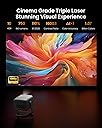
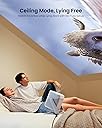
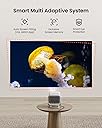
The JMGO N1 Portable Projector delivers a professional-grade home theater experience with native 1080P Full HD resolution and MALCโข triple laser optics for vivid, bright images up to 200". Its innovative gimbal design allows 127ยฐ rotation with automatic keystone and focus correction, enabling versatile placement on walls, ceilings, or floors. Equipped with premium 2x5W Dynaudio speakers featuring Dolby Audio and DTS, it offers immersive 360ยฐ surround sound. Powered by Android TV 11, it supports thousands of streaming apps, Google Assistant, and Chromecast for seamless entertainment. The projector operates quietly (โค26dB) and intelligently adapts to ambient conditions, pausing playback when obstacles are detected, making it perfect for indoor and outdoor use.


| ASIN | B0C4FD5WYN |
| Additional Features | Android TV 11.0, Google Play&Google Assistant, Dynaudio HiFi Audio Experience, Integrated Gimbal Design, MALCโข Triple Color Laser Optics, Multi Adaptive System: Exclusive Screen Memory/Smart Eye Protection |
| Antenna Location | Business, Education, Gaming, Home Cinema, ใNoteใIf you have any questions about the prices, please contact JMGO customer service. |
| Best Sellers Rank | #933 in Video Projectors |
| Brand | JmGO |
| Brightness | 750 Lumen |
| Color | JMGO N1 |
| Compatible Devices | Laptop, Gaming Console, Smartphone, Tablet |
| Connectivity Technology | Wireless/Bluetooth/Wi-Fi/HDMI/USB |
| Contrast Ratio | 1600:1 |
| Control Method | Remote |
| Controller Type | JMGO APP, Remote Control |
| Customer Reviews | 4.2 out of 5 stars 126 Reviews |
| Display Resolution Maximum | 1920*1080 Pixels |
| Display Type | Laser |
| Display resolution | 1920 x 1080 |
| Form Factor | Portable |
| Hardware Connectivity | HDMI, USB |
| Item Dimensions L x W x H | 7.3"L x 6.5"W x 7.5"H |
| Item Weight | 4.4 Pounds |
| Lamp Wattage | 5 Watts |
| Manufacturer | JMGO |
| Maximum Image Size | 200 Inches |
| Maximum Throw Distance | 5 Meters |
| Minimum Image Size | 60 Inches |
| Minimum Throw Distance | 1 Meters |
| Model Name | N1 |
| Model Number | N1 |
| Mounting Type | Table/Ceiling Front/Rear Projection |
| Native Resolution | 1920 x 1080 |
| Picture Quality Enhancement Technology | MALCโข Triple Color Laser Optics |
| Projector Maximum White Brightness | 800 ANSI Lumens |
| Recommended Uses For Product | Business, Education, Gaming, Home Cinema, ใNoteใIf you have any questions about the prices, please contact JMGO customer service. Recommended Uses For Product Business, Education, Gaming, Home Cinema, ใNoteใIf you have any questions about the prices, please contact JMGO customer service. See more |
| Special Feature | Android TV 11.0, Google Play&Google Assistant, Dynaudio HiFi Audio Experience, Integrated Gimbal Design, MALCโข Triple Color Laser Optics, Multi Adaptive System: Exclusive Screen Memory/Smart Eye Protection Special Feature Android TV 11.0, Google Play&Google Assistant, Dynaudio HiFi Audio Experience, Integrated Gimbal Design, MALCโข Triple Color Laser Optics, Multi Adaptive System: Exclusive Screen Memory/Smart Eye Protection See more |
| Video Encoding | H.264 or H.265 |
| Wattage | 100 watts |
J**S
The First Night...
For a tad bit of history. My first projector was the Capsule Max. And my second projector was the Viewsonic M2. Each of these were portable. And they had third party cases making them easily moved around w/ their power cables or hdmi cables. I have owned the JMGO N1 for a little over twelve hours. I completed watching the movie Twister on it, I watched a Buffy the Vampire Slayer Eipsode on it. And I took a peek at some of my favorite movies on it. I can say I am happy. One of the first things I want to address is the artifacting that occurs in dim or dark shots. I read this in another reveiw, and it gave me sufficent pause, that I actually cancelled my order; and subsequently un-cancelled. This strange stippiling does occur in low light scenes, but it does not always occur. On my first night with this device I was watching on the ceiling, but i would move the image to the wall, just to check out the resize, and how it felt as a larger screen. This grainy, stippiling affect that occurs seems to reset, especially if you make the image larger. But the moment, I would go back to the ceiling it would come back. I thought at first it had something to do with the image keystone correction for having the projector at an angel from the flat surface of the wall or ceiling, but even when I re-maneuvered to a straight on perfectly framed image that needed no keystone compensation, the stipiling would remain. Oddly, the longer I watched a movie or tv show, the less this would occur. When you are streaming and you occasionally have a slow down in your stream, the image quality can be less. Had no one ever pointed out this effect, I probably would have put it off to image quality affected by buffering. But apparrently this has something to do with laser technology. If this affect in quality were constant, I would not keep this device, but for the most part, it was not constant. It did not disrupt my viewing enjoyment. And because this is a smaller, more portable device, at a lower price point, with an image quality that is pretty much REALLY GOOD I am not at all unhappy. Another thing I want to address. Lately when I go to movies I have been noticing a red line in the image or along the edges of the image. I found this curious, especially as I watched Dune at the movies and a week later watched it at home and it was not there. When I was watching movies on my new projector i noticed this red line appear and disappear. I am pretty confident now this is an artifact created by one, the laser technology and two my glasses, that I need for seeing distant objects. I must move my head for this red outlinging to appear, and if i take my glasses off, it is completely gone. So long as my head, or my eyes are completely aligned with the image, there is no problem, but if I am looking from the side of my lenses, it appears. Just something to take note of. The setup of the JMGO N1 was uncomplicated. At first the pairing of the remote control was a tad of trouble. The first image that appears are instructions for how to pair the remote, then suddenly a screen that wants you to respond, with the remote covers the image. If you are not paying attention, you will have to reboot the system so that the instructions are visible, and then it is no problem. Right out of the box, there are some things you can watch immediately. Just keep in mind if you are downloading apps, or if the system is upgrading in the background, as mine was, your first few attempts to watch videos will be problematic. The interface felt cluncky at first, and unresponsive, but after apps downloaded and the system rebooted, and the remote re-paired, everything was right side up and felt even. The Android TV interface was much better than I anticipated. On both the Anker Capsule and the Viewsonic M2; I reverted to using a firestick, or google dongel to watch video from. I can see using the Android TV, the built in interface much more faithfully, as time passes I am sure I will go to Apple TV being connected or some other thing like a bluray maybe, since this device is supposed to do 3D bluray movies. Setting up Max, Prime Video, YoutubeTV, were all just as easy as using my phone to scan the QR code and give the okay for my new device to run on my projector. Because the on board OS/ Interface was so bad on the Viewsonic M2 and the Anker Capsule version I owned, I wasted time trying to set those up, with the JMGO N1 I was up and running rather quickly. I would say maximum I spent ten maybe twenty minutes setting up. From there it was Finishing up a movie, and skipping around checking out picture quality from ceiling to wall, to screen. Natuarlly the picture qaulity is best on a screen. I am going to keep an eye on the dark scene artifacting, as I do tend to enjoy some darker movies and tv shows, like horror genres. Buffy the Vampire Slayer, Supernatural and such. Intially I was watching on the ceiling, so when the brightness decressed as I switched to the wall , I was disappointed. Then, my eyes must have adjusted beause it seemed just as good, not as bright but just as good. Out of curiosity, I went and finagled with the image settings. I do not know why but my eyes prefer non-hdr settings, and this greatly increased birghtness, and my enjoyment of the image, be it on ceiling or on the wall. Strangely, and I will have to look into this, I have a small portable 40" projector screen; and the image quality was far more problematic with a small image. Now this particular screen has a bit of warp in it from the texas heat and sitting in my car for a week. So it may be that the automatic settings could not compensate and adjust focus, and keystone correctly. However, my previous projectors simply excelled in image quality and brightness when you brought the screen size down. I am giving this five stars. My logic is that every projector I have owned, one had to take time to learn how to configure it to one's personal likes. I am glad this projector does not have an internal battery that could go bad one day. Though the lens is 30k hours, that is exceedingly reasonable. With modern battery banks and the right adapter usbc to dc barrel, you could have interchangeable batteries, and keep an off grid movie time going for hours. The audio has a deeper bass than the Viewsonic M2, the audio placement would be better infront of you, as it was on the bed to my side, it did not bother me, I just recognize it would be better on a coffee table in front of me. With my Apple TV I could output the audio to a HomePod or a Sonos, or even my airpods. I have not yet tested bluetooth to bluetooth speaker yet. For now I am happy with this, and have aim to report back the more I use it. By comparison the Anker was way too dark, the M2 was just right but I had to lose it for reasons unrelated to function. Thought I was very happy wiht the Viewsonic M2 I could not see myself purchasing it at it is now discontinued. So the N1 seems to be just about equivalent, but somewhat better in certain aspects, upgrade. This is my birthday present to myself and will one day be my permanent bedroom television.
W**U
Good device. A shame that it does not support Netflix
Very good performance in all aspects at this price level. Just a shame that Netflix is not built-in. You have to install a "3rd party" app in your mobile phone which can act as a remote control for Netflix playing by the JMGO N1. But the remote operation for Netflix is sometimes not that convenient, if not frustrating. If not for the Netflix problem, would have rated 5-star.
K**A
Crisp and Vibrant Visuals
JMGO N1 projector is known for its high-quality display, providing crisp and vibrant visuals. Games look stunning, with rich colors and sharp details, enhancing the overall gaming experience. Large Screen Immersion: The projector's ability to project a large screen allows for an immersive gaming experience. It fills your field of vision, making you feel like you're part of the game world, whether you're exploring vast landscapes or engaging in intense battles. Flexibility and Convenience: N1 is portable and easy to set up in various locations. You can quickly transform any room into a gaming space, whether it's your living room, a bedroom, or even outdoors, offering flexibility and convenience for gaming sessions. Low Input Lag: This projector is designed with low input lag, ensuring that your commands are executed without noticeable delay. It's crucial for fast-paced games where split-second reactions matter. Multiple Connectivity Options: N1 offers multiple connectivity options, including HDMI and wireless casting, making it compatible with a wide range of gaming consoles, PCs, and mobile devices. This versatility allows you to enjoy a variety of games with ease. Built-in Audio: The projector is equipped with built-in speakers that deliver decent sound quality. While external speakers or a soundbar can further enhance the audio experience, the built-in speakers provide a convenient option for gaming audio. Social Gaming: The large screen of the N1 projector is ideal for multiplayer gaming with friends and family. It ensures that everyone can see the action clearly and participate in the fun, making it perfect for gaming nights or parties. Customizable Screen Size: You can adjust the screen size to your liking, whether you prefer a larger-than-life display for immersive single-player experiences or a smaller screen for competitive multiplayer gaming.
A**Y
JMGO N1
I've purchased a JMGO N1 Ultra and was thoroughly impressed with the experience, prompting me to order another N1 as a birthday gift for a friend. They absolutely loved it too! The standout features of this projector are its high brightness, vivid colors, and smooth image adjustments. The brightness level is perfect for creating a clear and vibrant picture, even in well-lit rooms. Colors really pop and look true-to-life, enhancing the viewing experience. Adjusting the image settings is incredibly smooth and intuitive, allowing for effortless customization. Another great feature is the convenient swivel base design, which makes positioning the projector a breeze whether it's on a table or mounted on the ceiling. I'm eagerly looking forward to JMGO's future products based on this exceptional experience. This projector has convinced me to be a repeat customer, and I'll definitely consider buying from JMGO again in the future. Highly recommended!
W**E
This little brother of the N1 Ultra and N1 Pro has plenty of spunk
JMGO's N1 projector is insanely bright and colorful for such a little unit! I invested in one of these projectors to play nature and other videos throughout the day. Despite its price point compared with the JMGO N1 Ultra, a 4K-capable projector I also own, it offers tremendous brightness and color output. If you plan to use a projector in the dark or in dimly lighted environments and are fine with 1080p resolution (particularly helpful with outside streaming, as 4K requires four times the bandwidth), the N1 might be just the ticket for you! This little projector delivers the same 110% BT. 2020 color output as its brothers, the N1 Pro and N1 Ultra. To most, these numbers and color standards are confusing, but trust me when I say that JMGO's entire N1 projector lineup puts out, perhaps, unrivaled color outputโdeep, rich, immersive and nothing short of spectacular. The N1 also brings some powerful sound and stereo separation. You can easily connect it to soundbars using an eARC HDMI connection for more ooomph, if desired. The N1's gimbal allows for easy pointing up, down and even at a ceiling. It's a particularly restful and enjoyable experience to take in a movie while resting on a floor or bed. JMGO is onto something special with its N1 projector, as with its N1 Pro and N1 Ultra projectors. Here's hoping they continue to iterate on these remarkable projectors in the coming years.
H**O
Mediocre projector for the price
I bought this projector based on a good review I read online. I am looking to furnish a small, budget-friendly movie theater. I am not looking for top-of-the-line. Yet, for the price, I was disappointed. I am returning it. PROS: 1. Compact projector 2. Triple laser/no bulbs to replace 3. Very sharp image CONS: 1. Only one HDMI port. Soundbar plugged into this one-and-only port. No way to connect a laptop or DVD player. We tried an HDMI splitter, an HDMI-USB converter, a DVD player with two HDMI ports....nothing worked. 2. Not bright enough. A small amount of ambient light in the dark basement made it very hard to see dark scenes. Disappointing for a projector that's approaching 1k in cost. 3. Gimble set-up. A lot of reviewers like this feature. I strongly disliked this feature, because every little cord nudge or device plug-in meant resetting the focus, keystone, and pan EVERY TIME. 4. Color was skewed a bit green; unable to adjust color saturation (in contrast to the lower-budget projector we purchased) #1 and #3 cons drove us nuts. Returning.
A**S
Great picture with auto adjustments make setup a breeze, but outdoor use needs some considerations
The picture itself is really crisp with bright colors. The auto keystone adjustment and digital zoom features are superb especially when compared to lower priced models where it's usually challenging to get right. Especially so when you set up fresh for each viewing such as outdoors. It has reasonable brightness, but still not bright enough to see even at dusk when there's no direct sun anywhere. So, you do need to wait till it's almost completely dark out before the images really spring to life. The audio lacks bass and I found insufficient volume when outdoors with a group of 16 watching. Perhaps not surprising from 5W built-in speakers, but plan on setting up external speakers if you want a more cinematic experience. When I received the unit, the gimbal swivel could not even support the weight of an HDMI cable without getting the projector to "auto" point skyward! I tried several imperfect ideas to take the weight of the cable, but it was frustrating to get right and hold steady. Eventually I wrote to customer support, who were quick to respond, telling me there were set screws under a cover on the gimbal arms to adjust the friction. These covers were easy to remove with a fingernail and the projector package did include an Allen wrench. Too bad the manual doesn't mention why it was included or where the screws are located. Overall, this unit is a big step up from the $200-$400 projectors. I am curious if the extra $400 to get the Pro model with better audio and image brightness is justified, but my budget can't stretch to two units :)
D**K
A perfect little projector
I bought this to go in my bedroom so I can watch movies in bed. So far so great! The N1 is surprisingly small and yet produces a great image with decent sound. The N1 was easy to set up and the unique gimbal design makes getting the image from projector to wall a breeze. Anyone who has owned a projector knows this is the most difficult part of any set up. I did have a wow moment when I rotated the projector upwards and projected onto the ceiling. Very cool. When projecting the image is very good, with impressive color, brightness and contrast. You will need a darkened room for it to look it's best, but it will work in a brighter room if the N1 is positioned closer to the projected wall. There is a little noise in the darkest tones but it isn't noticeable once you're sat back and looking at a moving image. Most surprising is the sound, it's good enough to fill a medium sized bedroom and outperformed another projector I had that claimed to have 40W of sound. It also runs quietly. It's not all perfect though, the Google TV operating system is a little sluggish and it doesn't include Netflix but these seem to be issues with a lot of these all-in-one projectors. It's not a deal breaker for me as I prefer to use my Apple TV and I ditched Netflix years ago. However, I am glad it has Google TV built-in because the projector is very portable. I can see myself taking the N1 around the house (and beyond - it comes with a very neat carry case.) The only other odd thing is sometimes when I put it to sleep the fan stays active and I have to wake the projector up and put it back to sleep again to get it to stop. I've reached out to JMGO about this and will update my review when I hear back, so far they have been very responsive in their support. All in all, a highly recommended projector.
Trustpilot
1 month ago
2 weeks ago