


🚗 Elevate your drive with wireless freedom and smart safety — don’t get left behind!
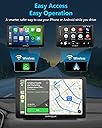
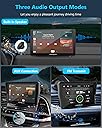
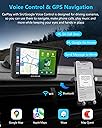
The aphqua2024 Wireless Portable CarPlay and Android Auto system features a 7-inch HD touchscreen with mirror link, seamless wireless smartphone integration, voice assistant control, and a 1080p waterproof backup camera with night vision. It supports multiple audio outputs including Bluetooth 5.0, AUX, and FM transmission, making it a versatile upgrade for any vehicle. Customizable boot logos and robust after-sales support complete this cutting-edge car infotainment solution.


| ASIN | B0C5MNS8HL |
| Best Sellers Rank | #134,948 in Electronics ( See Top 100 in Electronics ) #2,142 in Car Audio Receivers |
| Brand | aphqua |
| Color | black |
| Compatible Devices | Smartphones |
| Connectivity Technology | Auxiliary , Bluetooth, USB |
| Customer Reviews | 4.1 out of 5 stars 304 Reviews |
| Display Type | LCD |
| Manufacturer | aphqua |
| Media Type | Digital media streaming |
| Native Resolution | 1280x720 |
| Screen Size | 7 Inches |
J**Y
Convenient Wireless CarPlay & Android Auto Adapter
This portable adapter makes using CarPlay and Android Auto effortless and wireless. Setup is simple, and it connects quickly to both iOS and Android devices, providing smooth access to maps, music, and apps directly on the car’s infotainment screen. The compact design keeps it out of the way, and performance has been reliable with minimal lag or disconnections. It’s a great solution for anyone tired of cluttered cables while driving. Overall, a high-quality, convenient adapter that transforms your car’s connectivity experience. Highly recommended for anyone looking to enjoy wireless CarPlay or Android Auto.
D**N
Great Product!
Great alternative to those expensive and complicated radio replacements. The Pros: Quality product for a great price point SUPER LOUD. The EQ screen has a “loud” mode that jacks the bass and volume and makes the car shake when music is playing, which I certainly appreciate, as well as the volume goes up to 40. I have it set to 25 right now, which is still plenty loud, since there is also volume variation with the phone and the car stereo. Super easy setup! Took less than 5 minutes to get everything mounted, plugged in and connected, didn’t even need the instructions. The unit comes with two different mounting options: a flat stand that sticks to the dash, or a telescoping arm that mounts to the windshield. The arm seems pretty solid, the device didn’t move or shake when I was swiping on the screen or pressing buttons. Customer service is excellent. There is an option to customize the boot screen, which is a pretty cool and unique feature. All you do is email the customer service with the JPEG, and they will send you a custom update file! (installed via flash drive through the USB) Customer service was kind enough to offer a free rear view camera, which I was planning to buy from a third party anyway, so very excited for that and will review when it arrives. There’s a lot of playing options: there is wired carplay (not tested), wireless carplay, FM transmission (not tested) and AUX cable. All require bluetooth connection, and I am pretty satisfied with the AUX option so far. Bluetooth does take a second to connect, but usually you’re connected within a minute of turning the car on. EQ is very quality and comprehensive: not just adjust bass and treble, but the actual frequencies, with some auto presets and a custom setting, which I will play around with since I don’t understand the ins and outs of audio equalizing. The Cons: The telescoping arm and unit itself make a new blind spot for me personally, since my car and seat are pretty low. I’ve had to find a way to mount it to the vents or CD slot The plugs are all on the drivers side, which means there’s a lot of cables near my leg which is annoying, but I plan to hide them all This is more of a design consideration, but it would be nice if the 12V plug had a usb to charge phones. However, there is a USB plug in the unit itself (for wired carplay) All in all, great product. I have been looking for a quality replacement since my last cheap FM transmitter died, and it’s a fun and affordable way to give some modern features like Apple CarPlay and reverse camera to an older car like mine (08 Altima).
R**I
Works great, camera is an all or nothing option
I got this for my husband and he said it works great. Easy to set up, connect, and put to use. We’re Apple people and he’s been very pleased with the car play interface. The only draw back is that the rear camera is an “all or nothing” option. When you plug the camera cord in, the screen is the backup camera all the time. You lose the CarPlay, maps, and audio interface. We’ll probably exchange it for the non-camera option since plugging and unplugging the camera based on when he needs it isn’t convenient for him. (The car has a rear camera already, it’s just older and a bit off center.) If you don’t have a read camera, the image was clear and installation was simple enough, so it’s a good option if you are willing to deal with the plug-unplug hassle.
J**Z
Inexpensive and easy way to add CarPlay
I've put off getting a CarPlay head unit for several years now because the prices seemed too high for what I considered a compromised solution. For me the best solution is having CarPlay factory installed and using my car's in-dash screen, rather than adding a unit with additional wires going everywhere. But at $109 (after a $30 coupon) it was totally worth it. Installation was relatively easy, the only real challenge being the small size of my car's dash. One of the included mounting adapters worked with the CD drive mount I already had for my iPhone, so I used that as I didn't want to block my reverse camera and I didn't want it on top of the dash impeding my view. (Still trying to figure out where to put my iPhone now.) The instructions weren't terribly detailed and it took me a couple of tries to connect my phone to it but most of the time was spent figuring out where to put it. (If your intention is to use CarPlay, don't bother giving the unit access to your contacts.) After connecting, it worked as advertised. The unit's speakers are not good but it comes with an audio cable to route to your car's audio in. You can turn off the unit's speakers (by accessing the app provided in CarPlay and going to settings, then tap the orange button on the top to go back to CarPlay). I had to figure out how to get my car to default to audio in but once I did that I had the same sound quality I've always had from my car's installed speakers. The only difference is when starting up there is a small pop, but that's probably just an issue with my car and grounding or something. Siri is much easier to trigger now (I never really figured out how to do it from my car's installed system, I think I was supposed to hit the answer phone button or something, I always used my Watch instead). The unit's microphone does a decent job of picking up requests. From there Siri is, well, Siri. I am in a bit of wire hell now, unfortunately. Where once I had one cable for power to my phone, I now have three: power to the unit from the cigarette lighter (the only included powering option), audio from the unit to the car and power to my phone from the USB port on the unit. But, I knew that was going to happen. I guess you can also route your car's camera to the unit, but that would require another cable and, I think, cracking open my car's dash so I'm not going to attempt that. Overall, the price was great, the unit works well and I finally have CarPlay. Very satisfied with this purchase.
B**4
Does NOT Switch to Night Mode Automatically. Buyer Beware!!!
When I first installed this device in our "spare car" that does not have Android Auto, I loved it! My phone connected fast, and the screen was sharp. But most of the time we are driving that car during daylight hours. But boy was I surprised the first time I drove it at night and the screen of this device did not change to Android Auto's "Night Mode." The screen was "blasting bright" making it hard to drive. I even tried changing the setting on my phone to "Night Mode Always," and it still didn't change. I wrote to the company who said, "It doesn't change brightness automatically; you have to go into the settings and dim the brightness." What? First of all, changing the brightness does NOT put it into Night Mode. The maps are other screens are still showing a "white" background which kills your night vision. Secondly, who is going to go into the settings of the device and change the brightness for various times of the day each time you drive the car. This is a deal breaker for me, and I sure wish I had known this before I ordered it. It's too late to return it now.
K**R
Great way to use Android Auto on an older car
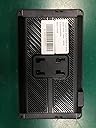
I purchased two of these head units for my cars. The cars are old enough that their phone messaging applications no longer work with my recently purchased cell phones, and also do not support Android Auto. This head unit is great to use navigation, audio, and hands-free call and messaging from my modern cell phone in my cars. Both units were packaged well and arrived in perfect condition. I had questions about some of the functions, and the support team was very responsive, replying to my questions within a day. Use: Android Auto Wireless using 5G WIFI and Bluetooth 5.0 from phone Audio Connection to Car: Cable from Aux Out on Head Unit to Aux In on Car Stereo Installation to vehicle: Flexible tape-backed dashboard mount, added removable sunshade Power: Provided power cable to 12v outlet in dashboard of car Pros: Very clean audio Secure dashboard mount Very responsive and helpful technical support Default audio settings are well-balanced between music audio, call, and nav playback Cons: Using built-in equalizer app tends to make call, message, and nav audio too low in comparison to playback of music. (Just not using equalizer solves this.) Does not work well with polarized sunglasses. Details: Phone connection. This is my first Android Auto connection, so I had a learning curve. My phone came with Android Auto pre-installed, but I found that the connection to the head unit became more reliable when I performed an uninstall of Android Auto on my phone, followed by updating the Android Auto on my phone to the latest version. The connection actually uses both the 5G WIFI and the Bluetooth service to manage the volume of data involved. When I have a connection problem, I find that restarting the phone generally resolves the problem, so I think the issue lies more with my cell phone than with the head unit. Hey Google and Google Assistant. I found that the unit accepts commands almost perfectly. I am able to send text messages and manage the apps on my phone without having to repeat myself. Equalizer. I'm not using it. I found that using the built-in equalizer in any mode but the default mode seems to make the playback of navigation, call, and message audio too low to hear without manually raising the volume on the car stereo. When the equalizer is in the default mode, the nav, call, and message audio comes out at a very comfortable volume with respect to the general level that I set for my music. Audio performance. I am using the Aux Out connection on the unit to connect to the Aux In on my car stereo. I also successfully tested the FM Uut on the unit with my car stereo, but I decided to stick with the Aux Out to avoid potential radio interference. (I did not experience any interference during my FM Out test.) I did note that, when a connection is made to the Aux Out, switching to the internal speaker does not work. Once known, this is not a problem. The sound quality is wonderful, even at high volume. Installation. The unit came with two mounts: a suction-mount with an adjustable arm, and a tape-secured simple dashboard vertical mount. Both mounts connect to the head unit with a standard four-point connection that I found to be compatible with many other vendors' car accessory devices, a nice design feature for customization. I originally tried the adjustable arm mount, but had problems with keeping it secure. I switched to the tape-secured mount and found it to be excellent for my purpose. For the tape mount, I made sure to clean the dashboard area thoroughly with alcohol, and then to allow the tape to bond for 24 hours before installing the unit.
K**R
Works great, but had to replace the cigarette lighter adapter. Also, support is poor.
Older car now has car play. Connected to aux of stereo, so music and directions come thru the car’s speakers. After owning this device for over 6 months the power adapter broke and needed replacement. I bought a Czepa 12v car dc charger cord with 8 connectors. It is 4 amps and works well with the carplay device. Also, recently my iPhones couldn’t connect to Carplay. Conyacted support who asked for my Amazon order number which I provided; but then no answer for 4 days and counting. Eventually I found that the iPhones were blocked from connecting to carplay. By going to settings, general, carplay and then selecting the aphqua device an option to reactivate Carplay for the device could be selected. Now the device works for the iPhones. Why couldn’t support get back to me and help?
J**K
Well Worth the Money & Great Customer Support
I think this is my 1st review and I bought many items over the last 15 years. This product is well worth the money. I can't compare to any $200 plus similiar product but I read the stats and other than a bigger screen, (7" by the way is very acceptable.) it has all the features the higher price devices. You might get a bit lost setting up the volume for different venues or how to navigate it, but it only takes a little time. I found the sound Equilizer to be quite good and the music & speech sounded great via the 3.5mm wire your my system I have a 2019 Toyota Camry with 8" screen. Note- Toyota dropped their nav system. I have an android Phone 5g Moto Sytlus, (great battery life). Back to this radio. The touch screen works well, and you can change screen brightness for both day & night. So for the money, I now have Nav with voice command, (Waze & Google Map, love Waze though.) this is a great unit. I only had it a day, so the proof will be how well it stands up after use and I will update this review based on that. Date 01/08/25. So, I was having some problem loosing connection especially with WASE App, and I wrote APHQUA support, and they responsed the very next morning. They supplied me with a New Firmware which I uploaded to my device, and went through the initial startup again. That help emensley and when it did loose GPS, it immediately recalibrated and had the directions back on line pronto. The new Firmware changed the setting look a bit and I think they are better. So, buying these products on line maybe fast and sometimes cheap but unless you have a GOOD company and staff that will support and follow up, your product might be useless after a year. Great Support & Product. Thanks !!!
Trustpilot
2 days ago
3 weeks ago