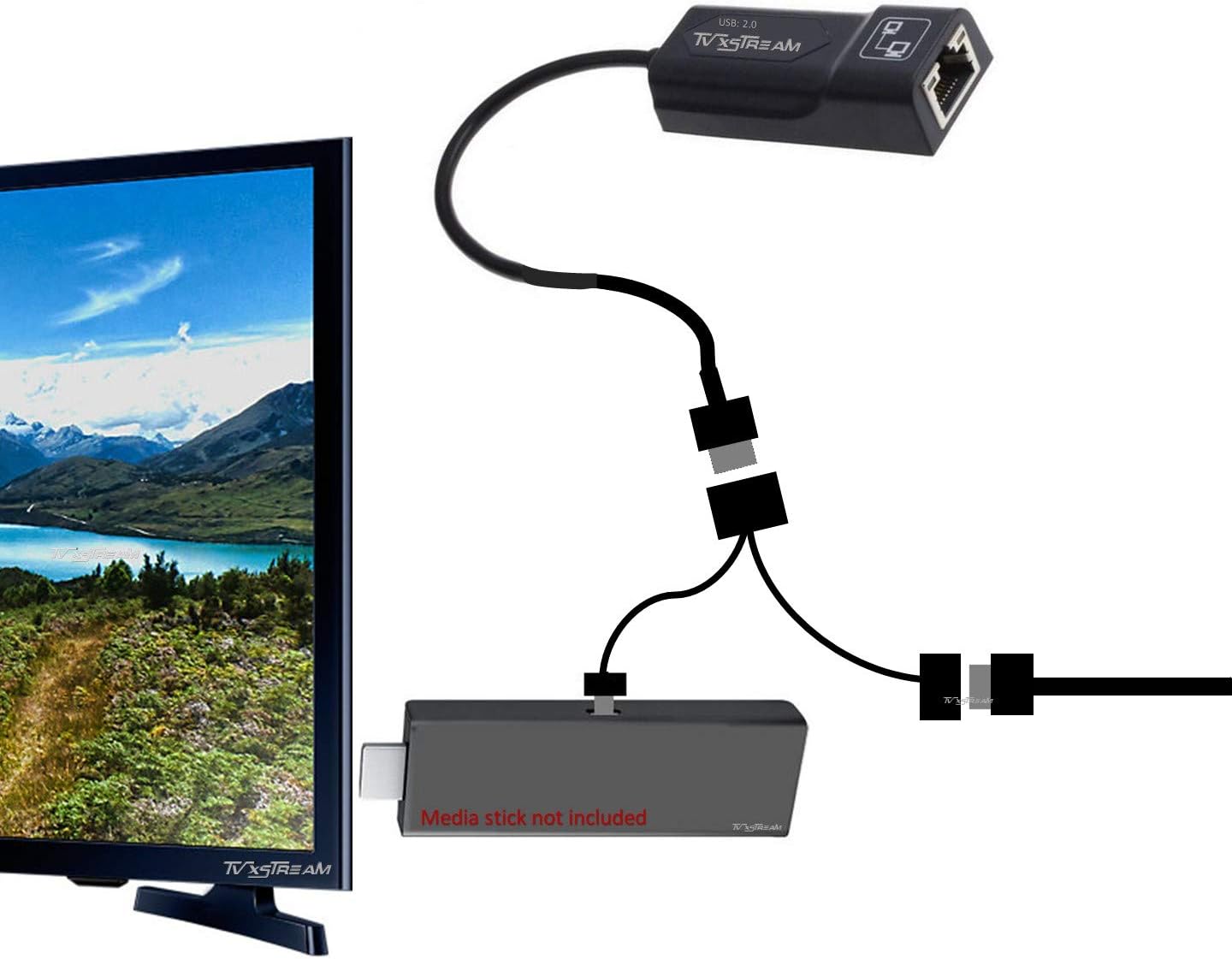
OTG Cable PLUS Ethernet Adapter
Product ID: 53260780
Details
- BrandTV xStream
- Colorblack
- Compatible DevicesTelevision
- Connector TypeMicro USB USB
- Specific Uses For ProductTV Box
⚡100Mbps wired speed
📶Stable wired connection
🔌Plug & play USB OTG
⚡ Upgrade your stream game—ditch buffering, embrace wired speed!
The Amazon Ethernet Adapter for Fire TV 2nd Gen and 4K streaming sticks delivers a reliable 100Mbps wired internet connection via USB OTG, ensuring faster, buffer-free streaming. Designed for easy plug-and-play installation, it supports auto-sensing and full/half duplex modes, enhancing your streaming experience with improved load times and picture quality. Compatible exclusively with select Fire TV devices, this adapter is the affordable upgrade for professionals demanding seamless media performance.
| ASIN | B074VKL4R9 |
| Best Sellers Rank | #1,390 in Lightning Cables |
| Customer Reviews | 4.3 4.3 out of 5 stars (873) |
| Date First Available | August 16, 2017 |
| Is Discontinued By Manufacturer | No |
| Item Weight | 1.41 ounces |
| Item model number | 43272-6325 |
| Manufacturer | tvxmedia |
| Package Dimensions | 5.67 x 3.9 x 0.59 inches |
E**C
GREAT PRODUCT
Works Great
N**Y
Nice little inexpensive upgrade
I bought two of these for both my Amazon Fire Stick 4ks. It was very simple to set up, just plug in the provided cable between the USB Power Cord and teh Stick. Then, plug in an Ethernet cable. This immediately took affect. I restarted the Fire Stick, and checked the network settings, sure enough it was running over Ethernet. I set the network settings to static settings (IP, Netmask, Router and both DNS). One thing I noticed was load speed increased. Another thing I noticed was improve picture and sound quality. While this worked well over WiFi, it works much better over Ethernet. This is a very affordable option than buying a stand alone streaming box. Finally, I am surprised this works as well as it does.
A**R
Just Buy It!
Been having signal strength problems the past few weeks on my Fire Stick. Searched Amazon for a hard wire connection, and was surprised to find there are quite a few out there. This one is recommended by Amazon, so I went for it. Price is extremely reasonable. Took about a minute literally to install. No more signal problems. No buffering. Apps and shows/movies start right up. Much crisper picture. Even if you do not appear to have WiFi signal problems, I would recommend getting this anyway. WiFi signals can vary from time to time, even while watching a show/movie. This keeps it all consistent.
R**W
It works
I plugged this in and it does work. I have been having problems with out internet the last few days. So it may not be a great review for this product. Most channels work. Some still freeze. But again our internet has been crashing so I can't blame it on the ethernet adapter. I can say that the channels I stream are a lot clearer. I don't regret buying it. That says a lot.
H**A
Eventually Works but Buggy
Pretty easy to connect and eventually it does work well but before it does, you will go through a nice dance of restarting your Fire Stick and the connection being disconnected and then reconnecting itself. This may take a few minutes or it may never stop. You could think everything is ok and you're watching a show and all of a sudden dropped connection. I don't get but that's how it is. When it works, it works but good luck trying to get it to work consistently.
T**M
Great device for Firestick 4k
I was stunned by how easy it is to install this device on a Firestick 4k. I already use an OTG cable for additional memory and a keyboard. Another ethernet adapter I bought took a very long time to set up and never worked very well. I just plugged this one into my OTG, powered up the Firestick and by the time I got to the network settings screen, the adapter was already configured and working great. Buffering is now a much smaller problem for me. Now, if I could only find one with a USB 3.0 interface.
B**S
This works great so far!
We had Fire TV Sticks and "whole house wifi" with up to 1GIG for streaming, but we were still getting "freezing" pics, plus "pixilating" of the picture on a daily basis on two of our tv's. We bought a couple of these Ethernet Adapters for Streaming Media Sticks and VOILA....no more problems. We just hooked them up with some cat6 cable running from our router to the Kindle Fire Sticks and plugged in the sticks as usual. Can enjoy streaming on every one of our tv's in our house now, including the one out back by the hot tub!
T**R
Much faster streaming
This device connects to my Firestick and Ethernet directly so Wi-Fi is no longer being used, just the direct Ethernet connection causing streaming to be must quicker and more stable. I have 2 of these for 2 Firestick 4k's. Hooked them up about 13 months ago and they work perfectly. Installs in minutes.
P**R
Works perfectly with Amazon Firestick
C**E
Works well
K**.
I plugged it in, the Firestick picked it up and it just worked. I did turn off the Wi-Fi because we don't use the Alexa feature and ran a speed text. The reported speed was about average for our broadband connection, about 20mbps. It's Good enough for HD with no buffering - certainly, a worthwhile upgrade if you have a solid wired LAN.
F**Y
It works well in my bedroom
T**Y
Connection intermittent Would not connect dropping out after sleep mode very difficult to reconnect
Trustpilot
1 day ago
1 month ago