Buy anything from 5,000+ international stores. One checkout price. No surprise fees. Join 2M+ shoppers on Desertcart.
Desertcart purchases this item on your behalf and handles shipping, customs, and support to Kyrgyzstan.
🖊️ Scan, Translate, Listen—Your Multilingual Workflow, Supercharged!
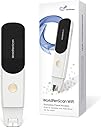
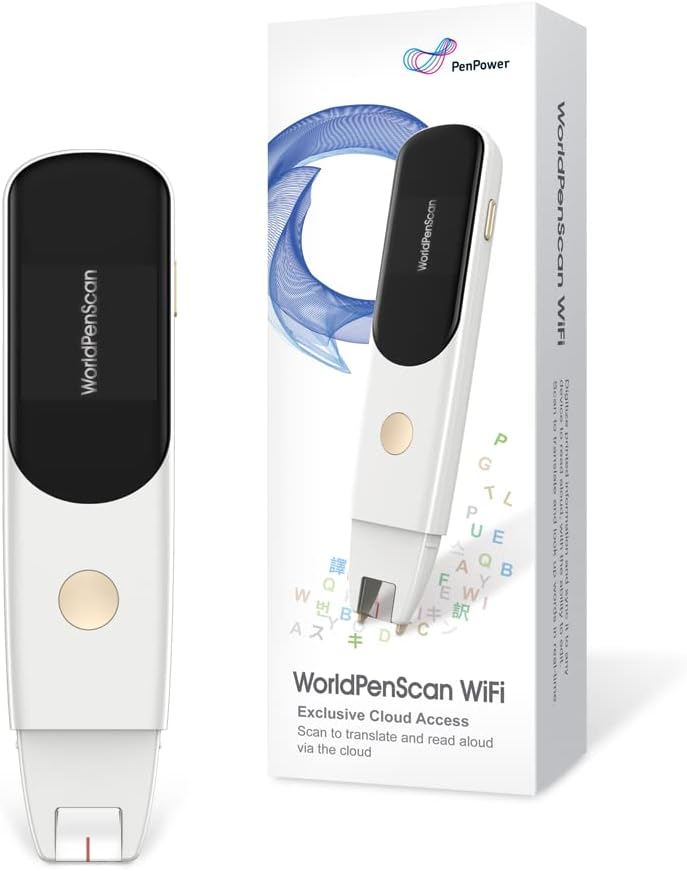
The PenPower WorldPenScan Wi-Fi is a compact OCR pen scanner that converts printed text into editable digital content at speeds up to 1,000 words per minute. Supporting 41 languages, it features customizable text-to-speech for dyslexia-friendly reading, cloud syncing for on-the-go access, and integrated dictionaries for instant translation. Compatible across Windows, Mac, Chromebook, iOS, and Android, it’s the ultimate tool for professionals, travelers, and language enthusiasts seeking efficient, distraction-free productivity.


| ASIN | B0BZCPQT7N |
| Best Sellers Rank | #121,409 in Office Products ( See Top 100 in Office Products ) #122 in Document Scanners |
| Brand | PenPower |
| Color Depth | 1 bpp |
| Connection Type | Wi-Fi |
| Connectivity Technology | Wi-Fi |
| Customer Reviews | 4.1 out of 5 stars 64 Reviews |
| Light Source Type | LED |
| Manufacturer | PenPower |
| Media Type | USB |
| Minimum System Requirements | Windows 7 |
| Model Name | SWPSWF01EN |
| Optical Sensor Technology | CCD |
| Resolution | 600 |
| Scanner Type | Document, Text |
| Warranty Description | 1 year |
T**D
scan the text line by line and does the work
i have this scanner pen for a week and use it regularly. it reads aloud/mute or save to a text file after scan. i purchased this scanner for education. it works very well with ChatGPT.
J**6
Great
This thing, to my surprise works really good.
L**R
Not for me
Doesn’t work like it was described. It doesn’t read every word, it does every 2nd or third word
C**T
Not very user friendly
Was not very user frindly, and a lot of hassle to get it to work.
C**T
My son had problems
My son had problems reading this helps him out a whole lot. Appreciate it to be here so
T**H
Works, with functional limitations and a few concerns
To start with, I do like this pen for what it does: scan specific lines of printed text and upload them in an app to be either translated, explained via a dictionary or copied to a text editor. The setup is straightforward, and the instructions included in the package (or downloaded / presented as a video by following a QR code) are clear, complete and easy to follow. The toughest part was entering my network password on the 3-lines / 3 characters per line scrolling keyboard on the pen; sure, it is partly a self-inflicted pain caused by me being security conscious and thus having passwords that are obnoxiously long and complicated. I would recommend NOT to connect this or any similar device / appliance to your day-to-day Wi-Fi network, instead set up at least one guest network specifically for such use. If you do not understand what I just said, please ask someone to assist you, but do follow my recommendation. Once set up, the pen can be connected to either a phone – the easiest thing, just scan with the phone the QR code on the pen’s screen. Or it can be connected to any device that has a browser: open the dedicated webpage in a browser on any device / computer and enter the pen id from the pen’s screen (touch on the small icon on the right / lower side of the pen’s screen to display the pen id). Either way, you end up in a webpage where anything the pen scans gets displayed and can be copied, translated or passed to a dictionary for explaining. To start a new line, the round button on the pen needs to be pressed. Otherwise, whatever is scanned from multiple lines gets captured as a single line – which is what you want to do for a long sentence or paragraph that spans multiple lines. Well designed. Now, for the limitations and drawbacks: - this is totally dependent on the web service that produces the page you are seeing on the phone, or anywhere else in your browser. At worst, if the service is discontinued, the pen is useless, forever. At least, at times the service may not be available, and by Murphy’s law that should happen when you are time-pressed and cannot afford it, like an overdue assignment or just before an exam or such; - the time for the pen to start / boot up is close to one minute; these days, it’s a long while; - there is a minimum writing size and a maximum size that the pen is able to read reliably. Neither one are stated in the instructions / info; - hand writing produces highly unreliable results, this pen is unusable for hand writing; - images and icons interspersed in the written text produce weird results, are not properly filtered out; - battery life is rather short: while I was scanning at a pace of a few lines every minute or so, the battery went dry before the hour. There’s one more drawback, and it’s a bit trickier: the pen id is fixed, there is not a new id every time the pen gets connected / paired to your browser. So, the pen uses a web service to pass through the text you scan to your browser, and the pen’s identity is fixed. That means that whoever runs the service (or whoever may get access to the data from the service) can gather a complete record of everything a specific pen is scanning, across multiple uses. Another concern I had about the fixed id is addressed, not an issue: the pen cannot be connected simultaneously to two browsers, even from the same device. The latest connection disconnects any previous one. This is good. But this opens the possibility for someone hiding anywhere in the Internet thicket to cause pain to users of such pens. There is a one-year warranty for the pen, and the manufacturer provides a direct contact (an email address) for support. Overall, this pen is useful and works well, within its limits. It is different from scanning text with your phone, quicker at extracting just the text needed, and across pages. For me, it also has the tactile aspect that I prefer, it is like using a highlighter. I do prefer this pen over scanning with the phone when it comes to extracting bits and pieces of text.
D**.
Amazing tech! Standalone version recommended.
The browser functionality has been the best. Every so often it would timeout and I'd have to reconnect the pen. But that wasn't so horrible once I got the hang of it. The web-based pen is great if you're going to do all your work at your desk at home. But something this portable really should be ready to travel. I like the ability of quickly scanning text and copying it into my projects. The accuracy is very good. Smaller, basic font was best. Larger, all caps would sometimes present an error. It struggles with handwriting, which is no big surprise. I would recommend the standalone version if you're looking to use it often or if you're buying as a gift for a student.
C**W
Well executed hardware, one small thing I wish the software did better, still 5/5
The hardware on this Pen Scanner is very well done. There is a little sliding piece to detect when it's up against the page and that is well hidden and well constructed so it works reliably and smoothly. The light is good and the viewing window well framed such that I never had any problem targeting the pen or figuring out what line it was on. (I am using it to get notable quotes from books as I read.) The way the software works you scan a QR code on the pen from your phone to open a web page and anything you scan shows up as text on that web page. Now, clearly, you will want to copy and paste the words off this web page into a document or note of some kind. Unfortunately every time you switch from the web page to your other app to paste text you will need to re-scan the QR code to establish the link with the web page again. I imagine this is because mobile devices save energy by suspending activity on web pages that are not the focus, but other web apps manage to maintain connectivity. HOWEVER, I am not removing a star because if you sign into the web app, it preserves text for you across sessions so you can use various workflows to gather a bunch of text before copy/paste. Still, it would be nice if the web page just held a session and I would recommend that to the developer :)
T**P
NON SODDISFATTA
Il prodotto è arrivato visibilmente già usato. A scatola era perfetta ma lo scanner non carica ed è arrivata lateralmente aperto e senza pellicola protettiva sul visore
I**.
Nur im WLAN nutzbar
Der PEN funktioniert leider nur, wenn er im WLAN ist und kann somit nicht in der schule eingesetzt werden, weil die deutschen Schulen keine Fremdgeräte von Schülern zulassen. Das war sehr ärgerlich. Der Stift ist echt teue und es hat lange gedauert bis die Lehrer alles geprüft hatten. Am Ende konnte er den Stift nicht nutzen.
F**E
super scanner
facile d'installation , rapidité de transfert impressionnant , un gain de temps enorme ,parfait
J**R
Easy to use
So useful. Easy to connect. Works well
J**S
Lápiz traductor
El aspecto es correcto Pero su funcionamiento es incorrecto
Trustpilot
2 months ago
2 weeks ago