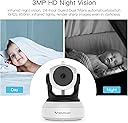
🔒 Elevate your home security with crystal-clear vision, day and night!
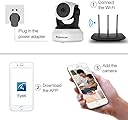
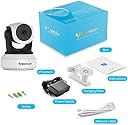
The VStarcam 1080P WiFi Camera delivers professional-grade home security with full HD 1080p resolution, advanced color night vision, and smooth PTZ (pan-tilt-zoom) functionality. Designed for indoor use, it supports two-way audio, cloud storage, and up to 128GB local memory. With multi-user access and intuitive apps for PC and mobile, it’s perfect for monitoring your home, office, or loved ones anytime, anywhere.


| ASIN | B07CSQWBWF |
| Alert Type | Motion Only |
| Antenna Location | Home Security, Motion Detection, Night Vision |
| Are Batteries Required | No |
| Best Sellers Rank | #320,342 in Electronics ( See Top 100 in Electronics ) #1,333 in Dome Cameras |
| Brand | Vstarcam |
| Colour | white |
| Compatible Devices | Laptop |
| Connectivity Protocol | Wi-Fi |
| Connectivity Technology | Wireless |
| Control Method | App |
| Controller Type | Android |
| Customer Reviews | 4.0 out of 5 stars 183 Reviews |
| Effective Video Resolution | 1296 |
| Field Of View | 360 Degrees |
| Form Factor | Dome |
| Indoor Outdoor Usage | Indoor |
| Indoor/Outdoor Usage | Indoor |
| Item Dimensions | 19.8 x 15.2 x 11.9 Centimeters |
| Item Weight | 249 g |
| Light Source | Infrared |
| Manufacturer | china |
| Model Number | C24S |
| Mount Type | Surface Mount |
| Network Connectivity Technology | Wireless |
| Night Vision | Night Color |
| Number of Channels | 2 |
| Number of Items | 1 |
| Other Special Features of the Product | HD Resolution, Night Vision, PTZ Technology |
| Photo Sensor Technology | CMOS |
| Power Source | Battery Powered |
| Recommended Uses For Product | Home Security, Motion Detection, Night Vision |
| Room Type | Garage, Office |
| Special Feature | HD Resolution , Night Vision, PTZ Technology |
| UPC | 667797843717 |
| Unit Count | 1.0 Count |
| Video Capture Format | MP4 |
| Video Capture Resolution | 1080p |
| Voltage | 5 Volts |
| Water Resistance Level | Not Water Resistant |
| Waterproof Rating | IP65 |
| Wattage | 5 Watts |
| Wireless Technology Type | Wi-Fi |
S**W
Superior Night Vision without using Night Vision
Update 01/18/21: Just received my 3rd Vstarcam. At this point, I can't imagine owning any other brand. I bought one of the 720p Vstarcams 2 years ago and I have it mounted inside my living Room Window so I can't use the night vision feature due to the reflection. Turns out, I really only need my porch light on and it is sufficient enough to see. Actually I like it better because It stays in color which can come in handy if you ever need to Identify the color of a car. Since I've owned the 720p Vstar cam I have bought several other brands and have mounted them right next to one another and have found not only are the others (which were supposedly 1080p) inferior to the Vstarcam in picture quality but the last one I bought was completely blacked out as soon as the sun set and useless without a LOT of I.R. led's blasting the area. So I decided that I was only going to buy the VStarCams from here on out because I definitely don't want to have to use more than one app. but I also haven't found another 1080p cam in this price range that is near the quality of this 720p. So when I ordered another cam a couple days ago, it was a no brainer to order the Vstarcam 1080p... thinking, at worst, It would be the same quality or a little better. After I hooked it up I could definitely tell a difference right away in video quality but the real surprise came after the sun set. If you look at the Pictures I posted, both are the Vstarcams and the darker image is the 720p and the brighter is the new 1080p and you can easily see that the new cam is absolutely amazing looking out my window and no night vision being used on either of them. The 2 pictures were taken well after dark and the only light I have on is my 60 watt led porch light which isn't really that bright. The darker picture from the 720p cam is more true to how I see it outside with my eyes but the other camera completely surpasses any that I've tried. The camera stays on all night with no night vision and it is still in color. I know looking at the screen shots looks like there are some IR's on but I promise you it is only the porch light and the street lights and the street lights are no where nearly as bright as they appear through that camera, it's just that camera has an amazing sensor. So this is an easy one.... I highly recommend anyone whom is looking to mount a camera on the inside of a window looking out and still wants to see everything clearly in color and use no night vision to buy these 1080p VstarCams. It's also worth noting that the software is far better than the software for other cams I own and there is actually a different app for the cell phone and PC which is nice because the app for the pc looks like a professional system with a ton of really great features. Lastly, the older cam I bought 2 years ago has never worked through my Alexa Echo Show but to my surprise the new one does and it didn't require me to jump through hoops to make it work since all the software was already configured for Vstar. Hooking up the second camera was very easy and fast, again, since my cell phone, PC, and Alexa Show was already configured for this brand, all I had to do was plug it in and open my Android app for the camera's and scan the bar code... and presto!!! Done!!
A**N
Works until it doesn’t and then you’re alone
Camera worked fine for a few months but now the charging port is faulty and there’s no customer service to repair this thing. The app Eye4 is ok. Basic UI and not much versatility. I’m not a fan of continuously having to “think about it” either when they try to sell their cloud storage. I have an SD card. There’s nothing to think about.
W**R
Poor web interface
The Good: 1. Picture quality is good for this price. 2. The app is functioning well and easy to use. The Bad: 1. The web interface is very poor, just minimum configuration options. Can't display multiple cameras. 2. If you use DHCP, it also sets it's ports dynamically, so the port will change every time it renews the IP address. This is important if you want to use IE in windows to connect to the camera. You will need to use the following - http://IP_Address:port 3. The phone app will only give you MAC address, not the IP address with the port number. It will be very helpful if the app will display the IP with port# due to above #2. 4. You need to use the downloadable utility to find the IP and port # on a PC. 5. There is no instruction in the box on how to connect to the camera via Windows PC, I had to do my own online research. 6. The app asked me to bind to an email address, but when I received the email, the link doesn't work, so I guess I will have to live with the pop up reminder every time when I open the app. Overall a decent camera, although I prefer the CamHi web interface. If you want to use the web interface, you should consider use a static IP address with static port #. It will make your life a lot easier.
F**A
Excellent product
Excellent camera. Works perfect as a baby monitor too
F**R
WiFi stopped working and only connects with cable now
First time connection worked fine, great! But the tilt resolution is awful; each click is a large movement. Can not navigate to any given center. It worked okay for a couple weeks. Then it lost connection and would not reconnect to Wifi. The worst part is having to remove from mounting to access internal cable with reset. Tried that three times, no luck 'failed to connect.' Finally had to remove again as the only way it would re-connect is using the network cable option, then set Wifi while connected with cable. Pain in the ***. You get what you pay for I guess!!! **UPDATE** Wifi will no longer connect. When it was connected and lost the first time, the offline cam shows a "reconnect" option. That option asks you to connect to the cameras specific WiFi (means changing from the one programmed that worked). That connects direct to the cam. Then you go to 'try to" set 'back to' the local Wifi and it will not connect to any local Wifi network! Always reports "fails to connect, please check password or connect to hot spot" Tried multiple times reset option and multiple networks. So the bottom line is it has a decent picture for the price, but buyer beware you WILL lose your wireless and only thereafter be able to connect using a wired Ethernet cable to your router or switch. BTW, the exact same thing happens on their outdoor 18x zoom cam. I suspect the updates are bad. Recommend once you get wireless working the first time, do not install any of the camera updates if everything is working.
Trustpilot
3 weeks ago
1 week ago