We remain fully operational. Our teams are working around the clock to ensure your deliveries continue safely.

DOWNLOAD THE APP


Customer Services
Copyright © 2025 Desertcart Holdings Limited
DOWNLOAD THE APP
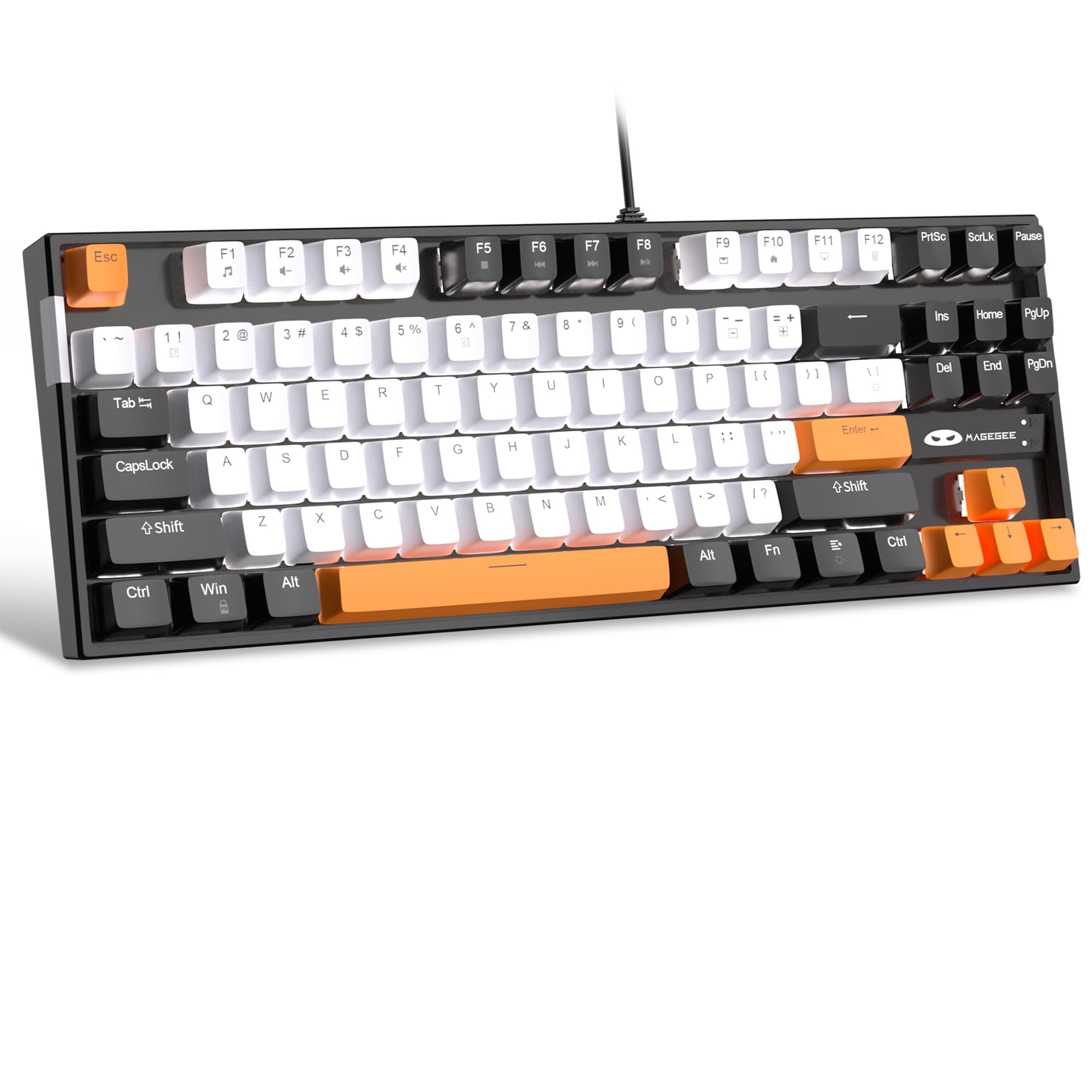
⌨️ Elevate your workspace with precision and style—because your keyboard should work as hard as you do.
The MageGee 75% Mechanical Keyboard features a compact 87-key layout with smooth linear yellow switches, customizable white LED backlighting offering 19 modes, and full anti-ghosting for flawless multi-key input. Built with a splash-proof metal frame, ergonomic adjustable feet, and double-shot keycaps, it ensures durability and comfort. Compatible across Windows, Mac, and Linux via USB plug-and-play, this keyboard is designed for professionals, gamers, and creatives seeking reliable performance and sleek aesthetics.


| ASIN | B0BVVJ4G7G |
| Additional Features | Non-slip |
| Antenna Location | Gaming, Multimedia |
| Best Sellers Rank | #957 in Video Games ( See Top 100 in Video Games ) #68 in Mac Gaming Keyboards #93 in PC Gaming Keyboards |
| Brand | MageGee |
| Built-In Media | USB Cable |
| Button Quantity | 87 |
| Color | White Black/Yellow Switch |
| Compatible Devices | Laptop |
| Connectivity Technology | USB |
| Customer Reviews | 4.2 4.2 out of 5 stars (4,677) |
| Enclosure Material | Metal |
| Hand Orientation | Ambidextrous |
| Item Dimensions L x W x H | 13.98"L x 5.04"W x 1.42"H |
| Item Weight | 890 Grams |
| Keyboard Backlighting Color Support | Single Color |
| Keyboard Description | Gaming |
| Keyboard Layout | QWERTY |
| Manufacturer | MageGee |
| Model Number | MK-Star White/Black |
| Number of Keys | 87 |
| Power Source | Corded Electric |
| Series Number | 530490 |
| Style Name | Contemporary |
| Switch Type | Linear |
| Theme | Mechanical Keyboard, Gaming |
| Unit Count | 1.0 Count |
| Water Resistance Level | Water Resistant |
D**J
Very good for price
If you're looking for a cheap, reliable keyboard, this is the, it's very responsive and fitz the fingers perfectly. It's also fun when you have the customizable keys, only one downside, it's a little loud
C**Y
You can disable the Windows key!
The keyboard works as expected. My son kept accidentally hitting the Win key while playing Minecraft (in particularly intense moments), which would suspend the game and kick him off servers and such. The instruction manual (see picture) isn't clear, but if you hold down the Fn key and hit the Win key, it disables the Windows key! I suspect this will reset each time the computer is restarted, but I'll update the review if that isn't the case.
C**5
Great for the Price!
You know, mechanical keyboards can be expensive, and we know that typically, you get what you pay for. MageGee has done something special with their keyboards. They feel like they are of relatively high build quality. I have to say that I enjoy typing on this keyboard and I am picky when it comes to boards. I have only used their blue (clicky) keys, but they feel great. The only complaint i could call out is the noise. You should probably put some o-rings on your keys to quiet them down when they bottom out. Other than that, the keyboard works VERY well and feels GOOOOOOOD to type on.
M**L
Highly recommend
I recently picked up the MageGee 75% Mechanical Gaming Keyboard, and it has been a great addition to my setup! This keyboard combines a compact design with solid performance, making it ideal for both gaming and typing. Build Quality: The construction feels sturdy, with a nice weight to it that prevents any slipping during intense gaming sessions. The keycaps are durable and have a satisfying feel when typing, which is essential for both gaming and productivity. Switches: The blue switches provide a tactile and clicky experience that I really enjoy. They offer great feedback and are responsive, which enhances my typing speed and gaming performance. However, if you prefer quieter keys, you might want to consider other switch options. Backlighting: The LED blue backlighting is vibrant and adds a nice aesthetic touch to my setup. There are multiple lighting modes and brightness levels to choose from, allowing for some customization. It looks great in low-light conditions, although I wish there were more color options available. Layout: The 75% layout is compact and saves space on my desk without sacrificing functionality. The keyboard has all the essential keys and functions while maintaining a clean design. It’s perfect for gamers who want a more streamlined setup. Performance: Overall performance is solid. The keyboard registers inputs quickly, and I haven’t experienced any missed keystrokes during gaming. It works well with various games and applications, making it a versatile choice. Value for Money: Given the features and quality, the MageGee 75% Mechanical Gaming Keyboard offers excellent value for the price. It's a great option for gamers on a budget who don’t want to compromise on quality. Overall Impression: The MageGee 75% Mechanical Gaming Keyboard is a fantastic choice for anyone looking for a compact, responsive, and stylish keyboard. While the blue switches might not be for everyone, they deliver a satisfying typing experience. I’d definitely recommend this keyboard to fellow gamers and anyone in need of a reliable mechanical keyboard!
T**R
Solidly built, lots of alt. caps, very nice aside from backlight features
I really like the heavy weight of it, and it came with a key cap puller as well as optional red keys for WASD, the arrow keys, and shift, enter, esc, and space bar. I'm just using the WASD caps in red, makes them easy to pick out on the go while gaming. My one complaint is about the backlighting, which automatically was on a sort of breathing mode I don't like. I'd have just changed it to a static on light, but couldn't figure out how, so I turned the backlight off. The keys that seemed to indicate they'd change the lighting style didn't do that, and mine didn't seem to come with instructions. Oh well, not a very important feature to me anyway, especially given the caps on this are in no way translucent. It weighs about 2 pounds, which impressed me. the switches feel good and the key caps go on solidly, I doubt they'll get loose. Anyway, I'm happy with it but wish I knew how to put on a static backlight. To me seems like a good price on a good product aside from the lighting issue, which could probably be figured out by delving user forums or something. *update* I figured out how to change the lighting settings, (FN+\ ) so it's all good now.
A**X
Get what you pay for
Purchased this keyboard as a budget option as the one I was replacing it with was double typing some of the keys, or just not registering input at all. However upon receiving the keyboard, it initially worked just fine, After just a few days I started to see the board double typing just as my previous one was. Thought maybe I was just not used the to key depression ranges, or even fat fingering. At about a week I noticed that the "D" key would just not register input at random. By the next day, essentially all the WADS keys would just not accept input at random. Decided to return and go with another brand. Previous keyboard was nearly 300USD when I bought it 12 years ago, and I have now since learned, that you get what you pay for with keyboards.
A**A
It sounds creamy and soft. Love it. And the spare key caps are awesome
D**E
Ottima tastiera , feed dei tasti ottimo. Meccanica e con tasti che si possono cambiare a piacimento . Molto bella esteticamente e led che fanno il loro lavoro
Z**H
Good keyboard, gives you the feel of old days before the advent of GUI based OS when there used to be the bulky TVS 128 keys keyboard and all the navigation was done using Tab, PgUp, PgDn, Arrow keys, etc. My 'Paisa Wasool' moment came when I was booking an Indian Railways ticket through IRCTC during peak holiday rush, those who have tried to book during the same period will understand, and to my surprise I was able to book a confirmed ticket within one minute of the window opening time. Note: I did not use the mouse during the whole process. It is heavy and holds it ground no matter how hard you punch the keys and thanks to the rubber pads at the base it does not slip even the slightest even at highly inclined table surface. The keys are soft and respond to the slightest touch with minimal pressure. The only con that I found that the left shift key sometimes got stuck, which was resolved by replacing the grey key cap with the red one that was provided among the extra key caps. Some people might not like the colour or the lighting effects or other aesthetics, but remember that this is not an artifact but a robust piece of hardware, and it serves this purpose well indeed.
J**A
i bought this while deciding what 'main' keyboard i wanted to invest in for my new setup - but i am so shocked at how much i love this one that i will probably just stick with it! colour is nice, i got the blue and white and it also comes with lilac switches that you can change which is really cute :) switches are perfect. i had the razor mechanical keyboard before which cost me literally 10x the price and i prefer this one. get it! :D
N**S
the blue switch keyboard is super tactile and clicky, and the keys are standard so you can switch out the keycaps. it's even easier with the tool that was included in the bag of lilac accent keys that came with the keyboard. the backlighting is vibrant and a really pretty shade of blue, and the different lighting settings are all pretty cool. the only thing is that the colours are a lot more pastel than advertised; I personally love it, but it's definitely not the bright, vibrant blue shown in the photos.
Trustpilot
1 month ago
1 month ago