


Desertcart purchases this item on your behalf and handles shipping, customs, and support to Kyrgyzstan.
๐ Discover the Future of Charging Testing!
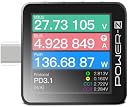
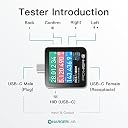
The ChargerLAB Power-Z KM003C is a state-of-the-art portable USB-C fast charging tester that supports PD3.1 and QC5.0. With a larger 1.54-inch LCD display, it allows for multiple tests including voltage, current, and protocol analysis. Powered by an ARM Cortex-M4 processor, it can handle up to 50V and 6A, making it an essential tool for tech enthusiasts and professionals alike.


| ASIN | B0BJ24PVNJ |
| Best Sellers Rank | #30,923 in Industrial & Scientific ( See Top 100 in Industrial & Scientific ) #480 in Voltage Testers |
| Brand | ChargerLAB |
| Brand Name | ChargerLAB |
| Colour | Black |
| Customer Reviews | 4.5 out of 5 stars 245 Reviews |
| Item Dimensions | 35 x 9 x 36 Millimeters |
| Item Weight | 0.58 Ounces |
| Item dimensions L x W x H | 35 x 9 x 36 Millimeters |
| Manufacturer | ChargerLAB |
| Measurement Type | Multimeter |
| Minimum Operating Voltage | 50 Volts |
| Model Number | KM003C |
| Number of Items | 1 |
| Number of Packs | 1 |
| Part Number | KM003C |
| Power Source | Battery Powered |
| Power Source Type | Battery Powered |
| Specification Met | CE |
| Style | Digital |
| Style Name | Digital |
| UPC | 756166474123 |
T**S
Spitzengerรคt und Hat zu vielen Entscheidungen beigetragen
- Zeigt die Flussrichtung der Ladung an > mit einem Pfeil bei IBUS - die lade Spannung und die daraus resultierende Power ird ebenfalls angezeigt - kappazitรคtsรผberprรผfung von Akkus durchfรผhrbar - auslesen von lade Standards (an Lade Ports) - auslesen der E-marker sspec von kabeln - resistiver wiederstand zuschaltbar - software ( allerdings ein bisschen fragwรผrdig ) Firewall Riegel vorschieben! Alles in allem ist das gerรคt sehr informativ und hat mich dazu bewegt nicht PD Fรคhige kabel auszusortieren auch wenn diese schick und toll aussehen, ich habe mir beispielsweise eine 240W Ladestation angeschafft, da ich mir schon gedacht habe das soviel "power" gegenรผber 40 Watt ladenetzteilen von anno dazumal un dem "Ladekabel" vom 3vorletzten Telefon etc pp. immer noch im Einsatz ist denkt man darรผber nach ob das dann noch alle so passt. Habe einen Akku mit 54W geladen wurde, das Kabel wurde leicht warm^^, eine Nachkontrolle mit dem Tester ergab da es keinerlei Quallifikationshinweise gab nichtmal den "normalen" PD Standard mit 60W, die Temperatur des Ladeports ist รผber 50 grad gegangen was mich zum abbrechen des Ladevorganges gebracht hat. Das kabel hatte keine e-marker infos, ist aber auch schon jahre alt. Selbes gerรคt wieder entladen und mit einem 100W Kabel geladen welches einen E.marker Chip hat und laut dem gerรคt mit 100W geladen werden kann ( Kabel/Spec = Pass ) > Temepratur 33Grad, das sieht dann schon anders aus. Das Bedeutet das auch ein Brand abwendbar ist wenn man mal das kleine teil zur Beobachtung zwischen das "verwendete" lade Kabel hรคngt. Aktuell habe ich handwarmer getestet, die haben garkeinen ladestandard, das teil holt sich sogar mehr ampere aus dem Versorgerkreis als es selbst verkraften kann, haben sogar einen USB C anschlus sind aber nur รผber das beigelegte USB A->C ladbar das ist dann schon heftiger. Aber nur weil ein gerรคt "keinen" PD oder QC kann heiรt das nicht das es nicht gut ist, beim laden wird beispielsweise der Handwarmer nicht mal Ansatzweise warm. Das erinnert mich irgendwie an den Makitakku der diverse Schutzfunktionen hat, den es aber auch "Aus Fernsost" ohne jegliche Schutzeinrichtungen gibt. Dadurch das sich heute aller jahrelang die Akkus und Techniken erweitern sind zwangslรคufig auch Sicherere Kabel und Gerรคte notwendig die "intelligent" laden. Das gerรคt hilft zu erkennen ob ein gewisser Standard vorhanden ist und ob eine Sicherer ladezustand mรถglich ist. Mit der Software kann man einen Kompletten Ladezyklus oder Entladezyklus รผberwachen und dadurch auch den zustand des akkus erfassen. von daher von mir 5 Sterne, alleine schon dafรผr das es mir die Mรถglichkeit gibt Sicherheit statt "Brand" zu erreichen. Mistet eure kabel aus und macht QC/PD draus und setzt auf e-marker chips in kabeln *Nicht jedes Teure -Emarker-Kabel ist auch gut" Schaut euch tests und rezessionen an die helfen auch weiter.
F**E
Does the job. I recommend!
Does the job to tell what your USB-C to USB-C really is. Is it a pure USB x or a Thunderbolt 3 or 4? This device will tell you. Also allows to make precise power consumption measurement over a period of time. Kudos to the manufacturer. Such a device is not easy to find. I recommend.
U**T
Useful tool
Very good for protocol analysis. A little on the pricey side.
A**.
โญ๏ธโญ๏ธโญ๏ธ The best of all testers, Alt DisplayPort capable
ChargerLab KM003C is by far the most modern USB-C tester, preserving all cable lines, thus it is Alt DisplayPort compatible and allows for video signal transmission with PD 3.1 support. It is surprisingly small, and the screen displays more information than the competition. By far the best USB tester, kudos to ChargerLab. I am providing an overall comment for three USB testers, all of which deserve to be purchased as they complement each other perfectly and are consistent in their results. I would like to dedicate the majority of this review to the Bit Trade One model, which has recently arrived on Amazon. It deserves a shoutout because the tool is exceptional and inexpensive for what it offers. The ADUSBCIM is a USB cable tester that truly complements traditional USB cable testers. Only the cable to be tested needs to be plugged into the A and B ports, and the tool does the rest. The reference value for calculating the cable's resistance is taken using a CR2032 battery, and I note that the calculation is very precise and stable. You can find on Bit Trade One's ADUSBCIM GitHub page, in the Pull Request section, a manual in English in PDF format. This is my small contribution to the project, as the current official English manual is more of a word-by-word description that is difficult to understand. Thanks to this tester, I discovered, for example, that Anker cables, the 765 series, were actually poor high-resistance cables, and that I had much better options for charging. I ended up wasting money on cables that turned out to be slower than cables that were given to me for free with computer accessories. The FNIRSI FNB58 is a very comprehensive USB-A and USB-C port tester. It notably offers numerous rapid charging protocol tests, can test the quality and resistance of a cable, and obtain oscilloscope-like graphical representations. Now that we are on PD3.0 and with PD3.1 approaching quickly, owning one of these tools is now essential to validate the proper functioning of an installation. I've read a lot of advice on Reddit, and if you're looking to equip yourself with the best products offering the most testing possibilities, here are the tester references to get: - Bit Trade One ADUSBCIM (very thorough cable tester testing all the lines of a cable) - FNIRSI FNB58 (the most comprehensive, many ports, many scenarios, USBA/C Micro) - ChargerLab KM003C (the most modern, TB4, 250W) If you have these three or at least a combination of the cable and usb tester, it will take you no more than a few days to become a USB expert. ๐
I**T
Utile e tascabile
Non riesco a far funzionare il cambio di orientamento dello schermo con la rotazione fisica dell'apparato, ma per il resto fa tutto quel che promette ed รจ un attrezzo insospettabilmente utile, che va maneggiato con cura per non sbagliare. Tenere sempre a portata le istruzioni.
Trustpilot
3 weeks ago
4 days ago