Buy anything from 5,000+ international stores. One checkout price. No surprise fees. Join 2M+ shoppers on Desertcart.
Desertcart purchases this item on your behalf and handles shipping, customs, and support to Kyrgyzstan.
✨ Light up your life, your way — smarter, brighter, and synced to your vibe! 🎶
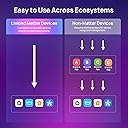
The Linkind Matter Smart Light Bulb is a 9W LED A19 bulb delivering 800 lumens with 16 million colors and 64 dynamic scenes. Compatible with Matter protocol and major smart home platforms (Apple Home, Alexa, Google, SmartThings), it offers voice control, music sync, and a sunrise wake-up feature. Designed for privacy with local control via the AiDot app, it supports 2.4GHz WiFi and lasts up to 25,000 hours, making it an energy-efficient, customizable lighting solution for modern smart homes.


| ASIN | B0BHRZFJDN |
| Accepted Voltage Frequency | 100 to 120 Volts and 60 Hertz |
| Additional Features | 16 Million Colors, 64 Dynamic Scenes, Energy Usage Insight, 120 Voltage, Music Sync, Seamless Interoperability |
| Best Sellers Rank | #880 in Industrial & Scientific ( See Top 100 in Industrial & Scientific ) #54 in LED Bulbs |
| Brand | Linkind |
| Brand Name | Linkind |
| Bulb Base | E26 |
| Bulb Shape Size | A19 |
| Color | Color |
| Color Rendering Index | 90 |
| Color Temperature | 6500 Kelvin |
| Connectivity Protocol | Matter, Wi-Fi |
| Connectivity Technology | Wi-Fi |
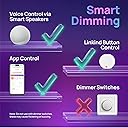
| Control Method | App, Voice |
| Controller Type | Amazon Alexa, Apple Home, Google Home |
| Customer Reviews | 4.5 out of 5 stars 662 Reviews |
| Efficiency | 88.89 lumens/watt |
| Frequency | 60 |
| Incandescent Equivalent Wattage | 60 Watts |
| Indoor Outdoor Usage | Indoor |
| Item Dimensions W x H | 2.36"W x 4.25"H |
| Item Type Name | Matter Smart Light Bulb |
| Item Weight | 7.83 ounces |
| Light Color | Red, Green, Blue, Warm White, Cool White |
| Light Output Maximum | 800 Lumens |
| Light Source Operating Life | 25000 Hours |
| Light Source Type | LED |
| Light Source Wattage | 9 Watts |
| Light Type | LED |
| Manufacturer | Linkind |
| Manufacturer Part Number | 1 |
| Manufacturer Warranty Description | 1. |
| Material Type | Aluminum, Plastic |
| Model Name | Matter A19 |
| Model Number | LS0101811266 |
| Number of Items | 4 |
| Package Quantity | 1 |
| Power Consumption | 9 Watts |
| Power Source | Corded Electric |
| Shape | A19 |
| Smart Home Compatibility | Smart Home Compatible |
| Special Feature | 16 Million Colors, 64 Dynamic Scenes, Energy Usage Insight, 120 Voltage, Music Sync, Seamless Interoperability Special Feature 16 Million Colors, 64 Dynamic Scenes, Energy Usage Insight, 120 Voltage, Music Sync, Seamless Interoperability See more |
| Style Name | 60W 4 Pack |
| Unit Count | 4.0 Count |
| Voltage | 120 Volts (AC) |
| Wattage | 9 watts |
| White Brightness | 800 Lumens |
D**L
Works w/Apple HomeKit. Easy and fast setup using AiDot app first then HomeKit. Highly recommended!
We have had smart bulbs before and have had varying experiences with getting them setup and with ongoing ease of use--or lack of it. We now use Apple Home exclusively as our home automation. Many smart devices say they work with HomeKit, but we have had issues with setup and ongoing reliability. So far, these are perfect. These bulbs don't appear to come with any instructions so you have to utilize everything they give you on the outside of the box. You can scan the QR code on the outside of the box which will take you to your App Store to download the AiDot app. Or you can just open your App Store and search for "AiDot". That is the first step. Don't skip it! Before you can add these to Apple Home you have to set them up in AiDot. I don't love having to install these apps, but if I want automation it is necessary. Take a quick look at their privacy policy by clicking the link to it when you're installing the app. At the time I installed it, their stated use of my personal information is acceptable. They stated they don't sell it or use it to advertise to me and also stated their privacy policy would transfer to the buyer if the company is sold. We never know what they're really doing, but this is about as good as it gets in terms of disclosing how they use my personal info. You need to setup a login for the app which only requires name, email address, and a password. I use "hide my email" and disposable email addresses for these apps. Once you have the app installed, the rest is pretty intuitive. Have a plan and be armed with what you need to do the setup start to finish before you start! Know: What you will name each room that has a bulb. What you will name each bulb (be logical and plan to use the same names for the bulbs in the AiDot app and in your preferred AI app (Alexa, Apple Home, etc.) I bought a box of 4 and named them Smart Bulb 1, Smart Bulb 2, etc. Your network name (the SSID-what network name you choose when you're connecting to your home wi-fi) Your network password. Know if your wi-fi broadcasts the 2.4 Ghz and 5 Ghz bands under the same name or separate names. Example, you might have "MyWiFi 5" and "MyWiFi 2.4 " as choices (Replace the "MyWiFi" part with whatever yours is named). Or you might only have "MyWiFi" without a number after it so that both your 5 Ghz and 2.4 Ghz bands are broadcast under one network name. Smart bulbs can't use the 5 Ghz wi-fi band so if yours broadcasts two names, only the one that is 2.4 Ghz will show up during setup. **Very important--If you don't see your Wi-Fi broadcast twice, one for 5 Ghz and a separate one for 2.4, you won't see your Wi-Fi as a choice during AiDot bulb setup. Don't despair! In AiDot select "other networks" at the bottom of the list of Wi-Fi choices. By doing that you will be given the option to type in the name of your Wi-Fi (the exact SSID) and the password. The app will then find your 2.4 Ghz band, connect to it, and remember it so that after you setup one bulb your Wi-Fi network will be there as a choice for all subsequent bulbs. Just be sure you type it EXACTLY as it is broadcast or it won't be found. If this applies to you, first go into your phone's Wi-Fi settings and note the exact name of the Wi-Fi you're using including Capital letters, lower case, etc. Type that exactly in the network name field in AiDot after choosing "Other networks" during setup. Also, your phone must be connected to the same network you're connecting the bulbs to during setup. If you have more than one Wi-Fi network near you, make sure your phone is connected to the right one or the setup will fail and you won't know why. You can't be off of Wi-Fi and just using your cell phone data either. Be sure you're connected to Wi-Fi correctly before you start setup. Right after I setup each bulb in AiDot, the latest firmware for the bulbs was installed automatically. Keep the bulbs on and your phone near the bulbs while this is happening. I was installing in bedroom ceiling fixtures so I laid my phone on the bed under the light fixture and left it until the install and update was complete in AiDot. The lights flicker a little when the update is finishing. It only took a few minutes. For Apple HomeKit setup, there is a QR code on the the base of each bulb. You will need to use that to set them up and the bulbs need to powered on the entire time. Don't bypass installing in AiDot first! I had to unscrew my bulbs just slightly so that my phone camera could capture the QR code on the bulb. If I was careful I could unscrew it just enough for Apple Home to see the code but not enough to cut the power to bulb. Hold your phone really close to the bulb while HomeKit is finding it and setting it up. I think many people who had trouble with HomeKit setup probably moved their phone away from the bulb before setup was complete. The one time I laid my phone down on the bed under the light fixture during Apple HomeKit setup, it failed to setup. I immediately started again but held my phone right up to the light and it setup in about 30 seconds. I will update this review if we experience problems. For now, I highly recommend these bulbs especially if you've been struggling to find bulbs that work with Apple HomeKit.
C**E
Best Lightbulbs I’ve Ever Bought
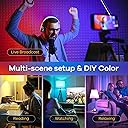
Worth it. I’m obsessed with these lights. Great price for great quality so many features!!! You can set routines, scenes, lights can sync all together or with music or movies! The possibilities are endless. You can even do DIY on your light settings and the color transitions and choose everything. Totally customizable. Literally probably over 100 different features options and customization tools you can set. Seriously if you were looking for color changing lights BUY THESE they are just that and SO much more. Have helped me so much with my daily routine. Might even go so far as to say have made me more efficient/productive. These would be an AWESOME gift. Since I bought these and received them 2 days ago I have been hooked with finding more products by this company and trying to figure out what customization features work best for me but also I can stop telling everyone about these light bulbs! Crazy amazing great product. Would highly endorse.
T**O
Easy to install and operate
These are my new go to for smart bulbs. Extremely easy to install to hook up to my home voice system.
L**Y
Honest review. Pretty good, not super great.
These bulbs are good, nice and bright. The color accuracy isnt always great though, light blue looks green, purple looks more like pink, but you know, I mostly use the darker blue and greens anyway, and those are good. And the tunable white is bright, lights up a room just fine. No heat. No connectivity issues, i connected one to alexa to turn on with movement, and that always works too. I also like that they are regular sized, so they fit any socket without issue. Overall, pretty good, not super great, shame about the light blue's and such.
C**5
A great option to transform a room with poor lighting
I'm honestly sad that I hadn't purchased these lights before. My bedroom lights have always had only an ON/OFF situation, and was never "cozy". (My landlord wouldn't let me install a dimmer.) Not only do these lights have dimming built-in, but there were some surprising things that I didn't expect: 1. The cost was reasonable 2. The app is free and is actually really nice. It lets you group lights so that I can control all of my bedroom lights at once 3. Some of the mood settings animate. I don't actually use those, but it's worth noting. 4. I'm pretty sure that some of the preset mood settings set different colors for different lights, which is really a nice touch. 5. You can tune in different "whites" (such as more warm or cold), and as I had mentioned before, brightness 6. They have some sort of "sync to music" feature, which I'm likely never to use. What I can't speak to, yet is the daily cost or durability, because I haven't had them that long. Nor can I speak to the company's customer support, because I haven't had to use it. Pro tip: If you shut of your wifi at night, remember to set your lights to how you want them in the morning. They require wifi to change their mood setting. Anyhow, definitely worth the price. And once again, hats off to the user experience designer who worked on that app.
R**L
Can control outside home
I previously had a different smart bulb. Decided to try these based on features. Things I like: Controllable through the app whether you’re home or out and about. Preset lighting options (relaxed, cozy, party mode, etc) Customizable lighting options (including brightness and custom color options, along with blink or color change patterns) Works with my Google home Can preset to turn on and off at certain times though I have yet to use this feature Things I didn’t like: If someone turns it off from the light switch instead of thru google/the app, the connection sometimes breaks and it has to be reset. It’s more of an annoyance than anything and doesn’t happen often. From the last smart bulb and the one I have now, it seems to integrate much better than the others I had. The connection is great, and I’ve messed with my roommates changing light colors or turning their lights off randomly which is pretty funny.
M**S
smart(DUMB)lights
These lights SUCK!!! They constantly loose connection and I have to delete them from my internet device and reconnect them. The lamp will be on but the light will not respond to my automations to illuminate at specific times. When I unscrew the bulb from the socket and then screw it back in it will come but I then have to go thru the whole setup process again. Save yourself time and aggravation and DO NOT BY THESE. IF I COULD I WOULD RETURN THEM.
E**R
Reliable, seamless, convenient, Functional.
I purchased the AirDot matter Wi-Fi light bulbs and I was expecting a cheap product at the price point for these light bulbs I was not expecting quality... boy was I wrong. from the moment I opened the box I could tell they were well made as soon as I downloaded the app I could see quality and attention to detail in every corner of the UI. i connected and integrated my bulbs into all of my smart technology and I will say there is a limitation with how Google can control the app functions but it does not seem to be a limitation of the product yet Google instead I am a theater performer who sings online everyday these lights have been such a game changer I have people constantly commenting and asking me where I got them and so many other questions and I so and asking me where I got them and so many other questions and I get so excited to share because these work so well. There are so many functions available between syncing up with music creating your own scenarios are one of the many amazing presets and so much more available on the app I really can't recommend these enough.
J**.
Check for firmware updates FIRST!
CHECK ONE BULB FROM EACH BOX FOR FIRMWARE UPDATES IN THE AiDot APP FIRST! I had problems with my second box of bulbs not "Generating Matter Credentials" during setup until I checked for firmware updates using the AiDot app. Guess what? All 4 bulbs had firmware updates that fixed the problem and allowed me to set them up fast and easy in the Google Home app. Don't assume your bulbs shipped with the latest firmware. After your bulbs are updated, you can add them to the Google Home app as Matter devices, then remove the bulbs you updated from the AiDot app, Logout and Uninstall it. Great bulbs. Brighter and easier to pair than the Nooie Bulbs I had before these. Recommend.
M**N
Great color LED bulbs
Great bulbs, easy to setup and works well with voice command. No complaints.
M**N
fast!
This set up faster than any other homekit light bulb I've tried! It's very responsive and I'm happy with it.
F**F
DO NOT BUY!
I bought 3 4-packs. Four of the bulbs stopped working after 1 month (5 weeks)… I had them connected directly to my wifi through an Echo speaker. Now they’ve stopped responding to Alexa AND they will not reset. I have had to connect them back to Alexa by using the AiDot app (yes, it’s odd that their app recognizes the bulbs to sync with them, but not the Echo speaker anymore…?) and then link the AiDot Skill to Alexa. This is what I DID NOT want to do and that’s why I spend the $$ to buy these Matter bulbs…so I WOULD NOT have to use a 3rd party app…but now I’m forced to…
C**D
After a year of use
I own six bulbs that I've used just about everyday for the past year and they all work great. Decently bright colours, easy to navigate the app, really bright white tones(however you're psycho if you like cool over warm). Only issue has been every few months a bulb will disconnect and I need to remove it from the app and reconnect it, however this could be an issue with my internet rather than the product, and really isn't a big deal due to how easy it is to connect.
Trustpilot
1 day ago
2 weeks ago