
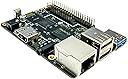
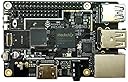

ameriDroid ROCK64 4GB Single-Board Computer
Product ID: 52279304
Details
- BrandameriDroid
- CPU ModelCortex
- Memory Storage Capacity4 GB
- Model NameameriDroid
- Ram Memory Installed Size4 GB
desertcart.com: ameriDroid ROCK64 4GB Single-Board Computer : Electronics Review: The Rock64 is a great piece of hardware; it gets a lot of things right, including price. - *Edit: Seeing so many negative reviews of the Rock64 based on operating systems, the wiki has all the current distros - just make sure to use the SD image for an SD card or the eMMC image for eMMC (they provide downloads for both). The link is here: http://wiki.pine64.org/index.php/ROCK64_Software_Release I personally went with Ubuntu Mate Xenial - I flashed the image to an SD card the same as the RPi3 and I haven't had any issues really. If you get a wireless dongle, don't get one that requires a realtek driver. I've been using an old 2.4 GHz Alfa Network adapter for wifi - it works great! I'll post a few pics of the Rock64 desktop below... *Original Review: The Rock64 4Gb is, in my opinion, one of the best sbc platforms currently available relative to its price point. Yes, the RPi 3B is great - I have several of them; but the Rock64, for ~$20 more than the RPi, presents a significantly more robust piece of hardware. I had hopes for the Tinker Board, but ASUS over-hyped an inferior sbc - the Rock64 is what ASUS should have provided given ASUS' recognition. The Rock64 has a 64-bit processor, which immediately makes the Tinker Board irrelevent. It has USB 3.0 input, Gigabit Ethernet, DDR3 RAM, and eMMC support - all missing on the RPi. It supports both Android and Linux; which I had no problem getting Linux going on the board - I cannot say the same for the ASUS Tinker Board. In terms of drawbacks, the desertcart listing doesn't offer the robust customization that the seller's website offers - I prefer desertcart, but I will likely have to use the seller's site in the future (fortunately PayPal seems to be accepted) given all the options consolidated in one spot. Also, for the uninitiated, this board may provide a challenge with Linux - fortunately there is support from the seller and from Pine's website on getting the board going. Also, there doesn't seem to be on board Bluetooth, nor WiFi - not a huge issue, especially given how inexpensive USB dongles are - but, nonetheless, it was a bit odd seeing it has IR support built in. In terms of the seller, shipping was reasonable and fast given it was coming to Iowa from Cali. The board comes well packaged in a nice plastic case instead of a smashed thin cardboard box (RPi). And kudos to the person that rang out the transaction - a simple hand-writtten thank you is a nice touch whenever you make a purchase online. Overall, a very nice piece of hardware and from the type of seller desertcart should seek out and retain. If you have a bit of experience with sbcs, perhaps the Rock64 would be a nice step up from the bigger brands selling hardware with a bit more to be desired. Review: Good value for the money - Good value for the money, first distro I tried worked (ubuntu mate), the only issue was that the LAN is not working yet.. Haven't dug into it too seriously yet, just grabbed a USB dongle for the meantime. I'll be integrating a couple of these into my SBC cluster, running docker containers on boards that are suited to a particular task - the memory, emmc, USB3, gigabit ethernet -- this should be well suited for running docker containers..
| ASIN | B076N3G3WS |
| Brand | ameriDroid |
| CPU Model | Cortex |
| CPU Speed | 1.5 GHz |
| Connectivity Technology | Ethernet, GPIO, USB, Wi-Fi |
| Customer Reviews | 3.7 out of 5 stars 16 Reviews |
| Item Dimensions L x W x H | 3.35"L x 2.2"W x 0.71"H |
| Item Weight | 1.76 ounces |
| Manufacturer | ROCK64 |
| Memory Storage Capacity | 4 GB |
| Model Name | ameriDroid ROCK64 |
| Processor Brand | ARM |
| Processor Count | 4 |
| Processor Speed | 1.5 GHz |
| RAM Memory Installed | 4 GB |
| RAM Memory Technology | LPDDR3 |
| Ram Memory Installed Size | 4 GB |
| Wireless Compability | Infrared |
J**N
The Rock64 is a great piece of hardware; it gets a lot of things right, including price.
*Edit: Seeing so many negative reviews of the Rock64 based on operating systems, the wiki has all the current distros - just make sure to use the SD image for an SD card or the eMMC image for eMMC (they provide downloads for both). The link is here: http://wiki.pine64.org/index.php/ROCK64_Software_Release I personally went with Ubuntu Mate Xenial - I flashed the image to an SD card the same as the RPi3 and I haven't had any issues really. If you get a wireless dongle, don't get one that requires a realtek driver. I've been using an old 2.4 GHz Alfa Network adapter for wifi - it works great! I'll post a few pics of the Rock64 desktop below... *Original Review: The Rock64 4Gb is, in my opinion, one of the best sbc platforms currently available relative to its price point. Yes, the RPi 3B is great - I have several of them; but the Rock64, for ~$20 more than the RPi, presents a significantly more robust piece of hardware. I had hopes for the Tinker Board, but ASUS over-hyped an inferior sbc - the Rock64 is what ASUS should have provided given ASUS' recognition. The Rock64 has a 64-bit processor, which immediately makes the Tinker Board irrelevent. It has USB 3.0 input, Gigabit Ethernet, DDR3 RAM, and eMMC support - all missing on the RPi. It supports both Android and Linux; which I had no problem getting Linux going on the board - I cannot say the same for the ASUS Tinker Board. In terms of drawbacks, the Amazon listing doesn't offer the robust customization that the seller's website offers - I prefer Amazon, but I will likely have to use the seller's site in the future (fortunately PayPal seems to be accepted) given all the options consolidated in one spot. Also, for the uninitiated, this board may provide a challenge with Linux - fortunately there is support from the seller and from Pine's website on getting the board going. Also, there doesn't seem to be on board Bluetooth, nor WiFi - not a huge issue, especially given how inexpensive USB dongles are - but, nonetheless, it was a bit odd seeing it has IR support built in. In terms of the seller, shipping was reasonable and fast given it was coming to Iowa from Cali. The board comes well packaged in a nice plastic case instead of a smashed thin cardboard box (RPi). And kudos to the person that rang out the transaction - a simple hand-writtten thank you is a nice touch whenever you make a purchase online. Overall, a very nice piece of hardware and from the type of seller Amazon should seek out and retain. If you have a bit of experience with sbcs, perhaps the Rock64 would be a nice step up from the bigger brands selling hardware with a bit more to be desired.
M**P
Good value for the money
Good value for the money, first distro I tried worked (ubuntu mate), the only issue was that the LAN is not working yet.. Haven't dug into it too seriously yet, just grabbed a USB dongle for the meantime. I'll be integrating a couple of these into my SBC cluster, running docker containers on boards that are suited to a particular task - the memory, emmc, USB3, gigabit ethernet -- this should be well suited for running docker containers..
B**S
I used amazon recommended power supply atolla US standard adaptor External Power Supply ...
Don't buy. Tried three different OS installs and all of them were unstable. Errors kept popping or the system would freeze. I used amazon recommended power supply atolla US standard adaptor External Power Supply 15W ( 5V/3A) AC / DC Adapter. Also this device is supposed to be 4K but Ubuntu 16.04 install only allowed 800x600 resolution. Their device, their OS build and this is the best we can do?
A**N
Makes a Great NAS
I originally wanted to make a network attached storage device for my home where I can store photos and movies. I originally went with the Raspberry Pi 3 B+ for this task. Upon loading openmediavault and getting a hard drive ready I realize the one major weakness of the Raspberry Pi... it only has USB 2.0. I only got speeds of 10 megabits per second which split among members of my family was extremely slow and provided very laggy movies and kids fighting over bandwidth!!! I had to find another solution and fast! The NAS products over the internet wanted ~$300 for just the container and didn't provide hard drives so that was not an answer. Enter the Rock64. This little board has a USB 3.0 but you sacrifice Wi-Fi. I did not need Wi-Fi for my purposes because it was going to be hooked up directly to my router. After everything was said and done this little board provided me with speeds of up to 80 megabits per second on a hard-line connection. I have had it on for a straight month and no problems so far. Best of all it's cheap and no more screaming kids!!!!! Bear in mind a couple of things regarding the rock64 it does not have the community support that the Raspberry Pi does. If you're looking to run raspbian or other operating systems you might not find the same support level that you do for the Raspberry Pi. However if you are planning just to use it for a NAS it is practically made for that purpose.
R**L
Incredible what they packed into this thing.
SUCH an improvement over my RPI3, I can't even say. It's running as a USB3 file/web/plex media server *plus* a minecraft server in the background, it's been up for weeks, no issues whatsoever. VERY HAPPY.
D**K
Currently there are only 4 stable OS's for Rock64. You should hold off for awhile.
Currently there are only 4 stable OS's for Rock64. You should hold off for awhile. Only 2 use the eMMC so forget that unless you're willing to use unstable software. There are like 4-6 micro sd boot able OS's but it's 10x slower loading and reading than the eMMC. I own 1 but admittedly it'll take awhile before it even catches pine64. On the Rock64 you also lose the ability of touch screen.
J**E
Thank you
Love this board, works great
J**V
you need to reformat sd card using pin64 installer a clone of etcher. has usb3 and 1gb ethernet
you need to reformat sd card using pine64 installer a clone of etcher, even cloning the sd card from one that works wont allow it to boot, unless it is formatted with pine64 installer first.it has different boot code than a pi does because its processor is different (even though spec is same, internally it has different parts and different init. but once these issues are resolved, and if you use a heat sink, and armbian release which is light weight like raspbian it should work without issues. this is an affordable alternative to a pi3 b+ the usb 3 and true 1gb ethernet port are a plus.
Trustpilot
3 weeks ago
2 months ago