![uni USB C to HDMI Adapter 4K@60Hz, Thunderbolt 4/3 to HDMI Adapter, [Sturdy Aluminum&Nylon] Type C to HDMI Converter for iPhone 17/16, MacBook Pro/Air, iPad Pro, Surface Pro, Galaxy, Dell XPS](https://m.media-amazon.com/images/I/61dZnkijdIL._AC_SL3840_.jpg)


🚀 Elevate your workspace with ultra-smooth 4K—because your screen deserves the best!
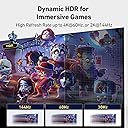
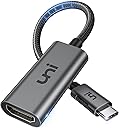
The uni USB-C to HDMI Adapter delivers crisp 4K resolution at 60Hz with Thunderbolt 3/4 support, housed in a durable aluminum and braided nylon design. Compatible with a wide range of premium devices, it offers effortless plug-and-play connectivity and is backed by an 18-month warranty for reliable performance.


| ASIN | B075V68NVR |
| Best Sellers Rank | 41,511 in Computers & Accessories ( See Top 100 in Computers & Accessories ) 78 in DVI to HDMI Adapters |
| Brand | uni |
| Brand Name | uni |
| Colour | Gray |
| Compatible Devices | MacBook Pro 2016 - 2023, MacBook Air 2018-2023, iPad Pro 2018 - 2023, iPad Air 4/5, iPad mini 6, XPS 17/15/13, Surface Book 3/2, Surface Laptop 5/4/3, Surface Pro 7, Galaxy S23/S22/S21/S20, Galaxy Tab S9/S8/S7 |
| Compatible devices | MacBook Pro 2016 - 2023, MacBook Air 2018-2023, iPad Pro 2018 - 2023, iPad Air 4/5, iPad mini 6, XPS 17/15/13, Surface Book 3/2, Surface Laptop 5/4/3, Surface Pro 7, Galaxy S23/S22/S21/S20, Galaxy Tab S9/S8/S7 Compatible devices MacBook Pro 2016 - 2023, MacBook Air 2018-2023, iPad Pro 2018 - 2023, iPad Air 4/5, iPad mini 6, XPS 17/15/13, Surface Book 3/2, Surface Laptop 5/4/3, Surface Pro 7, Galaxy S23/S22/S21/S20, Galaxy Tab S9/S8/S7 See more |
| Connector Type | HDMI |
| Connector type | HDMI |
| Current Rating | 3 Amps |
| Customer Reviews | 4.5 out of 5 stars 7,510 Reviews |
| Global Trade Identification Number | 00860009465855 |
| Item Dimensions | 17 x 60 x 150 millimetres |
| Item Weight | 19.5 Grams |
| Item dimensions L x W x H | 17 x 60 x 150 millimetres |
| Manufacturer | uni |
| Manufacturer Part Number | UNICHDMIF01 |
| Model Number | UNICHDMIF01 |
| Number of Items | 1 |
| Number of Ports | 1 |
| Package Quantity | 1 |
| Power Plug Type | No Plug |
| Product Finish Type | Aluminum |
| Product Warranty | 18 months warranty |
| Specific Uses For Product | Intended use: presentations, viewing multimedia content on a larger screen, connecting to TVs or monitors in professional or personal settings. |
| Specific uses for product | Intended use: presentations, viewing multimedia content on a larger screen, connecting to TVs or monitors in professional or personal settings. Specific uses for product Intended use: presentations, viewing multimedia content on a larger screen, connecting to TVs or monitors in professional or personal settings. See more |
| UPC | 860009465855 786411118069 |
| Warranty Type | Limited |
O**Y
It Works but Still Learning
I connected this to my 27" iMac and then a standard cheap HTMI cable to my 60" LG TV. and it worked straight out of the box. I can repeat my Mac screen on the TV and use the TV screen as an expansion of my Mac screen. No complaints about it working but am still struggling a little with practicality. A soon as I connect it my iMac, which is already a pretty hi res screen, goes into a "super hi res mode" with a cursor the size of a grain of dust and menus to match so I am struggling to do anything meaningful. It also seems that some commercial video output gets blocked from using the connected screen. None of this changes the fact that the adapter does exactly what it is supposed to do. I.e. send Mac video to a TV. It does seem to be a solid well made piece of kit and is good value for money. If I can find answers to getting a practical output I will update here. I find reviews of others useful in my buying decisions. If this helps you please click the "helpful" button so I know I am not wasting my time.
A**R
Great product for iMac Pro (2017) + 4K monitor
Relatively simple to setup and use - just plug and play (make sure you get the right port!). As the ports on the iMac are located on the back, I thought I could plug this in using feel alone. I located what I thought was the correct port, plugged it in (seemed a little loose) then got a popup on my screen stating a device is requiring high amount of power and usb devices will be disabled. TURNS OUT usb-c connectors fit into usb sockets (no properly, but when you can't see!) Luckily no damage, relocated to correct usb-c port once I realised what an idiot I was and have to say works like a charm. Zero setup on the iMac, just worked. The instructions are in English, a little broken as it's clearly been translated, but clear for purpose. Mentioned something about possibly getting hot and that being normal, but doesn't even get warm, never mind hot. I think the instructions cover multiple products so maybe more specific to other similar products they sell. I went for the usb-c adapter + hdmi cable over a straight usb-c to HDMI cable as its easier to unplug the hdmi from the adapter when I want to change devices on my external monitor rather than keep unplugging either the hdmi end or the usb-c end (given my initial faux-par, that might be a good thing!) I would recommend this adapter.
.**.
really useful when we visit friends or family and want to ...
I bought a USB C to DisplayPort Cable from this same company on Amazon and decided to budge and get a HDMI version as well that I can plug into my TV. After receiving I'm well impressed with the quality of the cable. Its a short length so takes little space to carry around, really useful when we visit friends or family and want to view videos or photos from my phone on the big screen. I preferred going for the HDMI Female adapter cable since you can just use a existing HDMI cable from one of your devices connected to your TV and don't need to go looking for the HDMI ports on the back or sides of the TV which can be a real paid for wall mounted TV's. In terms of Display quality I think its brilliant, the best thing is one cable can transfer sound and picture to your TV from your phone so ideal for watching videos or using video apps. The display mirroring is also lag free so its a good way to watch YouTube, BT Sports or the likes on your phone on a bigger screen. If you have a Note 8 or a USB C device, I would highly recommend getting this cable if you have a need to view content from your phone on a bigger HDMI screen.
S**N
does the job but GETS HOT
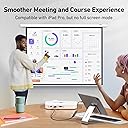
really good piece of kit, especially for the price. I've been using it to connect my iPad (2025 model) to projectors to teach with MS Powerpoint, and various notepads. quite a reliable dongle with a study and durable cable connecting each end and is very light and compact. When using it for a prolonged period of time (e.g. approx 2 hours) the device gets quite hot to the touch so disconnecting can be tricky to not touch the hot aspects.
S**Y
Has completely changed my workflow
The uni USB C to HDMI Adapter has revolutionized my MacBook Pro experience, offering an impeccable 4K@60Hz connection to my monitor and transforming the way I approach video work. The ease of use is remarkable. Simply plug-and-play, and I’m instantly connected to my 4K monitor with crystal-clear resolution at 60Hz. This adapter has become an integral part of my workflow, providing a seamless and efficient docking solution when working on video projects. The Thunderbolt compatibility ensures lightning-fast data transfer, eliminating any lag or latency in my video playback and editing. This feature has significantly enhanced the overall efficiency of my workflow, allowing me to focus on the creative aspects without interruptions. One important note is the power requirement – your MacBook must be connected to power for the adapter to function. While this might be a consideration for some users, the trade-off is well worth the exceptional performance and reliability provided by this adapter. The build quality of the uni adapter is impressive. It feels sturdy and well-made, with a compact design that doesn’t clutter my workspace. The reliability of the connection is noteworthy, and I have experienced no signal drops or disruptions during my extensive use. In conclusion, the uni USB C to HDMI Adapter is a must-have for MacBook Pro users seeking a top-tier solution for connecting to a 4K monitor. It has significantly improved my video editing workflow, and I now prefer docking my MacBook when engaging in multimedia tasks. If you’re looking for a reliable, high-performance adapter, look no further. uni has delivered a game-changer!
J**.
It just works !
Excellent product - worked straight out the box without the need to install any software. The only thing I needed to do was change the display settings in Windows settings. Note - make sure that the usb-c port on you computer can be used for external displays.
J**Y
Nice product
Not bad at all
C**R
Works great for MacBook, but not iPhone
I bought this to output via HDMI from my MacBook and iPhone; However, while it worked well for my MacBook, it only worked sporadically on my iPhone, often dropping out before coming back on.
F**I
ممتاز جدا
ممتاز
R**N
The product was not that good.
I bought this product actually to connect this to my phone to see my phone screen to laptop but it didn't worked out. So I was not satisfied with this product.
C**S
Perfect High-Res USB C to HDMI Adapter
I ordered this adapter so that I could watch stuff from my iPad Pro on my TV. I figured that it’s not only good for my tv at home, because I can pack this little adapter in my bag and always have it with me when I travel. Then I can use it at hotels, and the homes of my friends and family. Not only that, but I can even use it at work occasionally if I need to show my phone / tablet screen on a projector. It works great for that too. Most people have modern TVs now that show video wirelessly from their devices. However, if you have an older tv, or you have content on a tablet that you can’t cast, then this little adapter is perfect. Not only that, but if you are streaming something on your tablet from a website, you can just plug in this adapter and now your tablet is on the big screen. Perfect! What I love about this product is how easy it is to use and how quickly you can have everything working. It’s also super small and portable. Better than carrying a large usb c to hdmi cable everywhere. This adapter is way more practical. You just plug the usb c end into your computer, tablet, or phone, etc, and the other end into your tv or receiver. That’s it. No lag. No problems. It just works. The only 2 downsides for this thing are that you can’t charge your device while using it if you only have 1 usb c port (like a phone), and that it gets a little warm during use. But those are minor nitpicks that don’t affect it at all. It comes in a great little package and feels really well made. Like it will definitely last for a long time. It even comes with a small little carry bag for you to keep it safe. ...and a lifetime warranty from UNI too! I tested it with a few movies from Netflix on my iPad Pro to my tv and it worked great. It’s now part of my chargers and cables bag for whenever I have to travel, so it’ll always be with me. Honestly I don’t know what more to say about it. It’s great.
D**S
Très bien !
Répond parfaitement à mes besoins. En l'occurrence, connecter un troisième écran sur un Mac Studio. Contrairement à un produit équivalent acheté précédemment (et payé plus cher) celui-ci ne génère ni interférence, ni parasites sur l'écran connecté. Bref, l'image est nickel ! Produit vendu avec un coupon de remise.
G**E
Adattatore affidabile, qualità premium
Utilizzo questo adattatore da ormai un anno e devo dire che è diventato un accessorio indispensabile. La costruzione in alluminio anodizzato trasmette solidità e resistenza, molto più premium rispetto ai classici adattatori in plastica. Le dimensioni compatte lo rendono facile da portare sempre con sé. Il supporto al 4K@60Hz è reale: l’immagine è molto nitida, i colori sono fedeli e non ho riscontrato lag o sfarfallii, nemmeno durante la riproduzione di contenuti HDR o lo streaming di film. Anche per presentazioni e lavoro d’ufficio si è dimostrato impeccabile. Un altro punto a favore è la compatibilità non solo con i laptop, ma anche con smartphone e tablet che supportano l’uscita video tramite USB‑C. Davvero molto consigliato
Trustpilot
2 weeks ago
3 weeks ago