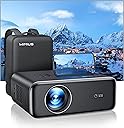
![[Auto Focus/4K Support] Projector with WiFi 6 and Bluetooth 5.2, 700ANSI Native 1080P Outdoor Movie Projector, WiMiUS P62 Auto 6D Keystone & 50% Zoom, Smart Home Projector for iOS/Android/TV Stick](https://m.media-amazon.com/images/I/81NQH7EiI+L.jpg)


🎬 Transform your space into a smart cinema—brighter, sharper, and effortlessly connected!
The WiMiUS P62 projector redefines home and outdoor entertainment with its auto-focus and 6D keystone technology delivering crystal-clear 1080P visuals at 700 ANSI lumens brightness. Equipped with cutting-edge WiFi 6 and Bluetooth 5.2, it offers ultra-fast, stable connections for streaming and gaming. Its versatile zoom, aspect ratio options, and multiple mounting choices make it perfect for any environment, while robust after-sales support ensures long-term reliability.


| ASIN | B0BTHDPTSG |
| Additional Features | Auto Focus, Built-In Speaker, Built-In Wi-Fi, Lightweight, ①After-sales: [email protected] |
| Antenna Location | Business, Education, Gaming, Home Cinema, Outdoor |
| Best Sellers Rank | #184 in Video Projectors |
| Brand | WiMiUS |
| Brightness | 700ANSI Lumen |
| Built-In Media | Carrying Bag, Cleaning Kit, Power cord *1, HDMI Cable *1; AV Cable *1, Projector *1, Remote |
| Color | Black |
| Compatible Devices | Gaming Console, Laptop, Smartphone, Speaker, Tablet |
| Connectivity Technology | HDMI , USB |
| Contrast Ratio | 20000:1 |
| Control Method | Remote |
| Controller Type | Button Control, Remote Control |
| Customer Reviews | 4.7 out of 5 stars 1,366 Reviews |
| Display Resolution Maximum | 1920*1080 Pixels |
| Display Type | DLP |
| Display resolution | 1920 x 1080 |
| Form Factor | Desktop |
| Hardware Connectivity | 3.5mm Audio, Bluetooth, HDMI, USB 2.0 |
| Item Dimensions L x W x H | 10.2"L x 7.8"W x 4"H |
| Lamp Wattage | 12 Watts |
| Light Source Operating Life | 50000 Hours |
| Manufacturer | WiMiUS |
| Maximum Image Size | 300 Inches |
| Maximum Throw Distance | 16 Feet |
| Minimum Image Size | 40 Inches |
| Minimum Throw Distance | 4 Feet |
| Model Name | P62 |
| Model Number | P62 |
| Mounting Type | Tabletop Mount |
| Native Resolution | 1920 x 1080 |
| Picture Quality Enhancement Technology | Auto Focus & 6D Auto Keystone Correction |
| Recommended Uses For Product | Business, Education, Gaming, Home Cinema, Outdoor |
| Special Feature | Auto Focus, Built-In Speaker, Built-In Wi-Fi, Lightweight, ①After-sales: [email protected] |
| Video Encoding | HEVC (H.265) or VP9 |
| Voltage | 240 Volts |
| Warranty Description | 2-year Money Back guarantee, 3-year Repair, and Lifetime Technical Support |
| Wattage | 12 watts |
H**G
Just WOW on the picture quality, auto focus, screen stretch, and connectivity/software options
This is such a huge upgrade from my last projector, which I thought was the best. After plugging it in, the lens started to move and auto-focused directly to the sharpest image on the screen, without me having to do anything. Right away, I was taken aback by how much clearer and brighter the picture was. It seemed almost double as bright and clear as my old one, which again I thought was really good. No more having to dim all the lights and shut all the windows. This thing is clear and bright! And in fact, everyone else in the room started to heckle me because as we were playing Mario Kart, I kept saying over and over again, "Wow, I can't believe how bright and clear this picture is. It looks like a regular high-def TV!" "Alright, alright, we get it", was the response I kept getting. They agreed. They just got tired of hearing me give kudos to the screen projector. This thing looks like having a 120-inch 4K TV in the room. My other favorite aspect is the ability to use its Keystone correction (Screen Fit) and aspect ratio function to zoom to just the right spot, and more or less draw the screen to exactly the size I wanted it to be on the wall. Other projectors I've had have a setting that allows you to get close to this, but still create gaps on the side. With just a few clicks, I was able to spread this out to the entire exact white screen length. As an analogy, think of taking pizza dough and spreading it to all four corners of a square pizza pan. it It can also use MS Office Suite in case this is going to be put into a workplace, and presentations need to be made. You can also insert USBs for photos, movies, music, etc. I have this hooked up to the Nintendo Switch and also to Roku, both through HDMI. It has two HDMI ports and multiple USB ports, which is great, so that we're not having to plug and unplug back in the source. The Bluetooth function works seamlessly to set up the Bluetooth speaker as well. I definitely recommend this WiMiUs P62 screen projector.
G**A
Great projector for the price
We’ve only used it once to play a slideshow from a trip and it worked great. Setup was easy. Picture quality was good. Very good projector for a very reasonable price.
P**K
The P-62 Is Stunning!!!
The Musts: Picture: impressive. I mean wow, like why do I have or need TV wow? Blacks are deep and the auto picture settings, keystone corrections, focus, zoom is handled automatically or manually. I loved being able to easily grab corners push the image to fit my 80 in screen with zero view bezels. Daytime vs Nighttime. I've got Vegas shades on my windows but even with every single light on in my room It still doesn't jump out at you, like oh well nice try. My Lumens test also scored above specs Sound: The unit comes equiped with two ten watt speakers, makinging everyday viewing from the projector unit speakers alone and we are good. My Soundbars and headphones are locked in Software: Zero frills. Plug in a stream stick or device to access any streaming service. Performance: Fan is whisper quiet. Smooth changes between apps. Hardware: 2 HDMI ports Two USB 3.0 ports. 3.5 mil headphone jack as well as Bluetooth and consistent wifi Update: I upgraded to the pro model. You can't go wrong with either the p62 or p62pro. The pro version adds a couple hundred lumens, my tests showed higher that advertised. Same review as above, the Pro remote might be preferable to some. Customer service: Reviews are filled with positive views and for good reason. I wanted a 2nd P62 but due to delivery time I was sent the Pro model. Wow. Just wow. Piece of mind is priceless. So are our movie nights. Both the P-62 and P-62Pro are so far to me, the gold standard of affordable projectors Purchase be impressed thank me later
E**I
Tough to beat for the price! 👍
Purchased this for use with my golf simulator in my garage. Was looking for a budget option. Auto focus, keystone correction, and iOS screen mirroring were all things I was looking for. I was a bit surprised I could get them all at this price. Nice sharp picture and easily bright enough for my garage. I’m running this in 4:3 in 1080P. Setup was super easy. Took less than 5 minutes to get it connected to my WiFi and running. The manual is good with clear direction, but you won’t really need it much. Comes with a simple remote, some connection cables, and even a nice carry bag. Very happy with my purchase. Skip the sub $100 junky projectors and spend a bit more for this. It’s worth it!
C**T
Incredibly vivid and bright 85" image from 8 feet away *without* using a projector screen!
I honestly didn't think our home was big enough to justify a projector and the more I thought about it and stared at the rectangular space in front of my bed, the more I realized this would be a wonderful solution to watch movies and not be constrained by the 27" monitor I have at my computer desktop and be in the comforts of my own bed instead of sitting in a desk chair. I'm also one of those people who doesn’t mind watching a movie on my smartphone, on occasion, and, in the past, bought a smartphone arm to make the experience better but the arm eventually broke so I haven't done this since 2016. Using this projector is a HUGE and welcome upgrade to watching movies in my room! When I got the unit, I was really impressed it came in a cute backpack carrying case! Back in 2000, I was running around the city with heavy gigantic projectors (*and* 2-3kg laptops!) - that **killed** my shoulder and back for sure. So to witness this little guy come in at 1.82 kg and be as bright and practical is nothing short but amazing with today's tech. Fully loaded (projector, case, instruction booklet, cables, accessories) the backpack weighs 2.5 kg. The first thing I needed to do is figure out how to prop the unit up. If you have a stand or a ceiling mount, you can remove the rubber feet and reveal four M5 mounting holes (one on each corner). In my case, it was straightforward to put the projector on a table and raise the front using the center front stand adjustment (1.5 inches max) and then prop it up further on a small box to get it to the right height (see photo). For my purposes, this is perfect, we’re not opening up a movie theater here :) There are two HDMI ports on the back and I put an ole skool Chromecast (the original!) in the first port and a Roku Streaming Stick 4k in the 2nd port. I was happy the 2 USB ports are able to power both streaming devices without having to plug either of them into the wall. I find myself using the Roku more often because it has a physical remote (image is downscaled to 1080p, more on this later). Apps like YouTube make it easy to cast to the Chromecast device without having to mirror your device. There is an input button on the remote (which takes 2 AAA batteries that aren't included so be sure to get a pair) and it expects you to use the D-pad to change inputs and hit OK. This is a bit of a nitpick but I personally would prefer pushing the input button repeatedly to change inputs like a lot of TVs and monitors (Dell, LG, etc) - I hope the manufacturer is listening and includes this in a future firmware update. I also wish they kept the same button layout of the remote on projector (the OK button is *not* in the middle so good luck remembering the layout in the dark!) (see photo) I specifically got this unit to test it's "keystone" capability - this is the ability to set the projector at an angle and be able to correct for it and still see a rectangle with the correct dimensions parallel to the edges of the room. (see photo to see the before (default) and after keystone correction) - I was so happy it corrected it so perfectly! Provided the unit is level, "auto keystone" works great - it’s like magic! Depending on how severe of an angle you are correcting - you may need to make additional manual adjustments which is easy to fine tune with the UI they provide. That said, I do wish you could assign the current keystone config to the keystone button on the remote. The remote button currently triggers "auto keystone" which can be annoying if you hit the button accidentally - perhaps this could be a setting to configure whether this button does "auto keystone" or “load your last saved config” (or provides a pop up asking you to choose while defaulting to your last saved config) The image is **amazing** thrown at 8 feet - after keystone correction, the image is 73x43" - a 85" diagonal. It blew my socks off how bright and vivid the colors are and I am **not** using a projector screen! In fact, the reason I selected this unit is because of the Star Wars footage I saw in another reviewer video - it looked too good to be true. Projector tech has come a long ways as nothing looks washed out and it succeeds with flying colors (ahem no pun intended) to make you feel like you're at the movies at home! 🍿 Due to keystone correction, you may experience blurriness of text in one corner but in our case, all our text (eg. subtitles) are centered (see photo w Paramount logo) so it didn't impact our viewing experience. See the video of an intro I felt has a lot of vibrant and contrasting colors and the blacks look pretty black! It already is watchable on the default "normal" (50% brightness setting), it looks best on this "Vivid" setting. I did a brief test during broad daylight and it's not something I would recommend. You can see the picture but highly recommend you pull down the shades and darken the room (to be expected) IMPORTANT: Make sure you set your expectations appropriately, the resolution of this projector is **1080p** - meaning we're not looking at a image you see when you walk into Costco looking at an 8k (or even 4k) TV! It is an HD quality image and it looks great for what it is. As others have mentioned, the speaker is fine if you don't have anything else available. I tried to pair generic BT headphones and it worked great and was easy to do. I also tried to plug an Apple wired headset and it worked great too. My only gripe is the BT volume is not well calibrated - I have to turn up the volume to 80%. I switch the BT headphones over to my Pixel and they are too loud at 80%. I'm just afraid there is a bug in the firmware and it might blast out my ears unexpectedly (I'm pretty sure it won't but I do use my wired headset when possible to avoid this issue) If I were to nitpick further (read: not dealbreakers, just things to think about while you are shopping): 1) The sleep timer is not very useful as it maxes out at 120 min which is shorter than the average movie these days. I would like to see a future firmware update have a setting of 240 min to accommodate a 3.5 hr movie and even 360 min for an extended TV watching evening session. This will surely prevent the projector from being left on overnight because you accidentally put some boring drama on 🥱 lol 2) I wouldn't say the unit is quiet but when I have my headphones in or even the internal speaker turned up, I really don't notice it - especially if you are absorbed in the movie you are watching because of the large screen (as you should!). Keep in mind the projector is super bright so you really need to expect it to be cooled down somehow. 3) In case you miss it in the product description, this is **not** a HDCP compliant projector - meaning you can't AirPlay Netflix, Hulu, Disney (and in my case, Amazon Prime) but to be clear, it is an easy workaround - just use a Chromecast or Roku or any other streaming stick (or even a laptop). AirPlay is really there to mirror other apps on your phone (or iPad) or even your MacBook (say in a business presentation) 4) As another reviewer noted, I confirmed the projector is not ideal for gaming due to “input lag”. Input lag is the delay between the screen and your commands, such as a press on the keyboard, mouse, or in my case a game controller. I tried a space shooter and the “input lag" made it very wonky - to confirm the lag of 120ms was indeed coming from the projector, I switched the HDMI cable to my Dell 4k monitor (unknown input lag but typical is 50ms w gaming monitors going as low as 9ms, the human brain *starts* to perceive "instant" below 100ms) and was able to resume playing the game with no input lag. So my recommendation is to get clear what kind of gaming (slow paced puzzle games would be fine) you want to play on your projector (if at all) before you buy one. For me, I personally am going to reserve using this projector for movies, not games. All in all, I'm really happy with this projector. It fits the bill to turn a small bedroom into a mini movie theater with a 85" screen without a projector screen. The unit is plenty portable so it's realistic to bring this over a friend's house and share the fun!
B**E
Great picture quality, lots of features, but still needs a little work.
First the pros: Comes in a very nice padded soft case that has a carry handle or padded straps to carry as a back pack. Inside the case is a pouch for the manual and a lens cleaning kit and a divider for cords and the remote. Has multiple inputs (USB, HDMI, AV, or WiFi). Auto focus works well and can be turned off. Manual focus on the remote at any time. "Keystone correction" (for squaring up the picture due to projector angle to screen). Many audio and video preset options or you can custom set each. Cooling fan is nearly silent. Picture reduction if the image is too big for your screen. Built is stereo speakers (sound is okay but speakers are tiny and sound tiny) Best sound when connecting to sound system with 3.5mm male x male cord for a real theatre experience. Can project right side up, upside down (for ceiling mounting projector) facing the screen or from behind screen (with proper screen). Threaded mounting holes available under the rubber feet for ceiling mounting. Easy to understand and navigate on screen menu. Affordably priced for the multitude of features and high quality picture. Cons: The owners manual can be difficult to understand in places due to poor translations. The sound did not work when connected to a DVD player. The instruction say to turn off Dolby if this happens, but it doesn't say where to turn it off so I kept looking for that option on the projector. When I figured out is was in the DVD player menu, and turned it off there, the sound was fine. This leads me to the next con. Tech support is advertised as 24/7. I tried to connect to their chat line but it never connected. I tried Email but got no response. Only after Amazon stepped in, did I get a reply. Once communication was established, they apologized for their error and have been communicating with me regularly to make sure I am happy with the projector. The automatic keystone correction didn't seem to do much but the manual correction works great and is very easy to use. The projector can connect to Bluetooth speakers but there is about a one second audio delay which is quite annoying. The manufacture rep said they are working on a fix that can be downloaded to the projector. When I first tried to connect to WiFi, there must have been something about the password that the projector didn't like and just gave me an error message. Changing the password fixed that and it now connects very fast. "Zoom" feature is not zoom. It is picture reduction and should not be called zoom. In summery: I didn't connect using the USB or AV so I can't speak to any issues with that but given the positive support from the manufacture rep, they will be there to help (eventually). I think for the money, overall, it's a good product. With a little work, it would be a great product, maybe the best!
J**Z
A great budget projector
Having had for nighly use for a few months, I can say this is an excellent purchase. In my bedroom, usually dark, it has a Clear sharp bright picture, auto focus and keystone work well. About 9.5 feet from the screen with zoom at 88% I have it sitting off angle from my screen and only need to do a minor manual keystone adjustment to fit the screen if I reset it. Otherwise it comes on does the auto focus and the keystone is set. I use a Google tv box with a BT speaker and sometimes an HDMI input from my pc. It works perfectly and I definitely reccomend it for anyone looking for a decent sub $500 1080p projector.
I**N
Movie Theater Experience at home!
After 2 months using the projector on a daily basis, I feel very confident in giving a 5 stars review. Currently, this projector has replaced my tv in the family room and I couldnt be happier. First of all, the packaging is impecable. The projector comes inside a very sturdy and elegant backpack, with all the acessories and manuals. Keep in mind, this isn't a mini projector, yet it's a powerful and portable projector. The lense is very well protected by a lid that seals with a foam (a bit hard to put it back on, but for a good reason). The manual is very good in giving you most the instructions you need, it's very direct to the point with step-by-step to be followed. The projector itself is very simple to use, most of it you just need to plug things in. I've tried this projector: 1) Inside projecting directing on a wall (light blue wall) during the day and aso at night; 2) Outside projected on a screen during the evening/night and 3) Inside projected on a screen during the day and at night. 1) I was actually surprise how good the colors and image were even my wall wasnt white. I played with the image configurations (different preset calibration modes) and manual set ups (brightness, contrast and blackness) and easily could find a way of balance the environment light during the day to still have a great definition. 2) when outside i used the projector in both: front and rear mode. Both ways works similarly great. 3) With a white 100 inches screen (not included) just made the high definition shine and have a movie theater experience. It allowed me to have true colors and made the preset image modes to be the only thing needed. I also tried this projector by conecting my laptop by HDMI cable and also with a Fire Stick. Both ways work great and are super easy to start. I opted by keep it conected to the fire stick because I use it now as my TV. To be honest the only hard time I had in my whole experience was going throught the Fire stick "Installation", and the hardness was due the Stick options and nothing to do with the projector itself. I also used the projector with it's internal speaker and with a sound bar. I must say I was surprised, the projector speaker is enough. The sound is pretty good and can get very loud, however a sound bar with surround system is the cherry on top. It connects via bluetooth, and again, it takes two clicks in the configurations and it's installed and working seamless. Regarding the unique features of this projector: Auto Focus and Keystone, these are incredible. Auto Focus andAuto Keystone make a perfect job alone to adjust to any size screen/wall from different angles. Auto Focus is set everytime you turn on the projector so you have a crisp image right away. I played with the manual keystone just for fun, and I was surprise, to say the least, on how precise you can get to adjust corners and shape of the projection. If you are looking to elevate your home experience and watch sports (GO CHIEFS), movies and shows with family or by yourself, this is a great investment. It does feel like you're in a movie theater, the image is the best quality you can get, the simplicity of instalation and how seamless it work makes this projector a must buy!
Trustpilot
1 month ago
1 week ago