๐ Unlock your ultimate productivity hub with Anker USB4 power!
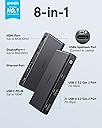
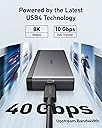
The Anker USB C Hub 8-in-1 Docking Station leverages cutting-edge USB4 technology to deliver 40 Gbps bandwidth, dual 8K display support, and 100W power delivery. Designed for professional-grade laptops like Microsoft Surface Pro 8 and HP EliteBook 850 G8, it combines high-speed data transfer, ultra-high-definition visuals, and robust charging in a compact, portable form factor.


| ASIN | B0BM46RVL8 |
| Additional Features | HDMIโข๏ธ, Powered |
| Best Sellers Rank | #1,672 in USB Hubs |
| Brand | Anker |
| Color | Black |
| Compatible Devices | Monitors |
| Customer Reviews | 4.1 out of 5 stars 132 Reviews |
| Data Transfer Rate | 10 Gigabits Per Second |
| Hardware Interface | HDMI , USB, USB Type C |
| Item Dimensions L x W x H | 5.12"L x 2.13"W x 0.65"H |
| Item Weight | 5.12 ounces |
| Manufacturer | Anker |
| Mfr Part Number | A83A8 |
| Minimum Required Operating System Version | Windows 10 |
| Model Number | A83A8 |
| Number of Ports | 8 |
| Operating System | Windows 10 |
| Special Feature | HDMIโข๏ธ, Powered |
| Total USB Ports | 8 |
| Total Usb Ports | 8 |
| UPC | 194644116903 |
| Warranty Description | 18-month |
C**G
USB4 Upstream + Premium Build Quality + 30w Turbo Mode for ROG Ally
These past few couple months I have bought and tried many hubs for my new ROG Ally. I have very strict requirements: -Activates '30w Turbo Mode' with proper wattage from power brick, and suitably rated usb-c cables both from the power brick to the dock/hub, and also from the dock/hub to the Ally. -Upstream bandwidth must be fast enough for operation of a hi-speed drive + any other peripheral at the same time -USB ports must be 3.2 gen 2 10Gbit -Must have a minimum of 3 USB ports -HDMI must be true 2.0 specs (4k60, 2k144, 1080p240) <-- *Have not been able to test this part yet* -sd card slot (does not matter if UHS-I) -Ethernet port -Supports at least 65W PD to main device -Able to maintain stable operation when part of a daisy-chain Before this hub, I mainly tested Ugreen hubs. This Anker one is better than the Ugreen ones I tested, but to be fair, all of the Ugreen models were $30 - $60. Material, and apparent build quality is about on par between the two companies. How this will hold up under load (my particular setup in a 3-hub daisy chain), will be the question. Only time will tell how good the circuits are, so I will report back if something goes wrong. This hub and the official Steam Deck dock are the only third-party hub/docks that I personally have tested that activates the '30w Turbo Mode'. Also, I have to mention Anker's support. They are professional, and quick to reply! Thanks, guys!
E**G
Fast and works great with 2023 MB Pro
My previous USB-C hub plugged into a 2017 MBP, and the 4k external monitor had the full range of resolutions when plugged into its HDMI port. However plugging it into a 2023 MBP, I had a reduced number of resolutions and, everything had become much fuzzier. Plugging directly into the computer HDMI port resolved that, but I wanted a hub so I would only need to make a single connection when I plug the laptop in at home. Hence the new hub. I updated it to connect via the displayport, and everything looks just as good as it did before. I did try a displayport-USB-C cable into the USB-C port on the hub. When I did that, the external monitor wouldn't connect. But using the exact same cable straight into the laptops port worked fine.
B**N
Probably the best non-thunderbolt dock
I got it as a dock for my secondary setup and for travel, all the features work and it has enough speed for my usb devices and monitor over displayport qhd 144hz, it DOES NOT support variable refresh rate/freesync like I was hoping but I guess it is what it is. It also works fine without a power supply as a portable hub. I got it for $100 and think it is ok for that price, for $150 it is a tougher sell and you should proably just go for a full thunderbolt dock.
D**T
Supply 100W of power to this thing, or else.
Turns out the 100W input rating isn't some kind of max limit, or suggestion, it's an absolute must. Tried using this thing with a 65W (OEM laptop charger) input and it failed to deliver power throughput, had serious banding/signal quality issues with screens, and reset occasionally. Purchased a 100W charger and it runs perfectly. It's a great product, but it should be crystal clear in the user manual that it actually needs a high wattage input to run correctly - the way it's stated currently is very misleading.
J**N
Works great with Ally X. "OK" for Zephyrus G14. Mac users posting bad reviews apparently can't read.
I have a MacBook Pro M1 Max. This 556 hub has confirmed video output issues with this hub. It's stated clearly multiple instances within this listing: "Compatible System - Windows" So...that explains most of the poor reviews here. (c'mon guys...READ!) I also have a ASUS ROG Ally X. My son has a ASUS ROG Zephyrus G14 (2024). This hub works perfectly with both products--per its reported specs. HINT: make 110% sure that the power adapter and PD cable both support 100W output (no exceptions) and you'll be fine. I use "Anker Nano Charger, 100W" with no issues. This hub's "100W" USB PD passthrough caps at 85W of host input (up to 15W required for this hub, depending on existing port connections). == ROG Ally X== With this hub and the aforementioned Anker Nano 100W charger+cable, the Ally X supports 30W Turbo mode (and that's WITH 1Gbps ethernet, HDMI AND both USB-A ports utilized). VRR is not supported via HDMI with this hub (though it may be with DisplayPort--haven't tried that) == ROG Zephyrus G14== This hub will NOT support the Turbo profile on the G14. That 180W requires input (via OG power adapter). That said, it does support the Performance profile while charging. Windows prompts that the power is not sufficient (that's because it's only getting 85W via the hub). All ports function to spec and without issue. I have not tested dual output (HDMI and DP simultaneously), and I don't believe that's possible with this hub. All in all... if you've got a Windows-based product that fully supports USB4 and has power requirements up to ~85W, then you will really like this dock. Just do yourself a favor.... DITCH THE INCLUDED 1.6ft USB4 cable! It's stiff, fray-prone trash. Minus one star for that.
D**S
Didn't last 4 months
Item quit working after 4 months. Seems that inquiring the power via the PD port, and it will no longer deliver video signal to monitor. An older hub with fewer ports does work, so issue is not with the computer or monitor. VERY disappointed in the products durability. It sits at a desk and has never been unplugged until I need to troubleshoot today.
L**A
Can't go wrong with Anker
Anker quality, works well out of the box, haven't had a single "video sometimes flickers" problems. Does fully support dual 4K@60 as advertised. Works perfect for my ROG Ally offering turbo mode with a 100W charger. Do keep in mind you need to bring your own power brick.
J**.
This one works!! Go USB4 and forget thunderbolt!
After messing with all the different Thunderbolt docks I am so happy to find one that works on all my devices. Multiple generations of Lenovo laptops, Samsung phone, and my portable gaming rig. This is a pure winner with enough video bandwidth for high color modes and refresh rates. It's so nice to have the ability to run 10-bit color at 4k 60hz on my old LG display. Go USB4 and forget thunderbolt!
H**S
Stopped charging laptop after 1 week
Connected to this a 130W power supply and it was working fine, and now it refuses to charge my laptop after a week of usage. Really disappointed in the quality of this product from a brand I trusted. Edit: the customer service was fantastic, they replaced the defective product and it is working better now.
J**.
Great Travel Hub
There are lots of options out there, this one works well for me to carry with my laptop and use in a flex space where they've got a variety of monitors. It's missing vga but i have a separate thunderbolt dongle for that. Think i also must have gotten it on sale as I paid about 50% of what I saw it posted the next day. Great size for travel if it has the connections you need.
C**R
Works ok, does 144hz @ 1404p, but missing features and more USB ports would be nice.
I had been searching and searching to try and find out if any of these Anker USB-C hubs supported DDC passthrough for controlling brightness, contrast, and other aspects of the monitors attached to the HDMI or DisplayPort ports. Could not find solid answers. Some Q&As said yes on some and other said no. I had no choice but to order one. Despite the Anker 565 11-in-1 supporting DDC this hub does not. Using BetterDisplay on macOS Ventura on my MacBook Pro M1 2021 I was NOT able to control brightness, contrast, etc despite it working with the 565 model. On the plus size this one does 144 hz @ 1440p whereas the 565 'only' does 120 hz. Still plenty fast enough for desktop use and basically any Mac compatible games in late 2023, though that may change in the future with Apple getting more into gaming. Note that the MonitorControl app does not support DDC via HDMI on M1 MacBooks, only BetterDisplay does (and maybe others?).
B**6
Once an Anker fan, their products are no longer reliable
I liked this hub, when it worked. I purchased one in Oct 2023. A few months later, it died. Anker replaced it under warranty. Now it's Dec 18, 2024. The replacement hub has now died. So I'm 2 months out of warranty. I've been troubleshooting my gear for a couple hours and turns out, it's the hub, again. Anker was a company I would recommend to friends as a less expensive option that's still pretty good quality, but it would appear that's no longer the case. Maybe it's just the this hub, I have some other Anker products that seem to be doing okay for now, so we'll see. Frustrating because I was okay spending more for something of decent quality.
C**P
Works great
I use this to connect my MacBook Pro to the network at the office. Works great.
Trustpilot
3 weeks ago
1 month ago