Buy anything from 5,000+ international stores. One checkout price. No surprise fees. Join 2M+ shoppers on Desertcart.
Desertcart purchases this item on your behalf and handles shipping, customs, and support to Kyrgyzstan.
🚀 Unlock Quad NVMe Speeds & RAID Power — Your Storage, Supercharged!
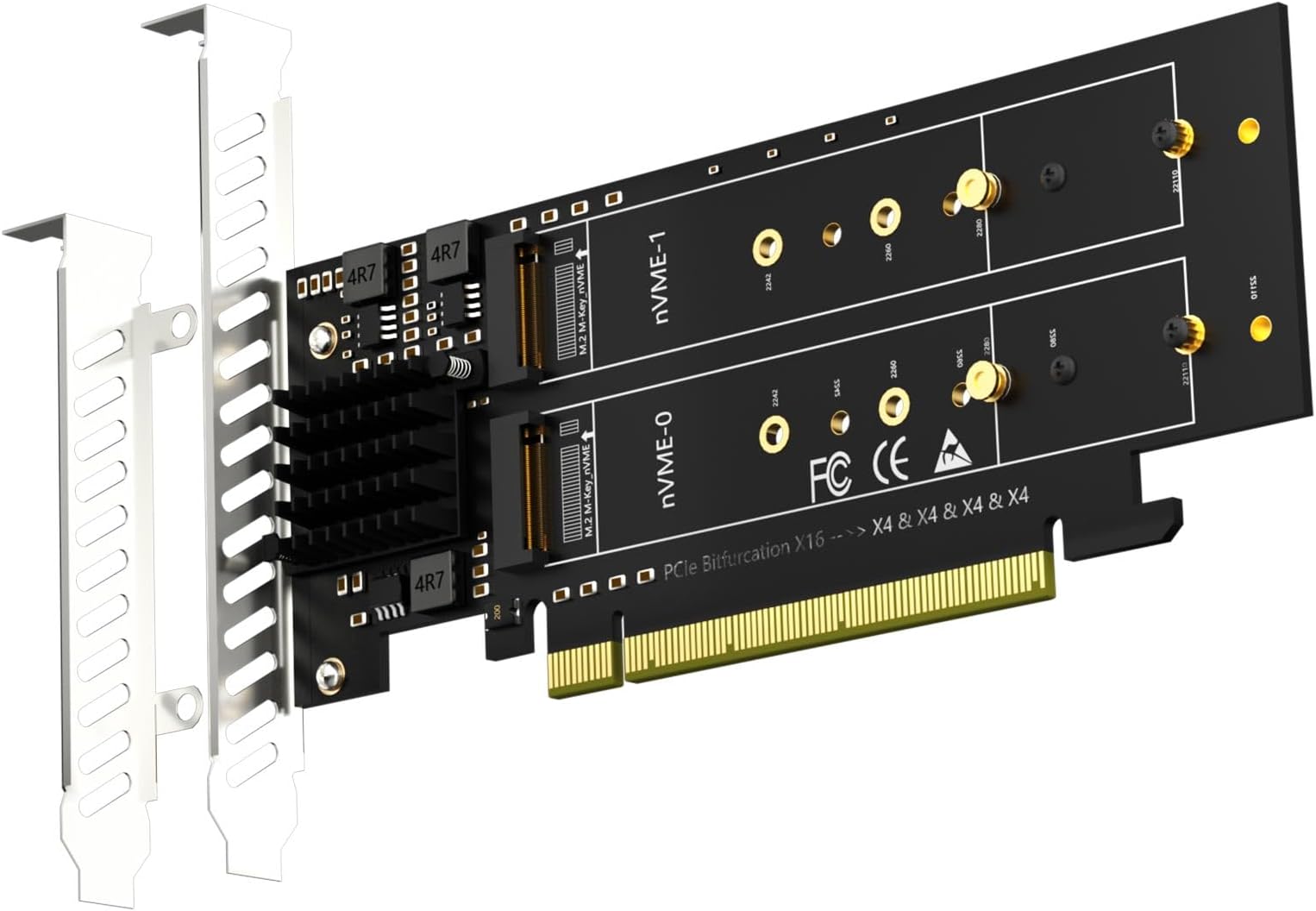
The GLOTRENDS PA41 is a high-performance PCIe 4.0 x16 adapter enabling installation of up to four M.2 NVMe SSDs simultaneously. Designed for motherboards with PCIe bifurcation support, it delivers full PCIe 4.0 x4 speeds per slot (64Gbps) and supports soft RAID configuration via OS tools on Intel and AMD platforms. Compatible with multiple M.2 sizes and major operating systems (excluding Windows 7 and Mac Pro 5.1), it empowers professionals to build ultra-fast, scalable storage arrays ideal for demanding workloads and future-proof setups.


| ASIN | B0BHWN7WKD |
| Best Sellers Rank | #977 in Computer Hard Drive Accessories |
| Brand | GLOTRENDS |
| Compatible Devices | PC/Server (PCIe Slot support PCIe Bifurcation: X4X4 or Hyper M.2 X16 mode), Not support Mac Pro |
| Customer Reviews | 4.1 4.1 out of 5 stars (513) |
| Hardware Interface | PCI Express x16 |
| Item Dimensions L x W x H | 6.77"L x 2"W x 4.7"H |
| Item Type Name | Quad M.2 PCIe Host Adapter |
| Item Weight | 0.14 Kilograms |
| Manufacturer | glotrends |
| Model Number | PA41 |
| Operating System | Linux, Windows, Mac OS (Not support Windows 7/ Mac Pro 5.1) |
| Style Name | Quad M.2 NVMe to PCIe 4.0 X16 Adapter without PCIe Bifurcation Function |
| Warranty Description | 30 Day Warranty Against Manufacturer Defects |
A**F
Works as advertised
Worked as advertised. Moved my GPU to the second slot in my ASUS ROG X870-A Gaming Wifi board and put this card into the primary PCIE 5.0 slot and set bios to bifurcate x4/x4/x4/x4. This freed up the other 3 NVMe slots on the mobo. Immediately recognized the three NVMe drives I mounted and they were running full x4 speed. Just remember that in order for this to work, your motherboard needs to support bifurcation.
D**V
Make sure your PC supports bifurcation
Fantastic product. Does what it says. I am using it to add 4 m.2 drives to my server. This card supports bifurcation, but you have to make sure your PC supports it, otherwise you will not be able to use all the drives
N**.
Much smaller than the alternative
Took a while to find this, but someone finally made one! I'd previously been using Asus's 4-drive card, which is absolutely massive. Unfortunately, that one cuts down on the case selection due to its massive size, and I've been wanting to move my server to a smaller, rack-mount chassis. I've included a picture for comparison. This seems to work great. Note that you will need to have a motherboard that supports bifurcation (x4x4x4x4, if you want to use all 4 slots). One thing to keep in mind is that if you are using NVMEs with chips on the back <22110 in length (i.e. 2280 and shorter), there might be interference with the screw for the drive on the other side. I've included a picture showing the screw sticking out the back. Note that I don't know how common NVME drives with chips on the back are. Fortunately, only 2 of my NVME drives are double-sided, and they are 22110 in length, so I was able to install them without an issue by putting them on opposite sides of the card (rather than next to each other). This is because the 22110 posts are permanently attached to the card, so don't require a screw on the other side. Also, for clarification of how 2280 and smaller drives are installed, see attached pictures - it took me longer than I'd care to admit to figure this out.
B**N
PCIe 4 Claims Are False!!!
TLDR: It does what it says it will - however, it is not designed to operate at pcie 4. It will function, but if you do not want to have issues or operation errors when trying operate at pcie4 speeds, go look elsewhere. If you are dead set on this one, only use this at PCIe 3 speeds or lower. Longer version: I purchased this for a custom 2u server build out thinking this would hold true to the pcie4 claims. I purchased an ASRock Rack B650D4U, 96GB of ECC DDR5, and 5x Micron 7450 Pro pcie 4 M.2 NVMe SSDs. Enabled a setting in bios to verify no PCIe errors were occurring, checked to make sure all the drives were showing up, and booted up a copy of Proxmox. Right after the kernel loaded, the screen was full of PCIe errors whizzing by. The Micron SSDs mentioned earlier that were attached to glotrends card were sitting idle, empty, and hadn't been formatted yet, were throwing so many errors it was hard to read what was going on. Go back into bios and force the speed for the SSD's attached to operate at PCIe 3 and all of the errors are gone. I got what I paid for - cheap and counting on you not to verify claims.
C**R
Provided a workaround for a limited motherboard
I am teaching myself how to operate a Proxmox Virtual Environment. To get started, I assembled a "budget build" PC as many have done before. I'm using a mini-ITX motherboard and running a CPU with integrated graphics. It has one m.2 port and one fully featured x16 slot. To my surprise, the BIOS on this board had bifurcation support. In theory, it should allow me to add more NVMe storage via PCIe adapter. To get started I bought two 2TB PCIe Gen3 NVMe m.2 drives. The first adapter I purchased was a physical x8 card with two m.2 ports. After populating both ports and enabling bifurcation in the BIOS, I could only see one of the two storage devices. I checked my two storage devices and both were functional, so there is something wrong with the card, or how my motherboard implements bifurcation. I started searching for PCIe to NVMe adapters that were x16 and featured either two or four m.2 ports. That led me to the product I'm reviewing now. First experiment: I installed my two 2TB drives on ports NVMe-0 and NVMe-1. This had the same behavior as the previous card. Only one of the two storage devices was available to the system. Second experiment: I moved the second 2TB drive to port NVMe-2 (first 2TB drive in NVMe-0 with NVMe-1 and NVMe-3 empty) and when I booted up, BOTH 2TB drives were visible in the BIOS and to my "datacenter". I suspect that my budget motherboard can't operate this adapter with all four m.2 ports populated, but I didn't have any spare drives to test this scenario. All in all, I'm happy that I was able to add two more m.2 drives for a reasonable price. If I decide to create another PVE node, I may use a higher-end motherboard and buy this adapter card again so I can leverage all four slots.
M**Y
Doesn't work well with X670E-E MB. Don't waste your time playing with bifurcation modes or searching for a solution, you'll get only one m.2 working at best.
A**T
Ottimo, non rallenta la velocità della memoria montata.
S**Z
Works perfect with the low profile adapter in my Power Edge R730! Be sure your motherboard or server supports Bifurcation as the listing says this unit does NOT bifurcate on the card.
K**N
Leider fehlten die Schrauben und Gegenstücke zur Befestigung der NVMEs. Die im Bild auf dem Board vorhandenen lassen sich nicht rausnehmen. Ich hatte Kontakt mit Glotrens, leider keine Vertretung in Deutschland bzw. bei Amazon, sondern im Land des Herstellers. Somit schicke ich das Produkt zurück und bestelle ein neues mit Schrauben. Die Funktion ist einwandfrei - Motherboard mit aktivierter Bifurcation erkennt vier einzelne NVMEs (nur unter Linux/Proxmox getestet).
F**E
Works like a charm if your motherboard and cpu have enough for it since each drive needs 4 data PCIe lanes.
Trustpilot
1 month ago
3 weeks ago