Buy anything from 5,000+ international stores. One checkout price. No surprise fees. Join 2M+ shoppers on Desertcart.
Desertcart purchases this item on your behalf and handles shipping, customs, and support to Kyrgyzstan.
🔥 Dominate 4K gaming with power and style!
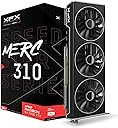
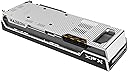
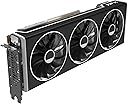
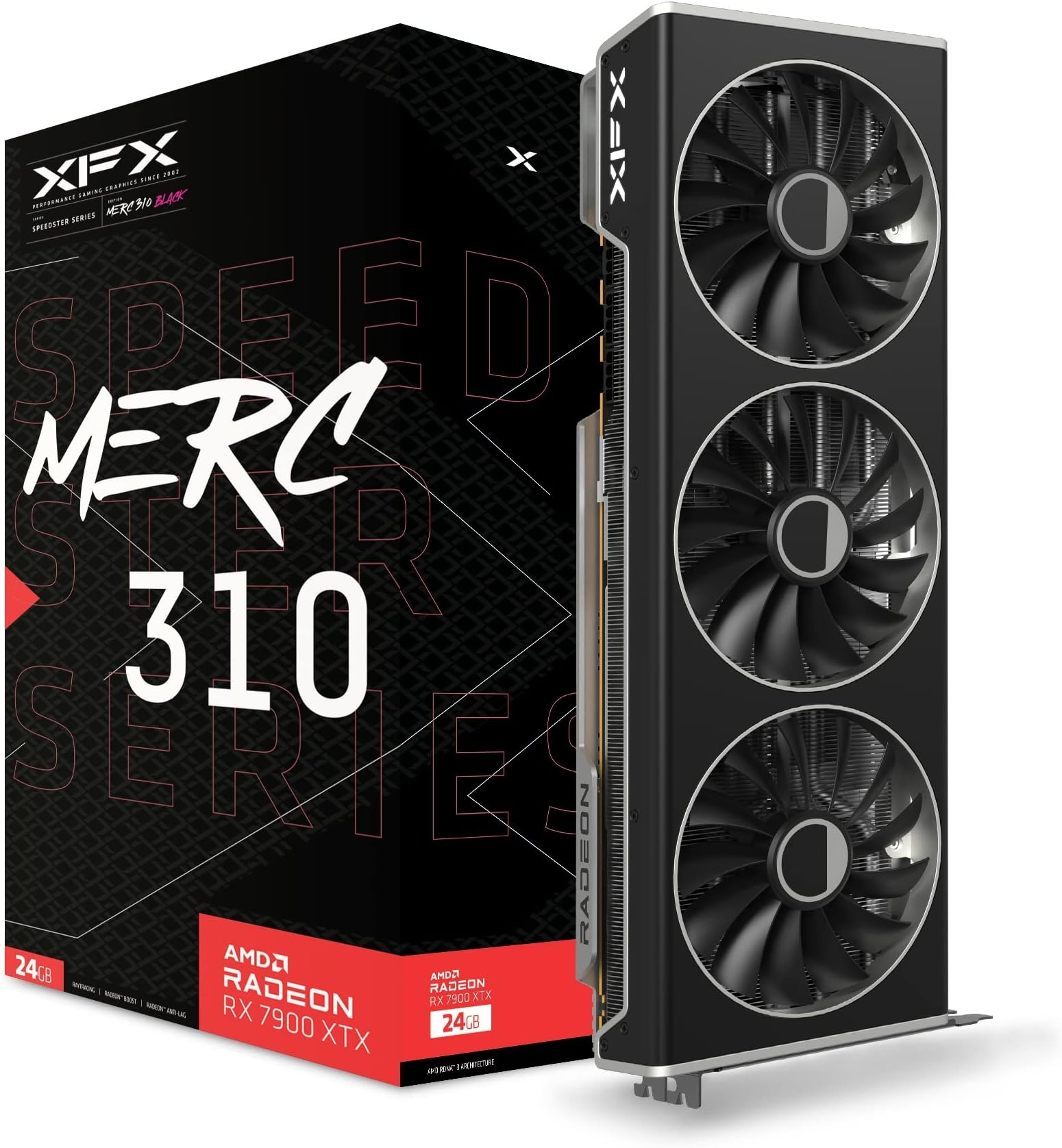
The XFX Speedster MERC310 AMD Radeon RX 7900XTX is a powerhouse graphics card featuring AMD's latest RDNA 3 architecture, a blazing 2615 MHz boost clock, and a massive 24GB GDDR6 memory. Its triple-fan cooling system ensures optimal thermals and quiet operation, making it ideal for professional-grade 4K gaming and demanding creative workflows. Designed for high-end desktop builds, it supports the latest display standards including DisplayPort 2.1 and HDMI 2.1, delivering stunning visuals and smooth frame rates.


| ASIN | B0BNLSW23M |
| Antenna Location | Gaming |
| Best Sellers Rank | #23 in Computer Graphics Cards |
| Brand | XFX |
| Built-In Media | Graphics Card, Z Bar |
| Compatible Devices | Desktop |
| Customer Reviews | 4.4 out of 5 stars 1,478 Reviews |
| Display Maximum Resolution | 3840 x 2160 |
| Display Resolution Maximum | 3840x2160 |
| Global Trade Identification Number | 00840191500640 |
| Graphics Card Interface | PCI Express |
| Graphics Card Ram | 24 GB |
| Graphics Coprocessor | AMD Radeon RX 7900 XTX |
| Graphics Description | High-performance AMD Radeon RX 7900 XTX graphics card with 24 GB GDDR6 memory, 384-bit memory interface, and a boost clock speed of up to 2615 MHz, featuring AMD's RDNA 3 architecture and supporting DisplayPort 2.1 and HDMI 2.1. |
| Graphics Processor Manufacturer | XFX |
| Graphics RAM Type | GDDR6 |
| Graphics Ram Size | 24 GB |
| Graphics Ram Type | GDDR6 |
| Item Dimensions L x W | 13.5"L x 5"W |
| Item Weight | 2.6 Kilograms |
| Manufacturer | XFX |
| Memory Clock Speed | 20 GHz |
| Mfr Part Number | RX-79XMERCB9 |
| Model Name | AMD RX 7900 XTX |
| Model Number | RX-79XMERCB9 |
| Number of Fans | 3 |
| UPC | 840191500640 |
| Video Output Interface | DisplayPort , HDMI |
| Video Processor | XFX |
| Warranty Description | 3 Year Manufacturer |
S**2
A fantastic graphics card (that I got at $799.99!) that I expect will last years
So, I am an avid VR player. I love playing VRchat with friends, going to events with 60+ people there, and to say it's GPU intensive is an understatement. My NVIDIA 3060 Ti could not keep up, not with it's 8GB of VRAM, and the only option was either accept hindered visuals and not being able to see everyone's avatar at once...or upgrade. I chose upgrade. It was Black Friday, so all the sales were going on. The question was "Do I wait for the 5000 series by NVIDIA, buy a 4070 Ti Super which is being scalped right now, or do I decide to buy from AMD and take a leap of faith?" I chose to take the leap. AMD has a rough reputation with GPU's, driver issues galore, and they used to be very fickle about working properly. But in the day and age where to get 4080~4090 performance, you need to shell out $1,500 or more, right when a new chipset is also around the corner, there's a reason to look at the competition rather than the "name brand". AMD is not the off-brand parts component supplier it used to be, it is a fighting force, and it has product that rivals NVIDIA at lower prices. The Radeon 7900XTX with 24GB of GDDR6 VRAM absolutely blew my expectations. I need to preface, I did have issues initially. My build is older. I'll give a spec sheet at the end of this, but long story short, I can't overclock my GPU without Blue screening. That's more likely due to my system specs than anything else. But that first night, despite PC crashes, I was capable of loading all 80 players with very poor optimization that VRchat has, while also using Full Body Tracking which also taxes GPU's, and it still had more fight in it. My 3060Ti would have been incapable of even running at 10 FPS, where it was running smoothly at 27~35 FPS with everything I could possibly throw at it to hinder my FPS, and just going to any room with less people instantly got me right back up to 45+ FPS. While it may not seem impressive, with my build, it shows this is putting in incredible work. It never even was using more than 60% of the GPU's utilization, which is either due to my build bottlenecking it, or the game itself. The incredible part of this GPU is that with that much VRAM, you can throw so much at games graphically, that you almost don't even need to worry about it. Almost no games currently run you so close to the limit of your VRAM capacity, unlike with the 3060Ti with only 8GB's of VRAM, where it was a constant limiting factor. Still functional, still can handle VR even, but with hinderances. I feel unhindered with this GPU, and with the black friday sale getting it down to $799.99? It was a steal. Expensive, most expensive computer component I've ever spent, but it was worth every penny. I will go ahead and say, if you have been running small(er) graphics cards like the 3060, you may find you cant fit this GPU in your case. You should double check it can fit before you put it in. Even with my current case I bought, it has enough room, but it's a closer fit. It's big. It's monstrous what it can do. I'm limited by everything else, and I think when I upgrade more, I'll see just how much it's capable of. If you can't or don't want to afford an NVIDIA GPU equivalent between a 4080 and 4090, this is a great card to get. Powerful, enough VRAM that games will take time to catch up with this much VRAM being normal in most computers for years, and I see no reason this GPU won't last me another 3 years easily if not longer. If it's on a substantial sale, or in a year or two you can buy one second hand working well, it's a great option. Even for VR. Drivers aren't bad, they aren't NVIDIA, but they are still responsive about getting them out. AMD is truly a competitor and worth looking into even their GPU's, which for years couldn't be trusted. If anything, while they have that reputation, you should capitalize on the bargain if Intel's new budget offering isn't to your liking. Spec Sheet: MSI Tomahawk B350 AMD Ryzen 7 5800X AMD Radeon 7900XTX EVGA GQ Gold 1000 Watt PSU 32GB DDR4 RAM (Sorry I don't remember specifics on the RAM sticks.) It performs well despite an older CPU and even older Motherboard, and seen 2 different upgrades. Ryzen 5 3600 and NVIDIA 2070 Super to the Ryzen 7 5800X and 3060 Ti, to my current. It performs well for all VR tasks, with nearly if any issues. I run nearly every game on highest settings at 1440p, and desktop games run at stable 60+ FPS, usually higher almost always. It's a fantastic setup that really, I expect can coast me by for a good few years, I may invest more in the motherboard and CPU, go up to DDR5, but really, I'm not hindered by much with my system for my applications I play. This GPU has made a substantial difference, the previous was good, this is another ballpark. This was and is the first PC component I bought and felt excited to see installed, and am still so enthralled with it. I have some deep pride for my AMD 7900XTX.
S**2
This card is a beast. I'll leave it at that...
As the title says. This card is a beast in every which way possible. I upgraded from the EVGA [RIP :< ] NVIDIA 1080Ti, which lasted me a good five years and was still pretty competent in running modern games, but was definitely starting to show its age with a 4K monitor and today's (poorly optimized) games. I decided to go AMD this time around, as the price/dollar ratio with AMD right now seems far better... especially with the 4080 costing on average $300 more, and the 4090 being off into space at double to above double the cost. That's not really cool when this card trades blows with NVIDIA's flagships in raster performance, and the focus of RTX/Radeon is for gaming, not for AI/Compute work. Not that AMD can't do those to be clear... ROCm is a thing, but just needs more developer support for it, and AMD still has some work to do in their drivers to unlock the full potential of these chips. The card itself is quite big, as shown in my photos, but it fits snug with my system configuration, the color scheme matches my system quite nicely, and the anti-sag retention bar is a nice addition to have with the card given its size and weight. Cooling-wise, the card operates at 60C when gaming under full load, with a 75C-80C Hot Spot Temperature, with the fans operating at about 30% duty cycle. The card power draw under full load is approximately 390 Watts. Gaming performance wise, I'm satisfied. Games such as Battlefield 2042 at 4K Native, 100% Render Resolution, Ultra Settings, HDR and Ray Tracing Enabled, push 70-100FPS. BattleBit Remastered does well north of 180FPS. Counter-Strike 2 runs at 170FPS+ at 4K Native, HDR and Max settings. Halo Infinite at 4K Native, HDR, Max settings, pushes approximately 90FPS. Overwatch 2, similar settings, similar frame rates. That's pretty much it. The card performs consistently well, and has the VRAM to handle demanding gaming loads (Halo Infinite for some reason needs 18GB of VRAM?!). I could get higher frame rates with AMD FSR3 or by turning off some settings like Ray Tracing, but, hey... these frames are already a huge upgrade from the 1080Ti, and can only get better in time. Video Performance Wise: Compared to NVIDIA, AMD does have a weaker video engine. This was something which worried me at first based on my past experience with AMD GPUs (The Vega 8 in my laptop, and the previous Radeon HD 5770 I used to have which would downclock the VRAM every time video accelerated content was played). However, it has not affected my day to day. 8K60 YouTube is handled and plays back with the AV1 Codec. VP9, H.264, AVC1, and H.265 decoding are similarly capable of smooth playback, and day to day use I notice no difference between the 1080Ti's NVDEC chip and AMD's VCE in terms of performance. Encoding wise, Handbrake was able to transcode VC-1 video (This AMD GPU does NOT support VC-1 Decoding in the Video engines, so some software limitations are at play!) to H.265 10-Bit with exceptional quality at 130+FPS, and did so without impacting the rest of the card's performance. AV1 Encoding performance is similarly quick, and for live streaming, is phenomenal, with a crisp picture produced at 14Mbps to YouTube at 1440p. The video engine seems to multi-task reasonably well, and I have yet to encounter any artificial limits imposed in the driver, unlike NVIDIA which limits encode/decode streams on their consumer GPUs... a limit I have bumped heads with many times when working with VEGAS Pro, and which has been responsible for NVIDIA's driver crashing. Driver wise: AMD does tend to release more frequent updates to drivers than NVIDIA. This tends to be due to AMD's Driver QA and refinement being less robust than NVIDIA's. I have certainly noticed a few more odd glitches in games like flickering hair or invisible vehicles. Some of these could be game engine bugs. None of these bugs have resulted in games being unplayable. CS2 for example had a stutter bug which specifically affected the 7900XTX and was fixed quickly by AMD, but I really didn't notice this personally. Battlefield 2042 occasionally has a colorful hair issue on some characters, but only at the end-of-game recap. Driver crashes have been extremely minimal - I've experienced one crash which was due to a bug AMD has since fixed with CS2, but that's not to say things have been exceptionally smooth for me. There are definitely some resource scheduling issues to work out in the drivers. When the GPU is under heavy (100%) load, you may find that stuttering occurs in other programs like web browsers and in the mouse when Alt-Tabbing at times. This hasn't resulted in the system being unusable. It's just annoying and is intermittent. I did not encounter mouse stuttering with NVIDIA, so they seem to do a better job with scheduling in that regard, but other programs (hardware accelerated Chromium apps) definitely took their time doing any sort of action with the NVIDIA card under full load. Things with this AMD card remain snappy even with the occasional stutters. The AMD Software suite is overall pretty good. Unlike NVIDIA, AMD includes automatic driver updates, game optimizations, game performance statistics, game streaming (AMD Link), live streaming, game clipping and background recording, performance monitoring as well as overclocking features directly in AMD Software, WITHOUT AN ACCOUNT BEING REQUIRED! That is on top of the usual GPU settings for Display color/resolution, software profiles, and global 3D settings. You just install the software and everything is right there in one control panel. Some settings like monitor arrangement and color calibration, AMD Software will defer to the Windows Control panel, and this seems to be only where Windows will do a better job. I have noticed my system no longer has this strange 3-4 second freeze on boot-up when the driver package loads like I did with NVIDIA when GeForce Experience was loading in, so that's a plus. Now for the fun bits. When I initially installed the GPU, everything was pretty smooth. Run DDU, shut down the system, pull out the old GPU, install the new GPU. Everything worked on the first go. Install the AMD Drivers, Reboot, and all is fine and dandy! Within a few hours however, I started noticing some odd behavior while running games. If I had a game running on my main monitor (a 4K 144Hz HDR display), everything would be fine... until I Alt+Tabbed to use an application on my secondary monitors (two 1080p 144Hz SDR displays), or touched any application based on Chromium (Steam, Discord, Google Chrome...) while a game was running. The driver would hang for a few seconds and then recover, but not hang in the sense that my game or any applications would crash out. My primary web browser, Firefox, didn't cause any sort of problem with the driver. Thinking this was the infamous "Chromium Hardware Acceleration" bugs that seem to plague AMD, I considered disabling hardware acceleration in Chrome, until I considered the fact that Windows itself is not exactly behaving right. My next troubleshooting steps involved disabling Resizable BAR (AMD Smart Access Memory), which was enabled on my Motherboard (ASUS PRIME X370 Pro) as this has been known to cause issues with NVIDIA RTX 3000 series cards, as well as the AMD RX 6000 series GPUs. Also, since I am using a Ryzen 7 5800X3D on an X370 board, it's very possible there's a strange board problem going on causing the driver to hang. So great! I turn off Resizable BAR, and the problems disappear... for about 12 hours. The problems then return with a vengeance! Simple actions like running VLC in Full Screen, full screening YouTube videos, trying to run games, basically anything an average person might do, would cause the driver to hang... and sometimes crash hard. Even more silly - mousing over the display in AMD Software was enough to hang it. To make matters worse, the system got so unstable to the point where simply loading color calibration profiles for my monitor would cause the entire video driver to hang hard just by logging into the PC! As part of troubleshooting with Windows becoming unusable, I continued to mess around in the BIOS by disabling IOMMU, SR-IOV, Resizable BAR at a Chipset level (rather than in AMD Software), and toggled between the two BIOSs available on this GPU using the BIOS toggle switch found towards the PCI Bracket. Nothing! But by chance, I happened across the solution. While troubleshooting, I discovered that the center DisplayPort port was misbehaving. It could detect AND sync my 4K display at HDR, RGB 4:4:4, 144Hz without an issue... as if nothing was wrong. But when I connected my 1080p displays to this same port, the monitors would detect but wouldn't sync (output video). Neither one of my external monitors would sync on this port. ONLY the 4K display. The other thing I noticed is, when I didn't use the center DisplayPort port... the GPU wouldn't hang! Windows would log in! Everything worked! My setup now avoids the use of the center DisplayPort port, with one 1080p monitor connected to the HDMI port, and the remaining two monitors connected to the left-most and right-most DisplayPort port. All of the monitors are being fully driven, and my GPU is now 100% stable... even with Resizable BAR (AMD Smart Access Memory) enabled, IO-SRV, IOMMU, you name it enabled. I don't know at this point if the problem is going to require me to RMA the GPU with XFX, but given the number of complaints I've seen online regarding "a particular port" (like the USB-C port) on other 7900XTX GPUs from other brands, it's sounding more like an AMD Driver bug. Some people were able to temporarily resolve their hanging/freezing problems with "a particular port" by using DDU only to have it crop up a day later. That sounds pretty similar, doesn't it? Since figuring out the initial stability headache, the GPU has been enjoyable to use, and I do not regret the move from NVIDIA (I have been a long time NVIDIA customer FWIW - RIVA 128ZX, GeForce 4400MX, GeForce 8800GT, GeForce GTX770, GeForce 1080Ti) to AMD. The only time the driver has crashed was when I was playing CS2 on launch day, while streaming the game via Discord. I chalked that up to Discord being the problem, as I also experienced similar driver crashes on NVIDIA when game streaming in Discord. Turns out that was an AMD bug which they fixed a week later... Overall, if you're switching from NVIDIA, or are unsure about this purchase, I recommend this card. If you encounter the instability issues I first encountered... definitely think outside of the box. It's rewarding at the end.
B**R
Glad I bought the 7900XTX.
I've had this for a month now and here's a little review. For my new PC Intel i5 13 gen build (only built it because of an ASUS motherboard and rtx2060s failure at the same time!), it came down to this or the Nvidia 4080. I went with the AMD 7900xtx. Why? 1. It's currently cheaper (it ain't cheap, but cheaper if you know what I mean). 2. The UI and drivers are better (with my rtx2060s, the Nvidia control panel kept disappearing in Windows 10, there's seems to be a conflict there between Microsoft and Nvidia.) 3. I don't care about ray tracing. 4. The way I run my system, with "Radeon Chill" enabled and limited to 60fps the power consumption is much lower than 350w and I can't tell any difference when my Samsung 75" Q85A TV is set to the smoothing "soap opera" effect compared to running it at actual 120fps (it will do about 130-150fps at ultra, FSR on quality and no Chill setting). The end result is a gaming system that runs RDR2 at 4k at about 60% usage and is cool and quiet. Power usage is about 200w with that game. The same goes with a 4k modded GTA5. I play these games A LOT so this matters to me. In the future, this system should scale up nicely to newer games with just more power usage over time as game engines get more complex. So I hope this helps someone. I have watched so many reviews on these video cards and only one Youtuber mentioned this setup. Sorry I can't remember your name as it wasn't the top 3 guys. It's hard to find practical information as most of those guys are always compared FPS charts. Update 08/24/23 ============== I started playing Elden Ring and added some graphic enhancements to really push this card in 4k. The biggest impact was increasing the LOD to maximum and an HDR reshade. It looks incredible! But, after a month I started getting high hot spot temps around 105c and a delta of 30. The fan was getting real loud. This is a big change from when I first got the card. Is this because of thermal paste pump out? I disassembled the card and found this to be true. I saw 1/4 of the GPU was bare with a lot of paste around the edges. This needed to be fixed. PTM7950 to the rescue! I ordered some on Amazon and installed it. Problem solved. With the card being pushed to the max, I haven't seen a hot spot over 90c with a max delta of 15. Most of the time it runs much cooler. Now the card is back to like it was when it was new and I was able to avoid an RMA. I read in the XFX warranty that doing this repaste does not void the warranty. Pretty disappointed that I needed to do this at all, but with the new repaste with PTM7950, I expect to stay fixed. Why isn't this stuff used in the factory? Too hard to install? Too expensive? Whatever.
T**S
AMD Radeon RX 7900XTX: A Reasonably Priced Beast
The AMD Radeon RX 7900 XTX is a flagship graphics card from AMD's Radeon lineup, designed to compete with the top-tier offerings from NVIDIA. It is built on the RDNA 3 architecture, promising significant performance improvements, power efficiency, and advanced features. This review covers the key aspects of the RX 7900 XTX, including its performance, features, and overall value. Performance The RX 7900 XTX delivers outstanding performance across a variety of gaming scenarios. Powered by 96 compute units and 24 GB of GDDR6 memory, it handles 4K gaming with ease, providing smooth frame rates even in the most demanding titles. Benchmark tests show that the RX 7900 XTX consistently competes with NVIDIA's RTX 4090, offering a compelling alternative for high-end gamers. Ray Tracing and DLSS One of the significant advancements in the RX 7900 XTX is its improved ray tracing capabilities. While AMD has traditionally lagged behind NVIDIA in this area, the RX 7900 XTX closes the gap significantly. Games that support ray tracing see substantial improvements in visual fidelity, although NVIDIA's DLSS (Deep Learning Super Sampling) still offers a slight edge in terms of performance boosts. AMD's FSR (FidelityFX Super Resolution) 2.0, however, is a strong competitor, providing impressive upscaling quality and performance enhancements. Power Efficiency and Thermals The RDNA 3 architecture is more power-efficient compared to its predecessors. The RX 7900 XTX has a TDP (thermal design power) of 350 watts, which is reasonable given its performance. In real-world usage, the card runs cooler and quieter than many competing high-end GPUs, thanks to its advanced cooling solutions. Custom cooling options from various manufacturers further enhance thermal performance and noise levels. Features The RX 7900 XTX comes with several noteworthy features: Infinity Cache: Improves bandwidth efficiency, reducing latency and boosting overall performance. Ray Accelerators: Enhance ray tracing performance, providing more realistic lighting and shadows in supported games. DisplayPort 2.1: Offers support for higher resolutions and refresh rates, future-proofing the card for upcoming display technologies. PCIe 5.0 Support: Ensures compatibility with the latest motherboards and peripherals, offering greater bandwidth for data transfer. Pricing and Value The RX 7900 XTX is priced competitively, offering excellent value for the performance it delivers. It provides a strong alternative to NVIDIA's high-end offerings, often at a lower price point. For gamers looking to build a high-performance system without breaking the bank, the RX 7900 XTX represents an attractive option. Conclusion The AMD Radeon RX 7900 XTX is a formidable graphics card that reaffirms AMD's position in the high-end GPU market. With its exceptional performance, improved ray tracing capabilities, and competitive pricing, it offers a compelling choice for gamers and enthusiasts alike. Whether you are looking to experience the latest AAA titles in 4K or prepare your system for future gaming advancements, the RX 7900 XTX is a worthy contender. Pros Outstanding 4K gaming performance Improved ray tracing capabilities Competitive pricing Advanced features like Infinity Cache and DisplayPort 2.1 Cons Still slightly behind NVIDIA in ray tracing performance and DLSS support Final Verdict The AMD Radeon RX 7900 XTX is a top-tier graphics card that combines excellent performance, advanced features, and great value. It is a strong competitor in the high-end GPU market and a fantastic choice for gamers seeking high performance without paying a ridiculous price tag.
T**M
Card Burned Out After 6 Months
I rarely ever write reviews, but this one so far has been beyond worthy of a review, and not a good one either. I am a fairly large content creator, I began purchasing all the parts to build a new gaming rig in April of 2023, and built my gaming rig September of 2023. This card had issues from the start. High demanding games would crash NUMEROUS times consecutively, which my viewers witness on several occasions. I would receive AMD crash pop ups, black screens, and let's not forget the 2nd display port on this card NEVER worked. Not once. This GPU finally burned out this past Monday, 3/11..yes you read that right. 3/11. 6 months of use and it's already gone. The only thing the rig was running at the time that the GPU burned out was YouTube, on 1080p... I smelled a strong burning smell coming from my rig, and simultaneously with that smell, both of my monitors went completely black, and would not respond to anything. We tried every port on the GPU (all 3 DP ports and the 1 HDMI port (of course the 2nd DP port was useless since it never worked to begin with), we tried every port on the monitors including removing EVERY cable from the gpu and trying 1 cable at a time in flat desperation to get ANY kind of display to come out of this GPU. Nothing worked. We installed a different GPU from my backup PC into my rig...and of course...everything works perfectly now, and this review is being typed on that exact GPU powered rig which now works flawlessly. After confirming this 7900 XTX would not respond in this computer, we installed it into my backup pc. Sure enough...nothing. Same exact result. Then comes the customer service, which so far, we are beyond unimpressed. XFX apparently does not appreciate talking to customers on the phone as far as we can tell. We called their customer support number at 11 am EST, and were directed to voicemail immediately....which stated their recorded hours of operation were exactly when we were calling...makes a lot of sense. We proceeded to fill out a "support ticket", and received a response today, 3/13. After submitting screen shots of our purchase from Amazon to XFX, we received an RMA form to fill out, which had some very...very interesting details that I believe is completely unacceptable. This GPU was over $1,000 at the time we purchased this, and lasted BARELY 6 months, while I have a 3rd pc over 10 YEARS OLD that has had the same internal structure its entire life...and has never once given me any problems whatsoever. Bare that in mind when you read this next part. 1, Items deemed "faulty" by XFX can be either replaced or "repaired". If the item is replaced...it may not even be replaced with the exact item YOU purchased with YOUR money. 2, XFX reserves the right to replace your AMD product with an NVIDIA product...which just makes perfect sense to give somebody a completely different brand than what THEY purchased...with THEIR money. 3, XFX states replacement unites are REFURBISHED/REMANUFACTURED units...so we paid for a brand new GPU over $1,000...and they are "reserving the right" to send us a "refurbished' aka USED, GPU in return...for a GPU that lasted 6 months...4, XFX states any replacement unit will inherit the warranty of the ORIGINAL product. Following that up by stating a replacement does NOT extend or alter YOUR original warranty. So a brand new GPU from XFX lasted 6 months...which we purchased last April and didn't even start using till September...and they are "reserving the right" to send us a USED unit...which will still have the original warranty which if I'm understanding this correctly from the rep over at AMD, is 1 year from the purchase date, April 3rd. Do the math. 5, XFX requires the CUSTOMER to pay for return shipping. So we paid over $1,000 for their GPU...and we have to pay return shipping on a graphics card that lasted a whole 6 months...after already dishing out the amount of money it took to purchase it in the first place, and let's not forget they also clearly state that if the package is damaged by the shipping company, they won't accept the return. So if their gpu craps out after 6 months...and you're already grasping straws trying to find out how you're going to financially replace a $1,000 GPU so that you can continue your job...don't look to XFX for a helping hand. They give themselves every way possible to weasel out of anything they don't want to do. This is the first rig I have ever built with AMD products. If this seller chooses to squirm out of doing what's right in this situation, this will be the last time I even remotely look in XFX's direction. If this GPU return isn't handled appropriately, which we will post an update here once this is resolved, I will definitely be advising my coworkers, fellow content creators, and viewers to avoid purchasing this GPU from this seller.
L**E
XFX Speedster MERC310 RX 7900XTX Review: Stupid Fast, Surprisingly Friendly, and Loves Classic DOOM
If you're the kind of gamer who scoffs at frame rates below 120fps and measures performance in decibels of silence, then strap in, because the XFX Speedster MERC310 RX 7900XTX is about to blow your socks off. This beast isn't just fast, it's stupid fast. We're talking butter-smooth gameplay at 4K even in the most demanding AAA titles, and I'm not talking low settings here – crank everything up to max and prepare to be amazed. Now, I'm not one for fancy ray-tracing bells and whistles, but even I was impressed by the 3DMark scores. This card lands in the top 13% for ray tracing performance, which is pretty darn good considering I could care less about it. But hey, if you're into that shiny stuff, know that the MERC310 has you covered. But speed isn't everything, and AMD knows this. The software experience here is top-notch. The Adrenalin control panel is intuitive and powerful, letting you fine-tune every aspect of the card to your heart's content. I'm talking overclocking, fan curves, custom profiles – the whole shebang. Plus, it's surprisingly stable, which is always a win in my book. Just be warned, though, this card is a monster. It's so big, I had to say goodbye to my 3.5" drive bays in my Phanteks Enthoo Pro case. Make sure you measure your case twice before taking the plunge, because this thing is no wallflower. Luckily, XFX includes a Z-bracket for extra support, but I opted for my own 3D-printed support for this monstrosity, for peace of mind (and because, well, why not?). But hey, all that size comes with a surprising benefit: silence. This card runs cool and quiet, even under heavy load. It's a far cry from the jet engine some high-end GPUs can turn into. Speaking of performance, let's talk about AI. This card is an absolute beast in NOD.AI SHARK, churning through complex AI tasks with ease. Whether you're training a deep learning model or just messing around with generative art, the MERC310 will have you covered. And to top it all off, my first game on this bad boy? OG DOOM (In GZDOOM engine). Because sometimes, classic is all you need. And let me tell you, ripping through demons at 200fps was pure, unadulterated joy. The Verdict: The XFX Speedster MERC310 RX 7900XTX isn't just a graphics card, it's a statement. It's for the gamers who demand the absolute best, who scoff at lag and live for smooth, stutter-free bliss. It's big, it's powerful, and it's surprisingly user-friendly. If you're looking for the ultimate 4K gaming experience, look no further. Just make sure your case can handle the beast. Pros: Blazing fast performance Top-notch software experience Surprisingly quiet Excellent AI performance Plays OG DOOM like a dream Cons: Massive size Pricey Ray tracing performance might not matter to everyone Overall: This card is a monster in the best way possible. It's a bit on the pricey side, but for the raw power and user-friendliness it offers, it's hard to argue. Just make sure your wallet and your case are ready for the ride.
C**R
Almost perfect performance...
The general performance of this card has been great, as expected from AMD's most expensive gpu. However, there was some driver crashing issues specifically with Destiny 2 for the first couple weeks of use, but it somehow has stopped happening over time without updating drivers or anything. Those crashes were really concerning for a brand new card and had me panicking due to some bad things I've heard about AMD drivers, but I do not regret switching from Nvidia now that it's sorted itself out. If you don't care for ray tracing and frame gen (not worth imo), this will deliver an outstanding experience. I enjoy many games at 1440p, 240fps on max graphics. Installation with the included "z-bar" support is pretty straightforward, but the support will require two additional gpu mounting screw holes on your pc case, leaving a sizeable gap under the card in rear wall of the pc case. With the support, the gpu sag is pretty mild, which is impressive since the card itself is gigantic (make sure your pc case is big enough). Noise level is generally pretty quiet. However, very high loads will induce a decent amount of whine. Not a problem if you game with headphones, but otherwise could be annoying.
C**S
When AMD makes a flagship, they make it right.
This is my first ever AMD GPU and I am genuinely impressed by how powerful it is. It doesn't falter when maxing out all my settings and handles 4k without a single stutter. I play a lot of Triple A games and a lot of other graphic intensive games, and every single game I have played I have been able to max out settings and still get a solid 70~100 FPS at 4k native. But there are some things to really keep in mind when using this GPU. 1) Installation: It's a simple plug and play like any other GPU, but you REALLY should by a GPU riser/bracket to keep the GPU secured properly, this thing is LONG and almost reaches the fans inside my Corsair 7000D PC case <--- it's THAT long! before I installed my own two gpu risers, this GPU wobbled and sagged like it was about to fall out. I cannot stress this enough, be ABSOLUTELY SURE YOU SECURE THIS GPU IN ANY WAY POSSIBLE. Ensure that it pretty much doesn't move and it should last you a lifetime. The RX 7900XTX comes with its own bracket(if bought new) to secure it to your case so make sure you use it AND use GPU risers just to be sure! 2) Power Draw: The highest I have seen this GPU draw is a colossal 400 watts. at MINIMUM you should have a 800w PSU. I am using a 1000w PSU with this GPU so no issues there. Remember: keep a little headroom just in case and NEVER CHEAP OUT on your PSU. This is the only part of your PC you should ACTUALLY overspend on if you can. 3) Adrenalin Software: It's almost on par with nVidia's offerings, but I don't really use it often so I can't fully vouch for how good it is compared to Shadowplay. Works well enough, dunno about the Streaming feature though. Conclusion: It's quite possibly the best value high end GPU I have used in a long time. It's performance surpassed all my expectations. It's said to be a little better than the RTX 4080, but the 4080 is almost 20% more expensive, has less VRAM and has a smaller memory bus. The other deal breaker is if you need CUDA. I do not use GPUs for 3d Rendering, or Machine Learning, nor do I use it for Crypto. so if the programs you use require the use of that tech I cannot comment on the functionality of this GPU for those purposes.
T**L
High price, high performance
Compared to team green, good performance for the price. With monitor 2560x1440: Cyberpunk 2077, Medium quality - avg 96 fps Satisfactory, High quality - avg 111 fps Rainbow Six Siege, High quality - avg 133 fps
M**N
Potente, caliente y consume bastante.
Es una excelente tarjeta. Es grande (40 cm con su soporte que ya viene en la caja). Genera mucho calor al trabajar al 100% (80°C en la unión) y, al mismo tiempo, consume gran cantidad de energía (casi llegando casi a los 400w según AMD Adrenalin). Recomendado un monitor 4K@120Hz mínimo y un gabinete muy bien ventilado. Ademas, tendrás función extra de calefactor para climas fríos. He llegado a 8K@60Hz sin problema +60fps sin utilizar tecnologías de escalado, todo al máximo/ultra, incluyendo el mayor Anti-Aliasing, con RT activado y con juegos de mundo abierto. (R7 5800X, 32GB@3200MHz). No quieras ahorrarte unas monedas y consigue el PSU mínimo recomendado, lo vale. Ya lo dice el dicho: "Si vas por un buen platillo, lo acompañas con un buen maridaje".
A**.
Inget att klaga på
Kortet kom fram på förväntat datum, splitternytt och efter extensiva tester så kan jag säga att det är ett genuint kort, även om jag fick det till på ganska suspekt bra rea. Allt som allt skulle jag säga att det här var ett bra köp, och en bra säljare. Kortet kommer inte med spelkod från AMD, vet inte om jag kan få den om jag pratar med säljaren och jag tror inte jag bryr mig nog om avatarspelet för att orka prova. Enda lilla klagomålet är att grafikkortets låda inte har något runt sig i fraktkartongen så den fick lite repor på sig (se bild 2), och kunde möjligen riskerat fraktskada. Så jag skulle rekommendera att de packar i lite störra kartong i framtiden med bubbelplast eller dylikt. Allt som allt så blev det fint i vilket fall.
V**.
Great GPU and plays everything.
Great card. Runs cool and fast. AMD software not as good as Nvidia, but it still delivers.
I**O
Good performance but poor longevity
The card performed well for under a year without issues like crashing or overheating but died suddenly after 8–10 months with no warning. It wouldn’t pass POST. RMA Process: XFX was initially helpful, offering a quick RMA with reasonable response times. I sent the card to Hong Kong and received a replacement, though shipping made the process lengthy. Unfortunately, the replacement failed within six months with the same issue. Extensive testing confirmed the card was dead, and local shops verified this. To make matters worse, XFX support has become unresponsive, unlike the first RMA experience. While the card works well initially, its lack of longevity and costly shipping for RMAs make it a poor investment. You’re better off spending on a more reliable option.
Trustpilot
1 month ago
2 weeks ago