We remain fully operational. Our teams are working around the clock to ensure your deliveries continue safely.

DOWNLOAD THE APP


Copyright © 2025 Desertcart Holdings Limited
DOWNLOAD THE APP


🔌 Upgrade your workspace—because 2 USB ports just aren’t enough!
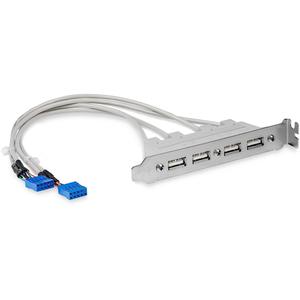
The StarTech 4 Port USB 2.0 Connector Backplate transforms your PC’s internal USB headers into four accessible rear USB-A ports, enhancing connectivity for multiple devices. Designed for easy installation into a PCI slot, it supports 4 or 5 pin motherboard connections and is compatible with major operating systems. Its solid build and quality cables ensure dependable performance, making it an essential upgrade for professionals seeking expanded USB access without breaking the bank.

| ASIN | B00015Y0FK |
| Are Batteries Included | No |
| Batteries | 1 AAAA batteries required. |
| Best Sellers Rank | 25,496 in Computers & Accessories ( See Top 100 in Computers & Accessories ) 438 in USB Hubs |
| Brand | StarTech |
| Colour | Grey |
| Customer Reviews | 4.6 4.6 out of 5 stars (1,137) |
| Date First Available | 23 Feb. 2012 |
| Graphics Card Interface | PCI |
| Guaranteed software updates until | unknown |
| Item Weight | 68 g |
| Item model number | USBPLATE4 |
| Lithium Battery Energy Content | 2.6 Watt Hours |
| Lithium Battery Packaging | Batteries contained in equipment |
| Lithium Battery Weight | 5 Grams |
| Manufacturer | Startech |
| Number Of Lithium Ion Cells | 4 |
| Number of USB 2.0 Ports | 4 |
| Operating System | Large compatibilité, y compris avec la plupart des systèmes d'exploitation Windows, macOS, Linux, iOS, et Android |
| Processor Count | 1 |
| Series | USBPLATE4 |
| Voltage | 240 Volts |
| Wattage | 50 watts |
W**M
Does what it claims to do!
Cables are the right length and the engineering quality is good. Easy to install
Z**Y
Four extra USB2 ports on the back of my PC for much cheapness. Very happy.
This adapter connects to the USB2 risers on your motherboard. It uses two risers to give you four USB2 ports on the back, and takes up one of the blank PCI slots on the back of your case. This doesn't ADD any USB sockets. It brings the existing ports on the motherboard out to the back panel. If your motherboard doesn't have these sockets (almost all do), this isn't the adapter you need. It is USB2, and does not plug into the newer, faster USB3 riser. The cables are nice and long, the thing is solidly build and it works perfectly. It was less than a tenner, delivered. Now I can plug my USB mouse, keyboard, game controller and other stuff into my ancient motherboard which only had two USB2 rear ports.
T**M
Decent kit.
Appears well made. Leads were long enough to reach the motherboard sockets easily. Works well. I use it for slower speed peripherals such as keyboard and mouse, leaving my USB 3.0 sockets for high speed devices, eg external hard drives. The only downside is that the lower screw holding the sockets to the plate is too low and pushes against the metalwork of the case. Needed a little more pressure than usual to secure the locking bolt at the top. Not a deal buster.
H**R
It does the job!
I've owned this now for over 12 months. It works fine and does the job. For my purposes, it would be better if this item was also available in black to look better in a modern glass sided case, but this was the only option when I bought it.
G**T
Space saving
Very handy to have four usb ports on one back panel. A bit of a shame that it's not available in black, the white/grey cables stand out behind the case's glass door, but that's a minor thing really. No problems in connecting or fitting.
M**Y
It does what it needs to do!
Took 2 mins to install and connect to the motherboard, no issues and now have lots of connections for my stupid amount of USB devices!
M**M
4 port USB 2.0 adaptor.
Excellent product, just the job. I installed it in my newly built desktop Win7 Pro x64 system to provide some extra USB 2.0 ports for my laser printer and scanner. Arrived very quickly at a good price.
S**N
Works as expected - can be loose fitting
USB 2.0 connector using an empty PCI/e slot - making use of those spare USB 2.0 motherboard headers, ideal if you're starting to max out your USB controllers. Works well as expected, with reasonable internal cable length, good value overall. Unfortunate that there was no black colour version, but generally not that noticeable in the 80s cream. The fit is highly dependent on your case (cannot recommend for NZXT cases). With no slot support, the backplate is very loose and easy to push in when plugging or unplugging USBs. The ports are suitably "grippy", but again, this can make plugging in USBs quite difficult with the backplate sitting loosely.
L**.
pratico adattatore per poter ampliare il numero di porte USB per un pc fisso ( attenzione di controllare di avere porte di espansione libere! ) ottimo rapporto qualità/prezzo. semplicissimo da installare ( apri il computer, attacchi i connettori alla scheda madre, avviti una vite, FINE ) non sono richiesti driver particolari; appena ri-accendi il PC, le porte vengono già viste dal sistema. Ho collegato vari dispositivi ( HD esterni, chiavette usb, cuffie usb, DAC, ecc ) nessun problema riscontrato. Non fatevi ingannare dal classico colore "bianco vecchio stile", il prodotto è nuovo e funziona benissimo
C**N
When building my second PC, this time to run Linux, I noticed there were two USB 2 pin headers on the motherboard in addition to the ones for the front panel. I suppose that some cases have USB 2 on the front panel instead of the USB3.2 and USB-C that are common these days. They also might be intended for programmable LED strips for gamers who want to trick-out their gear. But these pin headers each support 2 standard USB devices and just need connectors to put them to good use. When I saw these, I thought someone must make a breakout that could bring them to the back panel expansion slot, and sure enough, there were lots available on amazon. Most of these were two port versions but I found the StarTech item with four, which was ideal, so I bought one for each of my desktop computers, which are built in Fractal Meshify 2 cases. Installation is simple. The headers are 9 pin with 1 row of 5 and 1 row of 4, with the missing pin keyed on the connector. Like all motherboard connectors, care is required to align the connector to the pins correctly and not try to force them together. The last thing you want is a bent or broken pin on the motherboard, which would make for a difficult repair. On one of the 2 units the tip of the expansion slot bracket was slightly bent and it didn't want to go in properly. It took a very small adjustment to with a pair of pliers to set it right. I read a complaint in another review about the non-locking connectors falling out. I didn't have that issue. The connectors fit quite tightly to the pins, and it would take more force than I would want to apply to the cable to pull them out. Even if that weren't the case, a well placed tie-wrap would hold them in place if needed. Before installation I turned off the power supply with the switch on the back. On the windows machine, where I need them most, I moved the keyboard, mouse, a very old webcam and an automatic tuning unit for my ham radio station over to the new ports from the precious USB-3.2 ports on the back panel of the motherboard. When I rebooted everything worked as before without having to reconfigure anything. My computers tend have lots of things attached. I needed a firewire port on my Windows desktop, and to install the PCIe card without having to bifurcate the PCIe lanes and cut the bandwidth to my GPU in half, I need to remove the USB 3.0 PCIe care that was there. Having this little breakout allowed me to add back the 4 ports I lost by removing the card without taking up precious space on the PCIe bus. Lastly, there's the question of why not just use a USB hub. Overall I've found them to be useful, but not always as reliable as directly connected ports. I think the issues might be related to the available power on the hub (generally 3A for all ports) but whatever the reason, I prefer them attached directly where possible. This little device has provided a neat way to get that using a motherboard component I already own.
M**.
Vérifier si la carte mere possède 2 prises usb 10 pôles 9 pin disponibles et leur position car les câbles ne sont pas très long
B**N
The cables are much longer than the pictures indicate. They're actually over 30cm long, so plenty of length to reach USB headers located anywhere along the bottom of your motherboard. This product is great for the price (~$14 AUD at time of purchase). No need to purchase another dodgy (cheap) PCIe card to gain more USB ports. Can go in any empty expansion card space in your case and doesn't need a spare PCIe slot in your motherboard. Just needs a spare USB 2.0 header (or two, ideally, if you want to use all four ports) on your motherboard. Fantastic. I did consider removing a star for the name of this device, as it took a lot of googling and amazoning before I found this. No mention of "header", "motherboard", "internal", "9 pin", etc. Instead it's called a "USB Slot Plate Adapter" lol. I got there in the end though. Thanks!
C**N
I had a lot of problems with pcie usb cards This alternative just WORKS but with slow speeds ofc I manly usw it for Mouse, Keyboard and MIC
Trustpilot
4 days ago
2 weeks ago