Buy anything from 5,000+ international stores. One checkout price. No surprise fees. Join 2M+ shoppers on Desertcart.
Desertcart purchases this item on your behalf and handles shipping, customs, and support to Kyrgyzstan.
🔥 Dominate your MMO universe with precision, speed, and unstoppable endurance!
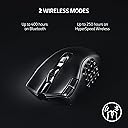
The Razer Naga V2 HyperSpeed Wireless MMO Gaming Mouse is a professional-grade, ergonomic wireless mouse featuring 19 programmable buttons, Razer’s HyperSpeed Wireless technology for ultra-low latency, and a Focus Pro 30K Optical Sensor for exceptional tracking accuracy. It boasts HyperScroll Technology for versatile scrolling, mechanical Gen-2 switches rated for 60 million clicks, and an impressive battery life of up to 400 hours on Bluetooth mode, making it a top-tier choice for serious MMO gamers seeking both performance and endurance.


| ASIN | B0BGJT87N2 |
| Additional Features | Focus Pro 30K Optical Sensor, HyperScroll Technology, Mechanical Mouse Switches Gen-2, Programmable Buttons, Up to 400 Hr Battery Life |
| Antenna Location | Gaming |
| Are Batteries Included | Yes |
| Are Batteries Required | Yes |
| Battery Average Life | 250 Hours |
| Best Sellers Rank | #90 in Video Games ( See Top 100 in Video Games ) #7 in PC Gaming Mice |
| Brand | Razer |
| Built-In Media | 1 AA batteries required, Charging Cable, Dongle, Dongle Adapter, Mice, Side Plates |
| Button Quantity | 19 |
| Color | Black |
| Compatible Devices | Personal Computer |
| Connectivity Technology | Bluetooth, USB |
| Customer Reviews | 4.1 out of 5 stars 1,178 Reviews |
| Enclosure Material | Plastic |
| Hand Orientation | Right |
| Hardware Platform | PC |
| Item Dimensions L x W | 4.71"L x 2.97"W |
| Item Type Name | Gaming Mice |
| Item Weight | 3.35 Ounces |
| Manufacturer | Razer |
| Mfr Part Number | RZ01-03600100-R3U1 |
| Minimum Required Operating System Version | Windows 10 |
| Model Name | Naga V2 |
| Model Number | RZ01-03600100-R3U1 |
| Mouse Maximum Sensitivity | 30000 Dots per Inch |
| Movement Detection | Optical |
| Movement Detection Technology | Optical |
| Number of Batteries | 1 AA batteries required. (included) |
| Number of Buttons | 19 |
| Operating System | Windows |
| Power Source | Battery Powered |
| Range | 10.0 meters |
| Special Feature | Focus Pro 30K Optical Sensor, HyperScroll Technology, Mechanical Mouse Switches Gen-2, Programmable Buttons, Up to 400 Hr Battery Life Special Feature Focus Pro 30K Optical Sensor, HyperScroll Technology, Mechanical Mouse Switches Gen-2, Programmable Buttons, Up to 400 Hr Battery Life See more |
| Style Name | Modern |
| UPC | 840272904732 |
| Unit Count | 1.0 Count |
| Warranty Description | 2 year manufacturer |
T**Y
Is the Razer Naga V2 HyperSpeed worth it?
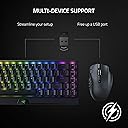
Came in perfect condition, and was exactly what I was looking for! The Razer Naga V2 has highly programmable buttons and the software that you use with it is simple to understand. Plus, if you have more than one razer product that uses wireless dongles (the USB stick;) then you can use their wireless connecting feature allowing you to save on USB slots and use them for other things! I haven't had any issues with the battery life, as it is in fact long lasting. If you are worried about it being wireless, then I'll let you know now. Computer technology has come a long way, and I believe that this is one of the best wireless mouses you can get for quality and price.
D**A
Just Short of Perfect
I have owned almost every Naga that's been produced, starting with the very first one. I play a lot of MMORPGs (mostly WoW these days) and the thumb keypad is ideal for how I like to play. I'm coming from the Naga X, which was phenomenal, but began to have button issues. I've found with Razer products that that's usually the death knell for one and it's time to move on. I am always hesitant to get wireless mice and keyboards because replacing batteries is just another level of hassle. However, I decided to take the plunge on this one and see how it goes. The connection has been brilliant. I pulled the little USB connector out of the mouse, plugged it into an open port, and it was basically plug-and-play after a quick reboot. The buttons are satisfyingly clicky and everything has been responsive and easy to use. Zero issues with any of that. My one complaint about this mouse is that it is slightly narrower than the Naga X and my pinky finger is not as comfortable. The Naga Epic had an actual pinky rest on it and was the best Naga ever produced. Razer dropped that from the design and it sadly has never returned. I would pay double what I paid for this one if it had a functional pinky rest beside the ring finger rest, but alas. This is as close to perfection as Naga is going to get, though I would give it 4.75 stars if I could because of the narrowness of the mouse. It's just short of perfect.
S**H
Razer is back on top! Naga V2 is awesome.
I used to despise Razer, but nowadays, the MMO mouse from Razer is pretty decent hardware. Their biggest problem has always been their software, however, and I must admit their support for software integrations is lacking. There's no OBS integration and no Discord integration. I'm getting by without setting up macros for hotkey combos by simply using my Logitech keyboard's macro keys for the integrations I want, and the only reason I didn't get another Logitech mouse was Logitech didn't make a new mouse model and discontinued their old, wired G600 model, making it cost too much to replace. I went with the Razer Naga V2 because it was somewhat cheap by comparison and wireless and I felt like giving other brands a try. I ended up really loving the build quality of the Naga V2, but Razer's software was still pretty terrible. The hardware design is pretty good, but there are some ergonomics issues. The top left mouse click buttons (not left click) are hard to find by feel and also a little difficult to reach. There's no palm rest for a big hand to rest on. I think this mouse could benefit greatly from a 3d printable palm extension, but that would increase its weight, and the mouse is very lightweight. I ended up using a wrist rest that helped a little with mouse fatigue. The battery is somewhat easy to swap out, and you don't have to swap often. It uses a single AA battery, and I opted to use a rechargeable lithium battery in it that adds some extra capacity. The LEDs on the buttons are very dim by comparison to my other MMO mice, and they don't have the same flair I get from some other brands. The colors are customizable, but there's no wave effect on the mouse, which is weird because Razer's keyboards have the wave effect. DPI is easy to change on-the-fly. I see no noticeable lag from being wireless. I also don't see any connectivity issues as long as I keep the mouse within 8 feet of its dongle.
M**"
When it works it's great ...see edit!
EDIT: about 2 days after my initial review, the Bluetooth stopped working all together. Would connect for a second then just stop. Which is pretty much the end of the mouse for us. The dongle is the connection that has the most connectivity loss midplay. We got it Sept 1st and it's Oct 16. Not even two months for a $90 mouse to be almost useless and need replaced. My husband needed to find a gaming mouse replacement and this was easily the most like the G600. When it works it's great, but when it falls asleep or disconnects randomly, it sucks. Buttons feel nice, much less effort to push than the G600. Size feels good in the hand for big or small hands, nice texture. Battery seems like it's not as good as you would hope, but at lease its replacable. When we changed it after about 2ish months, it was labeled not for individual sale, and it makes me think they were made with less life in them. The button settings are nice and can be changed, except the top 1 behind the wheel. Good sensitivity & speed. The sleep setting is what is absolute trash. It can't be turned off, only set to a max of 15 minutes, but it will disconnect randomly in less time. We've read it's a common issue and that using it as a cabled mouse helps, but that's not really an option we want from the mouse. Honestly, it's fine, but for the cost being so high I feel like it needs to be way better than just fine. If you are in need of a G600 replacement this is the best. I guess it's a trade of the Logitech double click for a mouse that stops working for no observable reason. It's on my list to get for myself, but I'm wait for a sale or something better to come out in the mean time.
M**L
Solid mouse, durability might be a concern in the future.
Base on using the mouse for about a week. - Was able to quickly connect the mouse once the USB dongle is plugged in. - The top part of the mouse comes off completely, this is where you have the battery and if you want to store the usb dongle. This is where my concern of the mouse comes in, the plate feels a bit on the low side of quality and can see in the future that this part could become damage over time but not sure. - So far the response from the mouse to PC has been smooth and haven't notice any kind of delays. - Size of the mouse is pretty much the normal size and fits well in the center of my palm. - Mouse easily connects to the Synapse of Razon and can easily customize the DPI settings for the 5 settings you can quickly change to with the top buttons by the left click. Overall the mouse is great and the price wasn't too bad for it but like I said before the only concern for me would be the durability of the top plate. If i could give it a 4 1/2 stars then I would.
K**.
Great MMO mouse! Easy to use
Love this mouse! I use it to hotkey a lot of buttons when I play MMOs. The software razer has also makes it easy to configure macros in case you needed it to hit a series of keys. Each button on the side is easy to press, so I don’t have to crawl around my keyboard to find anything. The battery life has been great too! I don’t think I’ve had to change anything and I’ve been using it for multiple hours a per day for over 3 months.
R**Y
Programmable keys don't work all the time!!!
This mouse is GREAT - for a basic mouse. It looks good and feels very comfortable - feels high quality. The other features, like shortcuts, macros and other keys (which is why one would buy this), work well - WHEN THEY WORK. They don't work all the time. The key value of such an expensive mouse is the added programmable buttons (12 of them in total). As great an idea as it is, it has severe limitations in its use because of RAZER's poor implementation decision. It's relatively easy to assign simple tasks like copy, paste, forward, cut, etc. using the app. And that's the core of the pandora's box of problems. Because all that data on the programmed keys are stored in the program, and not on the mouse itself, it means you need to have the program running for them to work. So if you were to plug this mouse up for use on your other PC or device, you don't have access to those macros and programmed keys. But that's not the worst of it. It turns out that many times even when the program is working, the macros and programmed keys DON'T WORK. Many people have commented on this issue and RAZER has been silent on it. Save your hard earned cash and get something more reliable for your short keys. I wish I could return this, but that window is closed and I'm stuck with this fairly basic mouse. PS. RAZER, rather than trying to be overly fancy with your software, give us something reliable. LOAD THE PROGRAMMED DATA ON THE MOUSE ITSELF... Learn from REDDRAGGON's take on programmable mouse buttons - which I use on my main desktop. I should've bought another one for my laptop rather than trying to be fancy and go for this more expensive paperweight!
R**K
Best mouse I've owned.
After my Logitech G604 at work decided to start having switch troubles, it was time to look for another mouse. I was hoping to get another Logitech G604 or similar since I utilize the side buttons for work and for gaming. Unfortunately, at least as of the last time I searched, Logitech discontinued the G604 and didn't plan on making another similar. I'm glad I started looking at Razer mice as this one caught my eye and I was intrigued. I've had this mouse now for 9 months and it was the best decision I've made in any of my PC purchases, minus the PC of course. The mouse feels good in your hand and is very light compared to the G604. The feet slide extremely easy on mouse pads for flawless movement. The buttons are very responsive and I enjoy the extra 6 that I get compared to the 604; more commands/shortcuts at a thumb press. Some have had the button paint start to wear off but I have not, at least yet, so I'm not sure if they just have super acidic hand sweat or eating Cheetos while gaming. Anywho, the paint has not worn off in any way and I can still read all the numbers on the side buttons. As far as connectivity, I don't 'hardcore' game so I probably won't ever use the HyperSpeed setting on it but the bluetooth works wonderfully and is very quick to connect on start up. The mouse also has a timeout function which you can adjust via the software. The software I don't hear much good about but I haven't had trouble with it I guess. It allows me to program the buttons as needed and that's about all I use it for since this is the only Razer product I have. I'd recommend this mouse to anyone who doesn't like searching for keys on their keyboard for functions. It's not only a great mouse for gaming but for work when you need button combos that are a pain to do on the keyboard. I liked it so much that I ended up buying another one for home and replaced my G604 at home a few months later.
B**I
Nice product
Work properly
し**し
ゲームにも作業にも
ゲームでは移動しながらアビリティ使える 作業ではコピーペーストだけでなく左側のボタンをカスタマイズできてショートカットキーを登録しておくといちいちキーボードに目をやらなくても操作可能。 特にいいのが専用のカスタマイズ画面でテンプレートを分けられる。 いちいち作業とゲームごとにボタンをカスタマイズする必要がないのがいいところ。
A**M
Great deal
Quick delivery. Only problem i could see was damave to the packaging. Great deal
H**S
Mouse Excelente, he dejado atras Logitech...
Excelente Mouse, estaba buscando uno que no usara caucho en la cubierta, a la larga se sienten pegajosos, pero este mouse tiene excelentes repuestas deacuerdo a la resolucion que selecciones que es mediante botones entonces super rapido cambias, la sensacion es limpia, las areas de contacto con la superficie son grandes por lo que se desplaza muy facilmente, tiene un buen de botones que aun no se para que usarlos pero para gamers esta super, lo unico que no me gusto es que para cambiar de bluetooth a USB es un boton mecanico debajo del mouse.
R**L
Produto veio como o esperado
Produto excelente, até o momento não tive problemas.
Trustpilot
4 days ago
2 months ago