We remain fully operational. Our teams are working around the clock to ensure your deliveries continue safely.

DOWNLOAD THE APP


Customer Services
Copyright © 2025 Desertcart Holdings Limited
DOWNLOAD THE APP
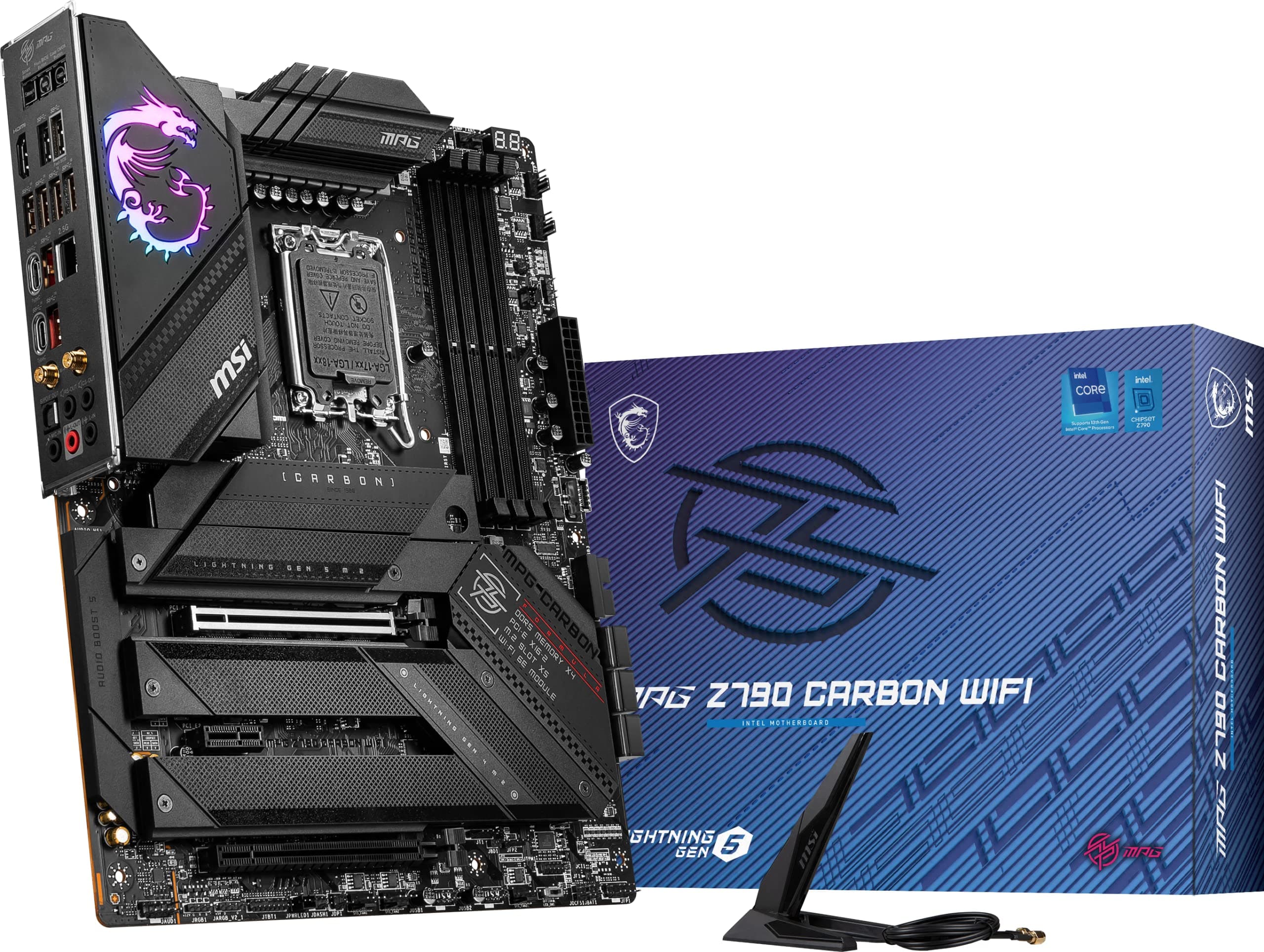


⚡ Power your future-ready rig with MSI MPG Z790 Carbon WiFi – where speed meets style.
The MSI MPG Z790 Carbon WiFi motherboard supports 12th and 13th Gen Intel processors with LGA 1700 socket, DDR5 memory up to 7600+ MHz (OC), and PCIe 5.0 for cutting-edge performance. It features advanced thermal solutions, a robust 19+1+1 power phase design, Wi-Fi 6E, 2.5Gbps LAN, and multiple high-speed USB 3.2 Gen2 ports, making it an ideal choice for gamers and professionals seeking a powerful, stylish, and future-proof platform.


| ASIN | B0BHCJ1QK8 |
| Best Sellers Rank | #1,037 in Computer Motherboards |
| Brand | msi |
| Customer Reviews | 4.2 4.2 out of 5 stars (195) |
| Date First Available | October 20, 2022 |
| Item Dimensions LxWxH | 12 x 9.6 x 2.5 inches |
| Item Weight | 5.17 pounds |
| Item model number | Z790 CARBON WIFI |
| Manufacturer | MSI |
| Memory Speed | 7600 MHz |
| Number of USB 2.0 Ports | 12 |
| Processor | pentium |
| Processor Brand | MSI |
| Product Dimensions | 12 x 9.6 x 2.5 inches |
| RAM | DDR5 |
| Series | MPG |
J**S
Great for gaming
Having just assembled a new PC build, this motherboard hits all the right spots. A beautiful design along with the MSI name is a match for anyone wanting a great motherboard for their new gaming pc. Has the straight forward bios that I've come to love with MSI. I only ran into two issues. The spots for the CPU cables is positioned in a way that my case didn't allow me to have as much space as I would have liked to route the cables, but this isn't really a negative on the motherboard itself. It also didn't come with any kind of manual in the box but I guess if you're spending this kind of money on a motherboard, this probably isn't your first build. Not an issue for myself but it would still be good to include a manual, or maybe I was an anomaly and they normally come with one. Overall a great piece for your build if you are building a higher end system.
J**E
Super fast and stable, love it!
I've been working with my new build for two days now and wow, what a fast beast. Not a single crash either. I updated the BIOS to the latest available, enabled XMP Profile 1 in BIOS, installed Windows 11 fresh on my new PCIe Gen5 M2 drive from Corsair, and am VERY happy with the speeds I am getting. I attached a screenshot of the PCIe 5 M2 drive speeds, you can imagine how snappy everything is, but everything opens almost instantly. My build components: MSI MPG Z790 Carbon WiFi Gaming Motherboard (this product) Intel Core i7-13700K Desktop Processor CORSAIR VENGEANCE DDR5 RAM 64GB (2x32GB) 5600MHz MSI MPG A1000G PCIE 5 & ATX 3.0 Gaming Power Supply - Full Modular - 80 Plus Gold Certified 1000W Corsair MP700 2TB PCIe Gen5 x4 NVMe 2.0 M.2 SSD Cooler Master Hyper 212 Halo White CPU Air Cooler MSI Gaming GeForce RTX 3060 Ti Graphics Card I am using this primarily as a work machine, application development in Visual Studio. My programs compile in a fraction of the time as my last machine, an AMD 5700X build with 64GB DDR4 RAM and PCIe 4 drives. Windows boots in seconds. Even Edge opens and runs faster. I don't game much, but Cities: Skylines feels faster, too. Couldn't be happier with this motherboard and my new build.
M**O
Great motherboard but buyer beware if you are building a PC 4090 and 4080
I had an issue with both the MSI z790 carbon wifi and a EVGA Kingpin z790 board where neither would recognize a 4090 or 4080 card. I kept thinking it was the board and second guessing myself thinking it was the GPU. Weird part is that my GPU would work on my z590 on old computer. I have both a 4090 Surpim X and a PNY 4080 and after many weeks of troubleshooting come to find out you will need to make sure you have a PSU that has at least 4 PCIE connections. I got the corsair RM1000x. What you will get with a 4090 or 4080 is a 12VHPWR to a 4 way VGA splitter. Make sure to purchase additionally a Corsair Premium 600W PCIe 5.0 / Gen 5 12VHPWR PSU Cable - Fits Type-4 PSUs via Dual 8-pin PCIe - 12+4pin Connector - Mesh Paracord Sleeving - Black for this board. If you have a 590 motherboard you will be fine with the cable that comes with the GPU. I have not tested on a z690 board. This is not written down anywhere and MSI support was not good or aware of this issue with their products.
Z**Y
Arrived not working
Arrived with poor packaging. After a few months went by and I had all my parts to finally build my pc the motherboard was of course bad. On start up it displays “usb overcurrent detected, shutting down to prevent damage to board.”
B**E
Great motherboard with some small issues.
I set off to build my ultimate gaming PC and decided to purchase this motherboard to build it with. I wanted a motherboard that was a little future proof, this seemed to fit the bill, DD5 ram, PCIE 5.0, M.2 gen 5 and not outrageously expensive. So I put together my PC and started to install Windows 11 home. Everything was going great until I got to the Wi-Fi screen. No networks were showing up and Windows had no option to move passed this and I didn't have a ethernet cable to plug into the motherboard. What could be wrong? Bad Wi-Fi hardware on the motherboard, no drivers installed, bad antenna? Two hours on the internet and Youtube, finally I found a way to bypass this stupid screen (that's Windows fault). Come to find out that the motherboard had no Wi-Fi drivers install on it (shame on you MSI). I was able to install them with the USB drive that came with the board (thank God)! After that everything ran fine. My other issue with this board (my fault for not doing more research) is that in the future if I want to use PCIE 5.0 graphics card and a M.2 gen 5 SSD, it cuts the graphics card down to gen 5 X 8 lanes instead of 16 lanes. I don't know if this will really be that big of a deal, but I just expected to be able to use both at full capacity. Other than those two issues, I love the board. It has been very stable and works great. Love the RGB lighting of the dragon in the corner. I am running Corsair 6400mhz DDR5 ram with no problems. I also like the digit display in the top right corner, I haven't had any error codes, but if I did this would make it much easier to diagnose, currently it displays CPU temp which is nice. Overall, I am pretty happy with this motherboard minus the two issues I talked about. UPDATE** Come to find out all current motherboards have this limitation of not being able to use PCIE 5.0 graphics cards and M.2 5.0 SSD's both at full speed at the same time. Apparently, there aren't enough PCI lanes in the current version of the chipset to solve this. The new 14th generation of Intel processors was supposed to fix this, but didn't. We will have to wait for the next generation of Intel chips to see if they add more PCI lanes to fix this.
M**I
من اعظم المذربوردات مع معالجات مثل i9-13900k بور لمت وصل حق المعالج 380 واط بسهوله
F**A
Intel no ha sabido dar solución al controlador de esta Motherboard y otras en general que incluyen exactamente el mismo controlador de red WiFi Yo la uso con cable ethernet, pero al investigar mas a fondo descubrí que viene con ese defecto, unas si y otras no.
J**H
Great power , thermals and shes a beauty. looks great in my msi build
A**I
ممتاز وانصح بها
W**E
My last build was msi z390 pro carbon.....tried a asus board this time was terrible experience never again ordered this msi board returned the asus 1 couldn't be happier.
Trustpilot
1 month ago
1 day ago