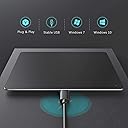
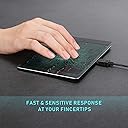
✨ Elevate Your Navigation Game!
The Vssoplor Trackpad is a high-precision, ultra-slim USB wired touchpad designed for Windows PCs. With a large touch surface and multi-touch capabilities, it offers a smooth and responsive user experience. Its plug-and-play functionality ensures easy setup, while its portable design makes it ideal for travel.


| ASIN | B0BDLJXBS9 |
| Additional Features | High Precision Multi-touch, Slim Metallic Design, Plug-and-Play |
| Antenna Location | Office |
| Are Batteries Included | No |
| Are Batteries Required | No |
| Best Sellers Rank | #85,814 in Computers ( See Top 100 in Computers ) #35 in Computer Touch Pads |
| Brand | Vssoplor |
| Button Quantity | 16 |
| Color | black |
| Compatible Devices | Personal Computer, Windows |
| Connectivity Technology | USB |
| Customer Reviews | 3.8 3.8 out of 5 stars (150) |
| Enclosure Material | Aluminum |
| Hardware Platform | Desktop, Laptop |
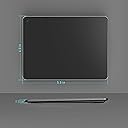
| Item Dimensions L x W | 14L x 14W centimeters |
| Item Weight | 0.15 Kilograms |
| Manufacturer | VssoPlor |
| Mfr Part Number | WGJP-055 |
| Minimum Required Operating System Version | Windows 7 |
| Model Name | RM |
| Model Number | WGJP-055 |
| Movement Detection | Optical |
| Operating System | Windows 10, Windows 7 |
| Power Source | Corded Electric |
| Style Name | Classic |
L**D
Like other users, I bought this trackpad to reduce pain associated with mouse use. The glass surface is gives a smooth and responsive performance. There is no 'click' when using the trackpad; it's a tap/tap and drag process. Online function instructions give the basic instructions but I also found that a fast double tap and hold allows me to drag items across the screen until I release contact. Scrolling in and out is by the pinch method. I'm very happy with the trackpad. It allows me to edit for several hours at a time without any pain and is sensitive enough to place the cursor exactly where I want it every time. Well worth the higher price compared to other offerings and with none of the issues I read of from other devices.
W**Y
This is actually the Jellycomb touchpad. I knew right away because the box came as T055, which is the Jellycomb touchpad. On the box was a picture of the silver one, but when I opened it up, it was the black one. I was pleasantly surprised that it was the Jellycomb because I had purchased that product on the Ergoguys website (for $ 120. 00 with taxes and shipping)., but they were out of stock. So, I ended up getting the same product unexpectedly for only $49.99 when I thought I was purchasing a generic touchpad from some unknown company (Vssoplor). Most importantly, I have wrist problems and much pain on my right wrist, so I needed a good quality product that was ergonomic and would save me pain on my right wrist while at work. This is my first time purchasing or using a touchpad, but despite my nervousness, as soon as I opened the box and began using this touchpad, it seemed to be working VERY GOOD. I would definitely recommend this excellent product. It's not just a nifty little gadget, it's saving my job and position at work. Without it, I'm thinking I'd have to start looking for a position somewhere else due to wrist issues, but this touchpad allows me to continue a job I love without using a mouse, which is very straining and debilitating at work. I increased the touchpad speed in computer settings and it’s working even more amazingly. Know that this product comes with a USB to Micro USB chord, 3 Feet in length, so if you're using it for a desktop, you'll probably want to purchase a 6 foot chord (don't go above 10 ' or you lose good connection). I've heard Anker is the best, but they have a gaming chord at Best Buy that will work by Power A. I'm getting the Anker one on Amazon for the same price. Here it is on Amazon: https://www.amazon.com/Anker-Powerline-Premium-Motorola-Smartphones/dp/B019Q5PXX8/ref=sr_1_6?crid=7AK7LSWR121M&keywords=Anker%2BMicro%2BUSB&qid=1673405569&sprefix=anker%2Bmicro%2Busb%2Caps%2C173&sr=8-6&th=1&fbclid=IwAR0nJh9r256NQluPp_b-XviV2v69I7P_7qTz5mA6S4OSikq4A05zlnK7-s4
L**E
Habe lange auf das Teil gewartet, nur um jetzt feststellen zu müssen, dass es keine "Klick"-Funktion hat. D.h. man kann nicht runterdrücken und dann den Finger bewegen. Man kann also keine Fenster verschieben, Text markieren oder Drag-n-drop Operationen durchführen. Evtl ist meine Einheit defekt aber ich fühle nichts was auf einen Klick hindeutet.
和**子
デスクトップPCでタッチパッド…ってのは使いやすいのか?と思って試してみたけど、思ってたよりは使いやすい。 ただ、この使用感というのは割高なんだよなー。ドラッグ操作はダブルタップが必要になってくるのでそういう慣れが必要だとか思うとこれだけでベスト!な選択にはなりにくいよね。
P**X
still learning how to move fingers, but it has brought relief to my hand, which pained with the mouse. but still have another gadget in conjection with this, for quickness in some moves. would reccommend, usb to computer which is easy to take out if not needed.
Trustpilot
2 weeks ago
2 months ago