Desertcart purchases this item on your behalf and handles shipping, customs, and support to Kyrgyzstan.
๐ Elevate your home Wi-Fi gameโstay connected everywhere, effortlessly!
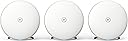
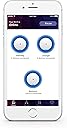
BT Whole Home Wi-Fi is a premium mesh networking system featuring AC2600 dual-band technology and three discs that blanket medium to large UK homes with fast, reliable Wi-Fi. Compatible with all UK broadband providers, it offers seamless roaming, intuitive app-based control for device management and scheduling, plus a 3-year warrantyโperfect for professionals demanding flawless connectivity and smart home integration.


| Brand | BT |
| Compatible devices | Laptop, Personal Computer, Smart Television, Tablet |
| Frequency band class | Dual-Band |
| Model name | 88269 |
| Special feature | Wi-Fi Roaming and Band Steering |
| Wireless communication standard | 802.11ac |
J**S
Highly recommended - reliable, flexible and it works .... and for non BT broadband
I live in an old house and the location of the single master BT point is in the lounge - the oldest part of the house, and the room with the thickest walls. Brilliant for insulation, a nightmare for wifi. When I moved in I chose BT to provide broadband (a rural location, so figured BT would be the best choice as I would be ahead of the queue when they upgraded the exchange to 'real' broadband), and worked through the BT hubs 4, 5 and 6. None of them were able to penetrate the thick walls and give me wifi throughout my property - which I understand: I don't doubt they are predominently designed for newbuilds with walls that allow the signal to penetrate. I have tried numerous signal boosters, but all have suffered from one draw back or another, and none have proved reliable. I also replaced the BT hub with an [expensive] ASUS gamer router with multiple antena - again, it was not able to provide a good signal throughout my property, and definitely wasn't as reliable as the BT hub .... but that is the subject of a different review! About a year ago (when I moved from BT to EE for my broadband provider) I invested in a BT 2 disk system, on the assumption that I could use the second disk to utilise mesh technology and provide a decent signal to the rest of my property. Hey presto - it works! The 'base' disk is plugged directly into the router, and the second disk has a decent line of sight to the base router, and this provides more than a good relay signal (completely workable) to the rest of my property. Move on another year, and I decided to go with Blink cameras for security. To explain for the purpose of this review, the Blink cameras (located outside) need a good wifi link to my broadband in addition to a good link to the Blink hub - something which I would imagine is difficult in many households, and although my two disks provide me with a 'good' signal throughout my property, the second disk doesn't provide a great signal throughout - I don't blame this on the device but on my very thick and old walls! Given previous positive experiences with the BT disks, I invested in the three pack to expand my existing network, locating the disks in rooms near the Blink cameras. The results? I now have EXCELLENT wifi throughout the whole of my property, which extends to the nearby perimiter completely sufficient for the Blink cameras which show a 5 bar wifi signal .... and inside, I have absolute coverage of excellent strength wifi in all rooms. I haven't needed to contact support, hence no rating, but I would happily recommend this product as a best buy for a number of reasons: 1) if you can have 'rough' line of sight between some of the disks, they can extend your wifi signal transparently to all devices throughout your household (my smart home technology just links to the best signal, and yes, I have seen an improvement in responses since I expanded 'the mesh'). 2) even if you don't have line of sight, you could potentially use a network over mains adapters to connect the devices remotely to your base router and share the signal throughout the house - I have tried this with numerous options, but I really didn't find it as reliable as allowing the disks to be able to relay themselves. In my experience, providing one disk has a semi-decent line of sight to the 'base' disk, the others all work very very well and provide a good signal: useful if your phone point it located somewhere with thick walls. 3) numerous devices nowadays need a wired connection to your router - I have an alarn and CCTV (separate to the Blink) which need a hardwired connection to 'the router' - the RJ45 network connection on the back of one of my disks (each disk has a connector to plug in a network lead) works perfectly well, and each devices 'believes' they are plugged in to the router. 4) I really like the guest wifi option - this is a separate wifi network you can set up which is kept isolated from your main wifi network, so guests can connect to the internet without being able to connect to any of the devices on your home network - great, as you don't have to rely on your guests having antivirus and malware protection, and potentially infecting your network devices (it's also useful for connecting 'suspect' devices to your network when the company doesn't have a clear privacy and security policy, e.g. IoT monitoring cameras, though I'm not talking about Blink ... of which I'm a huge fan!). 5) linked to 4, you can switch the guest network on and off without impacting your main network, and you can also pause your network - stopping internet access - the nice part being you can specify which devices this affects. I would imagine this would be useful for adults with kids, or guests who are streaming annoying music! 6) I like the phone app (also available via a web portal) that allows you to see what/who is connected, the signal strength between the disks, and to easily control reboots, guest network and numerous other settings such as if the disks lights are on or off. 7) I like that you have the ability to block specific devices from connecting to your wifi - my guest wifi is setup with the default BT Hub 4 settings, as this is what my guests previously connected to. As the network is quite easy to hack, several uninvited guests took the opportunity to utilise my broadband connection - I don't blame them ..... but their MAC addresses are now blocked. Not infaliable, but it makes it harder and so hopefully they will move on to another wifi network. The only downside, and I wouldn't say this is a reason to not purchase [more feedback for BT], is that there is no option (currently) to turn off the LED on one disk - the option is for all disks and it is either off, low or bright - personally, I want to keep the LED switched on for my disks as it is a good indicator that things are working well (or not!), but for the disk in my bedroom, I would like to be able to switch it off - but you currently can't for a single disk. In the meantime, duck tape means my bedroom isn't lit up with the [good status] blue LED. No matter who your broadband provider is, I would highly recommend this product - it's REALLY easy to setup either via the web portal or preferably the phone app, and it works. I am a very satisfied customer.
J**R
BT have a winner here...
BT Whole Home WiFi for ยฃ189. Summary to save reading the rest: The kit arrives in an excellent package which feels very upmarket so initial impressions was good. It is expensive compared to wifi plugs but it initially looks like money well spent especially at the price I paid rather than the original ยฃ299. It has managed to get wifi coverage everywhere in my house on a single SSID and with better performance than before. Would have been a 5 star review except for the mandatory BT app which let's it down in my opinion. ** After submitting the review with 4 stars I decided the BT app did not warrant losing a star so I've put it to 5 stars. Background info: I have BT Infinity2 (unlimited data and upto 70Mbps). When hardwired to the router I get 62Mbps via speedtest regularly. My house is really bad for WiFi. To visualise it, imagine a rectangle split into equal thirds. The BT HomeHub5 sits just inside the left third and wifi in this section is strong. The middle third starts getting patchy and the final third which happens to be where my lounge and bedroom are is usually no reception. I used a Solwise repeater in the middle third to help until now which has been great but when at the furthest point from it in the bedroom it was sometimes hit and miss. Plus we had three different SSIDs in the house. Setup: Opened the great bit of packaging and the feel of each disc was of really good build quality. I had already read that the BT whole home app was required so I had downloaded it already on Android. For me this is the only reason I haven't awarded it 5 stars. The first issue I have with the app is that it requires location services to be on or it just wont start. WTF? Why does it need to know where I am? I know I'm in my house and the devices are connected to the hub in my house and my broadband is in my house. I don't have location turned on as it eats my battery plus I'm paranoid about being stalked ;) So now I have to switch that on, tell google to take a run when it then wants me to allow all and sundry to access my location just so the app will start (and also having to remember to shut it off when I'm finished). That was issue one with the app. After that the setup was easy, plug ethernet cable into the router, plus other end into the first disc, power it on, wait 2 mins until the LED went solid blue and then I had a new SSID which I could connect to using the key that you get on the card that slides from the back of the disc (like with all BT hubs). The app then offers you to add more discs. It says go the spot you would like and click test. It tells you if you are in a good area or not. Once you have a good location for disc two, power it on, wait 2 mins for solid blue, then onto the third disc (same procedure). Once I had all three in location, using the app I changed the SSID to a different name and also changed the admin passwd (on the pull out card). I also clicked check for new firmware and it found some, download and install took a few mins. That was it for setup. You could easily do it in under 30mins but I tried a few locations and made sure I had it looking tidy with cables out of sight, etc so spent a bit longer. Testing: I used the speedtest app on my Sony Android phone for measurements. For reference - My usual results from speedtest show no more than 30Mbps down and 18Mbps up in the house when I have peak performance. The BT app shows you a graphic of devices connected to which disc so I could see where I was connected for my testing. I did various runs from different locations connecting to different discs and my performance generally was higher than I've ever had before with an average of low 40s for download and a peak of 58. uploads were a bit down though never peaking above 16 and sometimes in single figures. Not too worried about this as the majority of wifi traffic in my house is download. The only issue I experienced and it could be just the bedding in phase is that sometimes when I moved around the house and the passing on function of the devices (to the better reception) seemed to take a while so my first attempt at speedtest had network comms error. I will see how real life usage and movement affect the device over the coming days. BT app: i have already mentioned the app is mandatory which is acceptable to me although as they each have an ethernet socket you should really be able to connect a PC direct but most of us have mobiles so whatever. I also said I hate the fact you need location services turned on. My other gripe is that you cannot control the hub settings in particular parental controls. I have this set on the hub to stop my kids being on their phones all night. The only option via the app is the whole wifi off or on which will then affect sky, fire tv, my phone,etc... I think the hub still controls their access but I would like this ability on the app. I can also see devices connected to each disc but cannot do anything such as block them. Conclusion: Although I only set this up in the last 24hours from my initial impression of the hardware, through the ease of setup and resulting in wifi coverage getting the whole house with a single SSID, I am very happy with the outlay of cash. The bonus that the download performance has increased too is the cherry on the cake. I hope I have not reviewed too early and I don't start getting problems but if I do I shall report back. I highly recommend this as a solution if you had issues like mine especially as if it turns out not to work in your case you can simply box it back up and return to Amazon (that was my plan if it failed).
A**J
A class product, with some hidden advantages
This works, out of the box, gives excellent performance (so far), and WiFi coverage across the whole home [like it says on the box]. The iOS app also works fine, once you figure out the undocumented trick of ensuring you have not connected to a VPN on your device. If you do, then most (but not all) attempts to use the app fail, and the app claims not to be able to connect to the WiFi network, although it is up and working fine. Before buying this, I spent quite a lot of time figuring out ways of getting WiFi boosted in our two-floor flat in an old Victorian house with an extension that is close to a Faraday cage owing to the steel frame and metal stud internal walls. We have Ethernet cabling to various rooms, and use Virgin Media, Hub 3.0. My starting point was: something that I can plug into an Ethernet port that will extend or bring WiFi to the room concerned. If you try to connect an old router then a) you need to spend time getting your Hub 3.0 into Modem Mode, and b) you may need to spend a while fiddling with IP addresses and installing new firmware ... and then it may not work. See four of five reviews and articles and forums for the sorry tale. Next stop: Powerline with WiFi boosting: very high speed TP-Link devices with mains power "passthrough" (three-pin UK socket in the device enables it to be used as a normal electric socket too were all looking good, with "WiFI synch" (i.e. they all offer the same WiFi network id or SSID and use the same password), until I realized that to buy more than one of the latest, smartest "range extenders" (the devices that go into a room away from the router to provide boosted WiFi) ... I would have to buy more than one "Starter Kit", meaning that I would end up with two base stations (the devices that plug into the router via Ethernet) to get two range extenders. And to get three ... I would need to buy three Starter Kits. I could not believe that a company had product-managed themselves into such a hole, but sure enough, people reported the high price of a working solution for this very reason. And I also noticed that the range extenders are not actually mains power "passthrough". So I thought again. And read more reviews. Which brought me to the BT Whole Home WiFi product. EXTRA PLUSES: things it does that I didn't know about when I bought it. 1. I would expect this, but you never know: I plugged the primary disc into an Ethernet port away from the actual router location (and in a much better place to form the WiFi "mesh" with the other discs) and that all worked just fine. 2. You can plug each disc into an Ethernet port if you have on available. Then each disc "just" acts as a synchronised repeater of a single SSID with a single password, boosts WiFi, operates directly off Ethernet etc. All without touching the Hub 3.0, no switching it into Modem Mode (and losing an Ethernet port) etc etc. 3. There is a web admin interface as well as the iOS/Android apps, and it is very good, clear, easy to use (in fact both are OK once everything is working, see MINUSES below). MINUSES 1. No information in the app, online at BT's generally very good FAQ/knowledge base, or from their technical support department about the VPN problem: that took more Googling. Remember to switch off your phone's VPN to administer the network (and to set it up if that's how you are doing it) and also remember that you can use the Web interface (http://mybtdevice.home) once the primary disc is connected via Ethernet to the router. 2. The app guides you through set up, and two things went wrong: it asked you to test connections before switching on the second and subsequent discs, but when used to test the connection (signal level) in close proximity (a foot away) or at a reasonable distance (a location that actually works for a second disc) is showed a red disc and No Connection, which was a lie. I was wrongly told by BT tech support that you cannot test connections before plugging the second disc in (it will show signal strength when only one disc is working, at a potential location, if the app is reinstalled). 3. The quick start doc available on line (but not in the box, bizarre) says: don't switch on discs until the app says so. If I had followed this advice I'd be writing a different (one-star) review. Once the first disc is up and working (plug into mains, plug via Ethernet cable into router Ethernet port, power on) then WiFi works, devices can be connected etc. Take the second and third discs. Plug them into mains and power on, successively, and they hook up and work too. You don't need the app to make this work. 4. Minor niggle: you can't turn off the LED on only one or two discs: all three or nothing. But at least you can turn it off. 5. If these discs were Power over Ethernet (PoE) then it would be a happy day, but I'm sure that the next generation will be. And if BT are smart they won't make you buy a whole new system to get PoE, they'll let if all work with the old discs. Don't make the TP-Link mistake. The system seems to be really good, and the price, given the alternatives, is not cheap, but not unreasonable. The simplicity of setup (given the info above) is amazing. The admin is really simple and effective. This is a class product!
1**1
Wi-Fi issues? Look no further!
Ok, so Iโm one month into using this kit, hereโs a breakdown of my findings so far: Setup could be easier, but pretty good in fairness. The only slight issue was adding more disks into the setup, but was still doable with some knowledge or google. Signal quality... is absolutely amazing... Iโve been using a basic Virgin Media Wi-Fi router for years, but two of us WFH has pushed it beyond its abilities. Iโve held off spending the money for months and decided to invest. This is money really well spent, we have a 4 bed house and the signal now spans across all rooms, up the drive and down the garden, so looking forward to some spring and summer days working outside. Not only that, but for months weโve had connection issues, drop outs, freezing video calls, all of which has just disappeared since installing this kit. The disks are ok to look at and blend into your decor with no major issues, most of this sort of kit looks horrible and this is definitely at the better end of the scale. Iโm yet to restart any of the disks and this is a massive surprise. With most other cheaper network extension equipment Iโve owned (and Iโve tried a lot!!!) you find yourself rebooting it once or twice a week. With this kit, Iโve just forgotten itโs there, which is exactly what you want from a home technical solution. Whilst itโs great to put it together in the first place, you donโt want to constantly be tuning it, especially when youโre trying to use it for work. Frankly, for most homes with more than a single occupant and Wi-Fi signal issues, this is worth buying. As I said, Iโve used many other devices in the past and theyโve simply not been robust enough to do what I was looking for. Honestly, in the consumer market, I canโt think of anything that stands up to this at a lower price point - although I do notice there is a mini version of this kit also on Amazon which may be worth a test, it doesnโt come with some of the extra features included here. Id say if youโre having Wi-Fi issues, look no further.
M**D
The solution I've been looking for
Don't often write reviews but this deserved one. I've been struggling with intermittent wifi and poor range from my TPLink Archer VR800 wi-fi router/modem for over a year (TalkTalk are my ISP), often having to reset the router multiple times daily to restore the wi-fi connection. Hard-wired over ethernet was never a problem and always provided 36MBps, so I eliminated the incoming broadband as the issue. I tried several options to resolve the issue including range extenders (flaky connection, poor wifi speeds) and powerline adaptors (1920s house, so cabling was not up to the job) which were either too complex and/or unreliable. I was starting to burn through hours and hours of my life trying to sort it out and getting increasingly frustrated. A friend mentioned mesh networks to me and after some research, I came across the BT Whole Home product. Reviews seemed good and the price OK so I took a punt. The installation was an absolute breeze and took all of 30 mins from opening the box to being fully set up. You hard-wire one of the discs to your router/modem then the other 2 discs connect wirelessly, using the BT app to determine suitable locations for them around your house. I have one in the lounge, one in the kitchen and another upstairs and I now have 36MBps in every room of the house (same as the incoming line speed) and so far the connection hasn't dropped once. Devices switch connection automatically to the closest disc as you move around the house. You can then disable the wi-fi on your router/modem. I can't recommend this system enough if you have a have poor/intermittent wi-fi and dead-spots throughout your house. It provides full speed broadband in every room and is an idiot-proof, plug & play installation with virtually no configuration required. It's simple and it just works, which is exactly what I wanted. Perfect 10/10. Well done BT.
G**N
Work very well as an addon for an existing router or replacement for a WiFi setup
I bought these to go with my Ubiquiti ER-X router and replace a number of TP-Link WiFi access points we've installed over the years. The ER-X and access points are all connected via wired ethernet as our house blocks a lot of WiFi signal. The Ubiquiti ER-X router is connected to a BT FTTC modem and has no WiFi. The TP-Link WiFi access points worked reasonably well but did not perform reliably. The BT Whole Home WiFi system does not include a router - it is purely a WiFi add on for an existing set-up and this makes it easy to add to an existing set-up. I bought the three pack which has three identical BT access points. A smartphone app based application is used to set-up the first access point and then add the extra ones. Initially the app could only see one disk at a time which was frustrating. I did some testing and have found that the Netgear GS716T switch I use seems to filter some of the ethernet packets the disk use to mesh together for management and set-up. When I connected the disks to a TP-LINK TL-SF1005D the app could see all three disks and I can now manage them centrally and see the status of all disks. Mesh is the new WiFi buzzword and applies to devices implementing relatively new protocols such a IEEE 802.11k & 802.11v which provide support for finding the best access point, network layout and WiFi power. This allows a smartphone to attached to the best access point and quickly switch to another as you roam around the house. I'm very pleased with the WiFi performance on both 2.4Mhz and '5G' WiFi. As the units are all connected via ethernet they don't need to be able to mesh via WiFi. When roaming around the house our devices quickly switch from unit to unit to get the best signal - something that did not happen with the old TP-Link access points.
C**N
Really quite surprising...and with the firmware update, unbeatable.
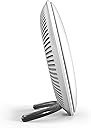
Update with the new firmware as of 22/05/17 below (plus if you own it already, please check out below for major performance upgrade details) Firstly, I'd like to make it clear that I'm not the biggest fan of BT. Billing problems in the past and poor customer service etc means I don't have the highest opinion of them...so why did I buy this product? Exasperation. We have an old house with thick granite walls, that was extended twice, making the problem even worse. (Thick walls where you wouldn't expect them.) They are also all lathe and plaster which makes running cables a chore and to cap it all, the master socket is above a door in the porch...problems, problems, problems... Anyhoo, I had tried TP link powerlines which were unstable and needed repairing every other day...these were 'rage unplugged' and then I ordered the Devolo 1200AC wifi plugs with passthrough. These were horrendously expensive compared to most plugs. These were more reliable than the TP link plugs and faster too, but still they would just pack in from time to time and require a restart which you couldn't do from the app. Cue dashing about unplugging and replugging. Old wiring...bad product...who knows? I was sick fed up. I tried the Ubiquiti Unifi too, but that brought its own problems. I wanted simple. Something that works with the router out of the box. With little ones, I haven't the time for faffing about now fixing networks, nor the inclination. I'd viewed various WIFI systems and bridging routers, but in the end I purchased the BT Whole Home WIFI simply due to positive reviews, well specced and because they were the cheapest option at the time for a MESH style wifi network. Google is double the ยฃ200 for just two units compared to the BT's three. Plus having the backup by purchasing from Amazon... The box arrived. It's massive and there's definitely a nod to more premium brands with the design and packaging. Almost similar to Apple. The discs are weighty with strong curved metal stands and have an almost pearlescent finish. In fact, if they had toned down the BT logo on the discs or hidden it altogether, they would've looked superb, but sadly the logo has its connotations. Everyone likes to bash BT (Me included at times) and their Hubs get a lot of deserved flak too, but I can't really fault these. On to setup. You download the app to your phone to walk you through the set up. There are no instructions in the box. Connect the first disc of your choosing to the mains and your router and wait for the solid blue light. Then you go through each step of adding each additional disc. The only slightly confusing task was you had to position yourself with your phone in the location you wanted to place your disc and check the signal before powering it on and naming it. This wasn't entirely clear from the instructions and I plugged my second disc in before checking, but as it happened, it connected pretty much straight away. Same with the third disc. There's an option to add more, but at the time being there aren't single units available to buy. Probably be in the next version I would imagine. Then the app tells you to forget your old wifi (from your router) on all your devices which is a bit daft in my opinion. I preferred to switch off the wifi on my router so they aren't competing and rename the Whole Home WIFI to my routers name and password. Therefore not having to reenter the new passwords on every single device in the house. Seems more simple. Anyway...performance is pretty amazing. Streaming HD movies from our NAS is wonderful compared to before. No buffering, it just plays. All three sections of our house have full coverage and I'm actually a little bit in love with the kit, which pains me a great deal. I can't believe it's a BT product. Sigh. There are several other options on the app such as being able to dim and turn off the lights on the discs (they will still display if there's an error or your connection is down) Plus you can monitor all the devices in your house and their connection speeds plus there's a pause button to stop the wifi and grab everyone's attention too. Not really any more options than that. No guest network etc, but you could use your router for that I suppose. Oh and we still have one of the Devolo units connected for our Drayton Migenie with the ethernet only which works away fine. No interference with each other. The only other slight negative is that the discs have only one Ethernet socket which is a bit mean, but an ethernet switch could be added. I really recommend them quite highly. A bit of a surprise really. I hope you have the same experience. Update: I have revised my opinion on the SSID setting. Don't set it the same as your router and here's why... I found that the main unit was stuttering with barely there wifi. Restarting both router and Whole Home Wifi didn't help. I switched back on the wifi from the router and paused the WHWifi, but the problem was still there. It turned out that something must have cycled the power on my Devolo Home plug and therefore switched its Wifi back on. Having the three items all displaying the same wifi name with the same password made it nigh on impossible to diagnose. I ended up resetting the WHWifi and choosing another name. It's a pretty unique scenario and perhaps I should have renamed the router and Devolo instead so I could have kept all my device logins, but its the other way I went as I've always wanted a Chortle-some SSID... Oh and my Samsung TV's could not connect via Wifi at all. I fixed this by using fixed IP addresses and they are connecting better now than they ever have. Update 2 Well that's a surprise. In fact a bit of a game changer. I saw that there was a firmware update available. Obviously being BT they don't bother to notify anyone to tell you what it is. Well it's brilliant. Utterly brilliant. Like, it's a different product brilliant. You may have noticed some people complaining that all three discs need to connect to the router based disc instead of daisy chaining as a mesh system would. Therefore although you switch seamlessly from disc to disc, the discs all need to be within reach of the first, router based disc. NO MORE! The latest firmware which is v1.02.01 build22 has actually transformed them to daisy chain. I was experimenting with positions before and at the far end of the house, there was a more suitable location for the third disc, but it was too far from the initial router disc. Not now, they are daisy chained to the far end. The third is now connecting to the 2nd for a signal and that signal is buttery smooth and sublime. For goodness sake BT, if it wasn't for the fact you've been messing me around with my fibre internet for the last two months, I'd kiss you. Oh and have a look....they are just about to release an extra disc for this system. For this actual system!! Not the next one...this one. So daisy chaining and the possibility of increasing range even more. Honest to goodness, this is a brilliant system. We've had it well over a month now and it is just phenomenal. So much better than homeplugs. Utterly fab. I still can't believe it's BT. It's truly a bargain at the current price too. Cheaper than our home plugs and so simple to use. The firmware update is as simple as clicking a button and it's sorted in two minutes. If you have the system, update and relocate your discs. Just try it!
M**M
Works with WIFI or Cat 5
Like anyone buying this set, its because the WiFi coverage in your house is a bit rubbish. Certainly, that's the case in my house partially because of the area, partially because it's part underground in the side of a slight hill and partially because when I renovated it, I used foil backed plasterboard everywhere for additional insulation. And of course created a big Faraday cage....Doh! Anyway, me being me I like wired connections as far as possible. This is probably due to the fact that on construction ships for offshore work we have to make everything as foolproof and reliable as possible and that means hard wiring. And I figured as each of these WiFi units had a LAN port they must be able to be used with a cable, right? And, well, yes. They are designed so that the first unit is wired in and then you wifi daisy chain them around the house using the BT app on your mobile to determine the best spot to achieve good connection and maximise the distance. However, you can use Cat 5 or 6 - although it does not say so in the manual. Essentially you plug them all into a switch and run LAN cable wherever you want and then plug each one it. It all works perfectly as they are all set to the same login and passwords. Using cable guarantees a good connection and I like that. However, the app does not which may or may not be important to you. When I tried to use the app with all the units wired in, it refused to allow me to name each one and set it up. That isn't a problem per se because just plugging them in and entering the WiFi login details into your device allows you to roam your house using each of the units in range. However, if you want to use the app and use these as intended - and avoid running Cat5 everywhere - then its also simplicity itself. Plug in the first one, follow the app instructions, then do the next in turn. You can name each one as you go and all you need is a power socket close by. The only thing I noted is that the range between these is not huge using WiFi only so if you have a particularly massive house then you might need another couple to cover everywhere. Regardless, these do work really well and give great WiFi everywhere using the same details for simplicity. Now, onto other things. Design is neat and pleasing on the eye with a very good tactile feel and build quality. These do come across as being well made and high end. The weird bit is the fact that on the back there is a hole for hanging these on a wall which, frankly is hard to understand. It would be nice if it could be done, but the stand is integral and can't be taken off and of course the Cat5 cable on the master unit will stick out the back. I could I guess take one apart and remove the stand but I run the risk of damaging it in the process. I may give it a go and see if I can neatly wall mount one and if I can, I'll update this. Overall, a fantastic bit of kit that works brilliantly and well worth the money if you need better coverage.
Trustpilot
3 days ago
5 days ago